

Closed (fixed)
Project:
Chaos Tool Suite (ctools)
Version:
6.x-1.7
Component:
Miscellaneous
Priority:
Critical
Category:
Bug report
Assigned:
Unassigned
Reporter:
Created:
18 Feb 2010 at 16:30 UTC
Updated:
3 Sep 2010 at 11:30 UTC
Jump to comment: Most recent file

Comments
Comment #1
merlinofchaos commentedIs this still happening?
Typically what this behavior meant was that the form was not properly sending the right button click and so the wizard did not understand that the finish button was clicked. I remember bugs about this and fixing them long ago, and this issue is somewhat old. Do we think this is still happening?
Comment #2
AntiNSA commentedeverything is ok now. Thanks for following it up.
Comment #3
anushajain commentedHi,
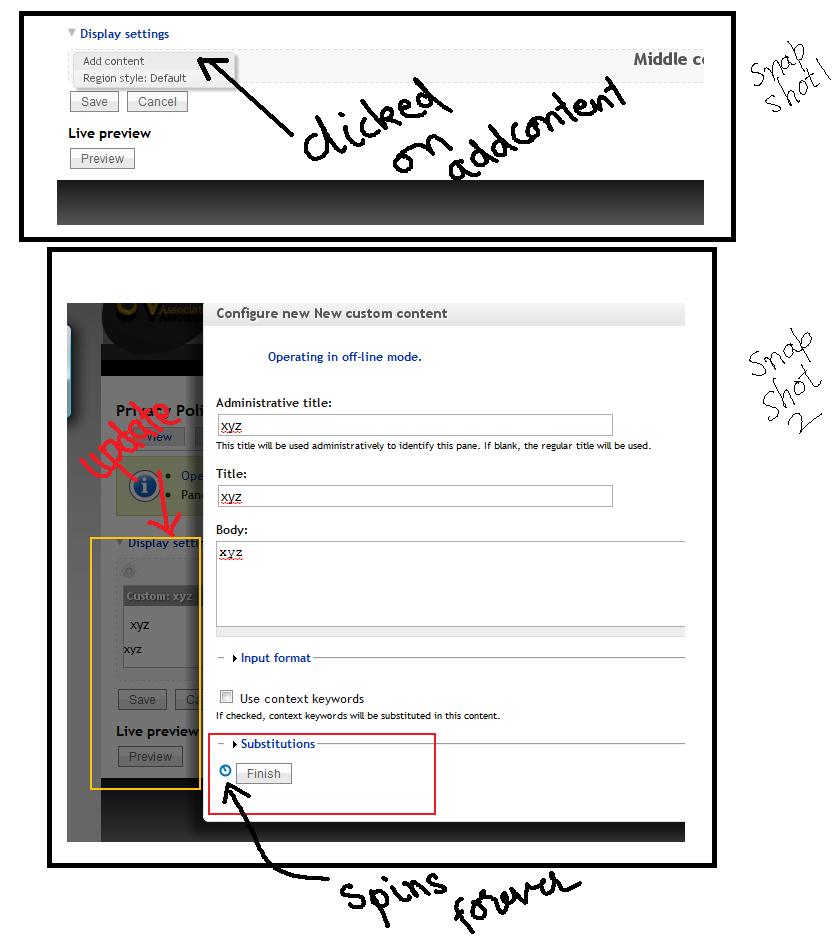
I'm also facing a similar problem. Once I update the content and click save, the progress wheel goes on spinning. In the background, I can see that the updates have been made, but progress wheel doesn't stop. If I close the window, the panel contents appear to be updated, but they are not visible after save.
Added an image which contains snapshots to illustrate the problem.
P.S.: I added two panels (with single panes) in the morning, and it worked fine. But now I'm not able to add any content to my panels.
Version info:
Drupal: 6.16
Panels: 6.x-3.5
Shall I create a new issue?? Its very critical problem for me :-(
Comment #4
merlinofchaos commentedHold off on creating a new issue until the next release which should be soon. You could give the -dev releases of Panels and CTools a try (be sure to backup first).
Comment #5
Melissamcewen commentedI'm using the latest dev of both ctools and panels and I'm having this problem.
Comment #6
jayson commentedHi, after upgrading to CTools 6.x-1.7 and Panels 6.x-3.7 and have the same problem. When I try to click "Finish" on any widget or panel piece of content during the add content process, the wheel spins and spins and spins and nothing happens. Basically I can't add any more content to any panel.
I did however notice that some of my theme was getting shifted around bizzarly in the background of the panels popup windows during this time. I have Floating Manager Menu (6.x-1.1), Superfish (6.x-1.6), and Simplemenu (6.x-1.9) running. Anyhow, I suspected that something might be going wrong or conflicting with some of them. The administration of panels is also horribly slow with this setup.
So, I decided to de-activate Simplemenu, and voila! After doing so, adding content to panels works again, there's no more funny business happening in the background of the popups to my theme, and panel administration is blazzing fast now :) This was very surprising. I use a Zen-based subtheme and when I click on any button inside any panels administration popup window, the primary links that are running with Superfish revert back to the default css/theme and my floating manager too. It's like there's a conflict between the Zen theme. I have no idea why disabling Simplemenu fixes all of this...
I also just tried to upgrade Simplemenu to the latest dev version 6.x-1.x-dev (2010-Aug-01) and no luck either. Adding content to panels still doesn't work.
I hope this helps someone else and helps solve the problem. I also hope some of you experts out there might give me some advice. I really like Simplemenu (I like it better than Admin Menu and Administration Menu). I really want an easy way to administer my site, but the slow downs experienced with these modules is quite frustrating. What is the best administration tool and are there any that don't slow down the site?
I guess for now, I will use the plain-jane Drupal /admin navigation ;(
Tks, Jayson
Comment #7
jayson commentedA little more info: Simplemenu provides a "Show block on specific pages:" configuration setting. So, I set it up to NOT show Simplemenu in "admin/build/pages/*". It hides the simplemenu, but it doesn't fix the problem and it doesn't speed up Panels either. This was also surprising. I then, disabled the Simplemenu module again and that worked - Panels work again and they are fast. Argh!
Should I raise a ticked with Simplemenu at this point?
Comment #8
jayson commentedIssue already exists on Simplemenu since Jan-26-2009: http://drupal.org/node/364695. Very weird that it has not been resolved in over a year. Funny though, before I upgraded Panels and CTools, everything was working fine... I think I had 6.x-3.5. Is there any changes in Panels/CTools that could have impacted Simplemenu?
Comment #9
Melissamcewen commentedAh, yes, we are using simplemenu as well
Comment #10
jrockowitz commentedHere is a temporary work-around I posted in the SimpleMenu issue queue.
http://drupal.org/node/364695#comment-3279352
Comment #11
merlinofchaos commentedOk, I grabbed simple menu to see what's going on.
Simple Menu is doing something really evil. I recommend you DO NOT USE IT. If you have simple menu, all your javascript and css files will be fetched by the browser every page load. This is horrible for performance.
That's also what's confusing CTools. This patch seems to fix simplemenu:
Comment #12
AntiNSA commentedawesome. I am not having this problem, but I am using simple menu. Have you added this to their issue queue?
Comment #13
AntiNSA commentedSorry . I am using Nice Menus, not Simple Menu. Thats great you caught that on the other module though.
Comment #14
merlinofchaos commentedNo, the patch is to CTools; it works around the evil simplemenu is doing, so it's probably a general improvement to CTools anyway.
Comment #15
AntiNSA commentedyou think we should apply this even if not using simplemenu? are there other potential evil doers out there?
Comment #16
merlinofchaos commentedIf you're not seeing problems with the modal anywhere then you don't need to apply it I don't think.
Comment #17
jayson commentedThanks for the patch merlinofchaos - much appreciated!
Comment #18
drewish commentedHum patch didn't seem to work for me but disabling simplemenu did the trick.
Comment #19
merlinofchaos commentedDid you make sure javascript got refreshed? Especially with aggregation on the patch woudl require a cache clear and/or force the browser to refresh the .js.
Comment #20
merlinofchaos commentedI committed an updated version of this patch that also does the same thing for CSS files, though that part is less critical.
Comment #21
AntiNSA commentedThis problem has resurfaced with latest dev version, once again disabling javascript optimization in performance settings allows you to add content.
Comment #22
merlinofchaos commentedI think this is fixed by #812744: Panelx 3.x incompatible with Drupal core's javascript aggregation
Comment #23
leisurman commentedsimple menu is removed and i can use my Panels again! Thank you