

Closed (outdated)
Project:
Content Access
Version:
7.x-1.x-dev
Component:
Miscellaneous
Priority:
Normal
Category:
Support request
Assigned:
Unassigned
Reporter:
Created:
21 Apr 2010 at 00:43 UTC
Updated:
28 May 2020 at 15:06 UTC
Jump to comment: Most recent, Most recent file

Comments
Comment #1
Lloyd commentedSo I think this problem is best served by using Rules along with Content Access. But I could use some help in figuring out the rule configuration.
The content type for the pages in question is "Commission Page". There is a page with the title Commission Schedule that generates the title-raw of "commission-schedule".
I have a custom profile field that generates the token "[user:profile_commission-schedule]". One of the values that can be selected is "schedule".
So, I tried to create a rule based upon the following two conditions:
1. Textual Comparison: commission-[user:profile_commission-schedule] in one box and [node:title-raw] in another. No other options are selected on that conditions page. I'm not sure but I left the "regex" unchecked.
2. Viewed content is type "Commission Page"
It seems that #1 should be true in my test case since it should be comparing "commission-schedule" generated by combining "commission-" and the token from the user profile to the node title-raw which should be "commission-schedule". And the content type is certainly Commission Page. So the conditions should be met.
For actions, I used "Grant Access for Acting User" with content "viewed content" selected and "view" access granted.
But, it doesn't work. What should I be doing differently?
Comment #2
salvisI think your chances to get a response would be better if you moved this to the Rules queue.
Comment #3
Lloyd commentedIt looks like the rule is created correctly. I used rules debug and there are no problems. However, it works for an administrator but not for someone in a different role. I'm not including anything role-related in the rule so I have to believe it's something to do with CA or permissions.
I know this is quite vague but what should I be looking for to figure out the problem? I do not have this role checked on the node's access control as I believe that would give access to everyone with the role which defeats the purpose. And the role does not have Grant Content Access permission in Permissions but I believe that's correct as well.
Comment #4
salvisHave you installed Devel Node Access and looked at the misbehaving node yet?
Comment #5
Lloyd commentedI haven't done that but can. Is there something in particular that I should look for?
Comment #6
salvisPost a screenshot of both DNA blocks for one node that is misbehaving.
Without that information, we're shooting in the dark.
Comment #7
Lloyd commentedRegarding DNA, do I need to be logged in with a role having an issue for the information to be of any value? when I ran it under admin it just confirmed that I had access, and simply said that my test account did not. I couldn't see any information as to why.
Comment #8
salvisNo, most of the information is independent of the current user, as long as you can see the node (and the two DNA blocks in Debug mode) of course.
Comment #9
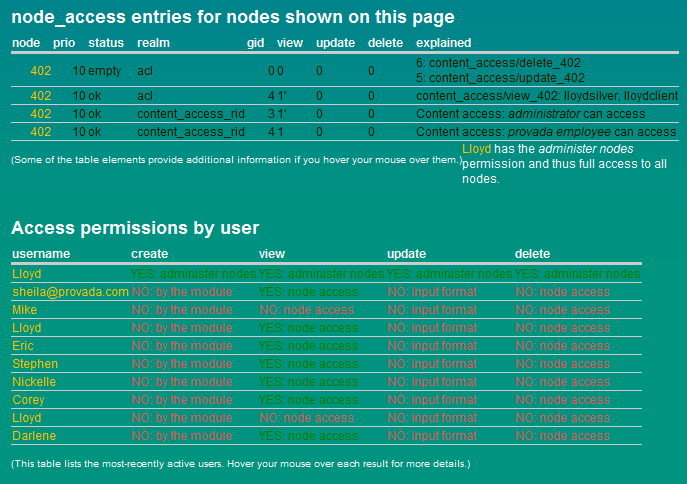
Lloyd commentedCool. Here's a screen shot. Hopefully there's enough info here. As I said, the rule seems to be working just fine as when I test it as the administrator it passes the Rules debug test. And it adds my admin user to the access list. But when I access as someone other than an administrator access is denied, and the user has the same setting as the admin in the custom profile field. So access should be granted.
Comment #10
salvisIs your test user Mike or Lloyd? The others seem to have View access.
Now, can you manually configure that same node so that it has the permissions that you'd like to have? What will the DNA information look like then?
Comment #11
Lloyd commentedthe test user is Lloyd. I can add that user to ACL and it will be identical to one of the other Lloyd's. FYI I'm using the realname module here so it can seem like there are duplicate names. Not sure if there's a conflict with Realname and CA. I guess the worst case scenario is to just use ACL. I'll have to add a couple hundred users and then manually update it when more come, but it will at least work. That's the weird thing. The rule tests fine when I run it as an admin (I haven't been able to figure out how to run Rules debug as a non-admin user). I can add someone manually to ACL. But when I try to give them access via the rule, and they are not an admin, I get access denied.
Comment #12
Lloyd commentedthe test user is Lloyd. I can add that user to ACL and it will be identical to one of the other Lloyd's. FYI I'm using the realname module here so it can seem like there are duplicate names. Not sure if there's a conflict with Realname and CA. I guess the worst case scenario is to just use ACL. I'll have to add a couple hundred users and then manually update it when more come, but it will at least work. That's the weird thing. The rule tests fine when I run it as an admin (I haven't been able to figure out how to run Rules debug as a non-admin user). I can add someone manually to ACL. But when I try to give them access via the rule, and they are not an admin, I get access denied.
Comment #13
salvisI don't think realnames has anything to do with it.
shows two of the Lloyds, but not the third one. It seems that if you can get two in, a third one should just be 'more of the same'...
Do you really mean you get access denied when trying to give them access, rather than when trying to view the node?
That would obviously depend on who is trying to run the rule. If the account trying to run the rule does not have access to the node, then they are not supposed to have access to the node. This is correct behavior.
Comment #14
jessehsUpdating to 7.x since this issue still exists.
Comment #15
jessehsI was able to accomplish this with a custom PHP action. The following snippet works for an entityreference field "studio_teachers".
EDIT: There was a bit more logic to apply the acl settings for nodes that have not had the content access setting form saved before.
Comment #16
gisleThis issue has not received any updates in the previous 6 years. If you believe it to still be relevant, you are encouraged to reopen the issue and update it.
If you got an email about this Issue status update, it is because you at one time (possibly a very long time ago), subscribed to it. To learn how to unsubscribe yourself, please visit: https://www.drupal.org/project/webmasters/issues/3142987