

Closed (won't fix)
Project:
Commerce Rules Extra
Version:
7.x-2.x-dev
Component:
Code
Priority:
Normal
Category:
Feature request
Assigned:
Unassigned
Reporter:
Created:
17 Jul 2014 at 10:50 UTC
Updated:
16 Sep 2019 at 16:36 UTC
Jump to comment: Most recent, Most recent file

Comments
Comment #1
kenorb commentedComment #2
MarcElbichon commentedIs this only for cart view and checkout pages ?
Do you want it too for view product page ?
Comment #3
kenorb commentedFor Cart view and eventually Checkout.
I was thinking about defining the rule, but there is no action to change the Quantity widget type.
What I've done so far it's workaround.
So I've created TPL file: views-view-field--commerce-cart-form--default--quantity.tpl.php
with the following code:
and the following two functions:
It seems it works, as I didn't see any other simple way of doing it.
Comment #4
kenorb commentedSo the feature would be eventually to implement the action rule, to disable or enable the Quantity widget type on certain condition (e.g. certain product type).
It is something to be considered, or it's just the edge case?
Comment #5
MarcElbichon commentedThis code should work too :
When you said Disable, you mean visible but not modifiable ?
On checkout page, quantity is not modifiable.
I think i could create an action, but form must be passed by the event. I'm trying to search a solution for.
Comment #6
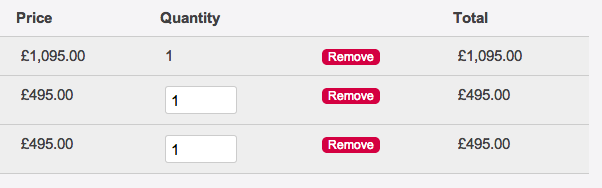
kenorb commentedYes, disable to be not modifiable or just plain text instead of text widget.
Check the screenshot for example.
Comment #7
MarcElbichon commentedNeed a precision.
In Stackoverflow, you said you have disabled quantity field by managing display for product display.
Does this mean quantity field is "hidden" in product view but when you showed cart, quantity field is present and modifiable ?
Comment #8
MarcElbichon commentedSorry, but i see no way to do this because we must interact with views.
Another method may be to add the raw quantity field after the quantity widget in the view (in the same column) and just play with css (display:none) in your template file according to product type. You can also use view customfield.
Comment #9
kenorb commentedI'm using Webform for adding product to the cart, so I'm not using standard quantity field on product view. So the only page where I can edit the quantity is a view (checkout and summary cart).
I think I'll stay with custom overriding TPL for now. Let see if there more interest in that kind of feature.
Thank you for your help.
Comment #10
StefCarr commentedI found this article on heavy kettle and this method works for me.
Comment #11
faadz commentedHi There
The code below works if we want to disable quantity widget on shopping cart page for product types. What I need to do is to disable quantity widget on the basis of Product ids.
Or
Disable quantity widget on shopping cart page if a boolean field is true on product page.
Any suggestions?
Thanks
/**
* Implements hook_form_alter().
*/
function custom_form_alter(&$form, $form_state, $form_id) {
if ($form_id == 'views_form_commerce_cart_form_default') {
global $user;
$product_types = array('pickup', 'delivery');
$cart = commerce_cart_order_load($user->uid);
foreach (entity_metadata_wrapper('commerce_order', $cart)->commerce_line_items as $delta => $line_item_wrapper) {
// check current line item product type against list of types to be disabled
if (in_array($line_item_wrapper->commerce_product->value()->type, $product_types)) {
foreach ($form['edit_quantity'] as $index => $line_item) {
if (is_numeric($index)) {
// compare the current shopping cart line item ID to the form line item ID
if ($line_item_wrapper->raw() == $form["edit_quantity"][$index]['#line_item_id']) {
$form['edit_quantity'][$index]['#attributes']['readonly'] = 'readonly';
$form['edit_quantity'][$index]['#attributes']['disabled'] = TRUE;
$form['edit_quantity'][$index]['#attributes']['title'] = t('This quantity cannot be changed.');
unset($form['edit_delete'][$index]);
}
}
}
}
}
}
}
Comment #12
faadz commentedHi There
The code above by heavy kettle works if we want to disable quantity widget on shopping cart page for product types. What I need to do is to disable quantity widget on the basis of Product ids.
Or
Disable quantity widget on shopping cart page if a boolean field is true on product page.
Any suggestions?
Thanks
Comment #14
perignon commentedYeah this is a feature hard to implement because it is a field being displayed in views and the field can change names.
Comment #15
faadz commentedHi Perignon
I have managed to disable quantity widget on the basis of product ids using the code below. But this doesn't work for me as I would have to add new product ids to the code each time if quantity needs to be disabled for new products.
The way I am thinking is to add a custom boolean field to a product type and if the value of that field is true then the quantity widget should be disabled. Any idea how?
Thanks
Comment #16
perignon commentedCould you edit your post so it is easier to read. Use the code or PHP formatting in the editor.
Comment #17
faadz commentedHi Perignon
I have updated the post now.
Thanks
Faadz
Comment #18
destash commentedthanks all