Hi all. Before diving deeper into this myself, is anyone aware of tips or tricks for integrating Commerce File with Commerce Product Bundle? The use case is simple: An Album is a Bundle of Songs. When a site visitor buys an Album, they get the file licenses for all the songs on the Album.
I've tried a couple of designs, but I wasn't able to get the sale of a Bundle to issue multiple licenses at once for the Songs in the bundle. It's possible I can achieve this with a simple fix to the rules - adding a loop to issue licenses for instance - but I've been down this road before... it seems like a simple fix would do the job but before I know it hours are burned with no results.
I'm hoping someone may see this and share some insight. I'll reply here myself if I come up with the solution in the meantime. Thanks!


Comments
Comment #1
recrit commentedi have yet to get product bundles working locally to test. It appears that it would make the sub line items for each product. Commerce File operates on any line items that are marked as a 'product' in their definition. Specifically, Commerce File issues the licenses when the order is marked as "Completed" - thats the status used in the default Rule "Issue licenses on order update", which can be altered for your implementation.
Can you check that your orders are moving to the Completed status to issue the licenses.
If they are moving to Completed, then I suspect that the bundle module saves the actual product line items under their bundle line item type; therefore, re-work of commerce_file_license_issue_by_order() would be needed to handle bundle line items.
Comment #2
recrit commentedmoving to dev
Comment #3
seanbfuller commentedI did a bit of digging into this and got to a point where I could use some advice from the module maintainers. This is just a proof of concept and the final method of integration would need to be determined once this is working. Here's what I did:
First, I altered the following chunk of code in commerce_file_license_issue_by_order(), which is located in commerce_file.entities.inc (the plus lines are where I added code):
Then I created a small module with this one function (note the devel module debug lines in there):
The idea is that after normal line items are processed in commerce_file_license_issue_by_order(), we kick off to this new function that looks for sub items and calls commerce_file_license_issue_by_line_item() for each one we find. We can pass in the original order, because it is only being used to get the user who is purchasing.
After some debugging in commerce_file_license_issue_by_line_item(), I'm finding that the orders are still not being created because they don't have the file line items (as pointed out in the help comment above), so the code doesn't enter the main foreach statement there.
Next steps:
I'm struggling to figure out the proper way to add the file field to the sub line item. I'm also not sure that adding the file field to the sub line item would work, but my thought is that at least it will get us into the foreach statement where we're failing in commerce_file_license_issue_by_line_item(). Perhaps someone who is more familiar with how line items are constructed can weigh in?
Comment #4
mediapal commentedAny news about this?????
Comment #5
ParisLiakos commentedi think this issue is identical to this #1401416: Digital Product Bundle
I plan to work on this when march ends..i will study those two modules till then.would be good to have some teamwork here,starting by a nice issue summary?
Comment #6
ParisLiakos commentedchanging title:)
Comment #7
tvilms commentedI'm coming back to this issue. I was the original author of the duplicate issue referenced in #5. I'm interested in helping deliver a working solution. I'll dig into the ideas presented by @seanbfuller. Hope to see some activity pick up here, as this would be a fantastic feature for anyone working with music.
Comment #8
seanbfuller commentedI just wanted to drop a quick note on where we left on this for our purposes. We backed out of this approach in favor of using filefield_source with commerce_file. This allowed us to have a product that has multiple files that already exist. This was closer to the functional requirements for our particular needs. However, our testing with that did uncover #1460308: Filefield_source file reference not giving access to files on other products, which is also not ideal.
Comment #9
ParisLiakos commentedhmm i have something ready...any feedback appreciated...
dunno if this module
i guess that is the maintainer's decision.
Some notes:
I couldnt get
commerce_product_bundle_get_sub_line_itemswork with the line items... i was always getting an empty array, i guess it is because the add to cart button was provided by a view and not the standard product displaySo i came up with a more generalized solution, to cover all cases...
(btw commerce_product_bundle is not needed at all for this to work)
All you have to do is
Thats it!
Comment #10
tvilms commented@rootatwc. Thanks for putting the effort into this. I've installed your module. Have been trying to test. However I'm getting tripped up on the rules logic. I can't get the rules to issue the file licenses. How did you configure the rules to issue the licenses for all the referenced commerce files?
Here are the rules I'm trying out:
1) Update the order state to "completed" when fully paid
2) Issue licenses after updating the existing Commerce Order (i.e., state changes to completed)
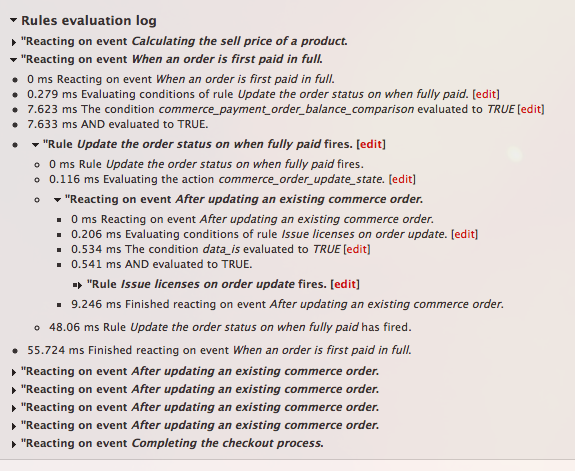
I'm attaching a small screen shot from Rules debug. In my test I have a Commerce File Bundle with four Commerce Files. I see that the state changes to "completed" when the payment is confirmed. That order status update automatically fires the second rule to issue licenses, which executes once. But then I see what I believe is your module taking effect -- the second rule fires four times (which I assume to correspond to the four Commerce Files in my new Commerce File Bundle). But as mentioned, the licenses aren't issued successfully.
Do you have any thoughts? I hope this is enough to go on for now.
Comment #11
ParisLiakos commentedwhat do you mean
I didn't mess with rules at all.
I am just attaching the files to the product bundle line item, early when entity_load occurs, so that commerce_file will be triggered and issue the licenses when payment completes.
So after i buy a product bundle of commerce files, i get the licenses of the files that the bundle references under
user/%/licensed-filesview.I can download the files from there.
sorry if i misunderstood here, or ignoring something
Comment #12
tvilms commentedThanks for the reply. It helps to know you didn't mess with the rules. What I meant was that I installed your module and followed the instructions you gave, but couldn't get any files issued after completing a purchase. The rules fired, but there were no file licenses showing in user/%/licensed-files
I've got to look at this more closely. The rules I'm using to issue licenses apparently aren't working. I've been exploring a few recently closed (but also some still open) Commerce File issues about not users not being able to access file licenses after completing a purchase. I'm on version 7.x-1.x-beta3 running some custom rules and I couldn't get your module to function. I think I'll install 7.x-1.x-dev and revert to the default Commerce File rules and then test your module again. I'll reply later with the results.
Comment #13
ParisLiakos commentedyes, i used 7.x-1.x-dev when developing this!
Comment #14
hmartens commentedThanks guys for working on this! I'm looking forward to using this feature :)
Comment #15
tvilms commentedFollow-up question for @rootatwc:
In this issue, http://drupal.org/node/1441898#comment-5624460, the author notes that "the field commerce_file_line_item_files was missing from admin/commerce/config/line-items/product/fields in one of his Commerce installs. However, when he used the "Commerce Downloads" Install Profile (from August 2011), that field shows up. It's a field generated by the system on installation. More recent updates to Commerce modules seem to leave that field off.
Do you have that field available when you look at that admin page? I'm trying to figure out the root cause of not being able to issue any licenses at all. At this state, after a lot of investigation and head scratching, I'm thinking its either its the rules logic, or a basic configuration is missing. Your answer will shed some light on this.
Comment #16
ParisLiakos commentedYes i do have it and i believe this is the problem here
Comment #17
tvilms commentedFYI, it's been confirmed that the missing field is a problem that prevents people from having the commerce file sale/download ability. Seems the current release and dev versions both come without a crucial field. I applied a feature submitted by another user (http://drupal.org/node/1441898#comment-5941214) and lo and behold, I was able to download individual files.
Anyway, now I can get back to testing your concept. Will report back how it goes.
Comment #18
tvilms commentedI've been attempting to use the patch in #9, but I was getting the following error:
" http://[site]/content/[product-display-node]|http://[site]/content/[product-display-node]|[nid]|Warning: array_merge() [function.array-merge]: Argument #1 is not an array in commerce_file_bundle_extract_referenced_commerce_files() (line 50 of .../commerce_file_bundle/commerce_file_bundle.module)."
I followed these steps:
1) I did NOT install the actual Commerce Product Bundle module this issue is originally posted against, per the comment in #9 "(btw commerce_product_bundle is not needed at all for this to work)". Perhaps my assumption that therefore it doesn't need to be installed is WRONG?
2) I installed the patch in #9 as a custom module
3) I installed the latest dev version of commerce_file module
4) I created a new product type (i.e. "Album") that has a unlimited product reference field to another product type which has a commerce file field (i.e., "song")
5) I created a new product "Album" with four "Song" products using the commerce file product reference field
6) I created a new product display node with a product reference to the "Album" product
7) I had the default rules for commerce_file, with one change - upon order update the state of the order is set to "completed" (instead of "pending")
8) I attempted to purchase the "Album". No file licenses for the referenced "Songs" were available to the buyer. That error you see above was thrown.
Comment #19
Fanaile commentedSubscribing. Not sure if this will fix my exact problem, but it might get me close.
Comment #20
deepakhj commentedI installed the patch as a module and I'm receiving this error when adding an album to the cart:
EntityMetadataWrapperException: There can be only numerical keyed items in a list. in EntityListWrapper->get() (line 918 of /..../sites/all/modules/entity/includes/entity.wrapper.inc).
Any ideas?
Comment #21
grady.wring commentedI have nearly the same error:
EntityMetadataWrapperException: There can be only numerical keyed items in a list. in EntityListWrapper->get() (line 953 of /.../sites/all/modules/entity/includes/entity.wrapper.inc).
I only get this error when I add a product to the cart that contains a product reference field. I also only get this error on pages that contain the cart block or the checkout page. Any help would be much appreciated. I am willing to pay for a solution.
Here is my site configuration:
Installed Drupal 7.7 with Commerce Downloads profile
Updated all modules to the most current versions and Drupal core to 7.14
Installed the Commerce File Bundle module
Comment #22
bakulaw commentedCan i create the product with commerce file from code? how? I've been searching the site and I cant find any help...How do I declare a commerce file field?
Comment #23
bakulaw commentedrecrit
Sorry for posting this here,cant get enough help here
How do I add a commerce file product from code, My site allow users to upload file for processing and the system produce an output file that I want to add as commerce file product from code on a per user basis. I can't find any example of products created from code that includes a commerce file.
Thanks
Comment #24
tbenice commented@rootatwc, please correct me if I'm wrong, it looks like your patch will look for multiple commerce file fields on the commerce product entity and assign them to a line item when the line item is loaded?
If so, I see how this is a possible way to go. You could have a 'bundle' commerce_product configured per the commerce_product_bundle module that has multiple file fields on it, one for each file to be licensed in the bundle, and also include other 'bundled' products via reference fields in the usual way.
However, I'm more looking for an full integration between commerce_product_bundle and commerce_file, to wit ability to apply licenses to files from bundled products themselves. IE, if I have 3 bundled commerce_products referenced on my bundle product entity, and one of them has a commerce_file field, then I want to license that file when the bundle product is checked out from the cart. This way, I can sell my file license separately and bundle the product in a clean way.
Maybe it's a fine distinction...
Comment #25
ParisLiakos commentedi see:)
you are right, i believe it is a better approach
Comment #26
tbenice commented@rootatwc - thanks, glad that you agree. I think that I have a working module based on your start. I'll see if I have time to make a new sandbox for it tomorrow and we can share, ok?
Comment #27
hmartens commentedI'm looking forward to this! This will surely be one of the most used extensions to Commerce File. Thank you for your dedication and hard work.
Comment #28
tbenice commentedPosted in my sandbox. Please test, tnx!
http://drupalcode.org/sandbox/tbenice/1690422.git
Comment #29
tbenice commentedComment #30
poniesI'm trying to get this to work with the latest version of commerce_file-7.x-1.x-dev.
On checkout I get, PHP Fatal error: Call to undefined function commerce_file_license_issue_by_line_item() in /var/www/drupal/sites/all/modules/commerce_file_integrate/commerce_file_bundle.module on line 116
Comment #31
recrit commented@ponies: refer any issues with commerce_file_bundle to tbenice since that is his sandbox. This feature is not in the latest dev or beta4.
@tbenice:
The function has been changed to the following in the latest release.
commerce_file_license_issue_by_commerce_line_item($line_item, $updated_license_status = 'pending', $product_refresh = FALSE, $order = NULL)Comment #32
poniesI was able to get this working with a patch to @tbenice's module.
Comment #33
deggertsen commented@tbenice: What happened to your sandbox? I would like to take a look at this and try to get it working on my site.
@ponies: Do you have the work you did? Could you post it here with an explanation of what you did to get it working?
Thanks
Comment #34
deggertsen commented@ParisLiakos: I tried your patch in #9, despite the flaws agreed on in #24 as they wouldn't affect my use case. However, when I tried to add a bundled product to the cart I got this error:
EntityMetadataWrapperException: There can be only numerical keyed items in a list. in EntityListWrapper->get() (line 962 of /sites/all/modules/entity/includes/entity.wrapper.inc).
Unfortunately I don't understand your code well enough to understand what the problem is here.
Comment #35
tbenice commentedHi All, there is a new project https://drupal.org/project/commerce_file_bundle that covers it.
test it out and put any issues in that queue.
-Ted
Comment #36
tbenice commented