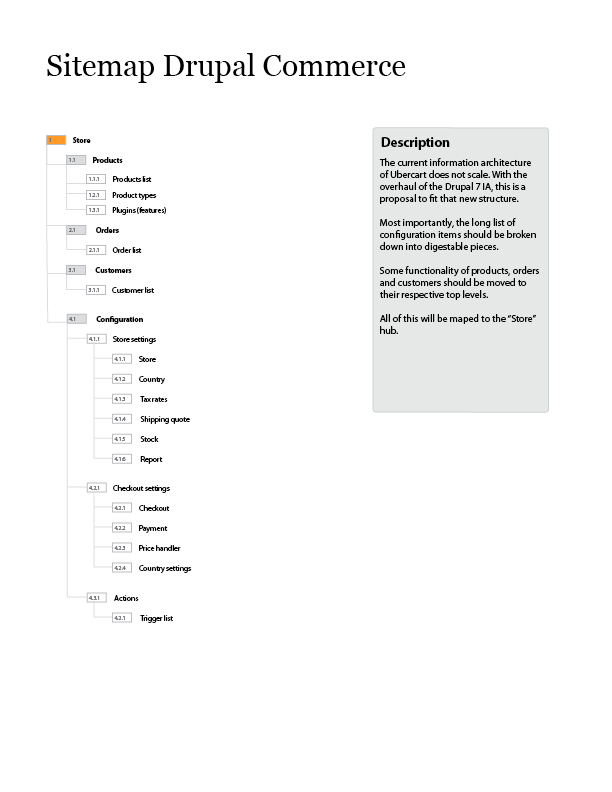
With the new information architecture of Drupal 7, we have numerous possibilities. Drupal Commerce will have a hub called Store under which there are tabs to Products, Orders, Customers and Configuration.
The order of the tabs is on use, where we see Products and Orders as one of the most used features, and then obviously customers and configuration. We take another design pattern from Drupal core here, making settings the far right tab.

The easy way to get back to the Store dashboard, would be to go to Store in the Toolbar or navigate by breadcrumbs.
Products
Below products we would have the Product listing and Product types as a secondary navigation, with this avoiding pollution in tabs. The logic is having types (which one will touch quite often) very close to it actual listing. So it doesn't live to far from the mental space of the user.
Orders & Customers
Both Orders and Customers won't havev any secondary navigations, they will merely be listings of configuration with some search capabilities.
Configuration
Configuration will be a hub, similar to admin/config. There will be 3 main categories on this page, which will be able to cover the three main configurations of core. Also it should be able to catch most categories needed by contributed modules.
- Store settings
- Checkout settings
- Rules
Sitemap
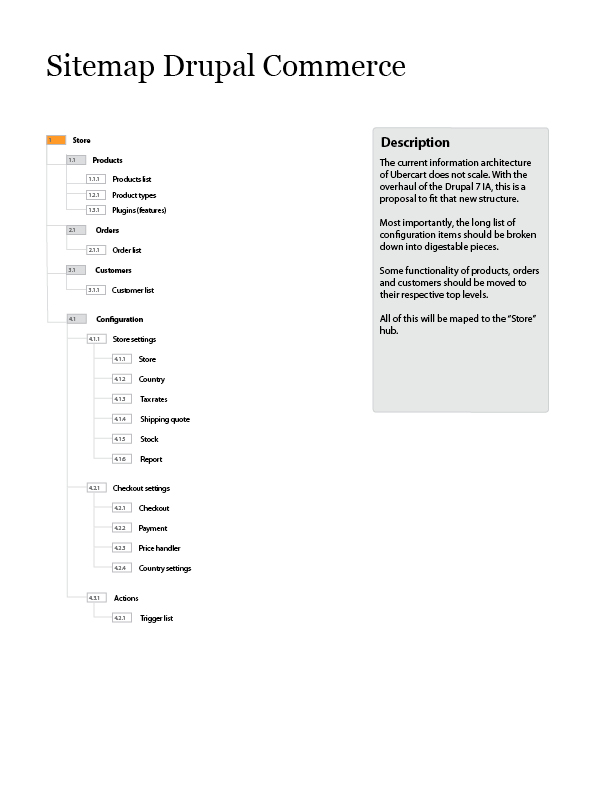
A clear overview of all the elements and how they live together. This is only on the administration side of Drupal Commerce, I haven't listed individual pages for editing and customer-facing elements.


Comments
Comment #1
rszrama commentedWe'll need to add into this the necessary pages for adding fields to Orders and managing their display across various build modes (of which I'm guessing we'll have at least a "Customer" and an "Administrative" build mode). I'm not sure about Line Items, but I'm guessing we'll need a section in the Configuration area that lets you tweak the Fields / display of various Line Item types, too.
Comment #2
redben commentedBojhan : Regarding product lists and product types (and i guess order list and order fields) , you suggest to have these under the menu item product. While to me this makes sense, keeping related things together, i wonder why you didn't prefer the paradigm that was chosen for drupal core ( splitting things in content, structure and configuration ) I mean something like :
Comment #3
Bojhan commentedThe paradigm for core is very much based on the fact, that items such as Manage and Structure will have new items coming from contributed modules / customization. Where this isn't the fact with Drupal commerce, also I do not think Structure the way you represent it will make much sense - ideally structure is about tools you use very often during the building of your site, I only envision order fields and checkout panes to be set once, and ideally then left alone.
I did separate out configuration very much to its own section. I believe whenever it make sense we need to keep items close to its relatives, in Drupal core we simply can't - but in Drupal commerce we can. Obviously testing still has to prevail how right I am or not :)
Comment #4
redben commentedI see what you mean, i totally agree with the idea of keeping related things together. It was just a "why different from drupal core" question. But as you explain, core did this because of contrib.
Thanks for the clarification !
Comment #5
rszrama commentedAgreed. Good ideas, Bojhan. I think it's a good assumption given our current implementation of Products to assume people will be editing Products / Product types more regularly than fields on the Order or panes in Checkout.
Comment #6
harrisben commentedWhere would the reports fit into this, or will they be located with the standard drupal reports?
Comment #7
Bojhan commentedThat is a serious problem, although we can place them as tab - or on the reports page. Both come with significant down sides, it being a tab on the Store main page, reduces the ability to easily hit the tabs (as their number improves). Placing it on the reports page makes a disconnect with the Store domain, as for now placing it as a tab seems the only possible trade off.
Comment #8
rszrama commentedSo, several things:
Comment #9
rszrama commentedAdditionally, there has to be a default local task tab... I'm thinking the Commerce UI module should define this as the Dashboard tab and the Views defined by the Orders / Products module can be tabs on that. The Configuration tab would also be defined by the Commerce UI module.
Also, if you think about the comparison of Orders to Content in regards to how the navigation tabs should work, clicking on links to add new content or edit content from a View actually loses your tab context. In a sense, I think this is fine, because we don't want people clicking a primary link tab when they're trying to add a product anyways. The bigger issue is losing the breadcrumb, but we can manually set that if that's what it takes.
Comment #10
redben commentedI've always had a hard time putting a lot of things in tabs. They are so limiting...or maybe this is a result of using them in a way they were not designed for. Just my two cent though.
Comment #11
bendiy commentedIf the Dashboard is defined as the default_local_task, make sure any reports that are on the Dashboard are high level and generate very quickly. It's annoying to have your user interface's main point of entry, the Dashboard, be a slow page to load because it's querying a bunch of data to generate some reports, none of which are cached. You will be navigating through the dashboard to do most other tasks in Drupal Commerce, so the Dashboard should be quick to load. This may require the reports on the Dashboard to be just a list of links you can click on to run the report.
Comment #12
Bojhan commentedAs per ryans comments on IRC I am marking this critical. And also considering some changes to the IA, there are limitations to Drupal core navigation which will sadly cause some usability problems - however we need to work around this as much as we can.
Comment #13
rszrama commentedFor the time being, I'm committing the attached patch as the "new direction." Basically, it's the old direction - i.e. an IA that resembles Ubercart's in that I'm not trying to keep all the main store areas under local task tabs of a single Store menu item. This is going to unsettle the current mock-ups, but it'll at least provide for a usable interface until we can move forward. I've kept the IA the same, just turned the local tasks into normal items.
As part of this patch I also cleaned up the implementation of some local actions (i.e. there was no need to set local actions through hook_menu_local_task_alter()) and ensured all our administrative paths are covered by hook_admin_paths(). I also unified some language and updated the Views accordingly.
Overall, I'm well pleased.
This did nerf the store dashboard, but I think I want to postpone that anyways. It's certainly not a critical item for a 1.0 and might better be based in a contrib module that alters the admin/commerce menu item anyways. Also, I was just doing too much monkeying with breadcrumbs in store pages to remove the core Dashboard breadcrumb.
Comment #14
Bojhan commentedCan you post a screenshot?
Comment #15
mertskeli commentedWhat's the difference between the site's user list and the suggested customer list? Isn't that the same? Let's say we are a wholesale company, and we have 20 clients/accounts. Why do we need a separate "customer list" tab?
Right now Drupal Commerce has Orders-Products-Configuration tabs, btw, and it's ok. (Products-Orders-Configuration might be more logical though.)
@harrisben
Orders are reports themselves, I assume. All the rest are just ordinary drupal site reports. Or maybe I'm misunderstanding "report"? What it is expected to contain?
@rszrama
Single "Store" item is a very good idea. Both e-commerce and Ubercart are confusing with that particular navigation. Store is store. It's a separate administration which has nothing to do with site administration.
IMHO, no need to fret with drupal's tabs. Normal links are ok, no problems. Not urgent, at least.
In general, the architecture looks very intuitive. Anyway, its a matter of habit.
Comment #16
rszrama commentedThanks for the feedback. : ) The main reasoning we've got for having a separate customer list is that there are plenty of e-commerce sites that maintain user and customer records off site with some form of integration between the cart and the external system. In their case, they wouldn't have each customer with a user account, but they might each have a record in Salesforce, Sugar CRM, etc. However, you could definitely maintain the customer <-> user link with a simple reference field.
Comment #17
mertskeli commentedAs it was already mentioned, for some (or even most) cases there is no need to maintain a separate customer list because customer=user.
There is another problem. Let's say we have some clients. They are not individuals, they are companies with several employees responsible for purchases. So we mark them as 1 client (customer) but they are several website users (accounts). We do not maintain order history for each of those guys but rather their company instead. Here we deal with a case of one customer but multiple users.
Of course it is possible that some customers do not use your site but still they are listed in your offline database. That's normal. But what's the use of having them been listed in your site lists? Anyway, presence of a customer in online database does not necessarily means that that account should be used.
Separation of site users from site customers could produce a mess.
It's just a point of view and some experience. No need to hook me up.
Integration mainly means import/export. Because real integration of business logic is too complicated for just a drupal module. In my opinion, a stable cart with order history and import/export is a good starting point to build up further functions. It would have customer details, shipping address, and order history (balance). Shopping cart here is just an automatic order-maker. (Manual order creation within admin area is a must for online b2b, and that's good we already have it in Drupal Commerce.)
Comment #18
mertskeli commentedInstalled latest:
- Drupal 7 dev
- Commerce
- Entity
- Rules
- Views
Drupal - minimal profile (only grayed-out "Required by Drupal" items + Blocks. (Contextual links & Field UI
are switched later on due to Commerce dependency.) Commerce - all features enabled. Entity - both enabled. Rules - w/out Scheduler & UI. Views - w/out exporter and UI.
Order: Views > Entity > Rules > Commerce. Note: At Rules activation - numerous errors with Entity.
Drupal theme - Stark. (Bartik - buggy and ugly, Garland - overloaded with CSS, Seven - not a theme at all.)
Stark - is a pure default inbuilt CSS behavior.
Drupal > Modules
Fieldset labels say "Drupal Commerce". Let's decide either it will remain like that, or it will be just "Commerce".
Note: If it becomes "Commerce" please make it stay below Drupal's "Core" section notwithstanding the alphabetical order. Imo nothing ever should stay above that section.
In general the grouping is good and logical (much better than that of Ubercart). Even "UI" section looks logical (means controls can be disabled without switching functions off). I suggest keeping it like that for future. All extras can be grouped in a way similar to "Commerce - Payment" (if numerous!), keeping the parent "Payment" within core section.
Management > Store
Good link title. Nothing else is required. (Ubercart's unnecessary suffix "administration" avoided, and that's good.)
- Orders
- Products
- Configuration
First two - good. For Configuration, "Settings" could be a better replacement to avoid confusion with Drupal's Configuration. Many contrib modules call it like that. Not critical, though.
Orders > Create an order
Ajax HTTP Error while pressing "Add line item". Note: I'm using IE6. It is 2010 now. Windows XP is dominant now. IE6 is the default Windows XP browser now. So no excuses for not supporting this browser now.
Customer & Creator uids. Is it supposed to be entered manually? What is planned for that?
Note: Export option to CSV is a must for Orders. Other formats would be nice too, although not urgent and critical.
Products > Product types
Here is a problem. Product is a sub-division of "Line Items". It's a kind of "line item type". And we have here 2 duplications: Product can be configured in "Products" and in "Configuration - Line items" (here only "Manage Fields" and "Manage Display"?).
Most likely such a term as "Line Item" is not necessary at all. Everything in trading is being called "Goods" (or "products" in our case) notwithstanding if it's a physical thing or not. Service - is a product, discount (coupon, etc.) is a product, store's own brand is a product. They are all kind of assets and have monetary value.
Or, if the root item will remain as "Line Item" than "Product" goes there. And there should not be any "Product type" - only "Line item type". Or just "Store Item".
Products > Product types > Add a product
Title "Create Product"? Link name and page name are different?
1. "Product SKU". Why not just "SKU"? Even if it necessary for system internals (product sku vs. other types' skus) why is it here?
2. So, a unique identifier will be called "SKU"? Nothing else? No choice or customization? "ID" had been reserved for system's internal primary key?
Product type > edit
Very good. And visibility settings are most welcomed.
The last question here, How actual page (node) can be created? I don't mind its absence in Drupal's "Add new content" (to put everything in one root item "Store" is a good idea indeed). But how to create it with all those Menu settings, Revision information, URL path settings, Authoring information, Publishing options, etc.?
Customers? Are they going to be taken from Drupal's user list? Filters possible? per role, let's say "clients" only?
Reports?
Thank you very much for this module's development. The progress for the last month is evident, at least it is functioning now.
Comment #19
rszrama commentedRevisiting this issue, I think I need to break mertskeli's comments in #18 into sub issues and mark this original issue fixed. I'm pretty sure most of the questions in #18 would be answered by, "Yeah, we need to implement that." : P
Perhaps the only unresolved item here is Bojhan's original sitemap specifies a different ordering to the main Store menu items that we don't have now. That should be easy enough to fix, and privileging the Products area above the Customer profiles area makes perfect sense.
Comment #20
rszrama commentedAnd... looking into this, I realized the reason those menu items aren't ordered is that they're being defined by Views and there's no way to adjust the weights. I suppose we can menu alter it if it's important enough, but it seems menu altering would then negate any changes made via the menu UI.
Comment #21
mertskeli commentedFinally I managed to install it :) though had 1 error (Notice: Undefined index: weight in field_info_max_weight() (line 794 of ...\modules\field\field.info.inc)
Unfortunately, I realized pretty soon that DC (in its current implementation, probably) is useless to me. It's my personal opinion.
I do not understand its logic. I still can not create a normal product node. For that I have to create a content type and to copy all the fields from "store product" to usable website product.
Now it is clear why there are 2 product configs (as a line item and as a pure product, as mentioned in #18). That one which is a line item product shall be used for orders only.
So, now we have 3 product configs: Store > Products, Store > Line Item, and Drupal Content > Create.
Still do not understand why would Views be necessary...
People > Permissions table - awful mess... but at least module components are finally grouped together.
Profile types. Maybe not "types"? They are fields, blocks, sections, whatever, but not types.
Create Billing information:
Country - required? What for?
Why so many fields? Suburbs...residence...floor...? One address field is not enough?
User information? Who is a "user"?
Owned by Anonymous... great. Anonymous is the default owner... Leave it blank to make the order be owned by admin. Why would I need to use a computer to become the owner of an order? The previous "creator" was meaningful, at least...
Well, I'd better shut up at wait the final result :)
Comment #22
rszrama commentedThis should have been closed out a while ago, but I was reminded of it again in a quick chat with Bojhan in IRC. I was eyeing moving Views defined menu items again, but apparently I'd already ruled out that possibility in this issue. : P
In any event, the IA for 1.x has been stable for some time now, with a few menu items moved around last month in the sprint.