

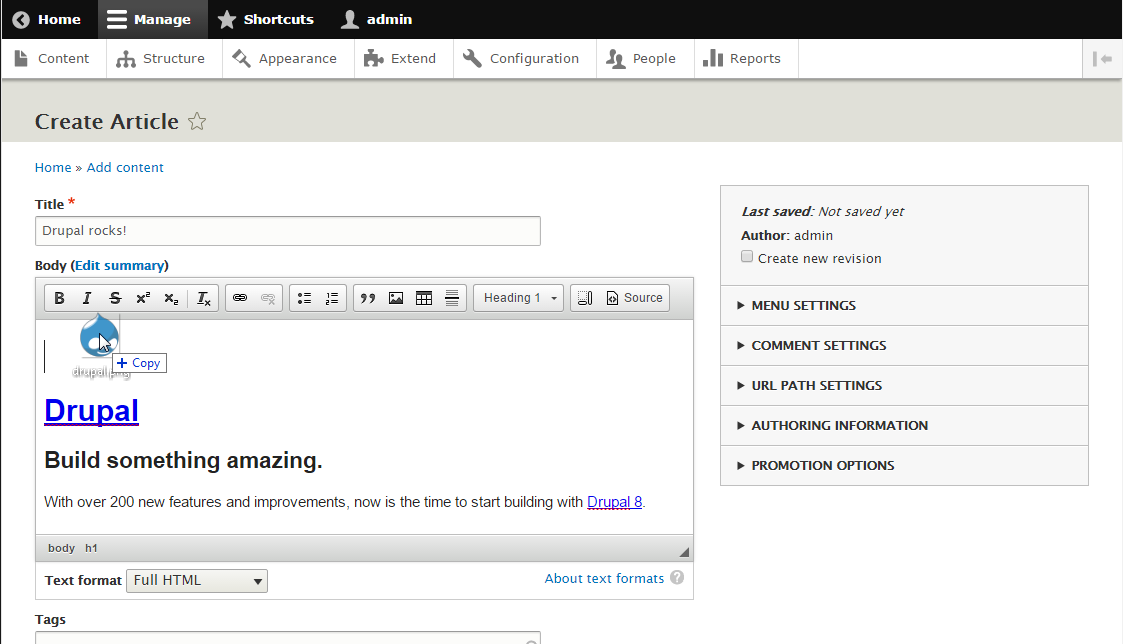
Integrates CKEditor's Upload Image plugin to Drupal. This enables Drupal's default WYSIWYG text editor capable of uploading images that were dropped or pasted from clipboard into the editor as inline image. The upload is implemented in a non-blocking way, so while the image is being uploaded the user may continue editing the content.
This module uses the settings and features of native DrupalImage CKEditor plugin for the uploaded images made via drag and drop or clipboard paste.
Features:
- Multiple non-blocking upload of images by drag and drop into the editor as inline images.
- Non-blocking upload an image by pasting from clipboard into the editor as inline image.
- Uses file name as initial
<img>"alt" attribute's value. - Client side maximum image file size validation.
- Control/add caption, alignment (left, right, center) and "alt" attribute value by double clicking the uploaded inline image.
- Change the size of the uploaded inline image by dragging its resize handle.
- Move the uploaded inline image around the editor by dragging its move handle.
- Integrates Media Entity using cores existing Image media type.
- Integrates with Inline responsive images module (more details).
- Works with IMCE module (more details) sponsored by stefan.r.
- Admin settings to control the upload directory, maximum file size, image dimension and turn on/off the image upload.
Requirements:
- Drupal 8.x
- CKEditor module
- Media module
- Upload Image
- Upload Widget
- File Tools
- Notification
- Notification Aggregator
Installation:
Download CKEditor plugins via composer
- Run
composer require --prefer-dist composer/installersto ensure that you have the composer/installers package installed. This package facilitates the installation of packages into directories other than/vendor(e.g./libraries/ckeditor/plugins) using Composer. -
Edit your composer.json file. Under the "installer-paths" section add the following:
"libraries/ckeditor/plugins/{$name}": ["vendor:ckeditor-plugin"]Note: If you have this line
"libraries/{$name}": ["type:drupal-library"], make sure to add the"libraries/ckeditor/plugins/{$name}": ["vendor:ckeditor-plugin"]before it. So it should look like this:"libraries/ckeditor/plugins/{$name}": ["vendor:ckeditor-plugin"], "libraries/{$name}": ["type:drupal-library"] -
Next tell composer which libraries to install. You have two options:
- Option 1: Use the Composer Merge plugin to include the CKEditor Uploadimage module's composer.libraries.json (recommended)
-
This is the recommended way which is more convenient and also ensures that the required libraries will always be updated when the module is updated.
-
The merging is accomplished by the aid of the Composer Merge plugin available on GitHub, so from the project directory run:
composer require wikimedia/composer-merge-plugin -
Edit the "composer.json" file of your website and under the "extra": { section add:
"merge-plugin": {
  "include": [
    "modules/contrib/ckeditor_uploadimage/composer.libraries.json"
  ]
},
Note: If the
"merge-plugin"key already exist, just append the following as one of its values:"include": [ "modules/contrib/ckeditor_uploadimage/composer.libraries.json" ]For example:
"merge-plugin": {
  "recurse": true,
  "replace": false,
  "merge-extra": false,
  "include": [
    "modules/contrib/ckeditor_uploadimage/composer.libraries.json"
  ]
},
From now on, every time the "composer.json" file is updated, it will also read the content of "composer.libraries.json" file located at
modules/contrib/ckeditor_uploadimage/and update accordingly.
-
- Option 2: Add packages manually
-
-
Under the
"repositories"section of composer.json, add the following:{ "type": "package", "package": { "name": "ckeditor-plugin/uploadimage", "version": "4.8.0", "type": "drupal-library", "extra": { "installer-name": "uploadimage" }, "dist": { "url": "https://download.ckeditor.com/uploadimage/releases/uploadimage_4.8.0.zip", "type": "zip" } } }, { "type": "package", "package": { "name": "ckeditor-plugin/uploadwidget", "version": "4.8.0", "type": "drupal-library", "extra": { "installer-name": "uploadwidget" }, "dist": { "url": "https://download.ckeditor.com/uploadwidget/releases/uploadwidget_4.8.0.zip", "type": "zip" } } }, { "type": "package", "package": { "name": "ckeditor-plugin/filetools", "version": "4.8.0", "type": "drupal-library", "extra": { "installer-name": "filetools" }, "dist": { "url": "https://download.ckeditor.com/filetools/releases/filetools_4.8.0.zip", "type": "zip" } } }, { "type": "package", "package": { "name": "ckeditor-plugin/notification", "version": "4.8.0", "type": "drupal-library", "extra": { "installer-name": "notification" }, "dist": { "url": "https://download.ckeditor.com/notification/releases/notification_4.8.0.zip", "type": "zip" } } }, { "type": "package", "package": { "name": "ckeditor-plugin/notificationaggregator", "version": "4.8.0", "type": "drupal-library", "extra": { "installer-name": "notificationaggregator" }, "dist": { "url": "https://download.ckeditor.com/notificationaggregator/releases/notificationaggregator_4.8.0.zip", "type": "zip" } } } -
Under the
"require"section of composer.json, add the following:"ckeditor-plugin/uploadimage": "4.8.0", "ckeditor-plugin/uploadwidget": "4.8.0", "ckeditor-plugin/filetools": "4.8.0", "ckeditor-plugin/notification": "4.8.0", "ckeditor-plugin/notificationaggregator": "4.8.0"
-
-
Run
composer require drupal/ckeditor_uploadimage -vvvto install this module.
Download CKEditor plugins manually
-
Download the following CKEditor plugins:
- Unzip and place the contents for each plugin in the the following directory:
DRUPAL_ROOT/libraries/ckeditor/plugins/PLUGIN_NAME
Install the module
- If you need media support, enable core's "Media" module.
- Install the module per normal https://www.drupal.org/documentation/install/modules-themes/modules-8.
- Go to the 'Text formats and editors' configuration page:
/admin/config/content/formats, and for each text format/editor combo under the CKEditor plugin settings, select Image and there you can control the upload directory, maximum file size, image dimension, turn on/off the image upload and turn on/off saving uploaded image as media entity image. - Under Enabled Filters, "Restrict images to this site" must be disabled.
- If "Limit allowed HTML tags and correct faulty HTML" is enabled, make sure the
<img>tag is included in "Allowed HTML tags" with attributesdata-cke-saved-src data-cke-upload-id data-widget data-cke-widget-keep-attr data-cke-widget-data class data-image-style data-responsive-image-styleinside it. - Enable the 'Use the CKEditor Upload Image' permission to applicable Roles at
'Permissions' page:/admin/people/permissions.
Sponsors
CKEditor Upload Image is being developed by Roland Michael dela Peña (arpeggio) of webfoobar. The author may be contacted if interested in sponsoring a new feature of this module or related module, Drupal consultation/installation/optimization or other Drupal-related projects.
Get involve
If you find this module useful, please consider the following:
- Helping other users that request for a support by sharing what you know is a kind thing to do.
- Patches are welcome. If you are developer, help fix reported bugs by sharing patches.
- Want to help but don't have the time, giving donation would help me allocate more time to support new feature request and fix old bugs (Donate here).
Your support is much appreciated. Thank you in advance.
Project information
- Project categories: Media, Content editing experience, Integrations
- Ecosystem: CKEditor 4 - WYSIWYG HTML editor
 634 sites report using this module
- Created by arpeggio on , updated
 Stable releases for this project are covered by the security advisory policy.
There are currently no supported stable releases.


