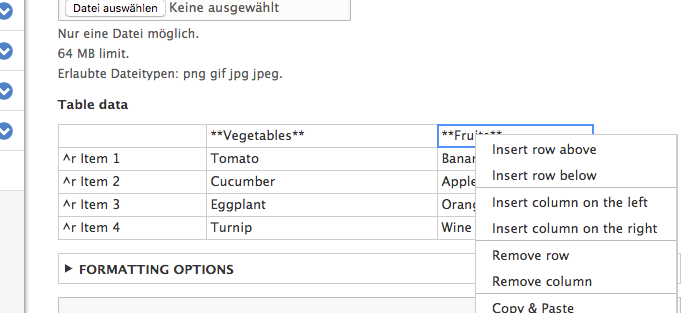
Provides an easy to use table field just to edit and display static Excel-like tables.
From 2.0.7, you can even use native JSON typed fields for data storage using the contrib JSON Field module.
This Module makes use from the JS-library "handsontable" to have an editable tables in the backend. It provides formatting options left/right-align, table headers and more.
Inside the table you can not use HTML but you can use MarkDown what will be rendered as HTML.
There are two JS-libraries required by this module: Handsontable and PapaParse. Both will be installed by composer for you.
| Module |
Handsontable |
Papa Parse |
league/commonmark |
| 8.x-1.0 |
0.34 |
4.1 |
0.11 |
| 2.0 |
12 |
5.3 |
2.4 |
Install
Before installing the module make sure to set up asset packagist repository in your composer.json manually. More info about that can be read in this Drupal documentation See an example here (in this example the site was installed using drupal/recommended-project with docroot under the "web" folder):
  "repositories": [
        "drupal": {
            "type": "composer",
            "url": "https://packages.drupal.org/8"
        },
        "assets": {
            "type": "composer",
            "url": "https://asset-packagist.org"
        }
  ],
  "require": {
    ...
    "oomphinc/composer-installers-extender": "^2.0",
  }
  "extra": {
        "installer-paths": {
            "web/core": [
                "type:drupal-core"
            ],
            "web/libraries/{$name}": [
                "type:drupal-library",
                "type:bower-asset",
                "type:npm-asset"
            ],
            "web/modules/contrib/{$name}": [
                "type:drupal-module"
            ],
            "web/profiles/contrib/{$name}": [
                "type:drupal-profile"
            ],
            "web/themes/contrib/{$name}": [
                "type:drupal-theme"
            ],
            "drush/Commands/contrib/{$name}": [
                "type:drupal-drush"
            ],
            "web/modules/custom/{$name}": [
                "type:drupal-custom-module"
            ],
            "web/profiles/custom/{$name}": [
                "type:drupal-custom-profile"
            ],
            "web/themes/custom/{$name}": [
                "type:drupal-custom-theme"
            ]
        },
        "installer-types": [
            "bower-asset",
            "npm-asset"
        ],
      ...
    }
Also make sure you have run oomphinc/composer-installers-extender package installed with composer require oomphinc/composer-installers-extender
Now the module can be installed with composer. See the install command at the bottom under Releases.
After this, check if you can find the libraries in the web/libraries/ folder.
Now you can enable the module via UI or drush.


 Seeking new maintainer
 75 sites report using this module
 Stable releases for this project are covered by the security advisory policy.


