

Closed (fixed)
Project:
Bartik
Version:
7.x-1.x-dev
Component:
User interface
Priority:
Critical
Category:
Task
Assigned:
Unassigned
Reporter:
Created:
3 Apr 2010 at 05:37 UTC
Updated:
17 Jul 2010 at 23:00 UTC
Jump to comment: Most recent, Most recent file



Comments
Comment #1
aspilicious commentedIncrease the standard height, that way it doesn't look squeezed
Comment #2
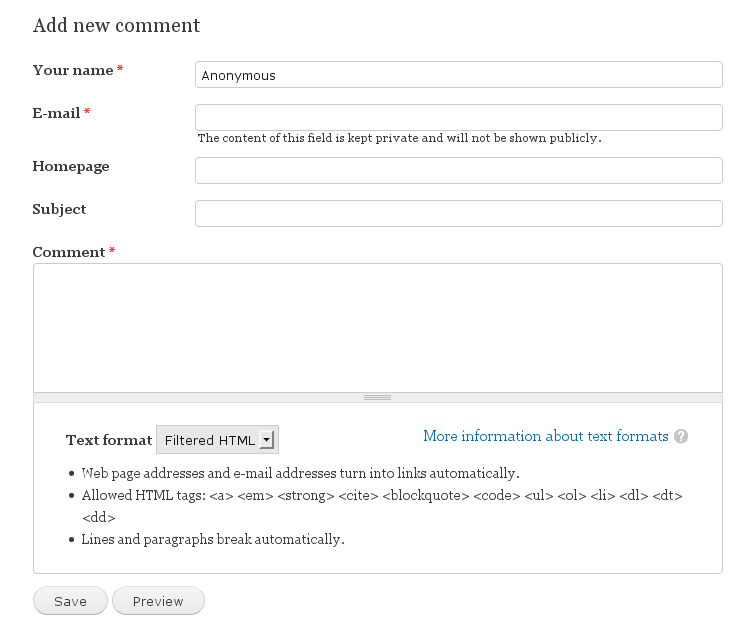
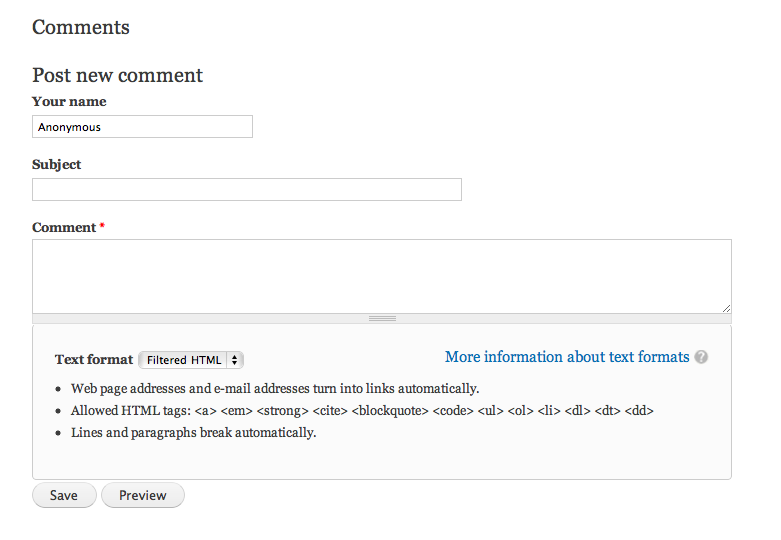
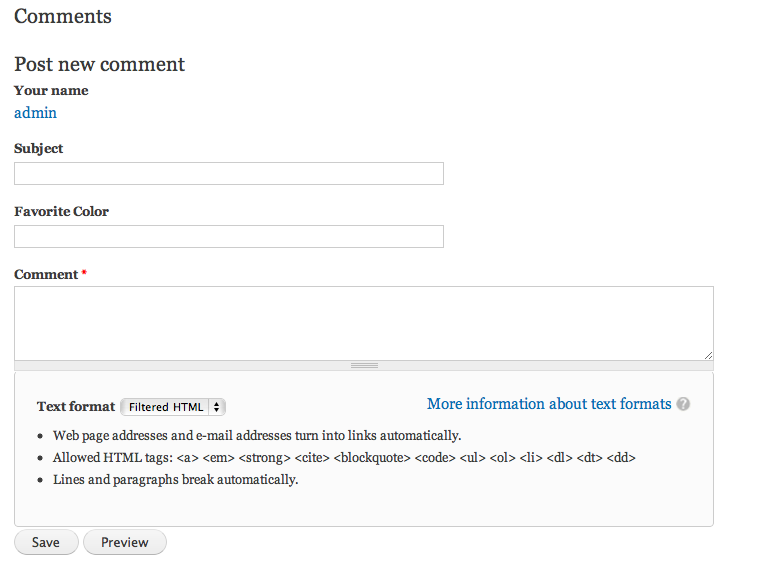
eojthebraveFor reference here are some screenshots of what the form currently looks like for anon users, and what it looks like with a field added to comments.
Note that adding a field to comments uncovered this issue, the screenshot below was taken with this patch applied. #763400: Comment preview/submit button weight not set causing fields to appear below preview/submit button
Comment #3
bleen commentedComment #4
heather commentedI was looking for an example which could be a good base.
http://www.blogdesignblog.com/blog-design/37-ways-to-design-the-comments...
http://www.1stwebdesigner.com/inspiration/77-inspiring-blog-comment-form...
http://www.agencytool.com/blog/10-great-contact-and-comment-form-designs
Since the comment response looks like a "speech" bubble, it might be nice to play off that.
It might be nice also align the form fields with existing comments. Meaning, place the labels to the left- leaving a margin, in alignment with the user info on left. (or vice versa in RTL version).
The thing which makes Drupal v different from examples is the multiple input formats in a menu selection and then the hints list which is going to change. The site maintainer can have multiple input formats, collapsed or not collapsed, or even with 'better formats' it could be hidden. This kinda perplexes me.
Not sure if that was helpful.
Comment #5
heather commentedAh okey here's an interesting solution.
In this example body is on top, and name or other comment fields are at the bottom. Maybe it would have to be flipped, as the site developer could add more fields.
From:
http://beerpla.net/2010/01/15/20-inspirational-and-original-comment-form...
Comment #6
Jeff Burnz commentedBe good to hide the redundant comment-wrapper title ("Comments") when there are no comments, eg...
Comment #7
Bojhan commentedWhat about making the width of the comment field, like 75% of what it is now?
Comment #8
jensimmons commentedThis still needs help:
I don't think we should go nuts. Just get the Your Name and Subject text fields to be the same width as the Comment text area. Perhaps put slight rounded corners on them all — so they match the rounded corners on the bottom. Maybe add some top & bottom padding to the text fields so that they are taller, and more spacious. And that's it. No total overhaul to make comments something completely different needed.
Comment #9
tsi commentedComment #10
tsi commentedI think the default comment form takes WAY too much space so to make it small and elegant I thought - Let's get the labels inline ! what do you say ?
Besides that I have :
* added the rounded corners.
* made all the fields align nicely and have the same width.
* reduced the huge margin of the filters box.
* added the rtl styling.
[Someone must tell me how you all got those images embedded here]
Comment #11
Bojhan commentedSo lets go with a far fewer width, just go for e-mail/website avarage and keep that for all those forms.
The height of the description of comment input formats should never exceed that of the actual comment form, so I would definitely add some height there.
Regarding inline labels, I dont know - jensimmons would need to validate that with her vision on the style.
Comment #12
tsi commentedSee #8 ("Your Name and Subject text fields to be the same width as the Comment text area.")
I honestly don't understand what you're saying here.
Comment #13
Bojhan commented@tsi
So that suggestion in #8 from jensimmons is wierd :P I will let her comment on that.
Sorry, I meant to write height. So the height of the description for input formats should not exceed that of the actual comment area. In this case it is.
Comment #14
Jeff Burnz commentedThe patch in #10 looks great tsi, looks like winner - clean and simple, get my +1
Bojan - what you are asking for is basically impossible to predict (the height of the input formats box) - if I add a lot of filters it will get very tall and vice versa, i.e. how high is high enough? I like the default of 5 rows.
Comment #15
Bojhan commentedIts impossible to predict technically, its perfectly possible to assume - lets say just 2 input formats.
Comment #16
tsi commentedThanks Jeff,
about the filters - I agree, but I also thought we could reduce the tips font size a bit (to the size of the form item description), what do you think ?
anyway if it was my site, and I believe many others too, would get this whole fieldset to be collapsed by default but I guess this shouldn't be in a core theme.
In this patch I also replaced some 0.x values with .x, but nothing more.
[and somebody please explain about the embedded images, what's with that ?]
Comment #17
tsi commented@Bojhan - it's not about the number of input formats you have on your site, it's about the number of filters you put in them, this list of tips can get pretty long.
Comment #18
Jeff Burnz commentedBohjan - it out of scope dude, I think your issue should be with core and not strictly Bartik. This issue is about being pretty, not anything else at this stage.
tsi -Some of us can use another input format that includes img (I have the Documentation Input Format available to me) and I can use Dre Editor to quickly embed an image as soon as I upload one (one click).
Comment #19
Bojhan commented@Jeff So I dont think its pretty to have an comment area which is so short. Lets make it longer. I work on core, I know this is not a core issue - this is a Batrik issue you can solve by increasing the basic height. If you don't agree that it's not looking better sure, but don't say its an core issue or something influenced by technical specifics - its a design choice we make.
Comment #20
tsi commented@Bojhan - even though it's true we can change anything we want on the theme level, the 5 rows default for a textarea *is* comming from core.
I like to keep things small on my pages and IMHO we shouldn't make this textarea bigger just because the tips box is big, if anyone is disturbed by this they can (for example) install better_formats.module and get rid of them. or even, as I said before, make them collapse with JS.
I did make it a bit less ugly by reducing the font size, isn't that better ?
Comment #21
eigentor commentedMaking the font size smaller is definitely better.
Maybe the tips box can be reduced in size even more.
In Drupal 6, the comment text area was way too big, it is fun that it may be too small now :P
In D6 it had 15 rows. Maybe a middle ground might make sense, say 7 rows. Garland colors the tips box differently from the comment text field itself, so this helps with distinguishing them and probably would help here, too.
Comment #22
tsi commentedI was careful with coloring because I didn't want to interfere with the color.module way of doing things, we need to keep in mind the background nay be black with white text on some sites or pink with green text on others.
Comment #23
tsi commentedjensimmons, as the one who have set this to critical, I would love to hear your opinion.
Comment #24
jensimmons commentedI like it. Committing the patch in #16.
We can always work on this some more, but for now, I'm declaring it fixed.