

 Come together with the global Drupal community in Rotterdam, 28 Sept – 1 Oct 2026. Sessions, contribution, connection, and Early Bird savings until 8 June.
When using IMCE file browser, aggregated JS files within default/files/js created by the AdvAgg module appear to contain all sorts of gibberish characters when loaded by the browser. Inspecting the page in Chrome dev tools reveals errors including "Uncaught SyntaxError: Invalid or unexpected token", "Uncaught ReferenceError: Drupal is not defined", and "Uncaught ReferenceError: imce is not defined". Inspecting the JS files through dev tools shows the gibberish characters, but they look OK when downloaded and viewed with FTP. Using the AdvAgg bypass cookie to disable Advagg temporarily resolves the issue. Changing the compression routine doesn't seem to matter.
Based on the several errors arising including Drupal and imce being undefined I suspect there's a load order issue, but I'm unsure how to manually override AdvAggs load order. Alternatively, I was thinking I could disable Advagg within IMCE windows, but I'm not sure how to go about that.
Thanks in advance!
| Comment | File | Size | Author |
|---|---|---|---|
| #29 | advagg-2817523-29-fix-imce-not-advagg.patch | 4.81 KB | mikeytown2 |
| #25 | advagg-2817523-25-disable-core-js-imce.patch | 493 bytes | mikeytown2 |
| #12 | firebug_js_response_1.jpg | 212.77 KB | cwkosman |
| #7 | html_response_1.jpg | 165.09 KB | cwkosman |
| #7 | html_headers_1.jpg | 114.36 KB | cwkosman |


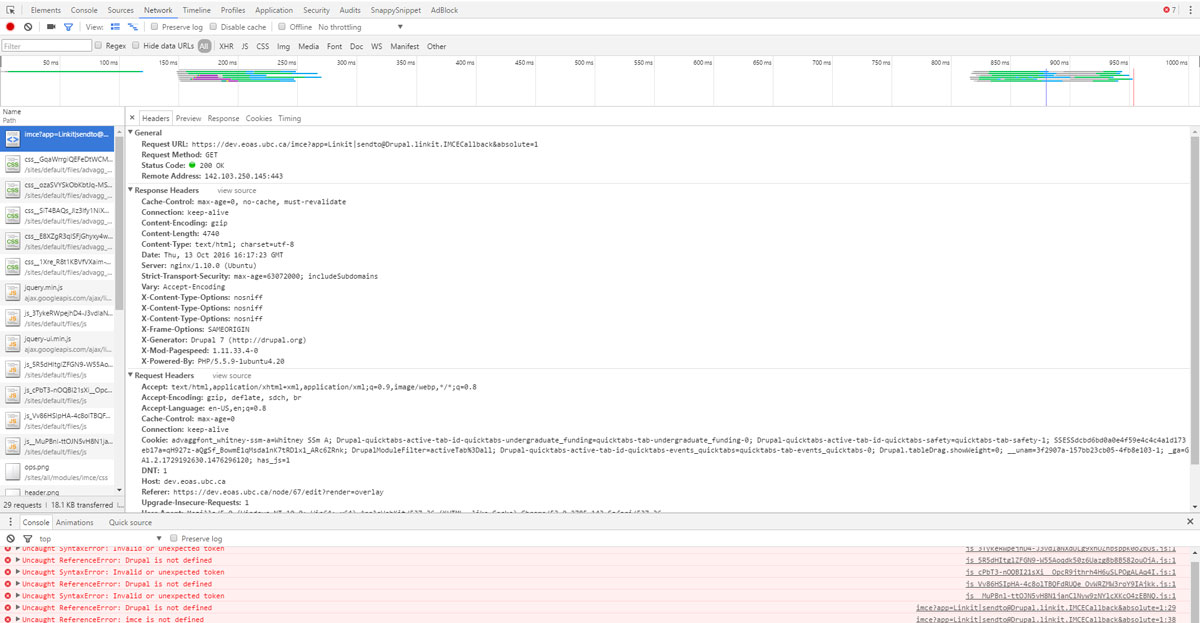


Comments
Comment #2
mikeytown2 commentedGibberish usually means gzip problems. The latest dev of advagg has some changes to the .htaccess file; it might help. In any case, fixing the gzip issue would be priority #1.
What does the network panel say about the Content-Encoding for the js files? If you click on the response tab is it gibberish ?
Comment #3
cwkosman commentedHey mikeytown2,
Thanks for your quick reply! Enabling the content-encoding column in the network panel of dev tools, its blank for all js files in the IMCE window. Those files are jquery.min.js, jquery.ui.min.js, and all the aggregated JS files (5 in this case, the number I arbitrarily specified in the Bundler options).
Comment #4
mikeytown2 commented3 things
Response headers: Content-Encoding - You confirmed it's empty
Request headers: what does Accept-Encoding say?
Response tab - is it gibberish?
Comment #5
cwkosman commented1. Response headers => Content encoding is gzip for the html file, but is blank for each of the javascript files.
2. Accepting encoding (on the html document) is gzip, deflate, sdch, br
3. Nope. The head has all of the javascript files called in, starts with jquery (from google cdn), then one of the aggregated files (containing jquery once, among other things), then jquery ui, then the rest of the aggregated js.
Comment #6
mikeytown2 commentedIf the response tab is readable then the browser can parse it as well. My guess is that deferred or footer changes done by the modifier is causing the issues you're seeing. Disable it and see if the problem still exists.
Comment #7
cwkosman commentedHey mikeytown2,
I apologize, I think I misinterpreted what you were asking in your 3rd point of (#4). In the response tab when opening IMCE windows, the javascript files are gibberish, but the html document is fine. To clarify, I've attached to this comment:
Re: your suggestion in #6, the gibberish is present with AdvAgg Modifier turned off; it was never turned on.
Thanks for your time and patience!
Comment #8
cwkosman commentedThe plot thickens: I've been using Chrome, where the developer tools show the javascript is jibberish in the response tab. In Firefox, the issue is not present at all: it's developer tools show all javascript working as intended. In internet explorer, the IMCE windows takes quite a long time to display (~15 seconds), but ends up working.
Compare the following aggregated javascript files from the site I'm working on:
https://dev.eoas.ubc.ca/sites/default/files/js/js_3TykeRWpejhD4-J3vdlaNX...
vs.
https://dev.eoas.ubc.ca/sites/default/files/js/js_3TykeRWpejhD4-J3vdlaNX... (this is produced because I have "create .gz files" checked off under Configuration => Obscure Options).
In Chrome, entering the first one in the address bar returns gibberish, the second one doesn't.
In Firefox, both are the same.
In IE, both are the same.
Comment #9
mikeytown2 commentedWhat does firebug in firefox say?
Comment #10
mikeytown2 commentedThanks for providing a link to the js file. Pretty odd behavior. I think it's nginx related.
Comment #11
mikeytown2 commentedIn Chrome
https://dev.eoas.ubc.ca/sites/default/files/js/js_3TykeRWpejhD4-J3vdlaNX...
Content-Length:19775
https://dev.eoas.ubc.ca/sites/default/files/js/js_3TykeRWpejhD4-J3vdlaNX...
Content-Length:6607
In Firefox
https://dev.eoas.ubc.ca/sites/default/files/js/js_3TykeRWpejhD4-J3vdlaNX...
Content-Length:6607
Content-Encoding:gzip
https://dev.eoas.ubc.ca/sites/default/files/js/js_3TykeRWpejhD4-J3vdlaNX...
Content-Length:6607
Content-Encoding:gzip
In the filesystem what are the sizes of these 2 files?
Comment #12
cwkosman commentedIn firebug on the html document:
Response header: content-encoding is gzip
Request headers, accept encoding is gzip, deflate, br
Response tab is identical.
On an offending javascript file:
The response tab shows regular, non-gibberish javascript. See attached screenshot.
Comment #13
cwkosman commentedIn the file system:
– the js file ending in .gz is 19,775
– the js file ending in .js is 6,607
Comment #14
mikeytown2 commentedThe filesystem seems like the issue; the .js.gz and .js files got swapped somehow. Delete both files and then hit them again; in order to regenerate them.
Comment #15
cwkosman commentedI should additionally note: the jibberish appearing in the .js file but not on the js.gz file in Chrome doesn't happen for every single file Advagg creates in default/files/js.
For example, the following both behave in Chrome:
https://dev.eoas.ubc.ca/sites/default/files/js/js_5R5dHItglZFGN9-W55Aoqd...
and
https://dev.eoas.ubc.ca/sites/default/files/js/js_5R5dHItglZFGN9-W55Aoqd...
Yet they are in the same directory as the files cited in comment (#8) and (#11).
Comment #16
cwkosman commentedCleared both the .js.gz and .js versions, cleared Drupal caches and my own browser caches, and had the files regenerated but the issue persists.
Comment #17
mikeytown2 commentedChrome
https://dev.eoas.ubc.ca/sites/default/files/js/js_5R5dHItglZFGN9-W55Aoqd...
Content-Length:24450
https://dev.eoas.ubc.ca/sites/default/files/js/js_5R5dHItglZFGN9-W55Aoqd...
Content-Length:13443
Content-Encoding:gzip
In any case these files are not inside of the advagg_js dir. You have issues with core; which means there's a not a lot I can do to help you if you're not using advagg.
Comment #18
mikeytown2 commentedGo to
admin/config/development/performance/advagg/infoand under Hook Theme Info and Hook Render Info what is listed?Comment #19
cwkosman commentedHook theme info:
template_process
advagg_mod_process_move_js
_advagg_process_html
ctools_process
rdf_process
Hook render info:
scripts:
#pre_render - _advagg_mod_pre_render_scripts, advagg_pre_render_scripts, advagg_modify_js_pre_render
#group_callback - advagg_group_js
#aggregate_callback - _advagg_aggregate_js
#after_build - conditional_fields_element_after_build
styles:
#pre_render - _advagg_mod_pre_render_styles, advagg_pre_render_styles, advagg_modify_css_pre_render
#group_callback - drupal_group_css
#aggregate_callback - _advagg_aggregate_css
#after_build - conditional_fields_element_after_build
Comment #20
cwkosman commentedJust updated core from 7.50 to 7.51. Jibberish javascript still present, but now IMCE window works. Unsure how that's possible.
Next move is to change to dev version of advagg
Comment #21
mikeytown2 commentedIn the HTML source see if the script tags point to the advagg_js dir or the js dir.
Comment #22
cwkosman commentedOnly in IMCE dialogue windows, the HTML script tags in the head point to the js directory.
Every other page on the site, including all other administration pages, HTML script tags in the head point to advagg_js directory.
On that note, I'll point out this is similar to the issue at https://www.drupal.org/node/2153217
Comment #23
mikeytown2 commentedMakes me wonder what runs after advagg_ajax_render_alter(); which is where advagg takes over ajax responses and renders the js.
What does this output?
Comment #24
cwkosman commentedArray
(
[0] => advagg
[1] => devel
)
Comment #25
mikeytown2 commentedOK so imce does it's own html page http://cgit.drupalcode.org/imce/tree/tpl/imce-page.tpl.php
No way around this. If you're having issues my recommendation is to disable js aggregation on the imce page.
Put this in hook_init().
If this fixes your issue I might include it inside of advagg as a hidden setting that can be turned on inside of settings.php. Guessing other people will have the same issue given the popularity of imce.
Comment #26
mikeytown2 commentedhmmm ok so there might be a way to get this to work. theme('imce_page') is what calls imce-page.tpl.php so in theory I could copy imce-page.tpl.php and use advagg to overwrite it so that it looks like this
Can you test this out? Inside of sites/all/modules/imce/tpl/imce-page.tpl.php
Change
print drupal_get_js('header');to
$scripts_header_array = advagg_get_js('header'); print drupal_render($scripts_header_array);and change
print drupal_get_js('footer');to
$scripts_footer_array = advagg_get_js('footer'); print drupal_render($scripts_footer_array);Note to self
Comment #27
cwkosman commentedI'm happy to report that both solutions (#25) and (#26) work.
The solution in #25 successfully bypassed Advagg in IMCE windows; no console errors, including jibberish javascript, were reported.
The solution in #26 also worked. It called in aggregated JS files from sites/default/files/advagg_js rather than sites/default/files/js and no console errors were reported.
Nice work and thank you so much for your time and patience.
Comment #28
mikeytown2 commented#25 bypasses core not advagg.
I'll work on a solution based off of #26.
Comment #29
mikeytown2 commentedComment #31
mikeytown2 commented