

 Come together with the global Drupal community in Rotterdam, 28 Sept – 1 Oct 2026. Sessions, contribution, connection, and Early Bird savings until 8 June.
Problem/Motivation
I don't like fixed elements on a page. Also it interferes with another sticky menu on my site.
Steps to reproduce
Install admin_toolbar.
Proposed resolution
Add an option to pick UX behaviour, disable fixed state, remove/switch-off "from the side" variant

| Comment | File | Size | Author |
|---|---|---|---|
| #33 | 3255672-33-admin_toolbar-sticky-behavior1b.jpg | 89.6 KB | dydave |
| #33 | 3255672-33-admin_toolbar-sticky-behavior1a.jpg | 177.19 KB | dydave |
| #23 | testing-issues-3255672.jpg | 47.93 KB | ador_jao |
| #6 | toolbar-at-top.png | 67.39 KB | ressa |
| #13 | BeforeMR76.png | 63.46 KB | kanchan bhogade |
Issue fork admin_toolbar-3255672
 Show commands
Start within a Git clone of the project using the version control instructions.
Or, if you do not have SSH keys set up on git.drupalcode.org:
 changes



Comments
Comment #2
romainj commentedPlease make a MR with your code. Thanks
Comment #3
ressaYes, I also prefer to not show redundant and distracting elements, and maximize the working area, when I am creating content, so this would be a nice feature.
Comment #4
ressaComment #6
ressaHere's a rough sketch. For some reason, the boolean value is saved as
1or0, and nottrueorfalse... so, if for some reason it is saved as1on some systems andtrueon others, used this:if ($toolbar_top === TRUE || $toolbar_top === 1)Comment #7
ressaI created an issue about the
1/truething.Comment #9
silvi.addweb commentedI have added toolbar top to schema, Now boolean value is saved as true or false. please review.
Comment #10
ressaThank you very much for a fast reply, and fixing this problem for me @silvi.addweb. It now works perfectly, and the values used are
trueorfalseas desired. I have updated the check to just useif ($toolbar_top === TRUE). If you have time, feel free to review the patch, and see if it works as expected, and the rest of the code looks all right. Thanks!Comment #11
bmango commentedI have applied the patch for this and it works as expected. Many thanks!
Comment #12
ressaThanks for reviewing @bmango! Feel free to change the status to RTBC.
Comment #13
kanchan bhogade commentedTested MR 76 on Drupal 10
The MR is applied cleanly...
Adding screenshot
RTBC+1
Comment #14
bmango commentedComment #16
dydave commentedComment #17
dydave commentedRebased MR and fixed an issue with stylelint so all the jobs would pass ✅
Personal comments on MR!76:
1 - Could we please change the name of the config variable
toolbar_toptodisable_sticky?Would anybody mind if I made the changes in the current MR?
Would anyone have a better suggestion for a better config name, or would you perhaps prefer keeping the current name?
I personally feel
disable_stickywould be more explicit and easier to understand when reading the code.2 - Additionally, I would recommend updating the wording of the added field on the settings form:
https://git.drupalcode.org/project/admin_toolbar/-/merge_requests/76/dif...
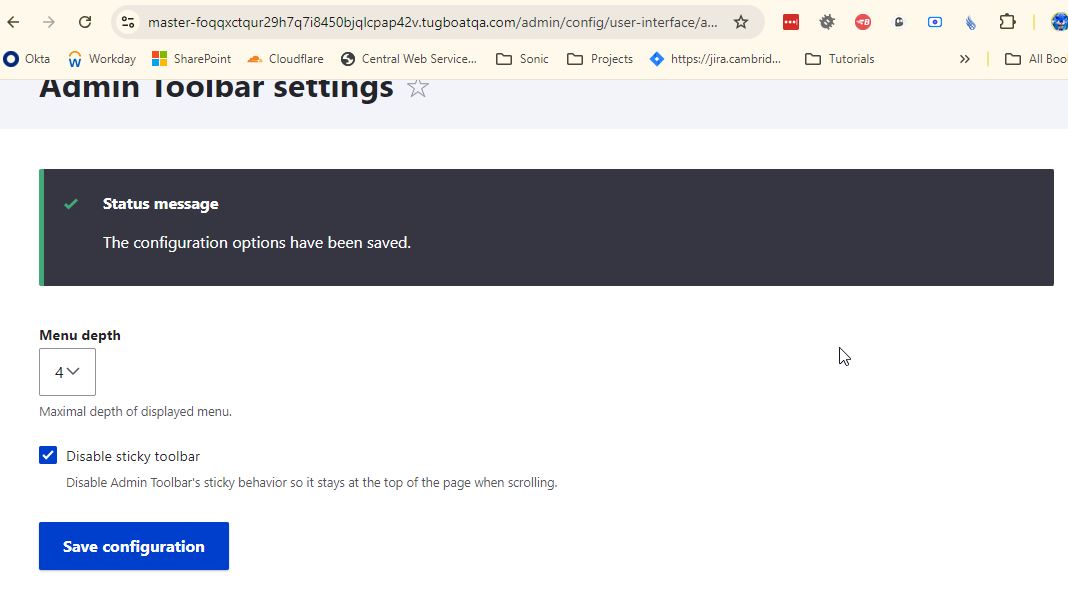
Toolbar at top==>Disable sticky toolbarMake toolbar stay at the top when scrolling.==>Disable Admin Toolbar's sticky behavior so it stays at the top of the page when scrolling.3 - Lastly, if possible, it would be great if this new setting could be automatically tested a minimum, building on top of the
AdminToolbarSettingsFormTestclass added in #3466125: [AdminToolbarSettingsForm] Fix Fatal Error: Call to undefined method Drupal\Core\Menu\MenuLinkManager::invalidateAll() (see MR!94): Check the CSS file is properly added to the rendered HTML markup if the setting is selected (TRUE), for example.Otherwise, I've tested this manually from a functional standpoint and it's working fine: A very nice addition indeed.
(Tested on a fresh D10.3.1 standard profile install)
Any feedback, comments and replies on the changes suggested would be greatly appreciated.
Thanks in advance!
Comment #18
ressaThank you @japerry for updating the MR, and all the other recent work on the module, and thanks @DYdave for the update here, and all the other great work you have done getting Admin Toolbar Drupal 11 ready. I very much appreciate it!
About your suggestions, they are great and I agree with all of them, so feel free to go ahead. Maybe someone can add the test you suggest?
Comment #19
dydave commentedSuper nice and speedy reply on this @ressa! 🙂
As always, constructive, positive and very encouraging!
I've been following quite a lot of tickets on which you've been doing amazing work, coordinating development and helping developers make the right decisions, just like in this ticket.
It definitely feels great knowing you're keeping an eye on this one 👍
I'll get cracking on the changes later today, after work: They are pretty straight forward.
However, for the tests, I'm not sure exactly how to proceed, since the
AdminToolbarSettingsFormis currently a major blocker, crashing on submit with a WSOD in the DEV branch as of release 3.5.0...#3466125: [AdminToolbarSettingsForm] Fix Fatal Error: Call to undefined method Drupal\Core\Menu\MenuLinkManager::invalidateAll() should be pretty much ready to get merged... and would greatly appreciate if Jakob (@japerry), you could please try taking a look at this one in priority.
Let's see how far we can take this ticket until the
AdminToolbarSettingsFormTestclass gets added to the dev branch.Thanks again!
Comment #20
dydave commentedQuick follow-up on this issue:
The changes mentioned above at #17 have been implemented in MR!76 and are ready to be reviewed once again.
Once
AdminToolbarSettingsFormTestclass from MR!94 is added to the code base, we should be able to adddisable_sticky => TRUEin the submitted form values and test:$assert->responseNotContains('css/admin_toolbar.disable_sticky.css')before and$assert->responseContains('css/admin_toolbar.disable_sticky.css')after.For the time being, issue could probably be moved back to Needs review as an attempt to get more testing, feedback and reviews.
Thanks in advance!
Comment #21
ressaThank you @DYdave, it's great to hear! I try my best to help out where I can -- though I have to leave the hard core coding to the experts, such as yourself and @japerry 🙂
Comment #22
dydave commentedHi Jakob (@japerry),
This ticket should also be ready to go.
I've just added basic checks (as suggested above at #20) for the added
disable_stickysetting to the recently addedAdminToolbarSettingsFormTest.Merge request MR!76 has also been rebased with the latest changes to 3.x and still seems to be passing all tests.
Please let us know if you would see anything else that would still need to be addressed in order to get this feature added to the module, we would surely be glad to help.
Thanks in advance!
Comment #23
ador_jao commentedHi, this is my first contribution and tested UI functionality. here is the screenshot.
Comment #25
dydave commentedQuick follow-up on this issue:
Rebased merge request on the latest 3.x to run the tests again which seemed to pass 🟢
Therefore, I went ahead and merged the changes above at #24.
This new feature will be made available in the next stable release.
Marking issue as Fixed for now.
Thanks again for all the work on this new feature.
Cheers!
Comment #26
ressaFantastic, thanks @dydave! You are really on a roll now, giving Admin Toolbar some much needed attention, I am very grateful.
Comment #27
dydave commentedThanks a lot @ressa for your support, I greatly appreciate it!
We're only getting started 😉
Take a look at all the tickets we've got lined up in the issue queue:
https://www.drupal.org/project/issues/admin_toolbar
All the ones in Needs review and/or RTBC....
If you get any chance to give us some help, we would like to get the following issues in as well, in priority:
We'll definitely get more done in the issue queue, step by step, in a more steady flow 👍
I've done a big round of clean-up in tickets yesterday as well, taking the issue tracker down from 2 pages to 1 😅
Closed lots of outdated issues (more than 2 years old)....
In any case thanks again very much for your great help on this issue and in the module in general!
Cheers!
Comment #28
ressaWhew, yes @dydave -- I can easily imagine there was quite a backlog of old issues in need of attention 😅
I'll take a look at #3440852: Make un-hover delay configurable, I am already a bit involved in that issue.
Is a meta issue, which lists relevant issues by priority worth considering ("[Meta] Clear out backlog for Admin Toolbar"?) so that the community can see where admins need help?
The Admin Toolbar is extremely popular, and the 5th most installed contrib module (excluding CTools), so getting it in tip top shape will be amazing. Name and installs as of 16 Feb.:
Thanks for the spring cleaning!
Comment #29
dydave commentedDefinitely! Thanks a lot @ressa!
I'll give the issue queue until the end of the week to see if we're getting any feedback on these issues....
Otherwise, great suggestion! I'll create a Meta issue with a plan for the next release and ask for help to get these tickets reviewed and tested in priority 👍
Given the popularity of the
admin_toolbarmodule, we would definitely want to give a good image of Drupal out-of-the-box, in particular by having a clean, robust and clear module ready for newcomers.That's why the Project Browser issue is a high priority.
Any help you could get on the module will be great! 🙏
Thanks again!🙂
Comment #30
ressaSounds good with the Meta issue, I'll subscribe to it when it's ready.
And I totally agree, we should aim at giving new users a good first impression of Drupal, like you describe. Let's do it :)
Comment #31
ressaPS. I tried the latest dev-release, but it didn't disable sticky toolbar ...
It looks like the specificity is too weak, but adding
bodyseems to do the trick:body.toolbar-fixed .toolbar-oriented .toolbar-bar... in css/admin_toolbar.disable_sticky.css:
https://git.drupalcode.org/project/admin_toolbar/-/merge_requests/76/dif...
Comment #32
dydave commentedThanks a lot @ressa once again for your great follow-up on this issue.
I'm going to give this another round of tests see if more changes would be needed.
In which case, we will probably need to create a follow-up issue to fix this.
I'll also take a look at #3304810: Toggle away Admin Toolbar completely and give it a round of tests.
Thanks !
Comment #33
dydave commentedThanks a lot @ressa, once again and sorry for the slight delay of this reply, but .... good news 🥳
I have just tested this feature successfully 🟢 with:
1 - admin_toolbar: the 3.x-dev version of the module (at commit:d7c8da0e), so the latest version of the module on 3.x, see commits:
https://git.drupalcode.org/project/admin_toolbar/-/commits/3.x?ref_type=...
2 - drupal/core:10.4.3
The feature seems to be working fine, see the screenshots below:

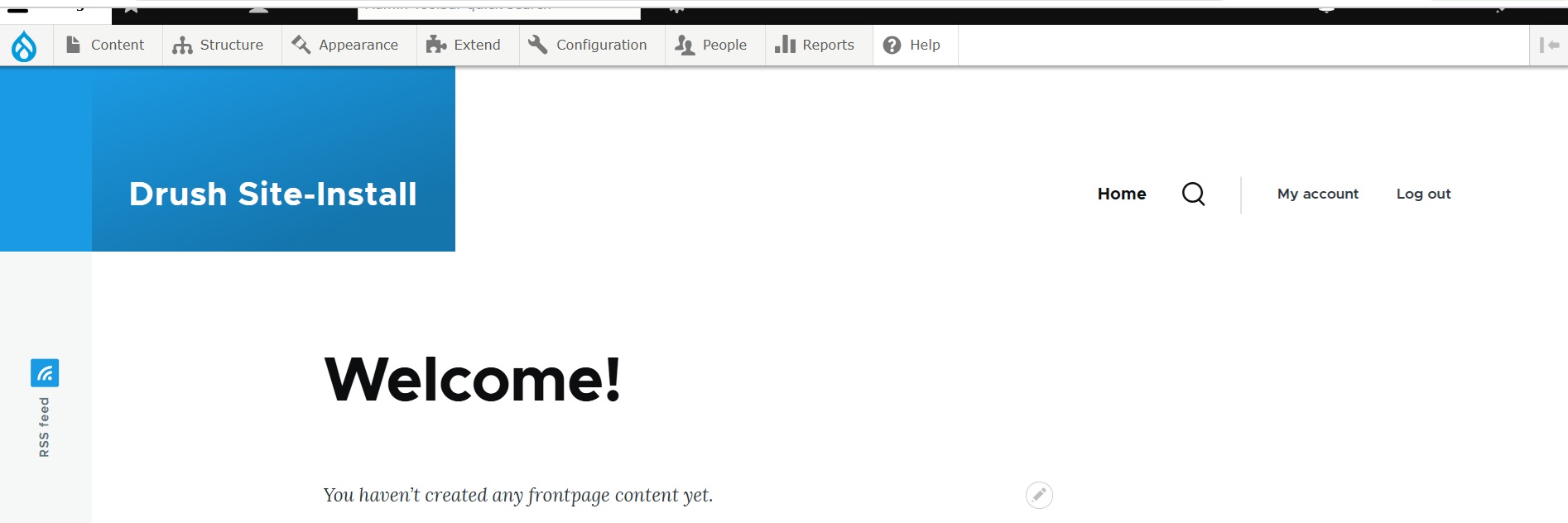
Sticky behavior enabled: Admin Toolbar will follow the scroll:
Sticky behavior disabled: Admin Toolbar will stay at the top of the page:

Therefore, we can consider the changes that were merged in this issue are working as expected on a fresh Drupal install.
RE #31:
Did you test with any specific theme? Maybe contrib theme Gin?
Could you perhaps try again with Core Claro?
Otherwise, if there really is an issue to fix, we should probably create a new ticket.
Thanks in advance!
Comment #34
ressaThanks for following up on this, and you're right, good hunch @dydave! I was using Claro Compact, and tried the latest dev-release in Claro just now, and it works perfectly.
So this feature is working well, and ready for the next official release. Sorry for the noise and you having to spend time verifying this.
EDIT: It was actually Bootstrap5 where the problem was, and I have created #3510704: Admin Toolbar "Disable sticky toolbar" doesn't work in Bootstrap5.
Comment #35
dydave commentedThanks a lot @ressa!
No worries at all!
Let's see what the Claro Compact users suggest, for fixing this issue.
We can always create follow-up tickets in the module for specific cases 👌
It's just that in this ticket, we confirmed the changes worked with a default/fresh install, at least 😅
which is probably the minimum any user could expect from a module
==> Covered by automated tests on supported Drupal Core versions with a fresh install ✅
So this should be good to go ! 🥳
No problem for covering more cases in the future, in other specific issues.
Thanks again for all the help in the many pending tickets! 🙏 😅
Comment #36
ressaGreat to hear, thanks for the understanding! It turns out I couldn't replicate it, so my installation must have gone bad somehow ... I should probably refresh my dev-installation more often :)