Problem/Motivation
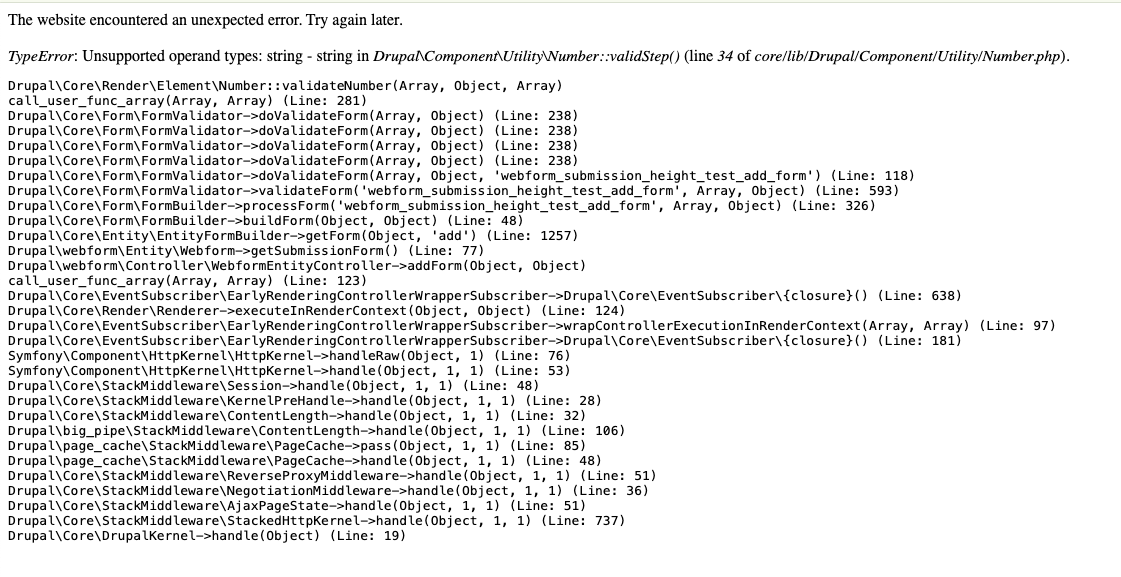
If the "Feet minimum" and "Feet maximum" settings are left blank when configuring a Webform Height input field, then filling out that form element will throw an error:
TypeError: Unsupported operand types: string - string in Drupal\Component\Utility\Number::validStep() (line 34 of core/lib/Drupal/Component/Utility/Number.php).
Drupal\Core\Render\Element\Number::validateNumber(Array, Object, Array)
call_user_func_array(Array, Array) (Line: 281)
Drupal\Core\Form\FormValidator->doValidateForm(Array, Object) (Line: 238)
Steps to reproduce
1. Create a new webform
2. Add a new element to the form of type: "Height (feet/inches)".
3. Under "Height settings" clear the "Feet minimum" and "Feet maximum" values.
4. Save the element and the form.
5. View the form.
6. Enter any value for the height field setup above, and submit the form. You will see the error listed above.
(tested with Webform 6.2.2 and Drupal 10.2 and confirmed with a clean simplytest.me instance.
Proposed resolution
This could be fixed either by making the min/max fields in the element configuration required fields. Or changing the Webform Height submodule code to treat an empty string "" as a proper null so that the 'validStep doesn't fail due to the empty string parameter.
Notes
Given that editors need to remove the default values to trigger this error means it is fairly easy to avoid, though it would still be considered a bug.
I note that this scenario was previously showing as a warning in a D9 site, but appears to now be an error with D10 that breaks the form usage.
See attached screenshots for the above.


 Show commands
 changes


Comments
Comment #4
maithri shetty commentedComment #5
nupur badola commentedReviewed the MR, No error is identified as the min and max field are mandatory fields now. Hence marking it to RTBC.
Comment #6
jrockowitz commentedThe below element replicates the issue when the feet are set and not the inches.
Comment #7
jrockowitz commentedI want to fix the validation issue and not always require a value.
Comment #8
harshitthakoreAttached patch file for min__feet and max_feet properties validation on element save.
Comment #9
harshitthakoreComment #10
jrockowitz commentedThank you for the patch from #8, but I think we can all min/max to be an empty string and deal with the validation issue via \Drupal\Core\Render\Element\Number::validateNumber.
Please review the MR, which changes the custom min/max from an empty string to
NULL, which works as expected for determining the offset in\Drupal\Core\Render\Element\Number::validateNumbervia$offset = $element['#min'] ?? 0.0;.Comment #11
liam morlandNeeds rebase onto 6.3.x.
Comment #12
jrockowitz commentedShould this bug be addressed in 6.2.x?
Comment #13
liam morlandI don't mind. I was thinking of 6.2.x as security-updates-only since it goes EOL so soon along with Drupal 10.2.
Comment #14
jrockowitz commentedIf the tests pass, let's merge this.
Comment #16
jrockowitz commented