Problem/Motivation
The following issues made a positive difference towards Navigation being usable in Windows High Contrast mode, but there are still a few outstanding issues to rectify.
#3423277: Icons are invisible in high contrast mode
#3483209: Navigation leverage icon core API
WCAG success criteria
Steps to reproduce
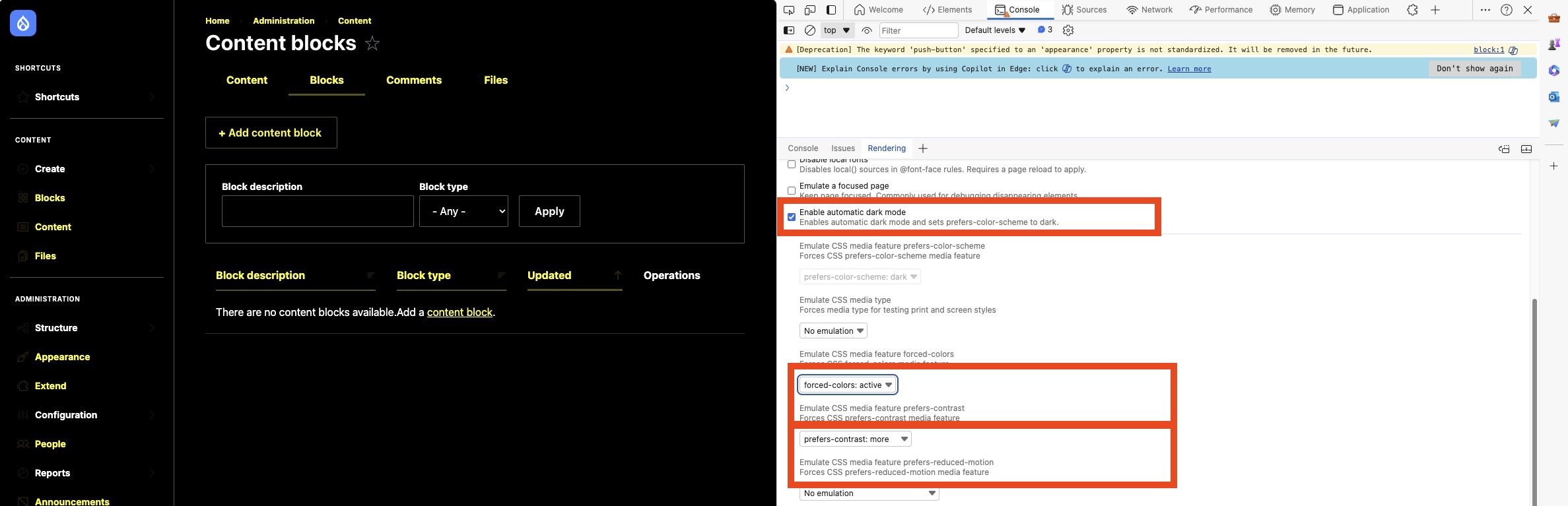
First set up your environment to test the latest 11.x branch (or dev release) on forced-colors mode. There are a couple of ways to do this, eg.
The following issues are present (description followed by screenshot).
1. The carets are only barely visible:
*retested in 11.x, not an issue anymore

2. The right border of the border is invisible, that way it is impossible to distinguish between drawer and background of the main content area:

3. The caret inside the expand and collapse button at the bottom of the sidebar is also close to invisible:
*retested in 11.x, not an issue anymore

4. With the sidebar expanded and the focus on configuration in this case, hovering the mouse cursor over appearance the outline is also hardly noticeable: (*not an issue - the screenshot was taken with automatic dark mode enabled in edge, and that setting is causing inaccurate display of forced colors, use "emulate css media feature prefers-color-scheme instead for accurate display)

5. With the sidebar collapsed hovering over a top level item without sub menu items a dark badge is shown in the non high contrast mode. With the high contrast mode on, the dark background of that badge fusions into one with the dark background of the main content area and the sidebar:

6. On desktop viewport the top bar is missing the bottom border, on mobile viewport is bottom border is visible

7. On the mobile breakpoint, the close button is barely visible:

8. On mobile the hamburger in the top bar is barely visible:

9. On mobile, the right border of the navigation is oddly interrupted:

10. the icon used in the top bar is not visible:

11. the icons of the top level menu items have the identical color even though the labels differ depending if the menu item has a sub menu or not:

some context: the problem is not reproducible in 11.x. the problem was either fixed indirectly on an other issue in 11.x or it got introduced within this MR - the latter is more likely. the problem is reproducible by checking out git checkout 4e7784d9fae9a87861ef8ee3b447606fa286d0e5. The last commit on the issue (d3f4484b56b9558e1a3b62804d9c8131a4777045) fixed the problem again.
12. The current page is shaded with a light colorized background in regular mode (#3426468: Make the active menu item visually stand out more is about improving the contrast and make it stand out more - but that is out of the scope for this issue)

but the problem in the context of forced color mode is that the information about current state is missing entirely

Proposed Resolution
User interface changes
2.
Before

After

5.
Before

After

6.
Before

After

7.
Before

After

8.
Before

After

9.
Before

After

10.
Before


After


11.
Before


After


12.
Before

After


Testing instructions
Walkthough of testing at https://www.youtube.com/watch?v=v4dTY4__F6U
Setup
- Install navigation module
- Create a node (the top bar exists on the node page)
- Use Chromium based browser such as Chrome or Edge
Testing criteria
- Ensure all icons visible
- Ensure all borders are visible
- Ensure text is visible (this wasn’t a problem before)
Testing steps: mobile
- Emulate forced colors in dev tools https://developer.chrome.com/docs/devtools/rendering/emulate-css
- Be logged in
- Note that the top navigation should have a bottom border and icon should be high contrast
- Expand the button
- The navigation will expand.
- Note the right border is visible. All icons will be high contrast.
- Open a submenu
- All text and icons should be visible
- Navigate to your node.
- Icons and text should be visible in top bar.
- Badge should have border
- Contextual dropdown should have border
Testing steps: wide
- Emulate forced colors in dev tools https://developer.chrome.com/docs/devtools/rendering/emulate-css
- Be logged in
- Note the left collapsed sidebar. All icons should be visible, have hover and focus states
- Expand a submenu. Border and any chevrons should be visible
- Expand the sidebar.
- Check that all icons and text are visible as expected
- Expand submenus. Everything should be visible as expected
- Navigate to your node, and check the top bar. All icons should be visible
- Dropdowns should have borders


 Show commands
 changes




Comments
Comment #2
rkollerComment #3
rkollerforgot the mobile viewport. made a few additions to the issue summary
Comment #4
kostyashupenkommm, i can't reproduce it @rkoller (i mean i can't reproduce almost invisible icons)
so you said:
In the system OS settings on Mac OS i have enabled dark mode
in MS Edge browser i have enabled forced-colors: active
and this
preer contrast set to morei think you were talking about system OS settings again? I see range bar in the settings to increase contrast (or this setting somehow i can apply inside of MS Edge)?Comment #5
ckrinaComment #6
rkollerno all those three settings were set within ms edge (@mherchel provided the instructions for this handy feature testing high contrast mode a while ago on slack if i remember correctly). you have to add the
Renderingtab either to the quick view or move it to the activity bar on top in the ms edge devtools:and i then only set and adjust those three settings highlighted:
Comment #7
katannshaw commentedAdded WCAG 2.2 success criteria and moved steps to reproduce into its own section for easier readability.
Comment #8
rkollerComment #9
ckrinaComment #10
ckrinaComment #11
kostyashupenkoI can't find solution for this, maybe some hints?
Maybe we can replace CSS mask-image with embedded svg icons ? Or to use iconic font and content css property (but embedded technology is better)
Comment #12
gauravvvv commentedI have updated the latest screenshot in the issue summary
Comment #13
gauravvvv commentedComment #14
mgiffordFor folks testing in high contrast, here is a guide.
https://www.lambdatest.com/blog/windows-high-contrast-mode/
Comment #15
m4oliveiWe recently landed #3483209: Navigation leverage icon core API, which had a positive impact on Windows High Contrast mode. I'll be doing some testing on the latest 11.x with the goal of updating the issue description to reflect the outstanding issues.
Comment #16
m4oliveiComment #17
m4oliveiComment #18
m4oliveiAdded a few more issues that I noticed.
Comment #19
m4oliveiComment #20
rinku jacob 13 commentedComment #21
kentr commentedI believe #4 in the IS (regarding the outline of the hovered menu entry) is caused by automatic dark mode. I can't reproduce it in basic forced colors emulation or MacOS Edge with Page Colors (dark themes on both).
I suggest removing that item. @rkoller, does this sound right, and do you agree that item can be removed?
Is #6 in the IS referring to the hamburger icon that #8 refers to?
I'm also adding Page Colors to the IS for seeing forced-colors mode. It's a little nicer DX than forced-colors emulation in DevTools.
Comment #22
kentr commentedFor IS #9 (gap in menu right border) I'm only seeing the issue in Firefox (Mac).
Also noticed another issue: The icon next to the username at top is hard to see. It may not be a UX / accessibility problem, though.
Screenshot attached from Chromium.
Tweaking the STR a little more.
Comment #23
kentr commentedI retract my previous comment about the interrupted menu right border. I now see it in Edge with Page Colors.
Suggestion for the remaining hard-to-see inline SVG icons:
currentColorin some form.Here's POC CSS:
Screenshot:
Comment #24
rkollerthanks for getting some momentum back into this issue @kentr!
re #21 yep in regard to point 4 i agree, good catch. just retested without the automatic dark mode and the hover looks totally fine and clearly visible to me. on the other hand the active menu item for the current site is close to invisible, but that has already an issue for the none forced color mode (#3426468: Make the active menu item visually stand out more). so i wonder about two things, should the forced color mode with the active menu item be fixed in the aforementioned issue or within the scope of this issue? and in regard to updating the issue summary, instead of removing point 4 i wonder would it be the better choice to strike it through and leave a note. that way the references of the others points after the current point 4 wouldnt have to be updated throughout the comments?
in regard to point 6 in the issue summary. i have to admit writing up that issue was a while ago and the issue summary also got updated by other people. not sure i did point 8 back then, that was probably added afterwards by someone else? in regard to point 6, that screenshot was taken with the automatic dark mode checkbox ticked and as outlined it was about the barely visible hamburger icon AND the missing top bar border. you were unable to distinguish what is the page and what is the top bar. but looking at the site without the automatic forced color mode active the issue about distinguishing the top bar due to a not visible border is not an issue without the automatic forced color mode. or wait i was too hasty. the missing top bar border is still an issue for desktop viewports! there it is missing while it is visible for the mobile view port. maybe point 6 should be rescoped to the not visible bottom border in desktop view port and point 8 should be solely about the hamburger. that way the two images used are more appropriate? if you agree i can update both points in a follow up comment.
re #22 yep i've noticed that as well now. in your example you are referring to the icon in the top bar on a user profile page but the invisible icon also applies to node edit forms. they are using the same image there as well. and the gap i am also still experiencing for the mobile view port in edge.
Comment #25
kentr commented@rkoller
👍 Good idea.
I don't know. It may need more than a
system-colorchange.I tested
ActiveTextin all Edge Page Colors themes and using the emulation in Chromium DevTools. The color is indistinguishable fromLinkText. Shouldn'tActiveTextbe a distinct color?There was a Chromium bug related to this.
Here's a screenshot in Page Colors Dusk theme. The "Appearance" item is current and has the following CSS.
Firefox uses a distinct color for
ActiveText.👍 Sounds good.
Adding a new issue: More actions button should have a border (related Slack discussion).
This may be fixed by #3540337: Improve visibility of More actions menu button, but does the
menusidebar "Close"iconbutton also need a border?Comment #26
kentr commentedDid a little research, and I believe I misunderstood
ActiveText. Apparently it's for links that are being activated (pressed), not for the "active" link that corresponds to the current page.Comment #27
rkollermade the following changes to the issue summary
and there is one more potential detail that could be added to the issue summary, the background color for the workspace is not displayed in forced color mode. in "regular" mode you have a green background for the workspace that is live while all the other none live workspaces have an orange background (SC1.4.1 might apply here?). in addition to that the yellow font color used on the live workspace implies that it would lead to a page but strictly speaking just an area on top of the current page is displayed.
Comment #28
kentr commentedLooks like that is mentioned in #2910673: Workspace UI usability review.
I'd vote for making that element a progressively-enhanced button like in the MR for #3090120: Improve accessibility semantics for Toolbar buttons with trays.
Then the style can be something like this:
I'm uncertain if this is a Navigation issue or a Workspaces issue. It would be nice if Navigation handled it for all menu components.
I'd also really like to see this pattern be global, with a policy of progressively-enhancing all cases like this. Then it could be:
Comment #32
mherchelMerry Christmas and Happy Holidays!
Changes for forced-colors are made. This mainly involves adding transparent borders (which are made visible in forced-colors), and adding proper fills for SVGs.
Comment #33
mherchelAdding testing instructions to IS
Comment #34
mherchelAdded a walk though of testing at https://www.youtube.com/watch?v=v4dTY4__F6U
Comment #35
rkollerthat looks fab and really close! as already mentioned on slack i really liked the additional testing instructions you've provided as well as the youtube video as a linkable resource to others to quickly illustrate how to test forced color mode. i've then went ahead and manually tested in edge. I've noticed a few minor details that might require some more work (some might be out of scope) but overall this look really close:
point 5 from the issue summary still requires work. (using dark color scheme with forced color active and prefers contrast set to more)


i guess the easiest would be by simply adding an outline to the tooltip in forced color mode - the inverting background color pattern wouldn't be viable nor solvable across the possible different forced color choices imho. for regular mode the tooltip uses a dark dark background inverting the white background for example.
point 10 from the issue summary also requires work. the icon in the top bar is not visible for every default page color theme. for some light color themes it is visible but for the dark variants it is completely invisible:
Dusk (settings -> accessibility - page colors)

Desert (settings -> accessibility - page colors)

Night Sky (settings -> accessibility - page colors)

Aquatic (settings -> accessibility - page colors)

White (settings -> accessibility - page colors)

dark color scheme with forced colors active and prefers contrast more in devtools (page colors are off in the accessibility settings)

Out of scope for this issue, but one detail that is highlighted again in the examples for point 10 in forced color, is the need to increase at least the size of the dots on the more actions button ( see #3540337: Improve visibility of More actions menu button). The dots are shown in the correct color across the different page color choices but they are barely visible nor noticeable.
Also out of the scope for this issue, and I am uncertain if there is already an issue for that (i "thiiiiink" there might be, but was unable to find it yet), with the navigation sidebar collapsed you are able to tab through the top level menu items of the sidebar. so you have several tab presses with no visible focus outline (see focus.mp4)
One additional detail I've noticed, the

Skip to main contentlink is missing a visible focus outline while in regular mode the focus outline is visible:Comment #36
mherchelThe three dots in the top bar's contextual menu is responding to the forced colors. It's set to
buttonTextwhich is a system color in CSS that responds to forced colors. I think it's just small (as you said), so it's not highly visible.Pushing a fix for the tooltip in a sec!
Comment #37
mherchelTooltip border added. Hopefully good to go!
Comment #38
rkollertooltip looks good now:

thank you!
Comment #39
mherchelPushed another commit ensuring that the title icon is visible in high contrast. Hopefully good to go!
Comment #40
kentr commentedThat sounds like #3541910: Elements in closed sidebar are focusable.
Comment #41
mherchelPushed another commit to ensure that the toolbar-button component uses the proper system color within forced colors (e.g.
linkTextfor links andbuttonTextfor buttons)Comment #42
rkolleri can confirm that the last open issue, point 10 from the issue summary, is fixed now as well:
and while testing with the navigation sidebar collapsed by accident in forced color mode i've noticed one other issue i've raised in the dicussion with @mherchel on slack. in the expanded sidebar the labels of top level menu item with a submenu and those without have different colors while the all the icons employ the same color.

So color is conveying additional meaning that is lost in the collapsed state:

with the recent changes by @mherchel icons are using the appropriate colors:


In regard to the focus related issues i've agreed with mike on the following. the "skip to main content" link is not styled in the navigation module but the admin theme and should therefore be fixed in claro in a followup issue. same for the dotted focus outlines, those should also be fixed in a followup issue in the claro queue.
and thanks to @kentr for digging up the correct issue! i knew that there was one. was away from the issue queue for too long the last few months. so for the tabable top-level menu items in the collapsed mobile menu the followup is #3541910: Elements in closed sidebar are focusable. so the navigation sidebar and the top level sidebar look good to go in forced color mode. i will update the issue summary tomorrow.
Comment #43
rkollerComment #44
rkollerupdated the steps to reproduce section and striked every issue that isn't reproducible in 11.x anymore and add the additional problem that surfaced in #42. will add before and after screenshots for the remaining issue in my next comment.
Comment #45
rkolleri was over eager, reverted the striking of point 6, it still applies on the desktop viewport. aside that i'Ve added a user interface changes section to the issue summary with before and after screenshots for easier review.
Comment #46
mherchelIs there anything left to do?
Comment #47
rkollerFinally finished writing up the two followup issues.
#3565271: The skip to main content link is missing a visible focus outline in forced color mode
#3565294: Increase the contrasting area of focus outlines in forced color mode
plus the issue @kentr linked:
#3541910: Elements in closed sidebar are focusable
not sure if it is enough to link them as related followups or if all three should be also added to the issue summary? the only open question as discussed on slack is the question how to label the current page in the navigation sidebar.
Comment #48
mherchelPushed a new commit adding a left border for the active menu item.
Comment #49
mgiffordThis looks good to me. Thanks for all the work improving this!
Comment #50
rkolleri've asked for feedback by @kentr and @mgifford in regard of the latest changes about how to label the current page in forced color mode and if it is a reasonable approach to solve this problem - everyone agreed. So I've updated the issue summary, and added how to label the current page as point 12. Overall this issue looks ready to go. Per the discussion with @mherchel i'll set it to RTBC. and also thanks again to @mherchel for all the work over last days pushing this issue to the finish line!
Comment #51
needs-review-queue-bot commentedThe Needs Review Queue Bot tested this issue. It no longer applies to Drupal core. Therefore, this issue status is now "Needs work".
This does not mean that the patch necessarily needs to be re-rolled or the MR rebased. Read the Issue Summary, the issue tags and the latest discussion here to determine what needs to be done.
Consult the Drupal Contributor Guide to find step-by-step guides for working with issues.
Comment #52
kentr commentedIt looks like performance tests need to be updated for the CSS changes. That should make the pipeline pass:
https://git.drupalcode.org/issue/drupal-3438477/-/pipelines/702218/test_...
Comment #53
kentr commentedI don't know what caused #51, though.
Comment #54
mherchelWoohoo! Tests passed!
Setting back to RTBC per #50.
The only changes are changing target of MR to
main, fix tests, and resolve merge conflict (which was minor).Comment #59
lauriiiThank you for working on this! Committed 🚀