

Active
Project:
Admin Toolbar
Version:
3.x-dev
Component:
User interface
Priority:
Minor
Category:
Feature request
Assigned:
Unassigned
Reporter:
Created:
23 Jan 2023 at 14:43 UTC
Updated:
8 Aug 2025 at 08:46 UTC
Jump to comment: Most recent, Most recent file
 Show commands
 compare


Comments
Comment #2
rajneeshb commentedDevel sf-dump class having z-index 99999, so to fix the issue for toolbar menu added z-index to 100000.
Comment #3
james.williamsWorks for me! That said, I wonder if a fix should really go into core, since core's own toolbar gets obscured by the output from the dumper too. admin_toolbar could probably then just make use of core's fix. Up to this module's maintainer really?
Comment #4
adriancidThanks
Comment #7
joevagyok commentedThe changed z-index causes a problem with entity browser and other dialog, because the toolbar z-index the closing of the dialog is not clickable any more. Entity browser dialog has z-index:1260. The problem is present in both Claro and Seven themes.
Comment #8
butterwise commentedThe changed z-index also causes a problem with Ckeditor: When you maximize a formatted text field using Ckeditor, the admin toolbar shifts to the left-vertical position and overlays the editor window:
Comment #9
jessebaker commentedThis change to using an enormous z-index has also broken aspects of Acquia Site Studio which assumes the admin toolbar's z-index to be 502 which it has been for years.
Will it be reverted because otherwise we will need to resolve the issues it causes.
Comment #10
joevagyok commentedI tried to contact the maintainers on slack but haven't received feedback on the issue so far. I found another issue created related to this.
@jessebaker Just lock the version to 3.3.0 for now in composer until it gets resolved.
Comment #11
adriancidI'm reverting this issue due to the problems described at #3357617: New z-index is breaking other functionalities
Comment #13
jessebaker commentedThanks @adriancid. However I think you also need to remove the duplicate style declaration on line 1 of the same file -
was in that file twice.
Comment #14
adriancid@jessebaker can you check the last changes? I can't see any duplicate code there.
Comment #15
adriancidThe patch here is causing this error #3357815: Top search results are hidden under the toolbar.
Comment #16
jessebaker commentedHmm I might be wrong, sorry!
If you look here https://git.drupalcode.org/project/admin_toolbar/-/blob/3.3.2/css/admin.... you can see the following code twice (on lines 1 and again on 9)
It looked like the commit linked in your comment only removed the second one - but looking at 3.x it looks like both are gone!
https://git.drupalcode.org/project/admin_toolbar/-/blob/3.x/css/admin.to...
Comment #17
Harish1688 commentedHi
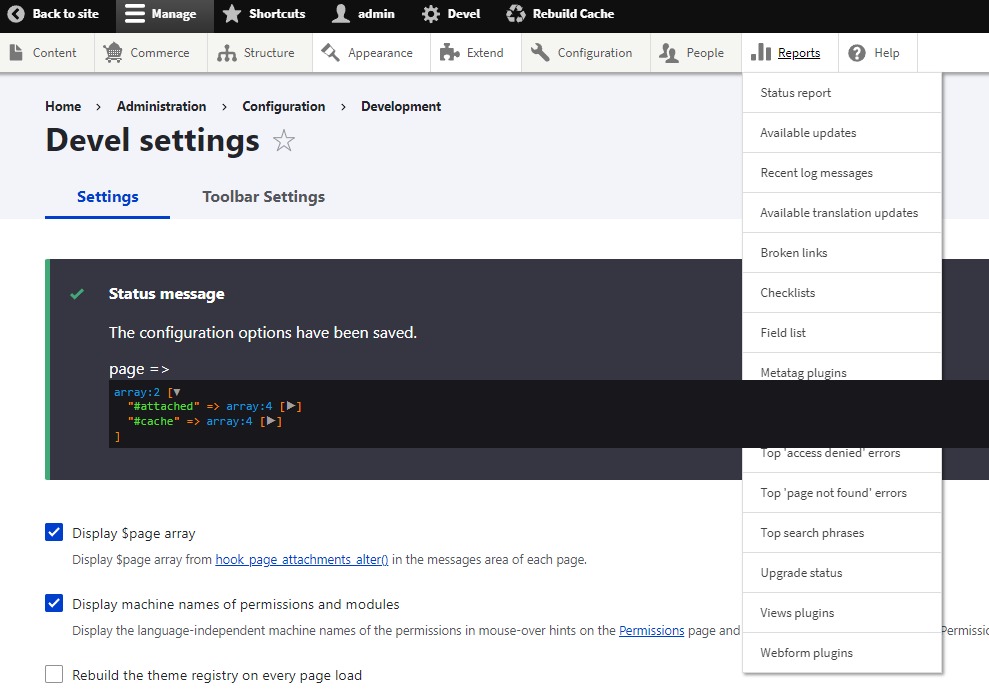
To address the issue, the requirement states that the toolbar menu should be positioned above the status message.
However, applying the CSS property z-index: 100000; to the #toolbar-bar class caused some unforeseen problems.
In order to resolve this for admin toolbar module, creating a - patch menu-z-index-sucks-with-devel-module-3335841-17.patch. override the CSS (z-index:0;) of the devel module specifically for the admin toolbar by modifying the "admin.toolbar_search.css" file.
Comment #18
Harish1688 commentedComment #19
Jaspreet-Kaur commentedVerified! After applying patch #17 issue seems to be fixed. Thanks!
Comment #20
adriancidI will leave open the issue until the other user reporting problems write a comment saying is working for them.
Comment #21
kartagisThe patch at #2 works for me, I don't know about the other issues mentioned.
Comment #22
dydave commentedComment #23
dydave commentedI've seen the previous history on this issue and it seems patch from #2 broke the module.
However, if anybody would have a better suggestion or idea, for a CSS rule, it would be warmly welcome.
It looks like this is still an issue, see screenshot below on latest 3.x:

Although it is rather minor, since it only occurs when developing which is probably not "too" much of a problem for developers.
But indeed, if this could be fixed, it would improve developers experience, therefore I've switched this over to Feature request.
We're accepting merge requests if anyone is interested in working on this.
Thanks in advance!
Comment #24
sandip commentedI am looking into it.
Comment #25
sandip commentedHi @everyone i observed this issue. As mentioned in #23 and #9 it is clear that we can not increase the z-index of #toolbar-bar. But some of the sections has z-index around 999 upto 99999. Thats why we are facing this issue. Here the patch at #17 i dont think it is properly solving the issue. The same issue is occuring for CK Editor also. Here is the the issue queue of CK Editor -> https://www.drupal.org/project/admin_toolbar/issues/3426402
So i think if we cant increase z-index of #toolbar-bar so can we apply the same approach to its parent div which is #toolbar-administration ?
Like we can use position: relative and z-index around 99999.
Comment #27
dydave commentedThanks Sandip (@sandip) for the recent feedback on this issue!
Could you please try translating these suggestions into actual changes in the following branch?
https://git.drupalcode.org/issue/admin_toolbar-3335841/-/tree/3335841-fi...
Then try testing a bit with different types of settings for the Admin Toolbar module, browsing on various pages of the site.
That would definitely be very helpful 🙂
Otherwise, I personally think this issue is probably different from the one with the CKEditor5 Toolbar (#3426402: zindex issue between admin toolbar and ckeditor 5).
But, at this point, it is still unclear whether a CSS or JS solution should be preferred.
It could still be worth exploring potential JS solutions as well:
For example, adding/removing CSS classes, altering tags styles (z-index, visibility, etc...), or other properties on initialization, when the devel module is enabled and/or a Kint or Symfony vardump tags are found on page, or rendered, etc...
Any testing, feedback and reviews would be greatly appreciated.
Thanks in advance!
Comment #28
justcaldwellIMO, this is not an issue with admin_toolbar, and I wouldn't try to solve it here. The problem also occurs if you're just using the core toolbar module without admin_toolbar.
The issue stems from devel's dumper using such a high z-index (99999). Actually, it's upstream from devel, as the (default) dumper functionality comes from Symfony var-dumper. I assume there's a reason for the high z-index, but maybe an issue should be opened in one or both of those projects.
If you wanted to conditionally raise the toolbar z-index in the presence of a dump, you could use something like:
Note: This might need other classes in addition to
.sf-dump.That would still have the same conflicts with other modules mentioned above, but only when there's a dump on the page. Maybe it's worthwhile if devel is only temporarily enabled (?). As I said, I don't think this is amin_toolbar's problem to solve.
Comment #29
kartagisI applied the patch in #17 but it didn't make a difference in .sf-dump, so I looked at the patch and it's for admin_toolbar_search. I'm not using it and I'm sure there are folks who don't use it as well, so here's a patch.