
On this page
- Disclaimer
- Introduction
- Why External Entities
- Strength of External Entities
- External entity data sources and limitations
- What can External Entities also do?
- Extensions
- External Entities Database storage
- Files
- managing data stored in files
- managing files themselves
- Mixing and combining data sources
- Moving external things to Drupal
- Drupal use case
- Discussion and going further
Harness the power of External Entities to include anything in a Drupal site
This documentation needs review. See "Help improve this page" in the sidebar.
Disclaimer
First, this documentation is under development and is not complete. It has been written using External Entities v2 and needs to be updated to address External Entities v3 changes.
Then, the extensions presented here are currently in beta stage: they may not work on all cases. Try them on development environments with regular backups, at your own "risks".
Introduction
Why External Entities
Why using External Entities and not developing a custom module dedicated to your external data? Or another similar module? The first question can be answered by two other questions: do you have time to do so? and wouldn't it be better to use a generic approach supported by a community rather than reinventing the wheel? The second question is legitimate. There are other modules that can do similar things. For instance External Data Source uses micro-services architecture to manage field values stored from outside Drupal. However, such module is field-based and not entity-based, which means if you need external data for several fields, you will have to query micro-services for each field. An entity-based approach would grab all field values in a single query and then map them to your local fields, which appears more efficient. The drawback is that only one service is used which would limit to a single external data source while with the External Data Source micro-services approach, you are not limited by a single service. Fortunately, even with an entity-based approach, there is a workaround to solve that issue and be able to query multiple external data sources (see xnttmulti module in this doc).
But what does "external data" really mean? When the External Entities project started, it was designed to consume data from REST endpoints. The idea behind was to manage data at one site and display/use it through multiple sites. However, the External Entities module design allows it to manage data from any other "external" source through plugins. It widens the scope of possibilities. So, while one would define "external data" as "data stored outside Drupal's site server", it could be defined as "data whose storage is not managed by Drupal". It could still be REST services but also remote or local files, remote or local databases, and even data inside Drupal but not managed through a Drupal API (but this last example has limited sense and is just here for the theory).
Strength of External Entities
External Entities provides data-model / data-storage decoupling through field mapping: it means that storage and display can evolve separately. Storage fields can be associated at will to (displayed) content fields: the same storage field can be associated to one or more content fields and a content field source can also be changed without changing the content model.
External entities data sources are managed through plugins. Therefore, any developer can benefit from the external entities API and module to build a light plugin that will be focused on fetching data rather than dealing with the complexity of Drupal entity and field APIs. A storage client plugin just needs a few methods to be implemented which makes it easy to write one.
External entity data sources and limitations
As explained before, an external data source can come from almost anywhere: a REST service, a file, a database... A first limitation in the initial design of External Entities is that an external entity is limited to one storage source. It was explained on the module's page "known limitations" section as:
Drupal and this module assumes all fields of an entity are coming from the same dataset.
However, a dataset can itself be a composition of multiple other datasets! External Entities Multiple Storage plugin (xnttmuli) uses this approach to get rid of the single data source limitation. It is now possible to combine multiple data source at will into one "composed" object that will be exposed to Drupal. Compared to a field-based approach, which would query the source for each field, this approach allows to query the source once to get a complete entity and then map any field needed to Drupal fields, avoiding multiple queries.
Another limitation of External Entities is that local Drupal fields of an external entity are only filled either by a mapping to an external source field or by constant values. To deal with this limitation, External Entities provides an "annotation entity" feature. It is basically a regular Drupal content entity that provides a reference to an external entity. So you can display that entity with the external entity "attached" just like if it was a single entity. However, you have to manually create such entities and manually link them to their corresponding external entities.
For Views support, version 3 now has a submodule that you can enable. See documentation for details.
Another workaround for using views which also address some limitations of annotation entities is to use the External Entities Manager to auto-generate and synchronize local Drupal content with External Entities content. It enables the automation of content synchronization and is also able to add missing fields to a local content in order to have it exposing the same fields as the external entity ones. It provides many other features such as massive annotation entity generation and bulk operations on external entities.
What can External Entities also do?
External Entities can be used to display and even manage (ie. create, edit and delete) external data. With the use of several extensions such as External Entities Manager and External Entities Multiple Storage plugin, the possibilities are huge. Just to give a few example use cases:
- testing Drupal CMS on existing data without having to touch an existing system
- manage external data through Drupal
- convert data from one storage source to another
- import/copy external data into Drupal
- rearrange data (file path, database structure), easily manage data model evolution
- compare data
- merge several data sources into one
- manage content access restriction with more flexibility (external content type based, data source based, even field based depending how data sources are defined, etc.)
In the next section, several extensions will be detailed and then we will dig deeper into some uses cases to have them illustrated. We will use "XNTT" as a shorter name for "eXternal eNTiTy".
Extensions
External Entities Database storage
Extension: xnttdb (external entities database storage)
Requirements: good to strong SQL knowledge, good knowledge of the external database schema. No per-table database prefixing in your settings.php (support dropped in Drupal 10).
Motivations: you have data in an external database schema that has been designed to suit your needs. You don't want to, or can't import your data into Drupal but still want to use Drupal to display or even manage it. You also may have multiple databases you want to use with Drupal.
Features: xnttdb currently supports both MySQL and PostgreSQL. It supports cross-database (MySQL) or cross-schema (PostgreSQL) querying through Database cross-schema query API and is not limited to one external database or schema at a time. Both database engines can be mixed on the same site (ie, Drupal can run MySQL and query PostgreSQL external entities and vice-versa). It handles SQL query placeholders in order to avoid complex sub-querying or hard-coded values in queries. It partially supports Entity API content filtering. It supports data edition but it can be complicated to set up.
Description: this storage needs a couple of SQL queries (using the Drupal database API/dbxschema notation). Each query (or set of queries) fulfills a given need: reading a record, listing records, counting records, creating a new record, updating an existing record and removing a record. The reading query generates an external entity object from the selected database fields and names them according to the queried field names or their given aliases in the query (ie. "SELECT somefield AS "alias_name" "). It uses an identifier to fetch the requested object the value of which is given by the placeholder ":id". The listing query just needs to list the value of the field used as the identifier but it also should include the ":filters" placeholder in order to support pagination and query field value filtering (used by auto-completion for instance). The create, update, and delete queries are sets of queries that can be set if the external entity should be editable. Those queries can use the entity identifier (for update and delete) through the ":id" placeholder and are free to manage things the way they want (manage all fields or a restricted set, call SQL stored procedures, use multiple queries to modify multiples tables, use an "is_disabled" field set to TRUE instead of deleting an entity, record a copy of a database record before modifying it, etc.). SQL queries must be written using the Drupal database API/dbxschema notation, which means tables should be names using curly braces and they should be prefixed by their schema/database index if using multiple schemas. Beside some reserved placeholders such as ":id" and ":filters", custom SQL query placeholders can be defined to avoid sub-querying or hard-coded values. For instance, if a table has a column "type_id" that holds the identifier of a type of record the name of which is stored in a "datatype" table, instead of joining that table in every query to retrieve the type identifier through its textual name, a ":my_type_id" placeholder can be defined and its replacement value would be fetched by a given query (ie. "SELECT type_id FROM datatypes WHERE name = 'my_data_type';") only when the external entity settings are saved. The cached "type_id" value will be then used in queries, avoiding joining the "datatype" table. It becomes easy to later change the "type_id" value in every query since it only requires changing the placeholder query and saving it (no other query needs to be updated). Placeholders support multiple values as well: they just need to use square brackets in their names (ie. ":type_ids[]").
Example 1:
You have a running Drupal site and want to display biological data from the chado database schema. It is a complex PostgreSQL schema designed for biological data, ontology-driven and used by an eco-system of (non-Drupal) applications. You can't and don't want to import your biological data into Drupal so you are using External Entities with the xnttdb plugin. You want to display "germplasm" which are stored in the chado "stock" table. Since that table stores several types of data, you want to use the "type_id" corresponding to "sample" which is a term of the ontology "stock types". If you don't know much about chado, you need to know that ontologies are defined in the "cv" (controlled vocabulary) table and their terms are stored in the "cvterm" table. Here are the tables of interest:
| Column | Type | Description |
|---|---|---|
| stock_id | integer | unique table identifier key |
| dbxref_id | integer | ref to a source database cross-reference |
| organism_id | integer | ref to an organism identifier |
| name | varchar | name of the stock |
| uniquename | text | unique name of the stock (for a given type and organism) |
| description | text | stock description |
| type_id | integer | cv term identifier (cvterm.cvterm_id) |
| is_obsolete | boolean | tells if obsolete or not |
| Column | Type | Description |
|---|---|---|
| cv_id | integer | unique table identifier key |
| name | varchar | name of the controlled vocabulary |
| description | text | controlled vocabulary description |
| Column | Type | Description |
|---|---|---|
| cvterm_id | integer | |
| cv_id | integer | |
| name | varchar | |
| definition | text | |
| dbxref_id | integer | |
| is_obsolete | integer | |
| is_relationshiptype | integer |
Then, 2 cases can happen:
Case 1 (simple): your chado schema is in the same database as your Drupal schema (nb. in PostgreSQL, a same database can hold multiple schemas, Drupal uses the 'public' schema by default and chado uses 'chado').
Case 2 (a bit more complicated): your chado schema is in a different database (Drupal can use MySQL or PostgreSQL or anything else, it doesn't matter).
Now here are the steps to reproduce to manage your germplasm through Drupal:
- in case 1, you can skip this step. In case 2, you have to edit your site "settings.php" and add a new database setting:
$databases['chado_db']['default'] = [
'database' => 'your_chado_db',
'username' => 'chado_user',
'password' => '1_Password',
'prefix' => '',
'host' => 'your_host',
'port' => '5432',
'namespace' => 'Drupal\\Core\\Database\\Driver\\pgsql',
'driver' => 'pgsql',
]; - Create a new External Entity content type (admin/structure/external-entity-types/add), call it "germplasm", and in the "storage" section, select the "database" storage client.
- Develop the connection settings, fill the schema name with "chado":
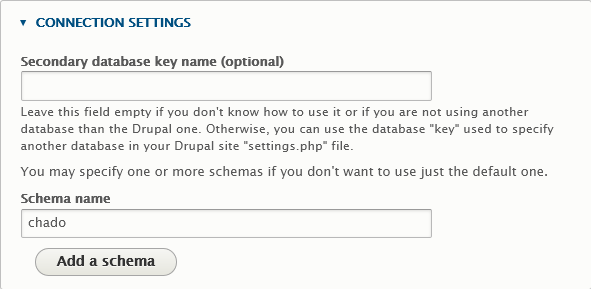
If you're in case 2, also set "secondary database key name" to "chado_db", just like you entered it in settings.php:

- Now, develop "Placeholders" and set a new one with "Placeholder" set to ":germplasm_type_id" and SQL query to "
SELECT cvt.cvterm_id FROM {1:cvterm} cvt JOIN {1:cv} cv USING (cv_id) WHERE cv.name = 'sample' AND cvt.name = 'stock types';"

When we save the External Entity type definition, xnttdb will execute this query to get the type identifier value that we will later use in our queries as ":germplasm_type_id" rather than hardcoding the integer value or using sub-queries or extra "joins" in our queries. - Next, fill in the "READ" SQL query as follows:
SELECT

	s.stock_id AS "id",

	s.uniquename AS "uniquename",

	s.name AS "name",

	s.organism_id AS "organism_id"

	FROM {1:stock} s

	WHERE

	s.type_id = :germplasm_type_id

AND s.stock_id = :id -
Fill the "List" SQL query as follows:
SELECT s.stock_id AS "id", s.name AS "name" FROM {1:stock} s WHERE s.type_id = :germplasm_type_id :filters -
Finaly, fill the "Count" SQL query as follows and save:
SELECT count(1) FROM {1:stock} s WHERE s.type_id = :germplasm_type_id :filters -
Now, edit the external entity type "germplasm" again and use the "manage fields" tab to add a new text field "Uniquename" with default settings.
-
Then, go back to the "Edit" tab and in the "Field mapping" section, fill the mapping and save:
ID: id
Title: name
Uniquename: uniquename -
Edit the germplasm type again, go to the "storage" tab and develop the "Filter mapping" section.
Do the following mapping:
ID (id): stock_id
Title(title): name
Uniquename (field_uniquename): uniquename -
Now, you should be able to browse your germplasm on Drupal (/germplasm/). Note that we didn't check the "Read only" checkbox on the entity type definition so you will be able to click on the "Edit" tab of any germplasm content. However, saving will not work since we did not enter the appropriate SQL queries for that. To do so, you could use the following queries:
CREATE:INSERT INTO {1:stock} (organism_id, name, uniquename, type_id) VALUES (1, :name, :uniquename, :germplasm_type_id);
UPDATE:UPDATE {1:stock} SET name = :name, uniquename = :uniquename WHERE stock_id = :id;
DELETE:DELETE FROM {1:stock} WHERE stock_id = :id;
And that should do the trick. If later you want to add joined tables in the READ query, changing the CREATE-UPDATE-DELETE queries may be a little more tricky as you may have to use multiples queries for each to work on the appropriate joined records in other tables. It might be better to design and call embeded SQL functions/procedures to perform those jobs by providing the the identifier.
Other examples: see tutorial
Files
motivations: managing file-stored data or just files
managing data stored in files
extensions: xnttjson, xntttsv, xnttxml, xnttyaml
- in a single file
- in multiple files: one by file, more than one by file, path pattern, file indexing
managing files themselves
extension: xnttfiles, xnttexif
- extracting data from files: exif example to be ported to svg, mp3 and audio, video, documents, etc.
- rearranging path structure (in combination with xnttmulti and xnttmanager bulk saving)
Mixing and combining data sources
extension: xnttmulti + other external entity storage plugins
motivations:
- data element in Drupal (annotation) with additional data from an external database, one or more related files and data from an external website (each with different identifiers) all combined into one single Drupal entity.
- data conversion / migration: loading from one source, saving into another (use of xnttmulti to set a source and a target and xnttmanager for bulk saving):
- migrating database(s) schema(s)
- importing files into database
- exporting data into files
- converting files (ex.: xml to yaml or tsv)
- combining multiple files into one file (ex.: json)
- exploding files into separate files
Moving external things to Drupal
extension: xnttmanager
motivations:
- synchronize once: data migration
- synchronize periodically through cron: synchronize with dynamic external sources but keep a local copy (backup) that can be used by views
Drupal use case
extension: xnttdb, xnttfiles, xnttmulti, xnttmanager
motivation: hesitating to move an old site to Drupal? Want to try while the project continues to be in use? And if seduced by Drupal, want to move progressively.
TODO: provide a full fake example with a database schema moved to Drupal in several steps. DB queries to generate a data model, associated image files rearranged, xnttmanager to generate Drupal entities and finalize site migration (with the possible co-existence of the old and the new sites).
Discussion and going further
- security concerns: database queries (xnttdb), file access (xnttfiles and derivative)
- efficiency: limited for files (use index file, possible evolution to database index) and websites (cache, local copy with sync)
- adding new file sources plugins: svg, mp3 and audio, video, documents, etc. (how to implement)
- adding new database sources (how to implement a database driver plugin)
- adding new website sources (example of the wiki plugin)
- port to Drupal 10
Help improve this page
You can:
- Log in, click Edit, and edit this page
- Log in, click Discuss, update the Page status value, and suggest an improvement
- Log in and create a Documentation issue with your suggestion
