



Introduction
Drupal implementation of the Choices.js plugin.
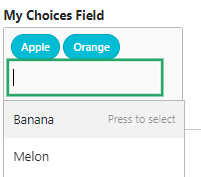
Choices is a user-friendly, vanilla, lightweight, configurable <select> input plugin, which renders "selects" as boxes or lists, (without utilizing jQuery)!
A Demo of the Plugin can be seen here
Features
This module provides two ways of integrating the choices plugin into your site:
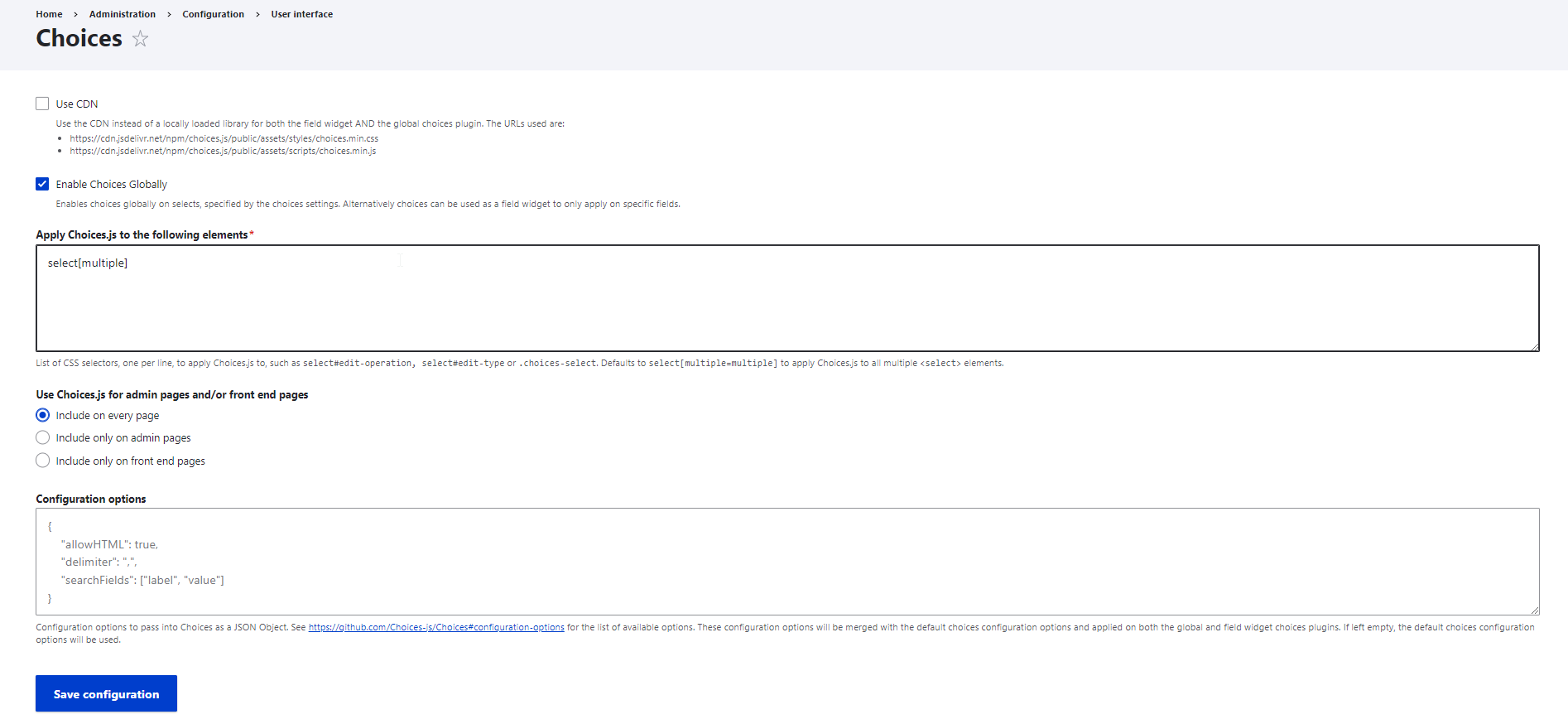
- A global setting to enable choices on your whole site, filterable through css selectors and optionally only on admin / non-admin pages
- A field widget, to apply choices on a select fields
Both integrations can have custom Choices configuration options applied to by JSON. Please read the README.md for further information.
Requirements
This module requires the following library:
Limitations
This module currently doesn't support <select> elements inside WYSIWYG Fields.
Installation
With composer
- Ensure asset packagist has been set up for your project. (Visit https://www.drupal.org/docs/develop/using-composer/manage-dependencies#t... for further information).
- Run
composer require bower-asset/choices.js drupal/choices. - Install the module as you would normally install a contributed Drupal module.
Without composer
- Download the Choices.js library and put it into your project's
/librariesdirectory. - Make sure the path to the relevant JS file is as followed:
/libraries/choices.js/public/assets/scripts/choices.min.js - Install the module as you would normally install a contributed Drupal module.
Using the Content Delivery Network (CDN)
- Install the module as you would normally install a contributed Drupal module.
- Go to Home > Administration > Configuration > User interface > Choices
("/admin/config/user-interface/choices"). - Check the "Use CDN" checkbox, save and flush all caches.
Visit https://www.drupal.org/node/1897420 and see the README.md if you have trouble installing the module.
Alternatives
- https://www.drupal.org/project/tagify
- https://www.drupal.org/project/select2
- https://www.drupal.org/project/chosen
- https://www.drupal.org/project/bootstrap_multiselect
- https://www.drupal.org/project/multiselect
- https://www.drupal.org/project/selectize
Also see related issues:
Drupal Core: https://www.drupal.org/node/2346973
Backdrop CMS: https://github.com/backdrop/backdrop-issues/issues/1800
Development proudly sponsored by German Drupal Friends & Companies:
webks: websolutions kept simple (https://www.webks.de)
and
DROWL: Drupalbasierte Lösungen aus Ostwestfalen-Lippe (OWL), Germany (https://www.drowl.de)
Project information
 Minimally maintained
Maintainers monitor issues, but fast responses are not guaranteed. No further development
No longer developed by its maintainers.- Project categories: Content editing experience, Developer tools
 923 sites report using this module
- Created by yusufhm on , updated
 Stable releases for this project are covered by the security advisory policy.
Look for the shield icon below.


