Problem/Motivation
The "Edit Media" button disappears when the "Convert line breaks into HTML" filter is enabled.
There's a javascript error.
Uncaught TypeError: Cannot read property 'insertBeforeMe' of null
    at h._setUpEditButton (plugin.js?t=q1mipb:242)
    at plugin.js?t=q1mipb:174
    at Object.success (plugin.js?t=q1mipb:320)
    at c (jquery.min.js?v=3.4.1:2)
    at Object.fireWith [as resolveWith] (jquery.min.js?v=3.4.1:2)
    at l (jquery.min.js?v=3.4.1:2)
    at XMLHttpRequest.<anonymous> (jquery.min.js?v=3.4.1:2)
The issue is that "Convert line breaks into HTML" is wrapping the drupalmedia tag in a `p` tag. The drupalmedia plugin.js assumes that the first element within the widget is the embed and that it has children (so you can call getFirst() on it). Since the `p` tag is empty, calling getFirst() fails returns null, (this is the null which has no insertBeforeMe property).
Proposed resolution
Modify the client-side JavaScript for the media embed filter so that it is able to anticipate the P tag added by filter_autop.
Remaining tasks
User interface changes
API changes
Data model changes
Release notes snippet


 Show commands
 changes



Comments
Comment #2
alison👈 "someone else having exact same difficulty"
Yesssss thank you for writing it up and posting!!
From my own share on Slack -- *in addition to* what @MrPaulDriver explained above...
An aside: For some reason, when I enable the embed media button on my site, the "allowed html" tags don't get added to my text format thingy. I added them, but, I'm saying it anyway as a "clue" or whatever.
I was finally able to get the "edit media" button to appear (in a filtered_html text field, which is what we use instead of basic_html) if I go into "source" and manually add
data-view-mode="media_library". If I use another view mode, such as "default" or one of our custom view modes, the button does not appear....When I have the "edit media" button (by doing what I described above) and I use it, and I choose a different view mode ("default", or a custom view mode), the view mode selection works (
data-view-modeis updated in the source, and it "sticks" if I save and re-edit the page), but edit button goes away.At one point, I think things may have been fixed altogether when I uninstalled and reinstalled the module, but I'm not positive -- and anyway, I know that isn't a "solution," I'm only sharing in case some one else had the same experience.
One other thought, inspired by the uninstall/reinstall thing:
Maybe something was borked bc the site was originally installed with 8.7.x (only a couple months ago -- it's a new site, still under development), then I updated to an 8.8.x-dev version back in early October, then alpha1 then beta1 -- that's when I realized the UI I had wasn't the complete UI (the issue didn't start with beta1, I just didn't know I was missing anything til then) -- and then I updated to rc1 earlier this week.
(I really don't know if this progression of versions has anything to do with anything, I'm just thinking "out loud.")
Comment #3
joseph.olstadplease clarify, you're in the 'media' queue for 'contrib' it's not the same as core 'media'
Are you using the media module included with 'core' or did you actually download the media module (not recommended) from contrib?
Please clarify and I will triage this appropriately.
Comment #4
mrpauldriver commentedSorry my mistake and yes this is a core media issue. Are you able to move the post?
If it helps, I too have been using media_gallery (successfully) since it first appeared as an experimental module.
Comment #5
joseph.olstadMoving to drupal core queue , media subsystem.
Comment #6
phenaproxima@MrPaulDriver, what browser/OS is this? I wonder if it is a browser-specific thing we wouldn't have caught, since Drupal CI's automated tests run against Chrome.
Comment #7
mrpauldriver commentedmacOS Catalina, Chrome and Firefox. I haven't tried Safari.
Comment #8
alisonI've experienced this issue in Firefox (70something) and Chrome (I don't remember the version, it's managed by my office, it's usually the latest version or close), on Windows 10.
I've also experienced this issue in Firefox and Chromium on Ubuntu 19.04.
Comment #9
mrpauldriver commentedRevising title as others are now reporting this (on Slack) with the 8.8.0 release
Comment #10
catapipperIf it helps I'm also getting a deprecation message on Safari prior to the same error above:
[Deprecation] Synchronous XMLHttpRequest on the main thread is deprecated because of its detrimental effects to the end user's experience. For more help, check https://xhr.spec.whatwg.org/.I do not however get either error on a fresh install of Drupal via a tarball from Drupal.org so maybe I'm missing something or another module is affecting it adversely.
Comment #11
catapipperI narrowed down the issue. If you have
Convert line breaks into HTML (i.e. <br> and <p>)enabled for the text format then it throws the error. If it is not enabled the edit button shows up and works just fine. As to why this is conflicting with that particular setting, I couldn't tell you. Although I have checked this with multiple different text formats and several of our platforms and this seemed to be what the issue was for us.Comment #12
phenaproximaNice sleuthing, @catapipper! Updating the issue summary with your findings.
Comment #13
mrpauldriver commentedYep. Confirm this. Good catch @catapipper!
Unchecking 'Convert line breaks into HTML' provides a workaround.
Changing to bug report as this should not be necessary.
Comment #14
phenaproximaYup, this is unambiguously a bug. I'm going to escalate it to Major, since this conflict means that a common filter configuration can render the media embedding system unusable.
Comment #15
alison(also caught up in the Slack thread -- thank you everyone!) (but/and...)
........ugh I haaaaaate posting this, but, I don't have "convert line breaks into HTML" enabled, never have :(
But I'll poke at it a bit and see what I can see.
Comment #16
alisonI feel like I'm awfully close to a reliable set of steps to reproduce, but I'm not quite there...
My "breakthrough" this afternoon was actually reproducing the problem on a Simplytest site -- feel free to poke around and tweak stuff if you'd like to try to figure it out!
https://stm5dead1ae49b8d-idmgreju1b10khuhb7ifj1tmknm2z8bn.tugboat.qa
For the most part, I've been toggling the "filter_autop" filter, moving the "filter_autop" filter around in the processing order, and tweaking the "media_embed" filter settings (which media types and view modes are enabled, which view mode is selected by default).
And, I grabbed the "allowed HTML" value from my own site (but removed the "entity_embed" filter stuff), along with one image style and image view mode, just like, to see what would happen.
............
As the simplytest.me site sits right now:
But/And...
I went through a ton of other variations, but I can't remember all the details right now.
............
About me
Firefox 70.0.1
Ubuntu 19.04
Drupal 8.8.0
Comment #17
mrpauldriver commentedGood to see this in quarantine.
How long does a simplytest.me instance stay alive? Could you reproduce this again if necessary?
Comment #18
alisonI don't remember how long, I feeeel like it's a certain amount of time after it goes idle, and I just refreshed it now, but good point -- I'll do a config export today just in case.
Comment #19
alisonMkay, I missed and lost it yesterday -- new environment:
https://stm5ded72e8535b8-0eudlkjyzgxfw9y0w6lqdeduk2qel3gh.tugboat.qa/node/1
Comparable situation:
data-caption="hello caption"and then switch back out of Source, no more error and the edit button is there.Aaaand attached is a full config export!
Comment #20
phenaproximaAdding credit for the work to reproduce this bug put in by @MrPaulDriver and @alisonjo315.
Comment #21
oknateThis is easy to recreate in Drupal\Tests\media\FunctionalJavascript\CKEditorIntegrationTest
Add
'filter_autop' => ['status' => TRUE],in the setUp() function.And you'll get a failure:
Same js error in the console.
Comment #22
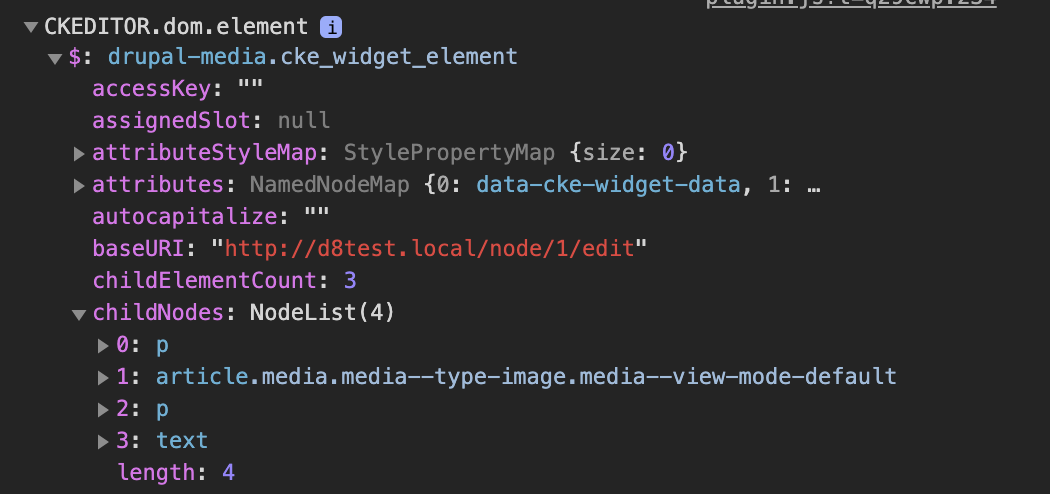
oknateYou can see here how the filter_autop is not playing nice with the embedded media, and is corrupting the output.
Check out the childNodes, where they are getting p tags inserted inside.
Comment #23
oknateThis seems to fix it (at least in the context of the test).
Let'e see if anything else fails. I don't like that
var embeddedMedia = embeddedMediaContainer.getFirst(isElementNode);can return a p tag. So I'm leaving it as needs work, for now.Ideally, these extra p tags wouldn't get added by the other filter.
But we shouldn't call something
embeddedMediaif it's theptag in front of the embedded media, even if it works.Comment #24
phenaproximaLooks like tests failed, but thanks for testing this @oknate!
Comment #25
oknateYeah, not what I was expecting. It passed locally. Let me see if I messed up the patch.
Comment #26
oknateGood news. The failure in #23 was a copy and paste error. I forgot to delete the first line here:
Comment #27
oknateI like this approach better. We just ignore the media embeds in filter_autop. There's already a precedent for this with comments. See
_filter_autop():
We can do the same thing for media embeds. I think it's inappropriate to be auto breaking lines. Especially where it's doing it. Where you have a tag like
<drupal-media>and it's adding an empty p before the tag. That's not good.Comment #28
oknateAdding test coverage to FilterKernelTest::testLineBreakFilter().
Comment #29
oknateSame as the last one, but providing a FAIL patch to show the test result in FilterKernelTest changes based on the fix.
Comment #30
oknateComment #31
oknateComment #32
oknateComment #33
oknateComment #34
oknateComment #35
oknateComment #38
oknateSorry, the patch in 29 was the same as the fail patch inadvertently. I just need to re-upload 28 again.
This patch has the fix and the test coverage. This is the patch to review.
Comment #39
oknateComment #40
alisonWoah, so exciting, thank you @oknate! I'll plan on trying it tomorrow, unless someone beats me to it.
Comment #41
oknateComment #42
oknateComment #43
mrpauldriver commentedPatch 28 works for me
How about you @alisonjo315?
Your comment at #15 suggested your setup was different to mine.
Comment #44
catchI think we should probably do the js change here, there might be other filters that do auto-paragraphs with a similar issue to filter_autop around.
Comment #45
phenaproximaThanks, @catch. Let's proceed with the approach from #26.
Comment #46
phenaproximaThis is a bit repetitive, and it could use a comment explaining what we're doing here. How about something like this:
Comment #47
oknateI realize now that there's no real reason we put the edit button inside first element within the embedded media wrapper. It seems more robust to just put it within the wrapper. Then whether the first element is a `p` tag or the `article` element doesn't matter. I also tested this with #3092795: [regression] Restore styling for embedded media edit button in Seven theme and made sure the styles still work, when that patch is applied with this one.
I created a follow-up issue for the drupal-media tag and the filter: #3100066: "Convert line breaks into HTML" filter should exclude <drupal-media> tag. I agree that it would be more robust to handle it both within the plugin.js and in the "Convert line breaks into HTML" filter.
Comment #48
alison#47 seems to work for me on 8.8.0, with or without filter_autop.
Notes:
media_library.settings:advanced_uiset "true."Thank you, @oknate!
Comment #49
alisonCrap, I'm sorry, the issue metadata field values were "out of date" in my open browser tab, I hate when I forget to do a fresh tab before posting a comment...
(Changing status back to "needs review," but it won't let me change the assignment back to oknate.)
Comment #50
oknateAssigning back to myself, if any further changes are needed. Thanks for the review, @alisonjo315!
Comment #51
wim leers-1
We should fix
filter_autop.If other filters wrap tags in
<p>tags, then those filters need to be fixed too. Core JS shouldn't defend against arbitrary crazy things filters could do. The same problem would arise if it were getting wrapped in<div>or<custom>tags. We wouldn't be defending against those either.Besides, most Drupal 8 sites use CKEditor, and hence don't use
filter_autop.In fact, using a text format that has
filter_autopenabled and uses CKEditor will result in weird behavior. That's why Drupal 8'sbasic_htmltext format does not usefilter_autop, unlike its predecessor (thefiltered_htmltext format in Drupal 7/6/5).Comment #52
oknateThanks for the feedback, Wim. Now that #3100066: "Convert line breaks into HTML" filter should exclude <drupal-media> tag is RTBC, we may not need this issue, at least to fix this particular issue, i.e.
ptags wrapping thedrupal-mediatag.Although, the current patch's solution will handle your counterexample too, so it provides additional stability:
Comment #53
alisonAre you saying the patch here would end up not being used, in favor of #3100066: "Convert line breaks into HTML" filter should exclude <drupal-media> tag, so we should test the other patch for fixing the edit button issue...? (It doesn't feel to me like the other issue would fix the edit button issue, but)
Comment #54
oknateYes, I think we should use that other patch to fix the issue. Then we can leave this one open, if we decide it's possible another filter does the same thing, i.e. wraps the drupal-media tag in markup.
Comment #55
alisonIiiiiinteresting, ok........ Adding a note to the issue summary. I'll be following closely :) Thanks!
Comment #56
oknateNow that the other issue has landed, this is less urgent (#3100066: "Convert line breaks into HTML" filter should exclude <drupal-media> tag).
I can see some value in fixing this if something else breaks the markup, but perhaps we should wait to see if anyone else has the issue.
I think the JavaScript change would make the plugin more robust, but if we commit it now, we're fixing a problem that no longer exists. So let's leave this open for now, and see if anyone encounters it from an interaction with a different filter plugin.
Comment #57
oknateChanging the title to de-emphase
filter_autop.Comment #58
sebastixDrupal 8.8.2
The filter_autop filter (Convert line breaks into HTML) is disabled for the editor profile
Still having the js error when adding a media entity into the editor (and no edit media button appears)
Comment #59
alphex commentedI'm seeing this issue, strangely enough though -- on my DEV/TEST environment.
But it works as expected on my localhost.
localhost is a lando environment
DEV/TEST (and eventually PROD) are on Pantheon.
Comment #60
jdleonardFor me this Javascript error is present (and the "Edit media" button is missing) when the filter "Limit allowed HTML tags and correct faulty HTML" is configured to be AFTER the "Embed media" filter.
Comment #61
jftzsmns commentedI came across this issue and it turns out, if you remove the
<div>or other element surrounding{{ content }}in yourmedia.html.twigfile, you will get this error/issue. Adding a div back into the template around{{ content }}solved it for me.Comment #62
tfranz commented#61 fixed it for me – thank you!
Comment #63
oknateComment #65
sergiur#61 does indeed fix the issue. If the media item isn't wrapped in another element (article, div, etc.), the edit button doesn't show. As soon as it's wrapped, it shows. The core 'Stable' theme wraps media in an article element.
I applied the patch at #47 anyway, as changing my templates late into a project broke things. The patch applied correctly on 8.9.1, though only worked with the
Convert line breaks into HTML (i.e. <br> and <p>)option enabled.Comment #66
bdanin commented#61 also fixed it for me. This is annoying as I prefer to strip empty wrapping div's. Luckily, I already use Role Theme Switcher to provide a child-theme of the main theme to anonymous users. For the anonymous theme, I added my custom template that removes empty div's while the authenticated main theme added this empty div back to the media.html.twig file.
This is really not ideal that an empty div is required for embedded inline media in CKeditor to be editable, and it is not documented outside this issue from what I've found.
Comment #67
phenaproximaWe need to figure out how to proceed here; at a quick glance, it looks like this issue stalled due to disagreement about implementation. Let's figure out what to do, and fix it, because this degrades the authoring experience.
Comment #68
prudloff commentedHere is a reroll of #47 for Drupal 9.1.
Drupal assumes the media is wrapped in something but this is not the case in our theme.
Comment #71
chamilsanjeewa commentedI applied the #68 patch, which created some UI issues.

Comment #73
andrea.cividini commented+1 for patch #68
Comment #76
gaëlgReroll of #68 for D9.5
Comment #77
choneyse commentedCan confirm that #76 worked for me to bring back the edit button in Drupal 9.5.2. Most likely unrelated to the patch however is now my selection of alignment / style only works on the initial save. When trying to edit the item a second time and change values the changes are not being saved.
Comment #78
azinck commented@choneyse it sounds like you're suffering from this bug: #3102249: Changing an existing embedded media's alignment or alt data attributes does not get saved with CKEditor5
Comment #81
vladimirausPushing to MR, hiding files.
Thanks everyone for commits 🍻
Comment #82
smustgrave commentedFrom what I can tell the MR 3297 is just the patch from #76 no?
As a bug this will need a test case
Comment #83
prexa commentedI was having a same issue and it worked by following the comment https://www.drupal.org/project/drupal/issues/3097338#comment-13371176
Still it's work around as it may impact the frontend on our project as vide mode needs to be updated.
Applying the patch #76 would at least provide the Edit Media button without affecting view mode. Also, not getting any issue with saving the alignment, alt text and caption. The only issue is with the edit media button styling. Sometime appears on left, sometimes at the bottom, sometimes at top while editing the media
Comment #84
afayland commentedRe-rolled the patch from https://www.drupal.org/project/drupal/issues/3097338#comment-13385746 into the ckeditor module here: https://www.drupal.org/project/ckeditor/issues/3342759#comment-15176900
Since this patch was from 2019, it no longer worked with the updated drupalmedia directory location.
Comment #85
gaëlgCan this bug be reproduced on a clean Drupal 10 install, i.e. with CKEditor 5? I don't think so. At least on my test instance I'm able to change the alt and alignment of the embedded media thanks to the new CKE5 UI.
As CKEditor 4 is now contrib and unsupported, I guess this issue should be in CK4 contrib and not in core?