

Closed (fixed)
Project:
Webform
Version:
8.x-5.x-dev
Component:
Code
Priority:
Normal
Category:
Bug report
Assigned:
Unassigned
Reporter:
Created:
7 Jul 2019 at 09:33 UTC
Updated:
18 Sep 2020 at 16:59 UTC
Jump to comment: Most recent, Most recent file






Comments
Comment #2
jrockowitz commentedComment #3
jrockowitz commentedComment #5
jrockowitz commentedComment #7
dureaghin commentedHi Jacob,
It seems that autocomplete "Off" no longer works.
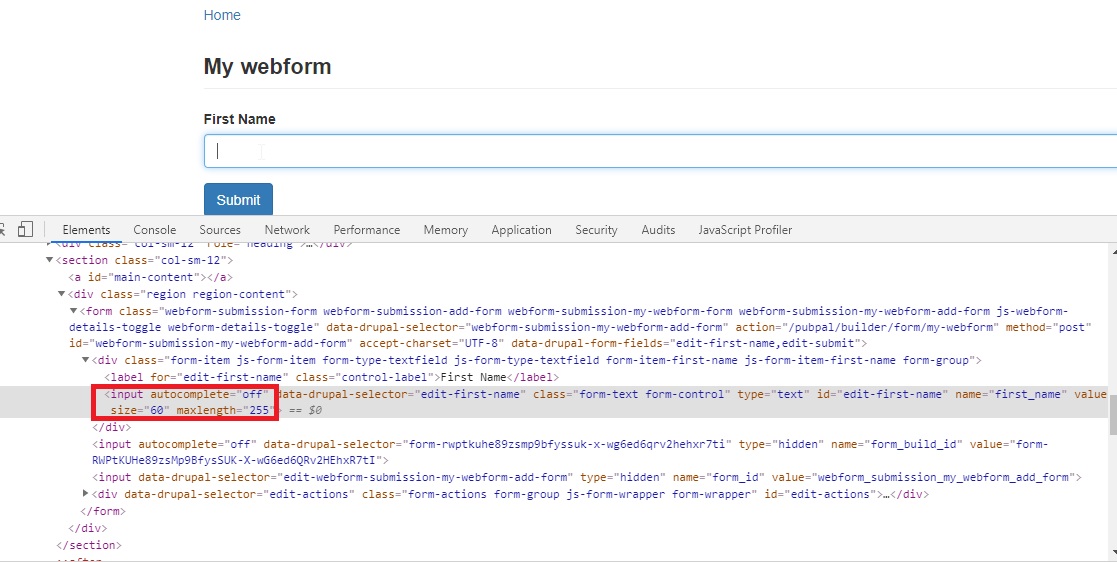
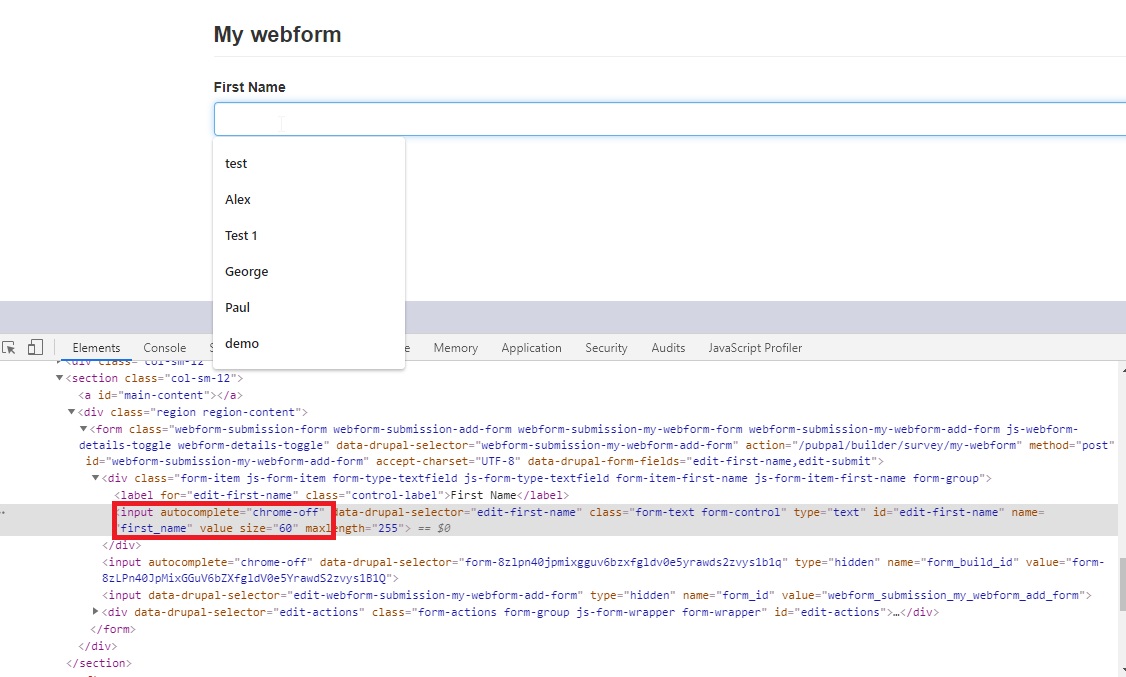
I think you need set the autocomplete attribute to "off". With "chrome-off" does not work. I tested in browsers: Chrome and Microsoft Edge.
https://developer.mozilla.org/en-US/docs/Web/Security/Securing_your_site...
Please review attached patch.
Thanks,
Alex.
Comment #8
jrockowitz commentedComment #9
jrockowitz commentedChrome is not supporting autocomplete="off" which is why we are using "chrome-off".
@see https://stackoverflow.com/questions/30053167/autocomplete-off-vs-false
@see https://www.google.com/search?q=disable+autocomplete+attribute+chrome
Comment #10
dureaghin commentedHi Jacob,
Have you tried to test this? It looks like Google Chrome is no longer ignoring "off".
My Google Chrome version is 80.0.3987.87 (Official Build) (64-bit)
Steps to reproduce this issue:
1. Add text field element
2. Turn Autocomplete Off, clear drupal cache and opcache
3. View form and click on field
Here's my testing with autocomplete="chrome-off" and with autocomplete="off".
Please see attached screenshots.
Thanks,
Alex.
Comment #11
jrockowitz commentedI am still using Version 79.0.3945.130 (Official Build) (64-bit) and below are my results from https://www.w3schools.com/tags/tryit.asp?filename=tryhtml5_input_autocom....
Comment #12
dureaghin commentedThis is not proper test, because https://www.w3schools.com/ is using iframe.
Try to test it from Drupal and you will see what I meant.
Thx.
Comment #13
dureaghin commentedComment #14
jrockowitz commentedI was able to replicate the issue and using autocomplete="off" works as expected in Chrome.
The attached patch removes the chrome-off workaround.
Comment #15
dureaghin commentedAlright. So I tested your new patch and it works as expected.
Thanks,
Alex.
Comment #17
jrockowitz commentedI committed the latest patch. Thanks.
Comment #19
tostinni commentedHi, I find that Chrome (80 but also the more recent Version 81.0.4044.92 (Official Build) (64-bit) for Mac) still autocompletes the input in conditionnal logic form.
Should this issue be reopened or should I create a new one ?
Comment #20
jrockowitz commentedPlease create a new ticket. I also noticed the regression in Chrome on OSX
Comment #21
prabha.venkatesan commentedHi @jrockowitz, the latest patch provided by you(3066264-14.patch) is working well. but it is not yet committed to the webform module. I have the latest webform version 8.x-5.19.
It would be great if you can commit this patch to the next webform update.
Comment #22
gun_dose commentedVery strange thing, but it seems, that without this patch in Chrome all works fine, but with this patch autocomplete still appears.
Comment #23
jrockowitz commentedChrome keeps changing how it handles autocompletion. The latest version of the webform module's autocomplete fix for Chrome is from #3126156: Disable autocomplete in Chrome macOS.
I am finding this issue so frustrating that I am ready to revert that patch and just start using autocomplete="off". We can just assume that Chrome will one day fix this issue.
Comment #24
jrockowitz commentedThe attached patch reverts the Chrome work-around and relies on autocomplete="off".
Comment #25
paulocsAfter I apply the patch #24 I could use the autocomplete feature without problem.
I try to use it before I apply the patch and I did not find any problem too.
Chrome version: Version 84.0.4147.125
Patch #24 looks good because it does not need to verify what the browser is.
Hope chrome will not change how the autocomplete works again.
I attached images after I applied the patch #24.
Cheers, Paulo.
Comment #26
jrockowitz commentedSadly, I think a few more people need to review this before we commit the patch.
Comment #27
jrockowitz commented@paulocs Thanks for reviewing the patch.
Comment #28
cecrs commentedPatch looks good and works for me.
Comment #29
jrockowitz commentedI will commit the patch and tag a new beta release.
Comment #31
jrockowitz commented