

 The 2026 Drupal Business Survey is open. Your response will help shape the future of the Drupal business ecosystem.
Currently there are no lines showing the corresponding elements when moved by keys. As this really helps when diciding to move elements, it would be great to always show them:

So as already said, currently the lines are just shown when arrow keys are used once:
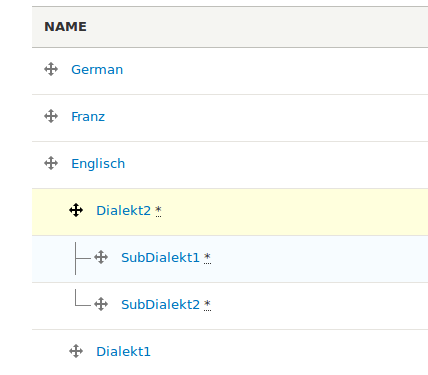
For me that does not make sense for these reasons:
- for someone using the keyboard, at the very first use there is no lines feedback which is bad
- for someone switching from drag&drop to keyboard drag, it's confusing (currently shown when parent element is clicked)
- in general the lines would improve usability
Possible solutions:
- always show the lines
- show the lines when tab was used
- show the lines when some element has been selected or some class on the DOM is placed or whatever

Comments
Comment #2
kwoxer commentedComment #3
BarisW commentedThanks for reporting this.
Need review is only for when there is an actual patch to review. Let's put this in the default state. Also, this isn't a major issue IMHO. Lastly, tags like 'needs accessibility review' are to be added when there is something for the accessibility team to test.
Comment #4
kwoxer commentedComment #5
kwoxer commentedComment #6
droplet commentedMy suggestion: show lines with the `drag icon` is selected.
Comment #7
kwoxer commentedHow will we continue here now? It's easy to fix but we need to know how.
Comment #8
mgiffordWell they don't behave link links. There's no activity that behaves like a link with the table drag interface.
I'd be fine removing the underline. I don't object to showing the line when the `drag icon` is selected or has focus. I would just like to have that be consistently applied as a pattern in Drupal. Not sure if there are any other instances where this would occur.
Comment #18
smustgrave commentedThis came up as a daily BSI target, not 100% convinced it's a bug though so moving to feature request.
I tested on D11 with a menu and confirmed it doesn't show the lines when moving links under each other.