Problem/Motivation
Clicking on the forgot password link it generate one time use password reset link which is send via mail. After clicking on the link we can see that Password and confirm password are not mandatory fields. Which misguides user at UX and functionality level.
Actual Result - The one time password generator link which has Password and confirm password is not compulsory.
Expected Result - When user follows one time link to set the password, 'Password' and 'Confirm Password' fields should be mandatory fields.
Steps to reproduce
- Install a new Drupal instance
- Installed Development Environment module, which allowed me to test the mail
- Created new user
- Reviewed site log report for One time link
- Click on one time login link
- Now View that password and required password field is not compulsory.
Proposed resolution
When user follows one time link to set the password, 'Password' and 'Confirm Password' fields should be mandatory fields.
Remaining tasks
Convert to an MR
Review
User interface changes
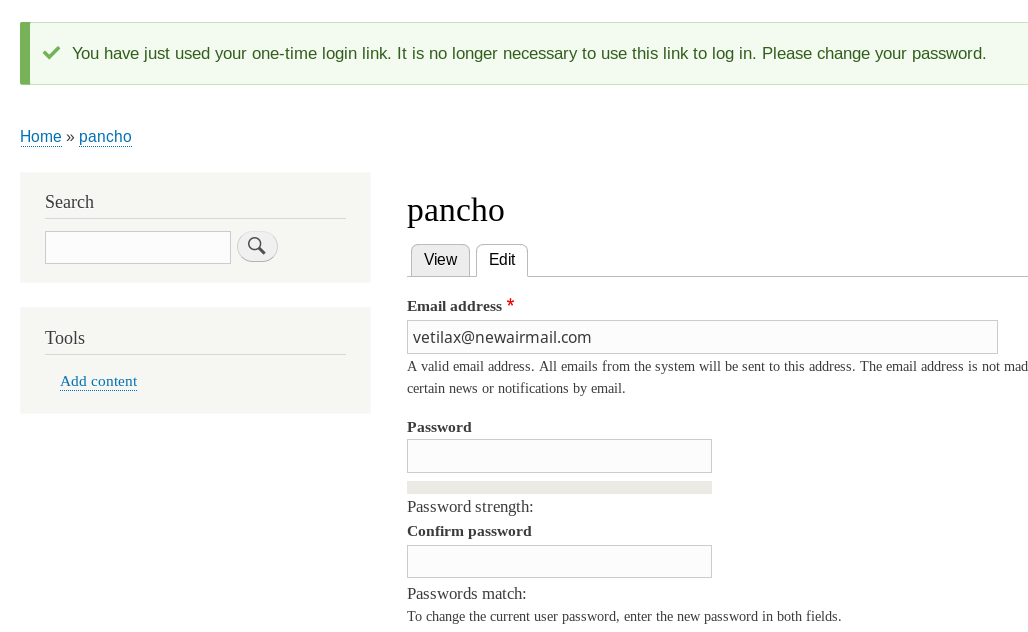
Before
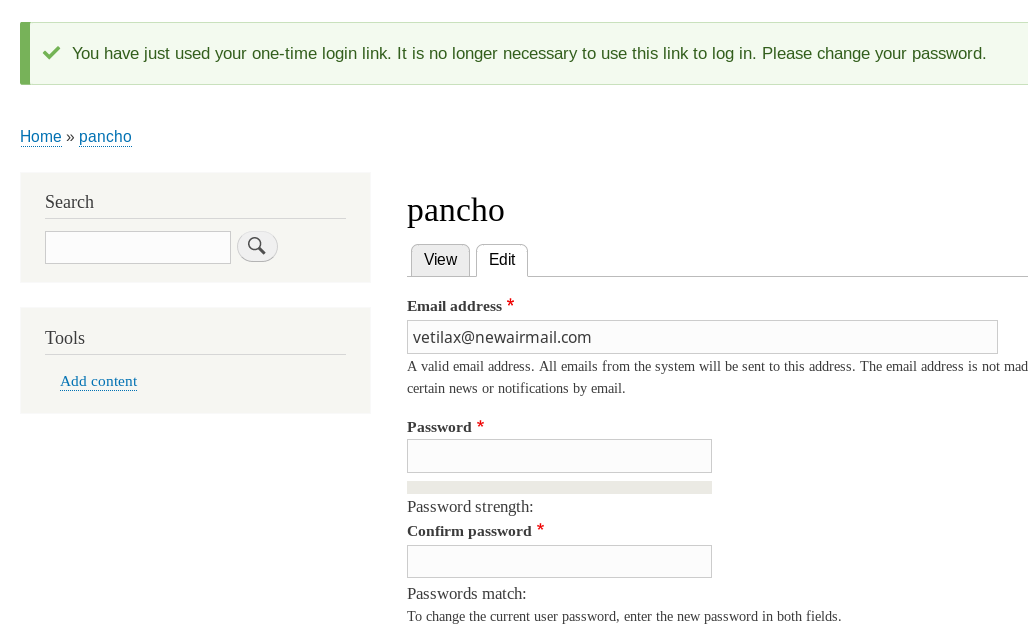
After


 Show commands
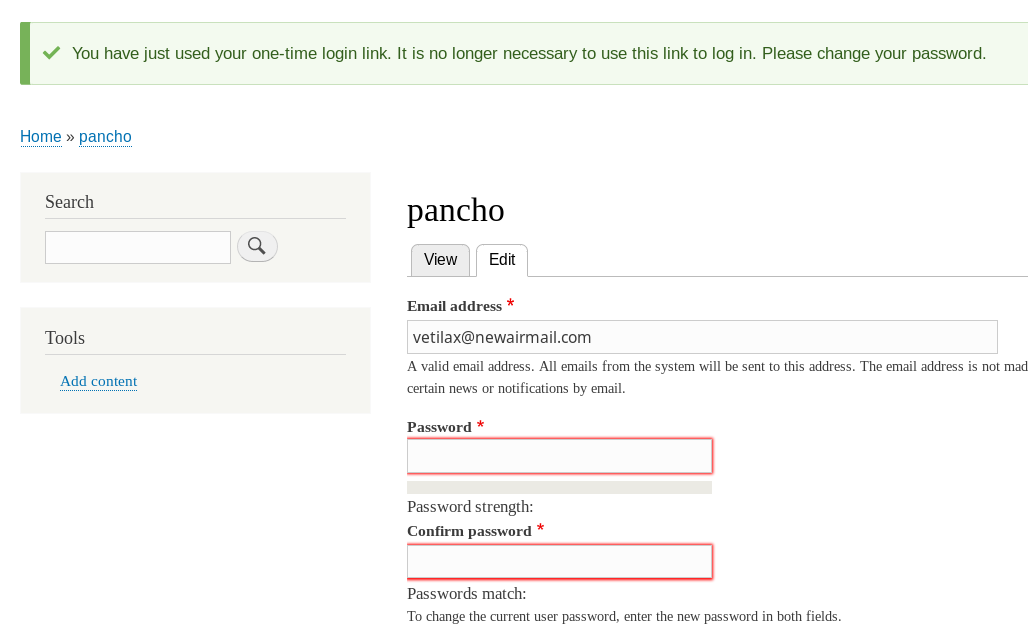
 changes




Comments
Comment #2
cilefen commentedBefore adding tags read the issue tag guidelines.
Comment #3
sourabh.singhal commentedComment #4
sourabh.singhal commentedHi,
I have created patch for this. Please review.
Find attached patch.
Thanks
Sourdrup
Comment #6
sourabh.singhal commentedAdding patch again. Please review
Comment #7
sourabh.singhal commentedComment #9
cilefen commentedAt a glance, I think #4 failed because it makes the field required in every possible usage of the form. It seems you uploaded an identical patch in #6. You should read the test results to see what happened.
Comment #10
sourabh.singhal commentedHi cilefen,
Yes, it is the identical patch and I have already went through the test results and found that there is no test case failure related to my patch. I have just added single line of code which works only in a condition when one time login link is used for setting up the password.
I have also tested the whole process and flow of user registration and it works perfectly fine as expected.
Thanks
Sourdrup
Comment #11
cilefen commentedI do not agree. Some failures are related to this change.
Comment #12
cilefen commentedComment #13
ashwinparmarI have updated my patch which will help you when user reset password from email link (With URL Token), Its mandatory to provide password and confirm password.
Comment #14
tameeshb commentedComment #16
ideaseed commentedI am working on this issue at DrupalCon Vienna (mentored core sprints) with @sugaroverflow.
Comment #17
ideaseed commentedSteps to test this issue:
# Created a dev desktop site with appropriate verison: http://drupal-8-5-x-dev.dd:8083/
# Installed Development Environment module to allow me to test emails
# Created new user "jenn-test"
# Reviewed site log report for email sent to "jenn-test"
jenn-test,
A site administrator at Triage has created an account for you. You may now log in by clicking this link or copying and pasting it into your browser:
http://drupal-8-5-x-dev.dd:8083/user/reset/7/1506686934/BT9SI1QRBWWj6Nj8...
This link can only be used once to log in and will lead you to a page where you can set your password.
After setting your password, you will be able to log in at http://drupal-8-5-x-dev.dd:8083/user in the future using:
username: jenn-test
password: Your password
-- Triage team
# Copied and pasted the link to a new incognito window in browser
# Clicked on login link (see screenshot)
# Observed the Password and Confirm Password fields are NOT showing as required, so this test fails.
Comment #18
ideaseed commentedComment #21
panchoBug fix goes to 8.6.x-dev. Also needs tests, including a test-only patch.
Comment #22
finex commentedHi, I've added an upgraded patch for 8.6.x-dev.
Instead of always setting the password required, this patch only require it on the reset password form after the one time login.
Comment #23
finex commentedComment #25
pancho[Dammit, crosspost. Still posting:]
Here's an updated patch, taking D7 patch #13 into account, with screenshots. Tests still needed.
Before:

After:

With no password being given:

Password correctly given:

Comment #26
panchoAdded expected/actual screenshots to IS.
Comment #27
panchoComment #29
sam152 commentedThis is NW for tests.
Comment #32
alternativo commentedHi,
I'm using D8.9.3 and the problem is still there...
A new user that registers himself, receiving confirmation email after admin unblocked his account, opening the one-time link in the email, the user can avoid to set the password and go navigating on the site's link. thus not having a password for the future login.
It should be forced to set the password (and the other required fields) before to let him navigate the site.
Are there any updates on that?
thanks
Comment #33
anushrikumari commentedRerolled patch for 9.1.x
Comment #34
alternativo commentedHi,
thanks @anushrikumari for the very fast reply...the patch for me work well (drupal 8.9.3)!
But my issue is another, and maybe I was not so clear...The problem is that even if the new user do not fill the password field (the now is required with the patch) and do not edit/save the profile, he can starts to navigate the site's links, without having set a password to login again: if he logouts, to login again he will have to do password recovery procedure. I think he should be forced to save the profile (and so create the password), and not to have the possibility to open other links in the site.
Maybe it's not so easy to do...:/
Comment #35
tanubansal commentedTested #33 for the below mentioned steps :
Admin sends invite to user by assigning role and notifying user to through an email
User will receive an email on his email address with one time link to log in to the site
User have to click on 'Log in' button on first screen
Now on next screen, user will have 'password' and 'confirm password' fields , but if user clicks 'Save' button without entering 'password' and 'confirm password', drupal allows to save the form as the fields are not mandatory
Works fine for me on 9.1
Comment #38
archana.phatangare commentedComment #39
vikashsoni commentedApplied patch #33 working fine for ref --- sharing screenshot
Step to reproduce ---
--- Install drupal-9.3.x-dev
--- Create a test user
--- generate one time login link
--- See there is option password and confirm password that is not required
--- Now apply the patch rebuild cache and see password and confirm password is mandatory field
Comment #40
danflanagan8Here's a fail test and a mash-up of #33 with the fail test. The interdiff shows the diff between these two patches, which is equivalent to the fix in #33.
Comment #43
gtoyloy18 commentedThe #40 2855328-40.patch file work correctly.
Thanks.
Comment #45
andrew answer commentedHello all, I created a simple module Min Password for fixing this issue. You can set up password length by this module, and users can't save zero-length passwords more.
Comment #46
aarti zikre commentedComment #47
aarti zikre commented#45 that's great stuff
Verified patch for Drupal 9.5.x dev version
https://www.drupal.org/files/issues/2021-09-30/2855328-40.patch
Testing Steps:
* Install a new Drupal instance
* Installed Development Environment module, which allowed me to test the mail
* Created new user "azikre"
* Reviewed site log report for email sent to "azikre"
* Click on one time login link
Problem:
Password and confirm password fields are not compulsory
Test Result:
Verified that after applying patch both the fields are set as required
Refer SS
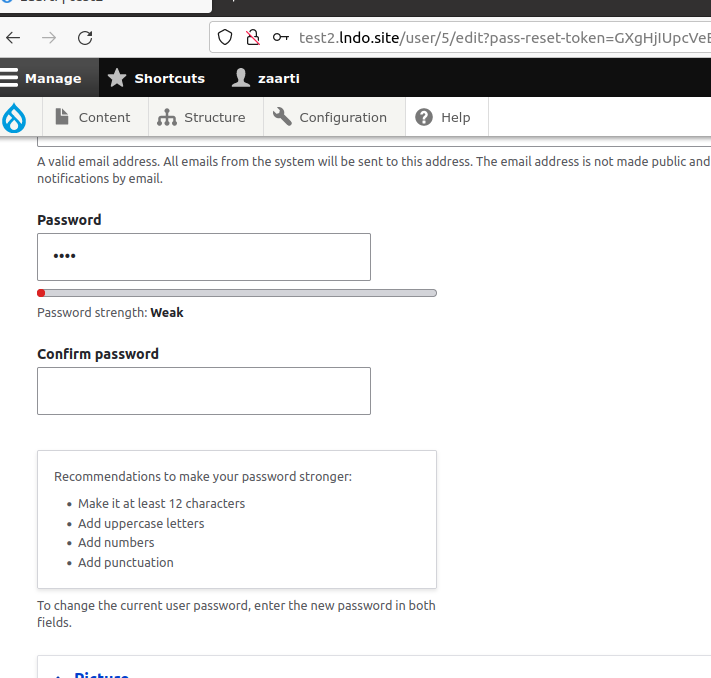
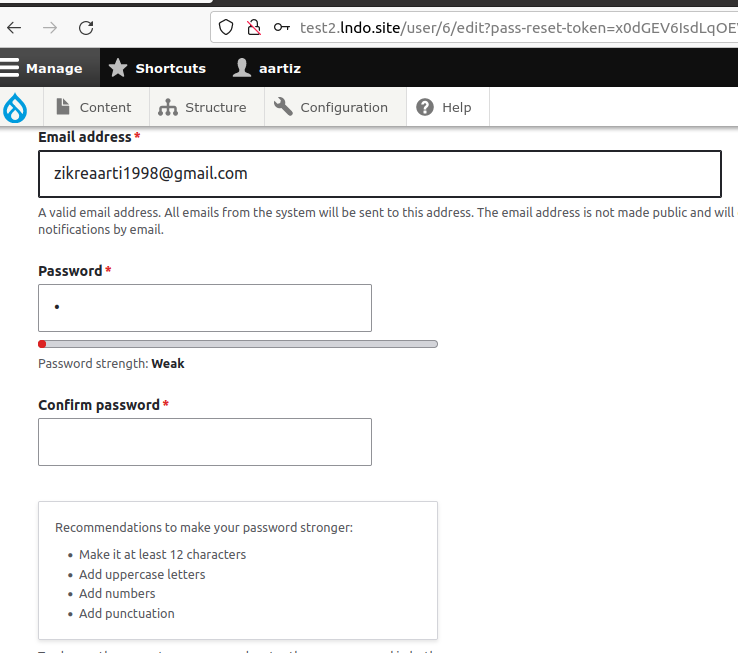
Before apply Patch
After apply Patch
Mail Details:
Time: 07/15/2022 - 13:27
Recipient: test@gmail.com
Subject: An administrator created an account for you at test2
Body: zaarti, A site administrator at test2 has created an account for you. You may now log in by clicking this link or copying and pasting it into your browser: http://test2.lndo.site/user/reset/5/1657871870/T5se1wUGmXW-BlXYCHLE_L7Xn... This link can only be used once to log in and will lead you to a page where you can set your password. After setting your password, you will be able to log in at http://test2.lndo.site/user in the future using: username: zaarti password: Your password -- test2 team
Headers:Array
Test Result Pass
Can be move to RTBC
Comment #48
aarti zikre commentedComment #49
quietone commented@aarti zikre, thanks for the work on this issue.
A few more things need to be done before this is ready for a committer.
The issue summary is out of date. It is simplest to add the standard template and complete the sections. Also, the latest screenshots should be in the Issue summary for easy review. Adding tag. I've added the template but it still needs an update. This is suitable for a novice, adding tag.
This is testing on 9.3 instead of 9.5.x, changing version.
I don't see any code review. Looking now.
I think the comment could be a lot simpler and clearer. What about this?
Comment #50
asad_ahmed commentedI am working on this issue.
Comment #51
asad_ahmed commentedComment #52
asad_ahmed commentedMade changes as per #40, still needs issue summary update.
Comment #53
asad_ahmed commentedComment #54
aarti zikre commentedIS updated
Comment #55
aarti zikre commentedComment #56
aarti zikre commentedupdated patch with comments
Comment #57
tiwariraj91929 commentedpatch comment updated as requested by #49.
Comment #58
idebr commentedWhy should the password field be required after using the one-time login link?
Comment #62
quietone commentedConverting this to an MR is a suitable for a novice, leaving the tag.
Comment #65
priscarabelli commentedCan somebody test what I have done? This is my first ever commit to Drupal. :)
Comment #66
priscarabelli commentedComment #67
smustgrave commentedHiding old patches and files
Issue summary appears complete so removing that tag.
Ran test-only feature and it failed but didn't output a failure so ran locally
Looking at the change to core/modules/user/src/AccountForm.php and comment helps and makes sense to me.
believe this is good.
Comment #68
alexpott#58 asks a good question. Here's one answer. Because if they are not required and you use the 1 time login and then save the account without entering a new password it'll save and the resulting form will have the current password field. But you don't have a current password if you've come directly from an email sent due account registration so this is then an impossible task. So I think this change makes sense.
Comment #69
catchI think this is probably fine.
There is a use-case for password reset links where people create a password, don't try to remember or it use a password manager for it, then use reset links each time. drush uli is a similar use-case during local development too.
However, because our password reset links also log you in, making the fields required won't break this - e.g. you can click the link, ignore the form, same as you previously did.
Comment #71
alexpottGiven this is an allowed change but to a majorly important form I'm only going to make this to next minor branches and not to the patch. branches (10.3.x and 11.0.x)
Committed and pushed 0b78493d29a to 11.x and 27f7b679085 to 11.1.x and 4027f70a0ec to 10.5.x and deead9fdad7 to 10.4.x. Thanks!