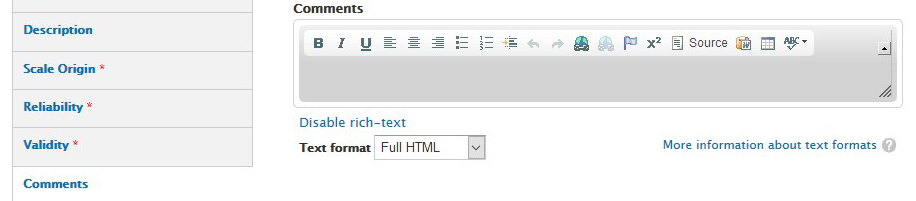
I recently updated a client site to 7.x-2.3 and found no problems on a regular node. However, when the client edited a node with all content consisting of fields in vertical tabs, he found the text area of the editor collapsed. It could be opened with the resize function, and the content was intact just not visible.
The CKeditor version was 3.5.3.6655. When I updated to 4.6.1, the problem disappeared. I'm posting here in case others come across this problem.
Also, perhaps the verified version list should exclude this and earlier versions of CKeditor?


Comments
Comment #2
twodSo, the problem is just that the default editor size is too small? Then the editor is most likely still working fine and there's no reason to change the supported version.
This is likely because there are sometimes issues calculating the size of invisible elements, or that the original textarea is too small to fit the complete editor UI. CKEditor 4 probably calculates its height in a slightly different way, so it renders better.
The only real change which could affect this between 7.x-2.2 and 7.x-2.3 is that if no height setting is set, Wysiwyg will default the editor to the same height as the original textarea instead of some fixed value. Sometimes this isn't enough and the editor looks collapsed, but you can override it using a simple hook implementation:
There's an open issue which will allow per-field alterations of settings, but it got put aside about a year ago and needs some merging conflicts resolved, so until then this will affect all fields. Adding a link to it to make it easier to find.
The next release will be bug-fixes only and will get out soon so it'll have to wait for the next one after that.
Comment #3
jn2 commentedThanks for the quick attention to this matter!
It's not too small, it's simply not there at all. Screenshot attached.
And thanks for the code, but it was easier and probably a better solution to update the CKeditor library.
Whatever you think best on the supported versions. Most people probably don't have this use case.
Comment #4
twodThe screenshot perfectly describes the situation I explained. The editor is there, but it's just large enough to fit the toolbar and the surrounding border. Resizing it will reveal the editing area, so the snipped I posted above will fix it.
Comment #5
jn2 commentedThanks for your help. You can close this however you like. It's here with code if someone else runs into trouble.
Comment #6
twod