

 The 2026 Drupal Business Survey is open. Your response will help shape the future of the Drupal business ecosystem.
If you already have an old d8 database, and you mistakenly specify that database during the install, the installer says "Drupal already installed" even if it isn't. I'm not sure if there's a way Drupal could distinguish between situations where the specified database exists and contains Drupal data, but the site is not actually installed, and situations where the database is set up and Drupal has been successfully installed. If it's possible to make that distinction, the "Drupal already installed" heading could be changed to something more helpful, like "You specified a database that already contains Drupal data. To continue with the install, you need to delete or empty that database, or specify a different database."
Granted, the bullets below the heading should help with that, but the heading itself can cause confusion.
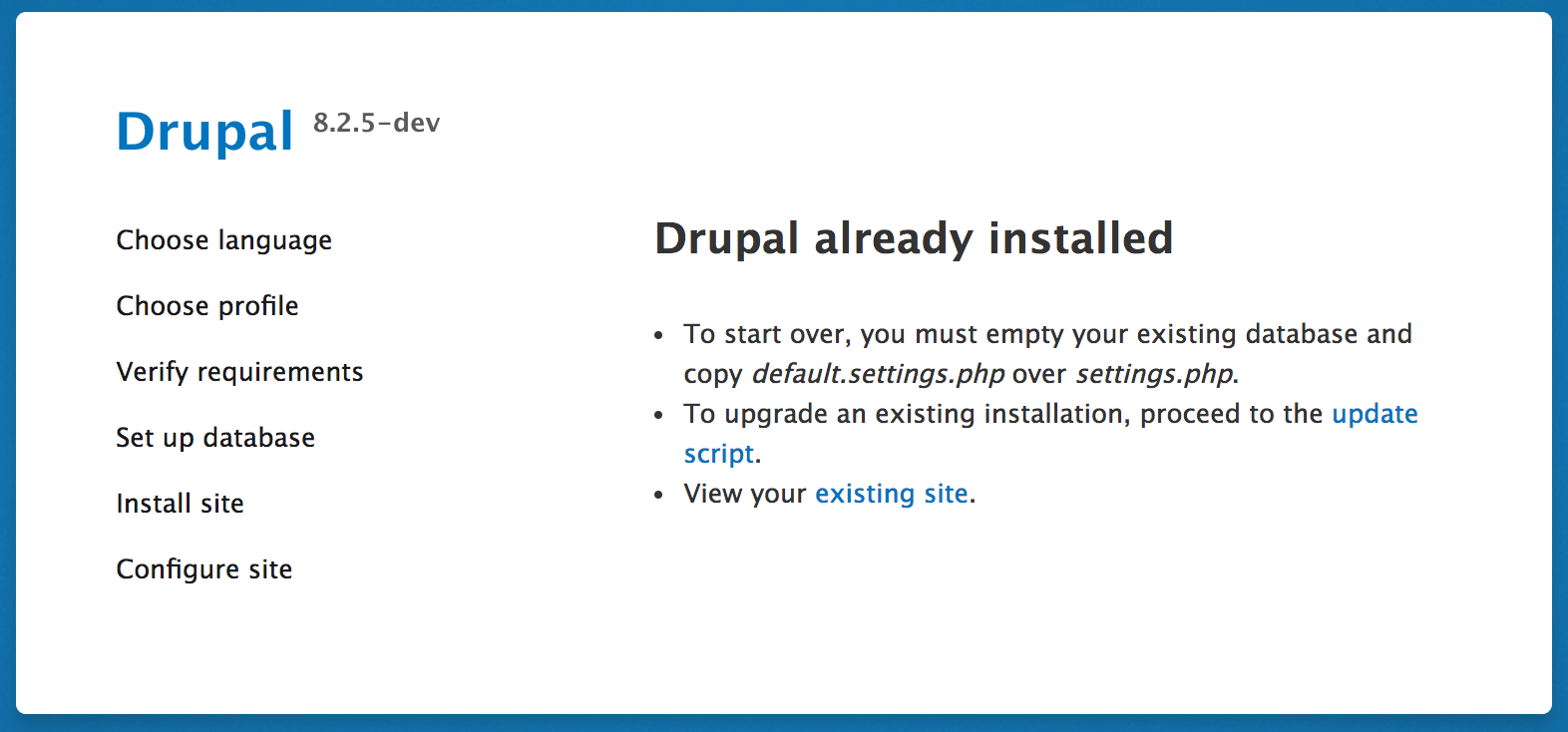
| Comment | File | Size | Author |
|---|---|---|---|
| #34 | Screenshot_2020-07-21 Drupal.png | 12.84 KB | sagir42 |
| #23 | Drupal Error on enable serialization module.png | 207.32 KB | docans |
| #2 | Screen Shot 2016-12-31 at 2.13.27 PM.png | 185.23 KB | cilefen |




Comments
Comment #2
cilefen commentedWell it reads:
That does seem clear.
Comment #3
cilefen commentedComment #4
denutkarsh commentedComment #5
cilefen commentedJust to be clear, there is not anything obviously wrong with the error messages. I am removing the novice tag so people don't start work on this. I linked a related issue that covers part of what is in the issue summary.
Comment #6
arnoldbird commentedThe language in the bullets is clear. I must not have read past "already installed". From my point of view, I knew that Drupal wasn't installed, so I saw that entire page as a bug. I stopped reading as soon as I decided the software was broken and was presenting an inaccurate message.
Should we distinguish between a situation where Drupal is installed and one where the user specifies an existing non-empty database? It may be that I tried visiting the homepage after Drupal indicated it was installed, and I got an error, not sure. I'm not sure what kind of check would constitute a meaningful test of whether the site was successfully installed, given that the database itself will tell Drupal that the site is installed.
I'm not entirely sure what series of actions caused the install to fail, but it may all have been user error. Maybe I somehow back arrowed in the installer or tried reloading some page in the installer, in the course of getting pre-reqs installed and getting perms right. Somehow I was able to mess up the right combo of things to make it so the install hadn't succeeded but Drupal was saying it was already installed.
Comment #7
arnoldbird commentedComment #8
arnoldbird commentedComment #9
arnoldbird commentedComment #10
bhatrafiq commentedGuys,
I have same issue. Actually it needs me to install the existing site on my local machine for which i did git clone and get the dump of database and imported it into my local mysql server. Now i have changed the variables in setting.php accordingly like database name, host, password etc. Now it should work and should show me the home page of site. But unfortunately it is always redirecting me to the core/install.php page and shows me same message "Drupal already installed" like screen shot is attached by someone above.
Please help me, i spend lot of time on it. FYI, i don't want to empty my database and then reinstall the site.
Thank you in advance,
Comment #11
yzan commentedHello,
same problem as 10
drupal 8.5.5
a charitable soul,
thank you in advance for any help
Comment #12
kswamy commentedThis issue is now reproducible in latest dev version which is blocking from fixing issues on 8.7.x. Issue occurs even if minimal install profile is used not just for standard install profile.
Comment #13
yzan commentedI have been suffering from this problem for a week now.
Full days to try to understand, and see what I would have done wrong.
No solution, it breaks the mood!
Comment #14
cilefen commentedThis does not meet the criteria of a major bug but I'm tagging it "usability" if reworded messages would increase understanding.
Comment #15
seppe beelprez commentedI had to uninstall Webprofiler and then everything works just fine. No idea exactly why but it works :)
Comment #16
liam morlandI get this with 8.7.x. I am trying to install into an empty Postgres database. It says "Drupal already installed". When I look back in the database, cache_container has been created. It is otherwise empty.
If I click "view your existing site", I get redirected back to "Drupal already installed".
Comment #17
ktch_my commentedSame issue on 8.6.2
Migrating a site to live server.
All files uploaded and database imported.
Updated settings.php, tried using default.settings.php as new settings.php and it still brings me to installation page with "Drupal is already installed" message.
Comment #18
SylDanh commentedSame issue on 8.6.5
New site, and after enabling some module, it show me this message.
If I click "view your existing site", and try to go to admin/module, i got 'The website has encountered an unexpected error. Please try again later.'
The only way to get a site working is to manually go to /update.php.
But after that, almost every module activation it show me this message "Drupal already installed ......".
Comment #20
matt_paz commentedI'm sporadically getting this.
Like #15, I suspect this may be associated with webprofiler.
Some excerpts from corresponding log entries below...
Warning: session_write_close(): Failed to write session data with "Drupal\Core\Session\WriteSafeSessionHandler" handler in Symfony\Component\HttpFoundation\Session\Storage\NativeSessionStorage->Symfony\Component\HttpFoundation\Session\Storage\{closure}() (line 240 of /app/vendor/symfony/http-foundation/Session/Storage/NativeSessionStorage.php) #0 /app/web/core/includes/bootstrap.inc(587): _drupal_error_handler_real(2, 'session_write_c...', '/app/vendor/sym...', 244, NULL) #1 /app/vendor/symfony/http-foundation/Session/Storage/NativeSessionStorage.php(240): _drupal_error_handler(2, 'session_write_c...', '/app/vendor/sym...', 244) #2 [internal function]: Symfony\Component\HttpFoundation\Session\Storage\NativeSessionStorage->Symfony\Component\HttpFoundation\Session\Storage\{closure}(2, 'session_write_c...', '/app/vendor/sym...', 244, Array) #3 /app/vendor/symfony/http-foundation/Session/Storage/NativeSessionStorage.php(244): session_write_close() #4 /app/web/core/lib/Drupal/Core/Session/SessionManager.php(198): Symfony\Component\HttpFoundation\Session\Storage\NativeSessionStorage->save() #5 /app/vendor/symfony/http-foundation/Session/Session.php(196): Drupal\Core\Session\SessionManager->save() #6 /app/web/core/lib/Drupal/Core/StackMiddleware/Session.php(60): Symfony\Component\HttpFoundation\Session\Session->save() #7 /app/web/core/lib/Drupal/Core/StackMiddleware/KernelPreHandle.php(47): Drupal\Core\StackMiddleware\Session->handle(Object(Symfony\Component\HttpFoundation\Request), 1, true) #8 /app/web/core/modules/page_cache/src/StackMiddleware/PageCache.php(106): Drupal\Core\StackMiddleware\KernelPreHandle->handle(Object(Symfony\Component\HttpFoundation\Request), 1, true) #9 /app/web/core/modules/page_cache/src/StackMiddleware/PageCache.php(85): Drupal\page_cache\StackMiddleware\PageCache->pass(Object(Symfony\Component\HttpFoundation\Request), 1, true) #10 /app/web/core/modules/ban/src/BanMiddleware.php(50): Drupal\page_cache\StackMiddleware\PageCache->handle(Object(Symfony\Component\HttpFoundation\Request), 1, true) #11 /app/web/core/lib/Drupal/Core/StackMiddleware/ReverseProxyMiddleware.php(47): Drupal\ban\BanMiddleware->handle(Object(Symfony\Component\HttpFoundation\Request), 1, true) #12 /app/web/modules/contrib/devel/webprofiler/src/StackMiddleware/WebprofilerMiddleware.php(38): Drupal\Core\StackMiddleware\ReverseProxyMiddleware->handle(Object(Symfony\Component\HttpFoundation\Request), 1, true) #13 /app/web/core/lib/Drupal/Core/StackMiddleware/NegotiationMiddleware.php(52): Drupal\webprofiler\StackMiddleware\WebprofilerMiddleware->handle(Object(Symfony\Component\HttpFoundation\Request), 1, true) #14 /app/vendor/stack/builder/src/Stack/StackedHttpKernel.php(23): Drupal\Core\StackMiddleware\NegotiationMiddleware->handle(Object(Symfony\Component\HttpFoundation\Request), 1, true) #15 /app/web/core/lib/Drupal/Core/DrupalKernel.php(693): Stack\StackedHttpKernel->handle(Object(Symfony\Component\HttpFoundation\Request), 1, true) #16 /app/web/index.php(19): Drupal\Core\DrupalKernel->handle(Object(Symfony\Component\HttpFoundation\Request)) #17 {main}.
Unable to store the profiler information.
Warning: Error while sending QUERY packet. PID=9061 in Drupal\Core\Database\Statement->execute() (line 59 of /app/web/core/lib/Drupal/Core/Database/Statement.php) #0 /app/web/core/includes/bootstrap.inc(587): _drupal_error_handler_real(2, 'Error while sen...', '/app/web/core/l...', 59, Array) #1 [internal function]: _drupal_error_handler(2, 'Error while sen...', '/app/web/core/l...', 59, Array) #2 /app/web/core/lib/Drupal/Core/Database/Statement.php(59): PDOStatement->execute(Array) #3 /app/web/core/lib/Drupal/Core/Database/Connection.php(631): Drupal\Core\Database\Statement->execute(Array, Array) #4 /app/web/core/lib/Drupal/Core/Database/Driver/mysql/Connection.php(358): Drupal\Core\Database\Connection->query('INSERT INTO {wa...', Array, Array) #5 /app/web/core/lib/Drupal/Core/Database/Driver/mysql/Insert.php(32): Drupal\Core\Database\Driver\mysql\Connection->query('INSERT INTO {wa...', Array, Array) #6 /app/web/core/modules/dblog/src/Logger/DbLog.php(78): Drupal\Core\Database\Driver\mysql\Insert->execute() #7 /app/web/modules/contrib/dblog_filter/src/Logger/DBLogFilter.php(63): Drupal\dblog\Logger\DbLog->log(4, 'Unable to store...', Array) #8 /app/web/core/lib/Drupal/Core/Logger/LoggerChannel.php(127): Drupal\dblog_filter\Logger\DBLogFilter->log(4, 'Unable to store...', Array) #9 /app/vendor/psr/log/Psr/Log/LoggerTrait.php(86): Drupal\Core\Logger\LoggerChannel->log(4, 'Unable to store...', Array) #10 /app/vendor/symfony/http-kernel/Profiler/Profiler.php(106): Drupal\Core\Logger\LoggerChannel->warning('Unable to store...', Array) #11 /app/web/modules/contrib/devel/webprofiler/src/EventSubscriber/ProfilerSubscriber.php(104): Symfony\Component\HttpKernel\Profiler\Profiler->saveProfile(Object(Symfony\Component\HttpKernel\Profiler\Profile)) #12 /app/web/modules/contrib/devel/webprofiler/src/EventDispatcher/TraceableEventDispatcher.php(76): Drupal\webprofiler\EventSubscriber\ProfilerSubscriber->onKernelFinishRequest(Object(Symfony\Component\HttpKernel\Event\FinishRequestEvent), 'kernel.finish_r...', Object(Drupal\webprofiler\EventDispatcher\TraceableEventDispatcher)) #13 /app/vendor/symfony/http-kernel/HttpKernel.php(210): Drupal\webprofiler\EventDispatcher\TraceableEventDispatcher->dispatch('kernel.finish_r...', Object(Symfony\Component\HttpKernel\Event\FinishRequestEvent)) #14 /app/vendor/symfony/http-kernel/HttpKernel.php(193): Symfony\Component\HttpKernel\HttpKernel->finishRequest(Object(Symfony\Component\HttpFoundation\Request), 1) #15 /app/vendor/symfony/http-kernel/HttpKernel.php(173): Symfony\Component\HttpKernel\HttpKernel->filterResponse(Object(Drupal\Core\Render\HtmlResponse), Object(Symfony\Component\HttpFoundation\Request), 1) #16 /app/vendor/symfony/http-kernel/HttpKernel.php(68): Symfony\Component\HttpKernel\HttpKernel->handleRaw(Object(Symfony\Component\HttpFoundation\Request), 1) #17 /app/web/core/lib/Drupal/Core/StackMiddleware/Session.php(57): Symfony\Component\HttpKernel\HttpKernel->handle(Object(Symfony\Component\HttpFoundation\Request), 1, true) #18 /app/web/core/lib/Drupal/Core/StackMiddleware/KernelPreHandle.php(47): Drupal\Core\StackMiddleware\Session->handle(Object(Symfony\Component\HttpFoundation\Request), 1, true) #19 /app/web/core/modules/page_cache/src/StackMiddleware/PageCache.php(106): Drupal\Core\StackMiddleware\KernelPreHandle->handle(Object(Symfony\Component\HttpFoundation\Request), 1, true) #20 /app/web/core/modules/page_cache/src/StackMiddleware/PageCache.php(85): Drupal\page_cache\StackMiddleware\PageCache->pass(Object(Symfony\Component\HttpFoundation\Request), 1, true) #21 /app/web/core/modules/ban/src/BanMiddleware.php(50): Drupal\page_cache\StackMiddleware\PageCache->handle(Object(Symfony\Component\HttpFoundation\Request), 1, true) #22 /app/web/core/lib/Drupal/Core/StackMiddleware/ReverseProxyMiddleware.php(47): Drupal\ban\BanMiddleware->handle(Object(Symfony\Component\HttpFoundation\Request), 1, true) #23 /app/web/modules/contrib/devel/webprofiler/src/StackMiddleware/WebprofilerMiddleware.php(38): Drupal\Core\StackMiddleware\ReverseProxyMiddleware->handle(Object(Symfony\Component\HttpFoundation\Request), 1, true) #24 /app/web/core/lib/Drupal/Core/StackMiddleware/NegotiationMiddleware.php(52): Drupal\webprofiler\StackMiddleware\WebprofilerMiddleware->handle(Object(Symfony\Component\HttpFoundation\Request), 1, true) #25 /app/vendor/stack/builder/src/Stack/StackedHttpKernel.php(23): Drupal\Core\StackMiddleware\NegotiationMiddleware->handle(Object(Symfony\Component\HttpFoundation\Request), 1, true) #26 /app/web/core/lib/Drupal/Core/DrupalKernel.php(693): Stack\StackedHttpKernel->handle(Object(Symfony\Component\HttpFoundation\Request), 1, true) #27 /app/web/index.php(19): Drupal\Core\DrupalKernel->handle(Object(Symfony\Component\HttpFoundation\Request)) #28 {main}.
Comment #21
rfletcher73 commentedHi there, i am running Drupal 8.7.3, the most recent version. I installed Gutenberg and everything was going smooth for the most part.
I just installed Devel module and now when i try to go to the Uninstall screen, I keep getting the /core/install.php page.
It says "To start over, you must empty your existing database and copy default.settings.php over settings.php.
To upgrade an existing installation, proceed to the update script.
View your existing site."
I've tried all of these options except the first one because I do not want to start over.
I tried the update script and rebuild script...I keep getting this error.
I'm new to Drupal, but so far it has been like everything little I do, I'm running into a problem here and there.
I tried clearing my cache too. Any suggestions?
Comment #22
docans commentedI am having the same issue.
Comment #23
docans commentedI am having the same issue.
I am trying to install the Json API. when i try to enable the Json API module, i am informed that i need to install the serialization module as a requirement. After installing the serialization module, i get the "Drupal already installed" message, i dont know if this has to do with core or with the serialization module.
Any Advice
I am on a windows 10 pc , using wampserver.
Comment #24
docans commentedI have found the solution.
This can be fixed by increasing the size of
your max_post_size in your php.ini file and increasing the max_allowed_packet in your my.ini as well as post_max_size to about 128 mb or more
Comment #25
justinmello32 commentedI think this thread includes a few different reasons why this is occurring but if you have just recently installed/enabled json api module then the fix is here, https://www.drupal.org/project/jsonapi/issues/3059472#comment-13236938.
Comment #26
phthlaap commented#24 worked for me
Comment #27
chenx319 commented#24 worked for me too
Thanks
Comment #28
egfguedes commented#24 Worked for me too.
Tks!
Comment #30
jhnnsbstnbch commentedI was running into this error message recently when attempting to create a multisite environment.
Example "sites" folder structure:
I had overlooked editing and renaming example.sites.php to include the names of the other folders (website.com and website2.com).
Once I did that the "drupal already installed" messages disappeared.
Comment #31
mark_fullmerAnother apparent trigger for this nondescript error is when you have a MySQL version that is below the minimum requirement. (For example, I got this error when trying to install Drupal 9 with MySQL 5.6...the minimum version requirement is 5.7.8 now). Using the minimum-compatible MySQL version fixed the issue.
Comment #32
cilefen commentedComment #34
sagir42 commentedI have encountered similar problem.
I have an existing website where I was trying to login. After providing login details when I click login button it redirect me to /core/install.php page and I get the bellow error message.
Comment #35
Hong Cai commented#24 works.
In my case, I tried to activate 6 modules (commerce_product_bundle and its dependent modules),
then the execution was time over 120s, which longer than the settings in php.ini file.
So the execution stopped and broke the whole system.
Comment #37
Abhilash001 commentedHi All,
I am using drupal 9.1.0. I have installed menu_item_extras module my site goes down i have uninstalled module using drush. now i am getting below error.
To start over, you must empty your existing database and copy default.settings.php over settings.php.
To upgrade an existing installation, proceed to the update script.
Thanks
Comment #38
jhodgdon@Abhilash001 -- you posted this question here and in the Discuss section of a Documentation page... Neither place is a good way to get support. Please see
https://www.drupal.org/support
to find a support channel where you are more likely to get help.
Comment #40
karthikeyan gandhimathinathan commented#24 worked for me
Comment #45
quietone commentedThere hasn't been any discussion here for 4 years so perhaps this is no longer a problem?
This does need steps to reproduce, so tagging. Since we need more information to move forward with this issue, I am setting the status to Postponed (maintainer needs more info). If we don't receive additional information to help with the issue, it may be closed after three months.
Thanks!
Comment #46
smustgrave commentedSince there hasn't been a follow up going to close out, if still an issue in D11 please reopen
Thanks all!