

Closed (fixed)
Project:
Commerce Core
Version:
8.x-2.x-dev
Component:
Promotions
Priority:
Normal
Category:
Task
Assigned:
Issue tags:
Reporter:
Created:
30 Aug 2016 at 22:11 UTC
Updated:
20 Jun 2017 at 21:39 UTC
Jump to comment: Most recent, Most recent file





Comments
Comment #2
niko- commented@mglaman coupon pane as we discussed in irc today.
Comment #3
andypost$this->order should be always here
I think here should be
OrderInterfacebetter to rename local var to
$coupon_codebetter use
count()queryhow that possible that order "outdated"?
Looks need separate issue to fix
if($result)is uselessPlease point todo to #77245: Provide a common API for displaying JavaScript messages
I think work flow should be different
That means that "Apply coupon" should have own submit handler (but this does not works with ajax)
Comment #4
niko- commentedMore detail info about // @todo Fix loading updated order into checkout pane. (This should moved to general workflow)
Steps to reproduce setuation why this load required now:
1. create new oder with any product
2. aplly any coupon to order
3. without page refresh try to apply one more coupon to order
ER: two adjustments must be availible in order
AR: only one adjustment availible in order
Comment #5
mglamanMy review. Thanks for this! We'll definitely want to get a FunctionalJavascript test on this.
Wouldn't it just be
$pane_form['#parents']The promotion storage has a check to load a valid promotion based on a coupon.
It validates if the dates are good, valid coupon, etc.
Again above about promotion storage.
We should also check if it applies first.
Probably needs to be an order refresh?
Comment #6
steveoliver commentedThis is just a normal task to get promotion coupons usable.
Comment #7
niko- commentedupdated pane.
Comment #8
niko- commentedComment #9
a.dmitriiev commentedI have a question regarding this implementation. Is there a way to know what Coupons were already applied? The problem is that Adjustment class in sourceId property stores only the PluginId that is actually not enough, because there is no way to know what exact promotion was applied.
This way the same code could be applied to the same order multiple times. I think this is not the desired behaviour. We need to store the applied promotions somewhere, in the new field in the Order?
Comment #10
niko- commentedHi
Updated version will attached here today or tomorrow
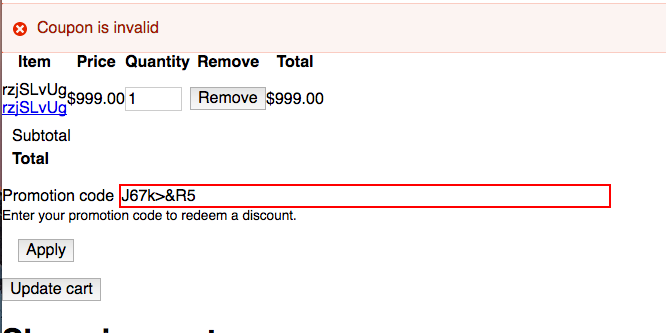
Comment #11
chishah92 commentedIs there a way to separate discount fields in the promotions from coupons ? as they get applied automatically on placing the order irrespective of the coupons.
Comment #12
a.dmitriiev commentedThank you, @niko.
I experience the same problem as chishah92. Because you have no conditions to specify for the promotion with Coupon it always applies to any order.
I had to create my own condition that checks the applied coupons, but what I also did is created a field in the order entity that stores all applied coupons. This solution is bad, I know, but for now there is no another way to do this. As an option I think it is really necessary to add one more property to Adjustment class, because for promotions it would be nice to see the id of the promotion that was applied, this way we can do some checks on order processing.
Comment #13
niko- commentedupdated patch, TBD about source context implementation with @mglaman
Comment #14
chishah92 commentedThere is no CouponOrderProcessor.php for the commerce_promotion.coupon_order_processor service.
Comment #15
niko- commentedThanks @chishah92
updated patch attached
Comment #16
mglamanAssigning to myself for now, going to review the issue and code.
Comment #17
niko- commentedComment #18
mglamanWe should remove the coupon from the field list, no?
We technically should have never been able to load the promotion (since we used loadByCoupon), so we could remove this.
I don't see this field added in a base field definition alter
I think I'd rather accept an array of Context classes.. so we can merge them together.
Also, we can remove
// @todo expose the operator in form.in\Drupal\commerce_promotion\Plugin\Commerce\PromotionCondition\OrderTotalPrice::defaultConfigurationComment #19
mglamanWe should always return renderable arrays, never rendered content.
Does this assume parent array key is "coupon"?
"@todo: follow up with ability to provide a custom view to display table"
Shouldn't we do a
!=and skip processing?Using #type => inline_template, and our Twig filter
Comment #20
niko- commentedComment #21
niko- commentedRefactored patch, condition\offers part was moved to https://www.drupal.org/node/2854313#comment-11947357
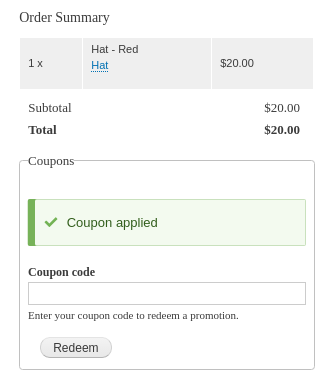
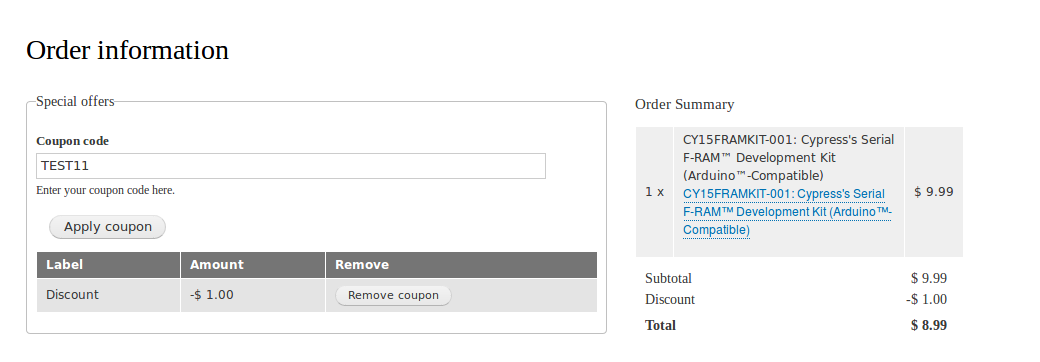
One known issue, please check http://prntscr.com/ebakeo
Comment #22
mglamanThanks for new patches and spinning those items out.
Comment #23
mglamanFrom IRC
But wouldn't we want to remove broken coupons? Such as the promotion is no longer valid.
The method
:: loadByCouponcalls:: loadValidQuery. So if the promotion is no longer valid (expired, disabled) the coupon is also invalid.We should remove the coupon from the order so it does not keep running on each order process.
Also, with,
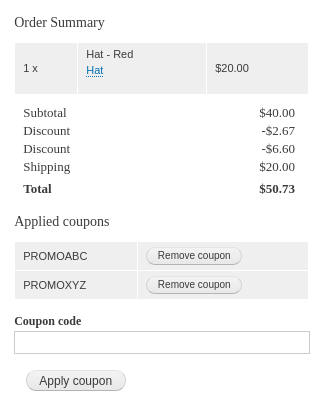
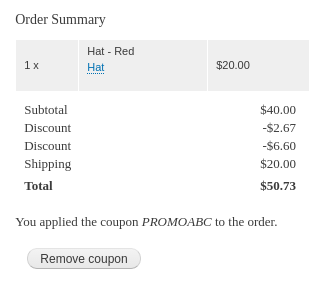
$query->condition('coupons', $coupon->id());, we will never have a promotion with an empty coupons field.https://github.com/drupalcommerce/commerce/blob/8.x-2.x/modules/promotio...
Comment #24
chishah92 commentedI am getting The website encountered an unexpected error. Please try again later.
dblog i found this :
TypeError: Argument 6 passed to Drupal\commerce_promotion\Plugin\Commerce\CheckoutPane\Coupon::__construct() must implement interface Drupal\commerce_order\OrderRefreshInterface, instance of Drupal\Core\Render\Renderer given, called in modules/contrib/commerce/modules/promotion/src/Plugin/Commerce/CheckoutPane/Coupon.php on line 103 in Drupal\commerce_promotion\Plugin\Commerce\CheckoutPane\Coupon->__construct() (line 82 of modules/contrib/commerce/modules/promotion/src/Plugin/Commerce/CheckoutPane/Coupon.php)
Comment #25
niko- commentedUpdated patch with fixes from #23 and #24
This patch is required as disscussed yesterday with @mglaman
Support render array in buildPaneSummary()
Comment #26
chishah92 commentedNow checkout flow page has coupon pane visible, but when product is being added to cart the website encounters error
DB Log :
Drupal\Core\Database\DatabaseExceptionWrapper: SQLSTATE[42S02]: Base table or view not found: 1146 Table 'cypress_store.commerce_order__coupons' doesn't exist: SELECT t.* FROM {commerce_order__coupons} t WHERE (entity_id IN (:db_condition_placeholder_0)) AND (deleted = :db_condition_placeholder_1) AND (langcode IN (:db_condition_placeholder_2, :db_condition_placeholder_3, :db_condition_placeholder_4)) ORDER BY delta ASC; Array ( [:db_condition_placeholder_0] => 23 [:db_condition_placeholder_1] => 0 [:db_condition_placeholder_2] => en [:db_condition_placeholder_3] => und [:db_condition_placeholder_4] => zxx ) in Drupal\Core\Entity\Sql\SqlContentEntityStorage->loadFromDedicatedTables() (line 1130 of /core/lib/Drupal/Core/Entity/Sql/SqlContentEntityStorage.php).
Comment #27
niko- commented@chishah92 looks like you forgot drush entup
Comment #28
chishah92 commentedIt's working now , Thanks!!
Comment #29
chishah92 commentedI applied the patch and did drush entup. Initially when i added my product and when i applied the coupon the discount got added (did not complete the order)
Second time when i tried again the discount got prerendered and on applying coupon the discount got added (Did not complete the order)
Third time when i deleted the promotion and created a new one , on adding product to cart i am facing website encountered error
InvalidArgumentException: Unable to remove item at non-existing index. in Drupal\Core\TypedData\Plugin\DataType\ItemList->removeItem() (line 139 of core/lib/Drupal/Core/TypedData/Plugin/DataType/ItemList.php).
Drupal\Core\Entity\EntityStorageException: Unable to remove item at non-existing index. in Drupal\Core\Entity\Sql\SqlContentEntityStorage->save() (line 770 of /core/lib/Drupal/Core/Entity/Sql/SqlContentEntityStorage.php).
Comment #30
padma28 commentedThe patch is not working. There are 2 issues which are mentioned below.

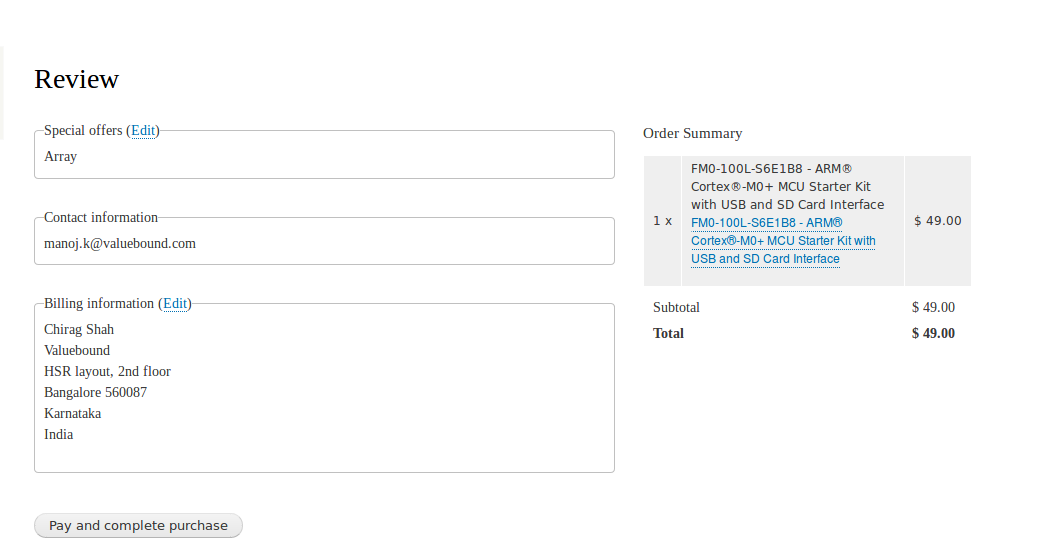
1. If i editing in the review page, again it goes to the order information page without coupon details. So, again it is asking to enter the coupon code.
2. Coupon details is not updating in review page.
I have attached the screenshot here.
Comment #31
mglamanI'm going to be running with this for a bit. I have a PR up over at https://github.com/drupalcommerce/commerce/pull/645.
To get rolling patch, see https://patch-diff.githubusercontent.com/raw/drupalcommerce/commerce/pul....
Biggest concern, and blocker from me actually using this is that the coupon redemption form is only in the pane. It needs to be its own form so it can be embedded elsewhere. And tests.
Comment #32
niko- commentedHi @mglaman
Thanks for your detail review.
About your concern, actually I have the similar.
I think we can modify current implementation in the following order:
1. we must move form out to the "manager"
2. we need make the coupons list in the pane configurable, (show\hide)
3. we need views field handler for adjustments field with configurable brief\full mode. (have some existing developments)
Comment #33
niko- commentedHi @padma28
1. known Issue, please check my previous update for @mglaman
2. You need patch from https://www.drupal.org/node/2854425 (already commited to core)
Comment #34
niko- commentedComment #35
mglamanOkay here is an update on current status:
I just fixed the tests on last one and waiting. This will unblock further progress. Once the last one lands, I'm going to begin building a Coupon Redemption element. This will be a form element that takes and validates coupon codes. An element allows this to be reused and embedded. None of my 2.x sites use the pane checkout, all custom. So this is a good way forward. Once we have the element we can build the coupon list applied to an order. And finally combine to build the pane!
Comment #36
padma28 commentedThank you @niko. I will look into this.
Comment #37
mglamanCrediting client work this is for.
Comment #38
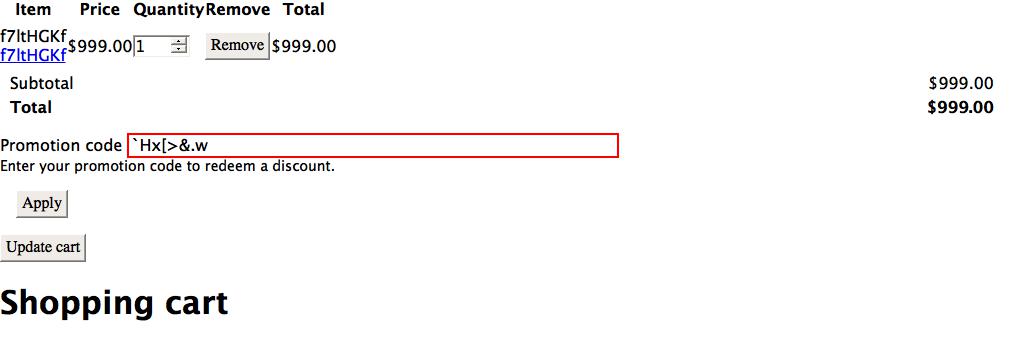
markshust commentedFYI I tested out your GitHub branch, and going to Checkout page resulted in this error:
Comment #39
mglamanUpdate for those following: with beta6 the element has made it. I have coupon redemption working in a client site and QA. I will be working to make a checkout pane in 2.x.
The initial pane will only support redemption of a single coupon and AJAX. We can expand to multiple coupon redemptions.
Comment #40
rajeshwari10 commentedHi @niko the issue reported in #30 is still not resolved.
I checked the patch you have posted. But it is not working.
Any suggestions would be helpful.
Comment #41
mglamanAnything before my comment in #39 is outdated. I'm working on a pane shortly. You can embed it fine as an element in custom flows, for now.
Comment #42
mglamanComment #43
mglamanOkay! Here is the first patch with the next steps. There's a basic test. It's failing. But I wanted to post the first/next step.
Comment #44
mglamanTest pass! Coupon redeems. Needs some more review and expose the settings in a form. We need #2863051: Allow the checkout sidebar to contain panes to land for this to be ultimately usable.
Comment #45
mglamanOkay. I've updated https://github.com/drupalcommerce/commerce/pull/702 to include a JavaScript test for the pane.
This is blocked by #2861529: CheckoutFlowBase should reload the order on an #ajax rebuild
EDIT: This is also blocked by refreshing the order summary. I have this working on the client site, but that's because we extended the element to do so.
Comment #46
rajeshwari10 commented@mglaman
After applying #44 patch we get a pane where we add coupon, But on applying the same discount amount is not displayed in order summary. Only on refresh the discount line item is shown there. Also the discount amount is not getting deducted from total amount.
But,Coupon works fine in checkout review page.
For this I have made some changes in CouponRedemptionForm. But it is not working.
Can you please suggest what should i do, to get it worked?
Comment #47
mglamanrajeshwari10, for now it sounds like you need to update to lastest -dev, because there was an order total issue when using order item adjustments.
There is also no direct way for the pane to directly refresh the summary, yet that I know of.
I am working to port my working code into the pane. There's just other issues blocking it. Such as the one linked earlier, which causes the Ajax rebuild to loose shipping info.
For now I'd recommend writing a local patch to disable Ajax, or make a custom pane which uses an extended version of the element to disable Ajax. Unless you want to work to make it fit.
I don't have an end all solution, especially with checkout flow using panes. It's simple when not using panes.
Comment #48
bojanz commented#2863051: Allow the checkout sidebar to contain panes has landed, we can now specify default_step => '_sidebar' in the pane annotation.
Comment #49
dom. commentedHi all !
Here is some more work regarding current status of patch 44.
Trying it, I noticed a few things that bothered me and that this patch changes :
This would be usefull for a custom CouponRedemption pane with a summary for instance.
Comment #50
mglamanIt was state this first pane would not support multiple coupons.
EDIT: This isn't to say last patch won't be used. I just need to review it, and specifying why it was not considered. The initial UX was "Click link to show redemption form, add single coupon." Because this is a common UX pattern. I want it to be an option "Use one, or multiple." If multiple, use Dom.'s approach.
Comment #51
nikathoneSo After applying the https://github.com/drupalcommerce/commerce/pull/702/ on the latest commerce 2.x dev I did have the coupon redemption pane available in the checkout flow. Then in order to refresh the order summary on coupon apply/remove:
and my custom
CouponRedemptionFormclass:Hope this will help someone until the pull is committed with a fix.
Comment #52
dom. commentedAfter some more devs on my new project, I noticed my patch at 49 did not actually work well with multiple coupons from diverse promotion types. So I refactored it a bit.
Also @mglaman made a point at #50 about applying unique coupons. I do understand this may be (most?) common config, but yet I think some people would like to be able to add more, also it makes sense I guess because of the compatibily option on promotions. Anyway, here is therefore a patch that makes best of both world: config option ! I added a new #single_coupon_mode key which is TRUE by default. The CouponRedemption can now be configured to optionnally allow multiple coupons.

Lastly, it really makes sense that OrderSummary pane can refresh when a coupon is applied, so I actually did incorporate @nikathone code idea into the patch.
The patch #52 thus include:
- CouponRedemptionForm can display optionnally the coupon used, with or without actions associated (add/remove coupons)
- CouponRedemptionForm can display optionnally actions to apply one or multiple coupons
- CouponRedemption still work the same by default, but can also be configured to allow multiple coupons
- A coupon applied via CouponRedemption pane is refreshed into OrderSummaryPane
Comment #53
mglamanAwesome work! Thanks Dom. and nikathone for taking my rambled notes and your initiative to push this forward. I just need some time, but I'll review #52. It sounds like it's the "real deal" and incorporates everything.
Comment #54
rajeshwari10 commented@Dom i have applied your patch. Also enabled Single Coupon mode in Coupon Redemption Checkout Pane, but same coupon code is getting used more than once during checkout.
Comment #55
dom. commented@rajeshwari10: do your couponRedemption pane textfield disappear once one coupon is applied ?
Then when clicking on review, can you see only one discount applied ?
If yes to all these questions: could you send screenshot of what's wrong ?
Comment #56
rajeshwari10 commented@Dom:
I have coupon for example ABCD10. I applied that coupon in checkout pane and the coupon redemption pane disappeared. on review page only one discount is applied.
But, the same coupon is applied again.
So my query is after enabling the Single Coupon mode. Only one coupon for example. ABCD10 should be applied once. Again if i use the same coupon it should give me some error saying same coupon applied again.
Please advice.
Thanks,
Rajeshwari
Comment #57
xsdx commentedI wasn't able to apply patch above with composer.
I resolved them so I'm adding patch after resolving these issues
Comment #58
mglamanUnassigning myself. I haven't had time to review.
Comment #59
replicaobscuraI seem to be running into an issue, I'm not positive if it's related to this patch or not. But I can't seem to apply any coupons during checkout, entering a valid coupon code for a promotion with no conditions on it gives me the error "Coupon is invalid."
Comment #60
replicaobscuraNevermind, the issue was with some other code. This patch seems to be working properly for me.
Comment #61
lothardesmet commented@bmcclure Can you tell us what solved your "Coupon is invalid" problem? I am having the same issue as you describe in #59.
Comment #62
replicaobscura@LotharDesmet:
The problem I was having is for some reason, 3 different times I created a promotion and it ended up being created with a start date of the following day, rather than the current day.
I don't know why/how that happened, as ever since then every time I test adding a coupon it defaults to the current date. But, that was what my issue ended up being.
Comment #63
mglamanConfirmed. Tests are failing because coupons are invalid. Reviewing.

Comment #64
mglamanAs bmcclure pointed out, the error is the start time. I debugged where promotions where being marked invalid. Looks like there's a bug in our promotion start date?
EDIT: Here's the problem:
gmdatewhichFormat a GMT/UTC date/time.Maybe not. It's weird.
When I run
$this->assertTrue($this->promotion->applies($this->cart));in the test all is fine. But in UI it's garbage.Comment #65
mglamanI've reported the logic issue in #2881791: Computed field value for DateTime field causes start time validation error. This patch includes the fix. We'll need that other issue to be fixed, first.
Here is updated patch which just removes some duplicate code. I'm going to review tests and add JavaScript tests.
Comment #66
replicaobscuraAwesome, I'll test that updated patch out tonight or tomorrow!
Two other potential issues we noticed with the previous patch so far:
1. There's no indication which coupon is active. The adjustment label is just "Discount", so I'd expect to see an indication within the coupon redemption pane of which coupon has been redeemed, probably just above the Remove button for that coupon.
2. The message indicating the whether or not the coupon was redeemed is showing up for us after the next page reload, rather than when the AJAX request completes to redeem the coupon. This makes it confusing, as there's no indication whether it was successful or not. Coupled with the issue from #1 of not knowing which coupon was redeemed, it makes people in our tests confused about whether it worked or not (even though the Discount adjustment item will be there if it worked).
Comment #67
mglamanThis is when you allow multiple, yeah? Willing to let this be a follow up.
It should. But there's a core bug around messages. I'm adding JS tests.
I skipped the tests from failing by providing a start date. There's a weird timezone / time difference when using the generated start time.
Comment #68
replicaobscuraThe issue is actually when you don't allow multiple. If you do allow multiple coupons, it shows a table of which coupons are active within the Coupon Redemption pane. If you only allow a single coupon, then after applying a coupon the only thing in the pane is a "Remove" button--no information about the active coupon.
When I discovered that it shows the active coupons when allowing multiple, I enabled that feature. However, now the Remove button next to the active coupon doesn't work, where it did when using a single coupon. I get this AJAX error now when clicking it:
So currently the issue seems to be either (a) not seeing what coupon is active or (b) not being able to remove active coupons, depending on whether multiple coupons are enabled or not.
Regarding the message not showing up until after a page reload: In many other areas, such as file upload fields, messages appear along with the AJAX response. Is there a way for the coupon pane to do this, or is the core bug preventing that from working in this case?
Comment #69
replicaobscuraRegarding the broken "Remove" button, in my case the issue is in the removeCoupon method. $parents is ['coupon_redemption', 'coupons'] and it's lacking the first "sidebar" parent that the coupon_redemption pane is actually nested within. This causes it to be unable to properly remove the coupon.
Removing the #parents definition from the button when it's defined in the table seems to cause it to determine its nesting properly, although the $parents array looks quite different then and still doesn't seem to work fully.
Update: This gets it working for me if I remove #parents from the button definition, and then use 3 array_pop()'s instead of 1. I'm sure this is not the best solution, but just wanted to say that seems to have gotten it working temporarily for me.
Update 2: Using the above fix, the Remove button works fine when multiple coupons are allowed, however when you remove the last coupon it shows a blank pane instead of showing an input field to enter another coupon. Reloading the page fixes it. This seems to be due to the #parents array also.
Seems we need a better way of either setting, or determining, the parent array in the ajax methods.
Comment #70
replicaobscuraHere's a patch almost identical to mglaman's #65 patch, except fixes the #parents definition by copying and modifying the parent element's #parents array instead of defining one from scratch.
I simply applied #65, modified CouponRedemptionForm, and created a new patch from that.
Comment #71
replicaobscuraNow I'm having other issues (coupons not applying, saying they're invalid) so I'm not sure if my updated patch broke something or what. Back troubleshooting this again...
Comment #72
replicaobscuraI'm not sure if this was an issue in mglaman's patch or how this got introduced, but the Promotion entity's available() logic got flipped around as it relates to comparing with the start and end dates. It was previously ensuring that the current time was not in between the start and end dates, instead of the other way around.
Fixed. Interdiff and new patch attached.
Comment #73
replicaobscura#72 works for our client for the most part, but the main issue using multiple coupons is that when you apply a coupon and submit it, the text field still contains the coupon code you submitted, making it attempt to submit the coupon again when moving to the next checkout step.
Seems maybe we need to blank out the coupon input field once a coupon is accepted?
Comment #74
replicaobscuraHere's an attempt to resolve that issue.
I think there might be a better way to solve this, but we needed a quick solution. I'm open to better ideas here.
Comment #75
replicaobscuraJust cleaning up non-patch files so they don't show at the top.
Comment #76
mglamanProbably need to alter user input, and re-set it.
Comment #77
mglamanAssigning. bmcclure, I'll merge in any of your work to my stuff locally. Can confirm the issue of status messages not rendering. There's a core issue here, actually. I can't remember it. But we work around it in 2.x somewhere, I think. Or we just force it to render. I'll see, because I have it working on our client's site.
Comment #78
mglamanHere is a new patch. It includes improvement from #74 for removing coupon code from user input. This also adds JavaScript testing. Which passes.
However I've added testing for multiple coupon support, and it breaks down.
Not sure if this is due to #parents fix from #70.
Comment #79
mglamanHere is a patch which fixes removal of coupons on multiple coupons allowed. And is tested.
Comment #80
andypostThe only usage of screenshot and looks for no reason
Looks like a part of #2099579: Discuss automated visual regression testing
Comment #81
mglamanRE: #80, yeah I temporarily committed that function for my testing throughout this. We use a trait to enable JS testing instead of core's JS test class (because being able to extend a single class between Functional/FunctionalJavascript.)
Comment #82
mglamanThis patch passed all promotion tests locally. Waiting to see what https://travis-ci.org/drupalcommerce/commerce/jobs/237780544. If Travis is green, then the next step is removing:
No idea how. Not sure if we should leave that hack and make it a follow-up, just so this sucker finally lands.
That and actually doing a final review of the code. I just wanted to get tests to pass. Which we need to add coverage for adding multiple coupons and removing individuals. But I'm at the point of just opening a lot of little follow ups.
EDIT: TESTS ARE GREEN!
Comment #83
replicaobscuraI'm running into an issue with the latest patch (from the PR). Not sure why yet, but I'm seeing a success message when applying the coupon, but it doesn't seem to actually apply, as I don't get a table of coupons showing up like I used to. Additionally, it's seemingly letting me redeem the same coupon several times on the same order, which makes me wonder if it's actually applying it at all. Perhaps I'm running into some other issue?
Comment #84
replicaobscuraActually, I *think* the issue is that the coupon should not have been able to apply to my order, but yet I got a success message anyway. I just realized I've got a condition on the coupon that makes it not match this order, which would explain why the coupon won't apply--however doesn't explain the success message.
Comment #85
replicaobscuraConfirmed. The problem seems to be that the coupon redemption form *thinks* the coupon is being redeemed, even though the coupon can't be redeemed on the order. I get a good error message if I try and redeem a coupon twice once it actually works, or if I use an invalid coupon code, so it seems this is only an issue with valid coupons which have conditions that aren't met on the order.
Comment #86
replicaobscuraIt seems like nothing is calling the "applies" method of the promotion currently. The validate function of the form element calls $coupon->available($order), but that just checks if the coupon and promotion are valid, but doesn't seem to check against the actual conditions of the promotion. Is this expected? Should applies() be called separately somewhere else?
Comment #87
replicaobscuraI ended up modifying the validateForm method so that instead of
if (!$coupon->available($order))for the condition, it's nowif (!$coupon->available($order) || !$coupon->getPromotion()->applies($order)).This seems to be working for us for now, but I'm not sure if this is a good solution yet.
Comment #88
replicaobscuraAfter fixing the above, we're noticing one final (I think) issue: We've got the coupon redemption pane in the sidebar so that it shows up on every page during checkout. If a coupon is redeemed successfully on the Order Information page, the coupon redemption pane is blank again when hitting the Review page, causing the coupon to have to be redeemed again for it to stick.
Not sure if this is some kind of conflict with something on my site, or if others are seeing this too. I'll be troubleshooting further tonight.
Is there any way the order object could be overwritten during the course of submitting the Order Information pane, losing the changes made to the order object from the coupon redemption form?
Comment #89
mglamanLet's chat in Slack later. We need more tests. But I also think it's couples with customization. Let's identify what additional tests we should add to the patch, then go from there.
Comment #90
mglamanHere is a new patch with clean ups. Attaching end results of what the element looks like, single use coupon.
Proposed follow-ups:
Comment #91
replicaobscuraThe only issue I'm running into so far with this patch (also noted in the PR) is that if the coupon redemption pane is in the sidebar, and thus available on both the Order Information and Review steps, then if a coupon is redeemed on Order Information, it's lost again when continuing to Review.
I didn't have this issue a few days ago, but I'm not positive which change or patch since then has caused the issue to start happening. I tried PR #703 to fix it, which seemed to work, but then broke my shipping/billing information pretty badly--much of the time, it was blanked out completely when moving to the Review step.
Comment #92
gauravjeet commentedThe issue I'm facing after applying the patch #90 is - When a coupon is applied,
$order->collectAdjustments()does not return anything from CouponRedemptionForm.php line 290. So, even if the coupon is applied to current order, the table is not displayed.Comment #93
mglamangauravjeet, please use the PR for any patch. I am not updating the issue that often.
See https://patch-diff.githubusercontent.com/raw/drupalcommerce/commerce/pul...
Comment #94
mglamanI have finally achieved a failing test revolving around some of the reports.
Steps:
I have added two tests:
PASSES: one that adds coupon, then changes payment method.
FAILS: pick payment method (perform AJAX), then apply coupon (summary refreshes fine). go to next page and coupon missing.
Comment #95
mglamanOkay everyone! Here is a patch which fixes the test failures. The issue was that CheckoutPane plugins were constructed with the checkout flow's order object. However the reference gets broken down the line, so the object is stale within the panes. Any operation done was ignored (hence why payment details would disappear, or coupon would.)
I have provided a fix which refreshes the pane's order object each time a method in checkout is invoked. Which means no developer changes for anyone. But it also removes all AJAX bugs for anyone implementing AJAX on checkout (Shipping, etc.)
Let's test this sucker.
Comment #96
dom. commented@mglaman: I see you continue to integrate with my idea for multiple coupons insertion. Thanks a lot for that !
I did tried you patch, and I have a couple of things that still don't work properly: maybe I did something wrong testing, please advice if so.
Also, in a related (but not belonging to this issue topic), is there a follow-up issue to build a coupon field to add to "order summary" or "cart" view footer ?
Comment #97
mglamanWe test the AJAX refresh of the order summary. However this is based on its default placement. In order information, not on the review step.
I removed this bit. We're replicating logic about promotion availability. That needs a whole lot of work on its own. For instance, the "only myself" doesn't care if promotions were applied previously, only before itself. If you want to keep that, I'd alter the form and do the magic there. But I would rather a more mature fix. Otherwise, we're duplicating the logic in the element and within promotion redemption.
See the test module in this patch. It adds coupon redemption to the cart form. I don't know how I feel about making a view field for this. Because 1) Views. 2) Views forms.
Comment #98
bojanz commentedMy turn. Initial review notes below.
This patch has the same CouponRedemptionPaneTest and CouponRedemptionElementTest under Functional\ and FunctionalJavascript].
The functional ones should be removed. Not sure if it was accidental, or if the idea was to perform the tests both with and without JS, in which case the current method is not reliable since the Functional test might be running under phantomjs too.
This code needs an explanation why (because ajax).
Not a good idea to repeat a workaround multiple times. In our case I think it's safe to do it only in buildForm(), since the parent method only reloads the order there.
This pane needs to default to the sidebar.
$pane_form is already a fieldset showing our display_label, we don't need another nested one.
Looks like the form name was not updated here. It also doesn't account for $pane_form['#parents'];
This is a submit callback, how could $triggering_element['#coupon_code'] ever be empty?
Also, if #coupon_code was an ID instead, we wouldn't need the loadByCode() call.
Also, the $coupon_id here is actually the index.
That's an unfriendly message. Why not "Please provide a coupon code"?
Comment #99
bojanz commentedAdding two screenshots to show the UX of the current patch.
We decided that the current state was unacceptable.
We needed to remove the fieldset, make the design powered by a Twig template, and have different looks for single-coupon and multiple-coupon modes. I also found bugs related to applying a code by submitting the main checkout form, and validation via the Redeem button.
Spent more than a full day working on this. Commit incoming.
Comment #101
bojanz commentedAnd committed. Attaching screenshots of the new UX. Controlled by commerce-coupon-redemption-form.html.twig, so it can be customized in any way, including having the same behavior for single and multiple modes.
Our two followups are #2770731: Add a display name to promotions and #2884210: Add a setting to hide the coupon redemption form behind a trigger link.
Thanks, everyone.