

Closed (fixed)
Project:
Smart Trim
Version:
2.x-dev
Component:
Code
Priority:
Normal
Category:
Feature request
Assigned:
Unassigned
Reporter:
Created:
11 Aug 2016 at 06:46 UTC
Updated:
21 Nov 2025 at 19:25 UTC
Jump to comment: Most recent, Most recent file
 Show commands
 changes
Comments
Comment #2
duncan.moo commentedA few notes on my patch:
It is far from perfect, please review, make suggestions, fix...
Comment #3
duncan.moo commentedCorrection on one of the parameters going into the smart_trim_field_formatter_view() function:
'trim_options' => array('text' => TRUE),Comment #4
duncan.moo commentedSo another revision of this patch, although it was working warning messages let me know that I was calling smart_trim_field_formatter_view() with $instance set as the token string. I am using field_info_instance() to get the correct array.
Comment #5
g33kg1rl commentedSuper patch!
I cleared the cache and the tokens were available, but they don't show up perfectly in the token list. (the node:body-smart-trim didn't show up but versions such as cer:node:body-smart-trim showed up)
I also received this error message after saving content:
Notice: Undefined index: en in smart_trim_tokens() (line 75 of all/modules/smart_trim/smart_trim.tokens.inc).
Warning: Invalid argument supplied for foreach() in smart_trim_field_formatter_view() (line 40 of all/modules/smart_trim/smart_trim.module).
Comment #6
maxplus commented@duncan.moo
Thanks for this handy patch, I'm using the smart-trim token for setting a node title using Auto Entity Label, works OK until now
Comment #7
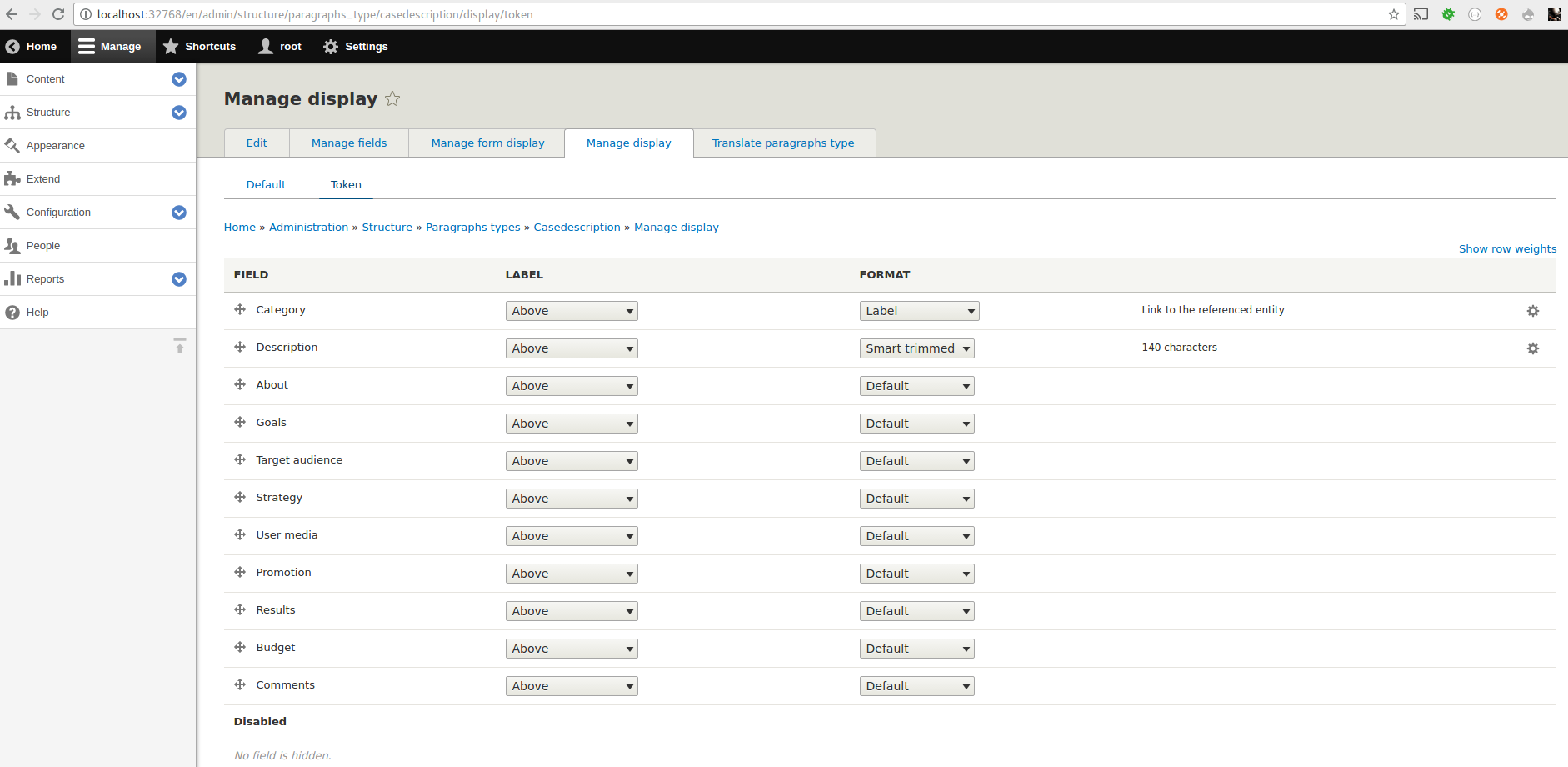
ruloweb commentedActually this can be done without the patch, if you enable the Token View Mode and apply the Smart Trim format to your fields, Token module will use it. It can be done with any Field Formatted that you want.
Please give it a try, I have solved it that way.
If you can solve it in that way, I think we should mark this issue as Works as designed.
Comment #8
g33kg1rl commentedPersonally I like this patch better. Sometimes I need to specify a very specific word or character count and I don't want it to be universally applied over the whole website.
I needed this for trimmed meta tag descriptions and meta page titles.
Comment #9
ruloweb commented@g33kg1rl actually I did the same, I wanted to trimmed and strop HTML in the metatag descriptions, if you select the Smart Trim format only in the Token View Mode, it will apply for tokens, not the entire site.
Comment #10
duncan.moo commentedThanks for the suggestion @ruloweb however it is not a node display that I am after here but as for g33kg1rl I needed a way to get a node summary that I could use for meta-tags.
I am just not clear on your suggestion, can you explain more clearly? I want to have a token that is specifically for the description meta-tag, it will not be used at all anywhere else, and I do not want to override the body token to be the same as the meta-tag token.
Comment #11
ruloweb commented@duncan.moo if you create (or enable if it is already there) a View Mode called Token for your entity, then you can change display settings on any field for that View Mode only, then metatag will notice that, and apply those settings.
Screenshot attached, I did that for a paragraph type, and it works like a charm.
Comment #12
g33kg1rl commented@ruloweb I do appreciate you taking the time to explain this alternative way, but it doesn't actually meet the needs that the patch does.
I do not want to change the format on the content type. I don't want the other format to appear anywhere else than the tokens that I put in the field provided by the Metatag module. This patch accomplishes that exact use case.
Comment #13
duncan.moo commentedYes agreed thanks for the explanation @ruloweb however if we are already using tokens for display of the field elsewhere and I change the token display mode it will affect the other use of tokens. So although it is a work-around it is not an ideal solution.
Comment #14
g33kg1rl commentedIs this rtbc?
Comment #15
duncan.moo commentedI found another issue with the patch supplied in #4, I was using langcode supplied by the function call rather than that on the node, this was causing an undefined index error.
Attached patch is a reroll of the full patch in #4 above.
Comment #16
duncan.moo commentedUploaded the wrong patch, trying again.
Comment #17
mgerbaultAvailable in Drupal 8 ?
Comment #18
chris matthews commentedThis patch simply removes the extra blank line at EOF.
Comment #19
bessonweb commentedWhen I try to apply the patch with git, it say "error: corrupt patch at line 96".
Do you have a solution?
Thanks.
Comment #22
volegerAdded token alter to fix [node:summary] token. Thanks for #2139587-1: Meta Description Token [node:summary] from Meta Tag Module Breaks using Smart Trim code snipped and little bit improvements, the [node:summary] token will respects trim_type words configuration.
Comment #23
volegerComment #24
volegerAdded helper function for word count token support. Now token ignores HTML markup during words calculations.
Comment #25
jim22 commentedThank you, duncan.moo. This patch is awesome.
Some notes for anyone else running into issues implementing.
1) I used patch #16, as #18 had an error.
2) I ran into an error on line 75 of smart_trim.tokens.inc. I switched [$langcode] to ['und']. This seems to have resolved it and now outputs the token.
3) I can't see the smart_trim tokens in the fast_token_browser, but using the following works for node body field.
[node:body-smart-trim:145]
Comment #26
anybodyAny active maintainer here for D7 to review this?
Comment #27
heddnI'm sure the implementation between D7 and D10 is a little different. But a smart trim token for summary fields is actually a missing feature-set in D10 too. And since the life-support for D7 is so short at this point, I'm going to just move versions and work on a version of these functionality for the 2.1.x version.
Comment #30
heddnInitial implementation in smart trim 2.1.x provided.
Comment #31
akalata commentedWorks as expected, though I'm not sure about the assumption of a `token` view mode -- but I think that's more of a foundational approach with "how do we handle tokens that might need to respond to settings?".
Comment #32
heddnThe 'token' view mode logic is exactly what
token.moduleassumes. It seems like that assumption was a safe one to continue using here too.Comment #34
ultimikeThanks everyone for pushing this issue forward, and also for your patience for one of this module's slacker maintainers finds the time to check it out (present company included).
First off - this needs a test. @markie and I have been really trying to require tests for all feature additions and bug fixes, so this would be no exception. I think a functional test would be pretty straight-forward...
I manually tested this using Gitpod with a few of our DrupalEasy alums and all appears to work as expected. The only thing I would make note of (possibly with an update to the README and/or docs) is the fact that the Token view mode must be enabled and configured with a Smart Trim formatter (for the field(s) in question) or the Smart Trim tokens aren't really involved.
Regardless, we tested Smart Trim tokens with Pathauto and Metatag with everything working as expected.
I went ahead and committed @heddn and @akalata's suggestions, as well as a PhpStan ignore for renderPlain() in smart_trim.tokens.inc (see #3463405: Handle renderPlain() deprecation).
-mike
Comment #35
heddnTest coverage added.
Comment #36
markie commentedNeeds a rebase please.
Comment #39
heddnThis should now be green, except for Drupal 11 support. Which is still not functional on HEAD.
Comment #44
heddnIn #39 thought I had it figured out why tests are failing on pre 10.2. They pass successfully on local 10.2, just not on the testbot. Since 10.1 is no longer supported and this is a new feature, I feel quite happy to simply skip execution on old drupal versions (that's what we do now). It results in the same work later since in both cases we'd have pre 10.2 logic that would need to be removed.
Comment #45
ultimikeI changing this to "needs work", but for any serious reason - only because I have a question about the test logic that I couldn't figure out on my own...
thanks,
-mike
Comment #46
heddnComment posted.
Comment #47
markie commentedComment #48
markie commentedTested in Drupalpod with metatag and it seems to be working well. Was able to update the metatag description with a token.
Comment #50
markie commentedMerged and prepping for the next release.
Comment #52
jacobupal commentedI've just tried this out and while
[node:body-smart-trim]alone will work, when I use it as a meta tag description[node:body-smart-trim:160]i.e. including a max-length value, it does not. The page simply loads without the appropriate meta tag present. Presumably because "[node:body-smart-trim:160]" could not be found.So two questions:
Comment #53
ultimike@jacobupal,
No, tokens that include a max-length value are not supported.
When using the new Smart Trim token, the max value (and the rest of the settings) will come from the Token view mode of the entity (if specified) or fallback to the default view mode settings.
-mike
Comment #54
heddnExactly what Mike said in #53. That is how core tokens work too. This is just following that precedent.
Comment #55
anybodyJust found this issue but couldn't find documentation on this secret feature anywhere. Is it possible that this isn't documented at all?
Maybe someone how knows how to use this could add some sentences to the READM.md or the documentation pages? (Maybe as follow-up?)
Comment #56
ultimike@anybody - it took us awhile, but here's a new doc page for it!
https://www.drupal.org/docs/contributed-modules/smart-trim/smart-trim-to...