Hello,
First of all I'm not sure if this was the correct issue queue to post this to, as it more relates with how Search API works with Solr, than Search API itself. If it should have been posted to Search API Solr my apologies and would be happy to move discussion there.
Using Drupal 7, Search API: 7.x-1.18, and Solr 5.5.0 I'm trying to get a Search API Index to work with a dataset that has been indexed into Solr using Solr's Dataimporter rather than using Drupal and Search API to index the data. The reasoning for this is my team is going to be working with a fairly sizable dataset, currently at 82 Million records and expected to increase to no less than 140 Million records. Using Drupal and Search API to index all these records would take at least a week to complete whereas Solr can import the data in a matter of hours. The problem with going this route is that the Index doesn't see the data that has already been indexed, as mentioned here https://www.drupal.org/node/2009804#server-index-status how can I make it so the Search API Index will be able to see these items? I have found that I can manually add the item IDs to the search_api_item table giving it the correct Index ID, and setting the "changed" column to be "0" I can manipulate the progress bar (x/xxxx indexed), but that doesn't affect the Server index status value, nor can the items in the Solr index be retrieved via Views.
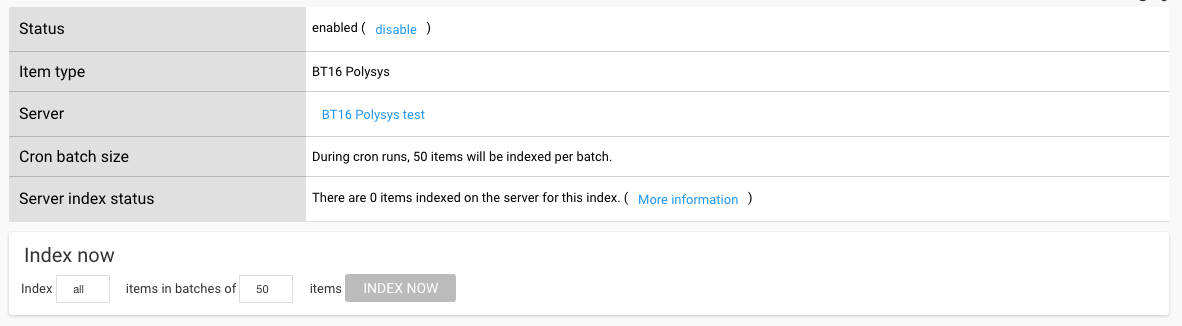
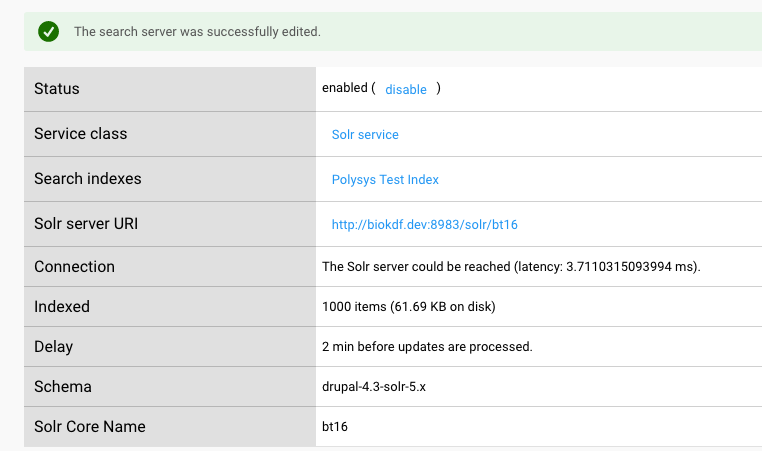
To test I created a core in Solr and imported 1,000 records, added a server within Search API which sees all 1,000 records, and created an Index under that server which reports that there is nothing. If I tell Search API to Index everything, then it works but it adds a second copy on top of what was already index, so instead of having 1,000 documents in Solr there would be 2,000 documents, which is not what we want and would take to long do the full 140+ million records. The goal is to not have to down the system for week(s) at a time to import new data into Solr which is why we are leaning just importing via Solr.
If it matter we have created custom entities in Drupal for this data and are able to load the data via calls like entity_metadata_wrapper() for use of Search API and Views.
Any recommendations on how this may be achieved?



Comments
Comment #2
drunken monkeyWhen indexing, just take care that Solr's
index_idandhashfields are correctly filled for your Drupal index and site, and at least the "server index status" count will be correct.Then, though, it's probably a matter of getting the fields recognized, too. If you create an entity for the items, you need to have the properties you're indexing marked as such on the index's "Fields" tab and then conform to the Solr backend's mapping between Search API fields and Solr fields (which you can change via
hook_search_api_solr_field_mapping_alter(), though – e.g., in your case, you could just create a 1:1 mapping (apart from the "magic" fields)).I think this should already be it. If you still have troubles, please just ask again here. (In theory, there's also the Sarnia module to integrate with external Solr data, but as far as I know it's not working correctly at the moment. On the other hand, though, there seem to have been some recent commits, so maybe that's not true anymore after all. Probably you should give it a try before going the more complicated DIY route.)
I'd leave the
search_api_itemtable alone. True, the "index status" will be wrong otherwise, but you don't need that if you don't want to index via Drupal.The proper way to integrate external data into the Search API is not by creating a new "fake" entity type but by implementing your own datasource controller (you can use
SearchApiExternalDataSourceControlleras the base class) for your item type, and then use that to implement all necessary operations. But really, in this case, an entity type should work just as well – maybe even better, in D7, to be honest.Actually, if you make this work properly, could you maybe do a short write-up of the process and add it to the module's handbook somewhere (e.g., as a child page of "Developer documentation")? That would be really great!
Comment #3
vendion commentedThanks for the tip about Sarnia, it looks like that may do what we need. If not I will pursue the other options.
Comment #4
drunken monkeyOK, then I'm marking this issue as fixed.
In case you do have more questions later, please just re-open.
Comment #6
kdleon commentedHi there,
Just wondering if there's a way to directly submit external content (from a JSON feed or an API) to a SOLR index?
I am working on integrating our drupal site to multiple third party applications and consolidated search is one of the main tasks. I looked at using the Feeds module and importing external content into drupal as nodes but I am worried about content ingestion especially if we're aiming to integrate with third party applications which make intensive use of knowledge articles...
So if there is a way to send external content directly into the SOLR index without having to import them into Drupal as nodes, that will be fantastic! I hope this is something that's feasible and someone has implemented already? If you can point me to the right direction, that would be really great!!
Thanks
Comment #7
ravi.sidd commentedHi team
Anyone who can help on kdleon Comments?
Comment #8
kdleon commentedHi amadady,
Here's a response from drunken monkey. He mentioned that sending JSON to SOLR index is very simple - I'm still unsure how to go about it though.
https://www.drupal.org/project/search_api_solr/issues/2961252#comment-12...
Hope this helps!
Comment #9
Bernd Glasstetter commentedI have been working on exactly this. A project in which we needed to insert large databases outside of a drupal-site, a drupal-site with a lot of content, some other sites to be crawled by a webcrawler and the attachments of the drupal-site into a single search.
Better plan first how the search will be done, what facets you are going to use, what fields you want to display and so on. This will save you a ton of time. We used search_api as it is actively developed. And it is pretty extendable. All needed submoduls are in their production-versions and no Beta or Alpha.
For the external databases we used Solarium, a PHP-based framework, which allows you to index rather quickly without a really big learning curve. However the documentation is a little bit small. Some fields need an array, some fields need text, boolean or an id. And you need to work this out. If the field stores multi-value fields it is i.e. an array that you need to supply to the indexing process.
If you want to get all of the content displayed in the search results, you need to know the "hash" and the "index_id" of your sites index. The hash is unique to every Drupal 7-site, in Drupal 8 it seems to be gone. As we are developing for Drupal 7, this was very important for us. The index_id is most of the times the name of the index you created in the search_api written in small letters, hense the machinename of the index.
You need to know the fields to be indexed. But their names don't remain the same in Solr. ss_, ds_, bs_, tm_, is_ and sm_ can be added to them. So you should check this out in the Solr-admin. Just run a query and you will see the fieldnames in the resulting JSON. And of course in the schema of your Solr.
Make sure, that the ids of your documents are different from the one, that Drupal uses. Drupal will do the id like this: HASH_INDEXTITLE_IDINTHEDRUPALDATABASE. You most likely have your own id in the database you try to index. It proved to be a good choice to use a different hash here. You don't need to use the one which is in an own field. The latter is used by drupal to identify the items as his items and to display them correctly. It is VERY important, that you define your id carefully. You don't want to delete by accident content from your Drupal-site and you want to update content from your external source if necessary.
Drupal can save the URL of the whole node in Solr. Let it do exactly that. You are going to use this field for your own URL.
If possible (except for Taxonomy) let drupal only display the results from the search within Solr. Or else you won't have a title, an URL and so on.
The steps for indexing:
1. Let Drupal index it's nodes first. It will the define the schema in Solr.
2. Then you can use this schema for extending upon it with other sources.
3. Index the external sources
4. Check if everything displays right.
IF you did everything right, IF you planned right, the external items are going to be displayed in the search.