Version "8.x-2.x-dev" is not working for me to prepopulate entity reference fields.
Here's the fix that worked for me:
In the prepopulate\src\Controller\prepopulateController.php file, replace line 47. Line 47 is
$form['widget'][0]['value']['#value'] = $request_slice;
Replace line 47 with the following six lines:
        if (isset($form['widget'][0]['value'])) {
          $form['widget'][0]['value']['#value'] = $request_slice;
        }
        else if (isset($form['widget'][0]['target_id'])) {
          $form['widget'][0]['target_id']['#value'] = $request_slice;
        }
And, below is an example of a relative URI that I was able to get working with this code change. This example is for:
- creating a new node of content type "page"
- prepopulating that new node's entity reference field that has the machine name "field_page"
- prepopulating that field so that it points to the node with the title "ExistingNodeTitle" and the id "45"
/node/add/page?edit[field_page]=ExistingNodeTitle%20(45)



Comments
Comment #2
juliencarnot commentedThanks a lot for sharing your fix, I happen to have the same problem: I want to create a node of the "project" type, referenced to a "resource" type node. So I created a field name "field_p_resource", which I can use with autocomplete on the project add node form (just filling the title of the resource). This field can have unlimited values. In the form, its name attribute is "field_p_resource[0][target_id]" and its label is "Ressource utilisée".
I've read the doc, specifically the part on entity reference, which gives this example:
node/add/content?edit[field_example_entity][und][DELTA][target_id]=Entity%20label%20(ENTITY_ID)but I'm not exactly sure what my own parameters should be, so I tried this and a lot of other combinations, with no luck:
node/add/project?edit[field_p_resource][0][target_id]=Ressource%20utilisée(49)(49 being the id of my resource node)
I get this error message, with or without the replacement you suggested:
Any hints would be very much appreciated!
Comment #3
JonFreed commented@juliencarnot, Try removing the "[0][target_id]" from your URI and putting a space ("%20") after "utilisée" and before "(49)".
I'm also updating the issue text to include an example of a relative URI that I was able to use successfully with the code change.
Comment #4
juliencarnot commentedThank you so much @JonFreed for the answer and example/explaination, it was one of the combinations I hadn't tried and it worked!
I get an additional notice message on the node add page and on the node page after it is submitted, still related to the type undefined index. I'll copy it here it is so others can find this issue:
Comment #5
jehon commentedHello
The fix worked for me too. Great.
Would it be possible to go one step further? Having the url containing "/node/add/page?edit[field_page]=45" (the node id) only seems more robust to me...
Thanks in advance,
Jean
Comment #6
jehon commentedSo I propose this code:
The code use this to fill in the complete title, if the requested parameter is an integer:
Check that the element exists and get it:
Get the title:
But since I don't understand very well Drupal api, you should check twice if it would not break anything anywhere else...
The first thing in my mind is that could open a security hole: this allow anybody to get the title of any node...
Comment #7
jehon commentedSo here is a version wich protect against discovering titles:
The test use this to check if the user has an access to the node:
Comment #8
juliencarnot commentedJust put the initially suggested fix in a patch, to be reviewed.
@jehon: sorry I'm not qualified to evaluate your suggestion, sounds like an interesting feature though!
Comment #9
malcomio commentedThis would be a very useful feature, but the access check is an important point.
Also USAGE.txt should also be updated with example URLs
Comment #10
malcomio commentedThe patch does seem to achieve the desired result, although I agree with the comment at #5 that it would be more robust to just use the entity ID - including titles gets messy, especially with accents and other special characters.
Comment #11
malcomio commentedHere's a patch based on @jehon's suggestion in #7.
I've only tested it on single-value node references so far, using the node ID.
Comment #12
jehon commentedHey, would be great to have it work with multiple values, for the sake of completelessness...
But I have no use case for the moment :-)
Comment #13
jehon commentedHello
Who should make this code review, and how to do it ?
Could you guide me to somewhere I could find that information?
Comment #14
malcomio commentedHi jehon - the best place for getting started is probably https://www.drupal.org/contribute/development for general information, and https://www.drupal.org/patch/review for info on reviewing patches
Comment #15
malcomio commentedLooks like multi-value fields don't work in the 7 version either, although there is a patch for it: #1468024: Impossible to prepopulate multiple values in select
Comment #16
jehon commentedComment #17
jehon commentedHello
I reviewed the code, and I confirm that it is working.
Thanks
Comment #18
pheraph commentedThe Patch #11 is working for me, too (with single value node references).
Comment #19
srjoshComment #20
srjoshThis one cleans up some PHP notices.
Comment #21
srjoshThis one cleans up a notice that happens when you attempt to prepopulate a field that doesn't have an actual field (markup type thing). Total edge case, but found in connection with my testing.
Comment #22
malcomio commented@srjosh - are these patches to fix issues introduced by the previous patch? if so, please could you create an interdiff? see https://www.drupal.org/documentation/git/interdiff
if they're issues that exist separate to the patch, please could you create a separate issue?
thanks
Comment #23
Derimagia commented"\Drupal\node\Entity\Node::load" - Reference fields don't have to be nodes. This shouldn't have any hard-codes to the entity type.
Comment #24
sreher commentedI have problems with the select type widget.
I guess it because I use no multivalue field. I limit the usage to "1", so
$form['widget']['#multiple'] = falseIt works without the new added array only "$form['widget']['#value']".
So we had to check the multiple value first and than decide which variant to use?
Comment #25
ressaI can also confirm that the patch in #11 works with a single value node reference. It would be great to get it committed to the current dev-version. Maybe even get a D8 alpha-release?
Comment #26
avibrazil@gmail.com commentedPatch #21 works beautifully for me.
Comment #27
dreeds commentedsubscribe
Comment #28
paddy.doyle commentedPatch #21 works for me too, for content with two entity references. Thanks!
Comment #29
juliencarnot commentedPatch #21 works for me too, marking this issue as RTBC!
Comment #31
jbrauer commentedCommitted. Thanks!
Comment #33
texas-bronius commentedFor anyone looking for it:
Just enable this module, and prefill your Drupal 8 entity reference field that looks like:
by a URL in Views constructed like:
Afaik, there's not an out of the box way of subsequently hiding that auto-populated field like nodereference_url would do.
Comment #34
skyredwang@jbrauer No. this issue is not fixed, as #23 pointed out. Can you reopen?
Comment #35
skyredwangAttached is the patch against the latest 8.x-2.x and fix #23
Comment #36
jbrauer commentedReopening for additional review.
Comment #37
daggerhart commentedRelated issue #2847371: Entity reference now works only with nodes contains a working patch that accounts for single and multiple value entity reference fields for any entity_type.
Comment #38
colanPlease review #2849432: Simplify Prepopulate implementation with the Entity API as we're looking for more feedback, and it should also solve this issue.
Comment #39
hanoiiFWIW, I tried #36 and works nicely.
Comment #40
possibriI was looking to test this patch but it appears the /src directory no longer contains a Controller directory, nor any of the code mentioned here. Are things changing or was that an accident?
Comment #41
colan#38 is in. Please reopen if it doesn't fix this.
Comment #42
possibri@colan I am using the most recent dev version of Prepopulate but this is still an issue. I tried using the syntax as shown in the issue linked in #38, but still my Entity Reference field doesn't populate. I've tried changing the field widget to autocomplete and also checkboxes and neither work. If there is anything I might be doing wrong please point me to the proper info and I'll do my best to work it out. Thanks!
Comment #43
colanSetting status back as per #42.
Comment #46
edysmpThis not works. Maybe this was broken in this?
Comment #47
sketman commentedIt does not work for me neither. I tryed every possible formatof url pattern but with no luck.
Comment #48
edysmpWorking on this.
Comment #49
edysmpThis patch works for me with dev branch.
Comment #50
edysmpuse this format:
?edit[field_page]=30&edit[title]=HelloComment #51
heddnCan we open a follow up issue for this? There's already been a commit and a very long conversation over the years.
Comment #52
edysmpOK. I don't noticed. but this is working with this trick without my patch:
?edit[field_page][widget][0][target_id]=2Comment #53
sketman commentedI can confirm that hack #52 works for me.
This prepopulates also Dynamic Entity Reference fields.
Thanks @edysmp
Comment #54
drupaldope commentedthanks sketman, can you also confirm this prepopulates entity reference fields using arguments from the URL ?
...
edit: it looks like the field has no options for prepopulate from URL like the entity reference prepopulate in Drupal 7.
Comment #55
heddnThere is no UI for this module. However, if the field values are prepopulated in the URL, then it will use them as prepopulated values.
Comment #56
heddnComment #58
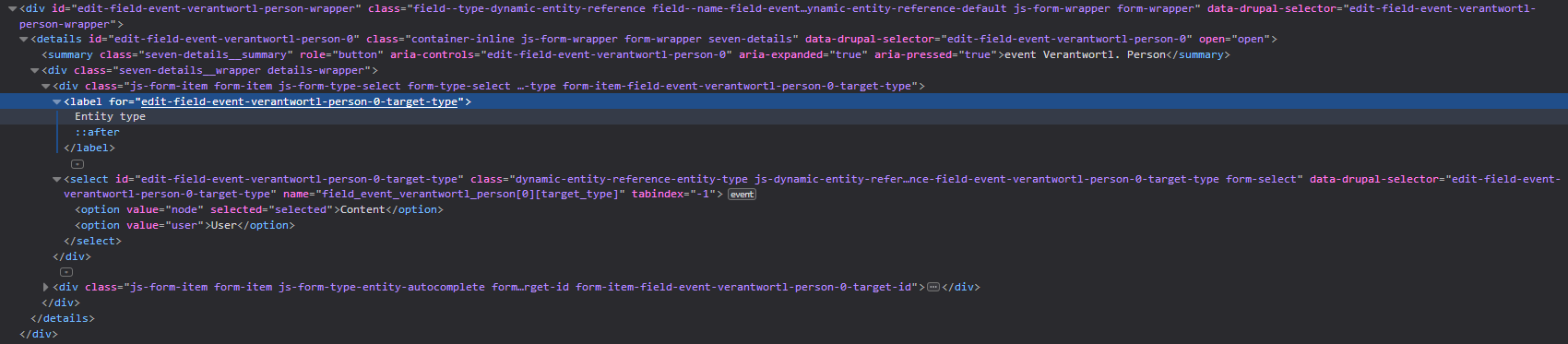
maxilein commented#52 isn't working for me: I have a DER (dynamic entity reference) field with different types of content:
I can set the value in the (label) reference field but I cannot select the entity_type.
There is an issue for DER with a patch, but for the very old beta version.
https://www.drupal.org/project/prepopulate/issues/2910117
Comment #59
maxilein commentedHere is the rendered output to image in #58
Comment #60
colanThis issue is closed/fixed. Please find/open another one if you're having problems. Thanks!
Comment #61
ressaI can confirm that the new syntax (as outlined on the module page) works with entity reference fields:
http://www.example.com/node/add/page?edit[field_entity_reference][widget][0][target_id]=123Comment #62
dureaghin commentedThe new syntax doesn't work for me. But this is working with this:
http://www.example.com/node/add/page?&edit[field_entity_reference]=123Comment #63
prineshazar commentedExample #61 & #62 didn't work for me. The following did (select field, wrapped in a container):
http://www.example.com/node/add/page?&edit[field_entity_reference][widget]=123Comment #64
bwong commentedI can get this working when the entity reference field is not within a container.
Comment #65
maxilein commentedWhat container?
Comment #66
bwong commentedAn Inline entity form - Complex - Table View Mode within a Details container.
Comment #67
maxilein commentedAnd it works without the details container?
So the IEF would be working? I never tried that.
Comment #68
tokihttp://www.example.com/node/add/page?edit[field_entity_reference][widget][0][target_id]=123This syntax suggested on the module page (like in #61) worked for me but only if the widget type is "Autocomplete" on your Manage Form Display. It did not work with "Autocomplete (tags style)" for example.
Hope this helps.
Comment #69
ledjerdemain commentedSorry for being a super noob here, but I don't get how to make this work. I have
Where is that label field? How do I rewrite the add/edit form url so that shodws "node/add/page?edit[field_entity_reference][widget][0][target_id]=123"?
Thanks in advance.
Comment #70
ressaI usually create a view, and add a block, to show on the content type referred to, which in this example is from a "Chapter" to an "Article". Under "Contextual filter", add "Node ID" and select "When the filter value is NOT available" > "Provide default value" > "content ID from URL".
Add the node ID field, call it for example "Prepopulated link with nid (Content: ID)". Under "Rewrite results", check "Override the output of this field with custom text" and add
<a href="/node/add/chapter?edit[field_main_article][widget][0][target_id]={{ nid }}">Create chapter</a>, add the block, and only show it on Article content type.Comment #71
socialnicheguru commentedThis seems to work on autocomplete but it does not work on autocomplete (tags).
Comment #72
maxilein commentedCheckout https://www.drupal.org/project/epp
Much easier because no hassle with widget settings. Docu is great.
Had it coexist with prepopulate for a while whitout any problems.
Comment #73
ressaEntity Prepopulate is great. Note that it requires the Token module to work with reference and text fields, and to show the token browser ("Browse available tokens.").