


Review Drupal major upgrade readiness of the environment and components of the site.
Use version 5 of the module on Drupal 10 to get to Drupal 11 or Drupal 11 to get to Drupal 12
The module provides the following key features:
- Checks if you are using a version of Drupal that supports an upgrade.
- Checks if your system meets the next major version's system requirements.
- Integrates with the Update Status core module to list the available updates of your contributed projects. Projects can be compatible with multiple major Drupal versions, so most projects can be updated on your existing site before doing the core major update.
- Runs PHPStan and a whole set of other checks to find the compatibility issues with the next Drupal major version that remain (see more details below).
- Analyzes modules, themes, profiles and recipes, also the ones that are not installed.
- Groups the projects by next step: remove, update, analyze, collaborate with maintainers, fix with drupal-rector, fix manually, update requirements, or nothing to do.
- Puts each problem in a category by what to do with it. Problems that only matter after the next major version are kept apart.
- Lists what makes the report less accurate, like newer releases of the analysis tools or old update data.
- Exports the report and the results as HTML, Markdown, CSV, Code Climate JSON and Checkstyle XML.
- Integrates with Drush and with the
drcommand of Drupal core for command line usage and to plug into CI systems. - The report fits the Claro, Gin and Default Admin administration themes, dark mode and small screens.
The analysis runs on your site. No LLM, API key or subscription is needed, and your code is not sent to a remote service.
You must run compatibility checks on your current site against the next major version (ie. on a Drupal 11 site for Drupal 12 compatibility). It is not possible to run most compatibility checks on an upgraded site (ie. once you upgraded to Drupal 12), because the deprecated APIs, libraries, etc. are not present anymore.
Also, jumping multiple major versions at once is not supported by Upgrade Status, nor the Drupal core upgrade path. In other words, it is not possible to directly upgrade from Drupal 9 to Drupal 11/12 or Drupal 10 to 12.
Installation
Due to third party PHP library dependencies, the module needs to be installed with Composer.
- Add Upgrade Status to the codebase.
$ composer require drupal/upgrade_status - Test classes are only analyzed when PHPUnit is installed. To analyze test classes too, you also need Drupal's developer dependencies.
$ composer show drupal/core | grep versions $ composer require --dev drupal/core-dev:[copy version above] --update-with-all-dependencies - Install the module using the Extend page or with Drush as you would any other module.
- Install Composer Deploy or Git Deploy, as appropriate to your Drupal setup. With one of those you get a more accurate split of custom and contributed projects, and the version information that the available updates are based on.
Using the web interface
Find Upgrade Status under Administration >> Reports >> Upgrade status.
The report starts with what makes the report less accurate, a summary, and the environment checks. Below those, your projects are grouped by next step. Select projects to analyze or export. Follow the link of a result to the page of the project. There you find the problems by category and file, with the line numbers.
Categories of problems
Each problem is put in a category by what to do with it. The names have the next major version of your site. The examples here are for a Drupal 11 site.
| Category | Meaning |
|---|---|
| Fix now with rector | Removed in Drupal 12. drupal-rector can fix it automatically. |
| Fix now manually | Removed in Drupal 12. drupal-rector has no fix for it yet. |
| Update requirements | A requirement or dependency in an info file, a composer.json file or a recipe that does not work with Drupal 12. Update these once the code is compatible. |
| Consider contrib deprecations | A deprecated API of a contributed module or theme. It is removed in a release of that module or theme, which may or may not be required for Drupal 12. |
| Check manually | A message without a Drupal version, like a parse error or code that could not be checked. It may not be about Drupal 12 at all. |
| Raise core requirement and fix | In a contributed project: removed in Drupal 12, and the fix only works from a newer Drupal core version than the oldest supported one. |
| Update core and fix | In a custom project: removed in Drupal 12, and the fix does not work on the Drupal core version of your site yet. |
| After Drupal 12 | Removed in a later major version. A fix is not required for Drupal 12. |
Command line usage
You can use Upgrade Status on the command line with Drush 13 and later, and with vendor/bin/dr on Drupal 11.4 and later. It does not matter for Upgrade Status if your Drush is global or site-local, however the Upgrade Status module needs to be installed for the commands to work.
The upgrade-status:analyze (us-a) command is provided to analyze code and export results. The command takes the following arguments and options:
Arguments:
  [projects]... List of projects to analyze/export.

Options:
  --all                   Analyze all projects.
  --skip-existing         Return results from a previous scan of a project if available, otherwise start a new one.
  --ignore-uninstalled    Ignore uninstalled projects.
  --ignore-contrib        Ignore contributed projects.
  --ignore-custom         Ignore custom projects.
  --ignore-list           Ignore a list of comma-separated projects.
  --phpstan-memory-limit  Set memory limit for PHPStan. The default is 1500M.
  --format                Set the format: plain (Markdown), html, csv (one row per message), checkstyle (XML) or codeclimate (JSON).
The exit code is 3 when a project has messages for the next major Drupal version or the analysis of a project failed, and 0 otherwise. Messages that are only for a later major version give 0. So you can fail a CI job with the command.
The upgrade-status:report (us-r) command prints the report of the whole site: the environment checks, and the projects grouped by next step. The command takes the following options:
Options:
  --groups                Show only these comma-separated sections: environment, remove, update, scan, collaborate, fix-with-rector, fix-manually, update-requirements, compatible.
  --ignore-uninstalled    Ignore uninstalled projects.
  --ignore-contrib        Ignore contributed projects.
  --ignore-custom         Ignore custom projects.
  --ignore-list           Ignore a list of comma-separated projects.
  --format                Set the format: markdown, html, or csv for the projects only, one per row.
Integration with Gitlab CI
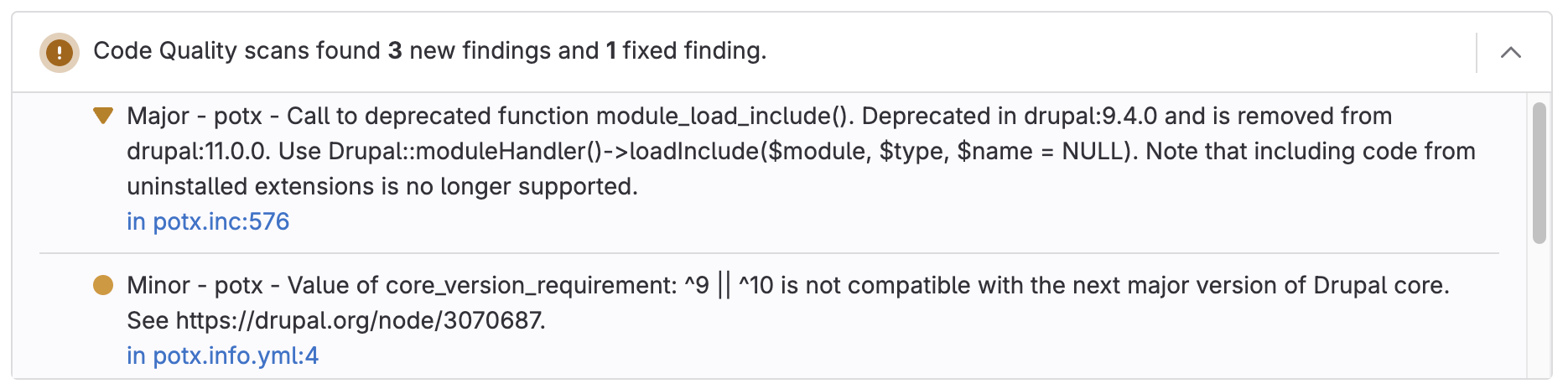
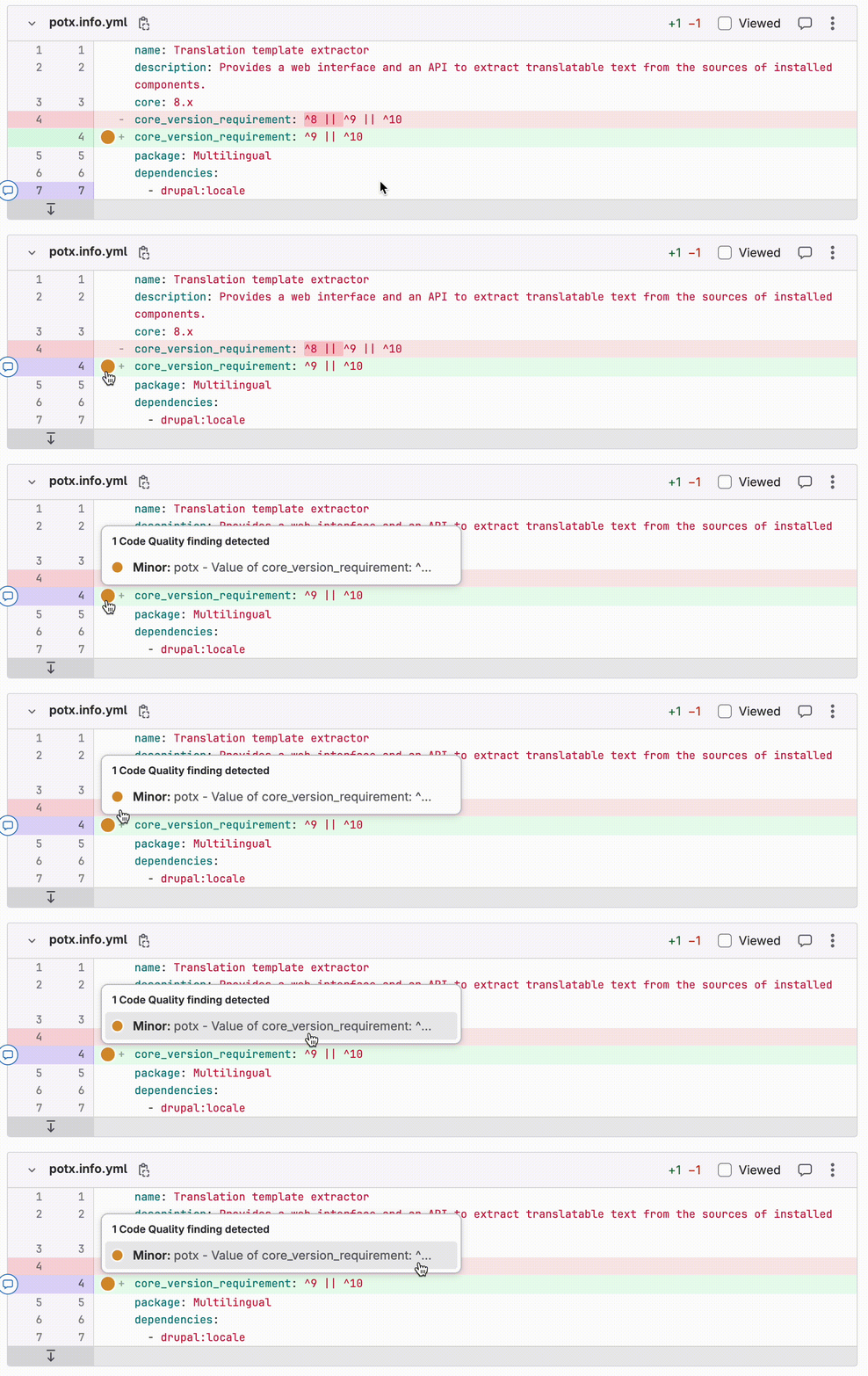
With the Code Climate JSON format of the analyze command, you can integrate Upgrade Status with Gitlab CI. There is built-in integration in the Drupal.org templates, so you can easily run Upgrade Status on your projects to ensure forward compatibility. Inline results will be displayed in code changes additionally to the summary.
Automated patch generation
Upgrade Status finds deprecated API uses, and does not fix those. The drupal-rector project provides a command line solution for that. The problems that drupal-rector can fix are in the "Fix now with rector" category, with the commands to run.
Upgrade Status and drupal-check compared #
You may have heard of drupal-check which is a command line tool for deprecation checking. Upgrade Status would not have been possible without the internals of drupal-check, but it adds on various additional features that drupal-check does not provide:
| Feature | In drupal-check | In Upgrade Status |
|---|---|---|
| Command line interface | ✔️ (native) |
✔️ (Drush or dr) |
| Web interface | ❌ | ✔️ |
| Checkstyle XML output option | ✔️ | ✔️ |
| JSON output option | Simple | Code Climate (eg. GitLab CI) |
| PHP deprecated API checking | ✔️ | ✔️ |
| Results categorized to rector fixable, manual fix, manual review, only after the next major version, etc. | ❌ | ✔️ |
| Twig deprecated APIs found | ❌ | ✔️ |
| Deprecated hooks, theme hooks, template variables and theme suggestions found | ❌ | ✔️ |
| Deprecated library use and extensions found | ❌ | ✔️ |
| Deprecated routes and services in YAML files found | ❌ | ✔️ |
| Deprecated plugin definitions and config schema found | ❌ | ✔️ |
| Deprecated JavaScript APIs found | ❌ | ✔️ |
| Recipes checked | ❌ | ✔️ |
| info.yml checked | ❌ | ✔️ |
| composer.json checked | ❌ | ✔️ |
| Next Drupal major requirements checks | ❌ | ✔️ |
| Current Drupal core version check | ❌ | ✔️ |
| Project awareness | ❌ | ✔️ |
| Available project updates integration | ❌ | ✔️ |
| Export clickable HTML reports | ❌ | ✔️ |
| Export CSV reports | ❌ | ✔️ |
| Export ASCII reports | ✔️ | ✔️ (Markdown) |
| Can be run site independent | ✔️ | ❌ (need to install on [dev] site) |
Project information
- Project categories: Administration tools, Developer tools
 88,573 sites report using this module
- Created by sun on , updated
 Stable releases for this project are covered by the security advisory policy.
Look for the shield icon below.

