I've been checking the different options for setting geolocation data in the 7 and 8 branches. I don't know whether the v8 feature set is by design or just the state of the rewrite, so here are some remarks...
In version 8, we have:
- Geolocation HTML5: A single button, with a textual only feedback (lat,lng in decimal), an accuracy information in meters divided by 1000, no map, no option to adjust/correct the data from a browser, which can be wrong. Very lightweight and not dependent on external resources, from what I see.
- Geolocation Lat/Lng: I don't really see a use case for a human inputing decimal lat,lng values except for a manual data transfer, so I wonder if it's really worth offering that "option".
- Geolocation Google Geocoder: search for an address, place your marker on the map, move it, clear it, but no way to use html5 location, and not as handy on mobile.
In the 7 branch, the geolocation googlemaps widget did allow to use the html5 api to get a location, to review it and to adjust it on the map.
For the 8 version, what do you think about offering 2 modes, which could be renamed for less technical users:
- Browser geolocation only: the mapless option, with a single button to trigger the html5 API call (and maybe even a buttonless/hidden option calling the API on page load), with a textual only feedback (lat,lng in decimal) and an accuracy info/alert allowing to call the API again (for example if the location was set before the gps fix on mobile. It would remain very lightweight and not dependent on external resources, and fitted to low accuracy needs.
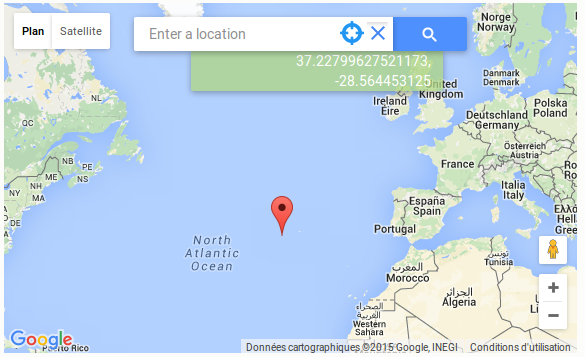
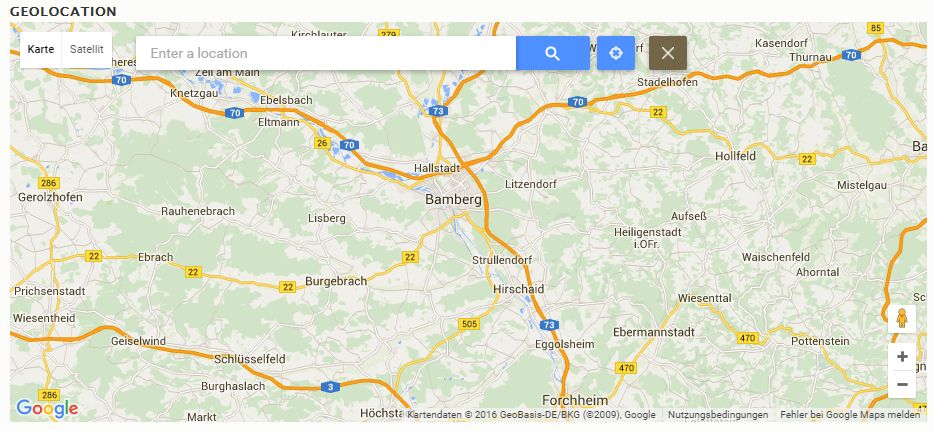
- Browser and map geolocation: display a worldmap, and from the search bar (see mockup), either call the html api or search for an address or zoom in and place your marker on the map. Any option give visual feedback to the user and an opportunity to adjust/correct it or clear it.





Comments
Comment #2
derjochenmeyer commentedThanks @juliencarnot for your feedback.
Your suggestions are great.
Comment #3
juliencarnot commentedThanks Jochen for your answers!
I finally found some time to try to modify Geolocation Google Geocoder to include the HTML5 browser geolocation in the google geocoder widget and it seems to work pretty well on my side. Please bear with me, this is my first ever patch, I hope it will be useful but it surely needs review!
After thinking about it, I went for something a bit different and simpler than what I described earlier. Upon loading the form containing the widget, if no location is set (so only on create form and not edit form), the user is prompted to share her browser's position. When the location is shared, the marker is set, a circle with the accuracy radius is drawn and the map is set to the position, zooming in to show the accuracy radius. Values for lat and lng are passed to the hidden form. If needed, the marker can be set somewhere else as usual with a click, and the circle disappears. The clear button also works as usual.
This feature works pretty well when a user is contributing data on scene with a smartphone or around his place, but I guess some use cases for the module would imply users contributing data for some remote places, in which case it wouldn't be that practical to deny the getCurrentPosition before using search. I'm thinking this should be an option/configuration for the module, in order to keep the interface clean. If that's not possible, we could also go back to a getCurrentPosition button and no call on page load, like in the previous mockup, but it's adding a tap on a small button for a smartphone user.
Thanks for your time!
Comment #4
juliencarnot commentedComment #9
derjochenmeyer commentedThanks for the patch! It seems you are using tabs instead of space characters for indentation.
Please review Drupals JavaScript coding standards.
Comment #10
juliencarnot commentedThanks for the tip! Hope it's ok now!
Comment #11
derjochenmeyer commentedLets test it :)
Comment #16
derjochenmeyer commentedConverted the patch to utf-8 without BOM and removed the brakets from the filename.
Comment #17
juliencarnot commentedThanks Jochen, I'll keep that in mind for next time!
Comment #20
juliencarnot commentedI'm back with some improvements on this feature... It looks alright (see screen capture) and works pretty well for me, however, this patch probably has a lot of issues, which I tried to document... Keep in mind I consider myself a bad coder and it's mostly the result of trials and errors! But I'd really like to give back and hope somebody can have a look and show me how it should have been done!
To name two of the main shortcomings:
One more general question: I was assuming that geolocation.js should contain features needed for displaying the field and that geolocation-widget-googlegeocoder.js would contain the widget related features, but it seems like it's not really the case. For example, buttons and search are in geolocation.js but used in the widget. Is there an explanation for that or is it waiting to be refactored some day?
Thanks a lot for your patience!
Comment #21
juliencarnot commentedComment #23
isholgueras commentedHi!
I applied #20 patch in 8.x-1.5 and works great, but I found some issues (I think) and I send you a patch and an interdiff.
This is fully working for me.
I applied and tested it with 8.x-1.5 version.
About the failed tests, I cannot reproduce it, so maybe will fail again, right?
Comment #24
juliencarnot commentedThanks for your tests and new patch Ignacio!
That's weird for the getlocation button, it worked well for me. I'll give a try at your patch when I find a bit more time.
Any ideas on the "code replication" problem described in #20? There has to be a better way and it seems like something we should address before considering merging this feature! Thanks again!
Comment #25
isholgueras commentedHi Julien,
Maybe because I didn't tested it in the dev version? My fault. I will test it in the dev version to see if it has the same issue.
I didn't see that duplication. Sure I will take a look at this too.
Thanks
Comment #26
christianadamski commentedThis just adds a new button, which when clicked moves the map to the clients location. No more, no less.
Are we happy with that?
Comment #27
derjochenmeyer commentedBedankt Christian, lets commit this and then reopen the issue for a possible follow up patch. The button works, but compared to the D7 version there is still some functionality missing.
D8:
- Browser location centers the map on the users location, but values are not stored. It's designed as a help for manually finding your exact location by clicking the map to add a marker.
D7:
- Browser location centers the map on the users location
- Marker is set
- Zoom is applied based on the accuracy level the browser returns (this differs significantly between desktop and mobile, which is pretty on spot)
- The marker can then be manually adjusted
Any volunteers to port the missing functionality to D8?
Comment #29
christianadamski commentedCommitted. I will open a new issue for the missing functionality. Seems cleaner than messing in here some more.
Comment #30
christianadamski commentedSee #2777753: Missing D7 functionality in Geocoder D8 "Homing" button. for follow up