There's general consensus that the Page Manager UI is quite complicated and doesn't provide the best user experience.
While we have an interim proposal to mimic the incremental improvements that Backdrop made to Page Manager in [#], we don't (yet!) have a plan for we'd ideally like it to be.
This issue to plan/discuss how to do a formal UX rethinking of the Page Manager UI!
Originally from @Crell on #2513910-11: Consider using page manager UI similar to Backdrop?
Expanding the discussion a bit, there's I think 2 ways to approach this problem.
1) The user should go through the process in the order that the code does. Ie, define a route first, then select what type of thing to put there, then configure that thing. [...snip...]
2) Flip it around completely. First have the user create the thing (Panel, HTTP responder, Node, REST, whatever). Then, and only then, ask "OK, so where do you want to put it?" This is somewhat more how Views works (although Views conflates these two steps as well).
Both of those are very viable approaches, although have extremely different implications for how things like Context or variants get defined. I'm not sure which one is better, to be honest. However, I do believe that trying to complect "what this thing is" and "where it goes" is the source of a lot of confusion around Page_Manager/Panels. "What" and "Where" are legitimately different things. Don't try to paper that over to the user. (Having both just be different tabs in a long list does paper that over, which IMO is part of the problem.)
And later on in #2513910-15: Consider using page manager UI similar to Backdrop?:
Sounds like we need some formal UX input on the "route then panel or panel then route" question. That's rather core to the UI interaction, and will impact everything else that gets done. We need to make sure to get that right. :-)




Comments
Comment #2
mustanggb commentedReflecting on D7 panels for a moment; the wizard is one of the thing that annoys me. I just bomb through it leaving everything as default so I can get on with what I want to be doing, which is creating the panel, then go back and edit what needs to be edited after the panel has been created.
Also it doesn't help that the UI when creating and the UI when editing a panel are different, if I spend most of my developer time editing existing panels then I become very familiar with the interface, then when it comes to creating a new panel I can't be confident that I'm plugging the right information into the right places, so again it becomes easier just to "skip" the wizard then go back and edit it later.
I think it would be nice if both approaches Crell mentioned were simultaneously possible.
For example a user could do any of the following:
1. A page(/route) is created with a variant that is specified to be a panel, but the actual panel is not created at this stage, a second variant is added and specified that it will be a JSON response, but again the actual response code is not created yet. Then I can navigate away from the page manager to my list of all panels, create a new panel from there, then plumb the two together by either:
1a. Navigate back to the page manager, edit the panel variant, and select the panel I just created from a list.
1b. On the panel edit page select the page manager page(/route) and variant from a list.
2. A page(/route) is created with a variant that is specified to be a panel, this time instead of leaving the panel selection blank I select an item from the list immediately, but instead of selecting one of the existing panels I select a "special" entry at the top called "New panel", this then goes through the panel creation and is automatically plumbed into my page, then once the panel has been created I'm returned to the page manager ready to create my JSON variant.
3. This one is probably not needed, as I see it being the least useful use-case and users would also lose the understanding that pages can have multiple variants, but essentially the same as 2, however this time the panel is created first then a new page can be created from the panel directly.
TL;DR
A page variant type can be added to a page, without specifying which actual panel (or specific implementation of what the actual type is) at the time of page creation. The two can then be plumbed together from either side at a later date.
Comment #3
mustanggb commentedWanted to see how it might feel to use, so put together a mockup.
https://moqups.com/MustangGB/ftPrvtPR/
Comment #4
dsnopek@MustangGB: That is a really cool mockup tool! And thanks for putting that together. :-) That's a good demonstration of separating the creation of routes from panels.
Comment #5
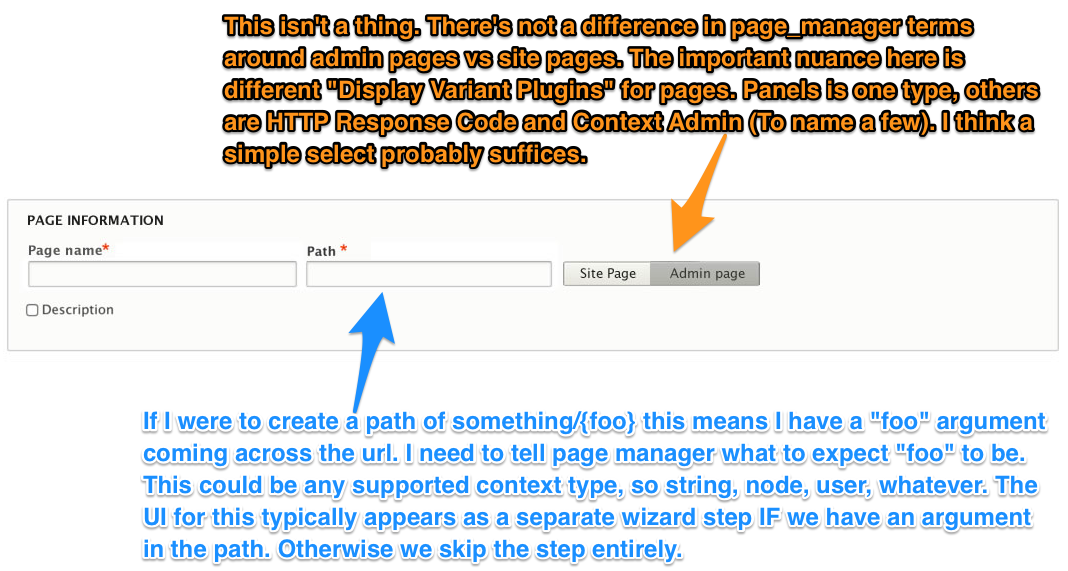
Crell commentedWe could probably improve it even further, but my first thought is "it's better than Panels/PM D7". (Which I grant is not that high of a bar, but...)
Comment #6
tkoleary commentedIn order to do a "Formal UX re-thinking" we need to apply some basic UX principles to this issue.
The following questions can focus this effort
Based on a lot of the work we have already done in the UX group we can answer several of these questions immediately.
What is the problem we are trying to solve?
At its simplest the problem is:
There are many complex variations of this problem but if we don't succeed in solving this main problem we've failed.
Who are we solving it for? Is it more than one kind of user?
There are at least three distinct personas here, each with varying needs and goals:
Related personas that impacted include The content author, The content strategist, The themer, and The designer but we don't need to be as concerned with these since they generally don't perform this task.
What are the skills, needs and context of the user?
The developer
The developer is working either in an agency or in-house on a team producing a site. She probably has a project manager, scrum-master or other leader to help her if she's blocked. She is comfortable reading documentation and "figuring things out". In most cases she also has a team of other developers working with her who can help her get unblocked. She already has the tools at her disposal to solve this problem. Assuming she knows PHP and twig, she could simply write new templates for each new page, however she would prefer a solution that the site builder or content editor can use to do this job themselves.
The Site Builder
This person may be in an agency but more likely is an in house team member who builds out or makes changes to a site so that it is suited to the needs of the organization. He may know a lot about Drupal but only a small amount of code. The code he does know is usually HTML, CSS, Jquery or some other javascript library. Even if this site is his first use of Drupal, he likely has worked in some other system with it's own concepts of "template", "Page" or "Layout" like Wordpress or Squarespace. Without a good tool for creating pages and layouts he will attempt to hack them in by doing things like creating a basic pages and stuffing the body full of custom markup. This will tend to cause problems for the Content Editor.
The Content Editor
She is tasked with getting specific content up on the site and works with authors, designers and possibly marketers or social media manages to pull all of the content together, often then handing it off to site builder, or even the developer, for more complex pages. She has less knowledge of code than the site builder and less knowledge of other systems. She would prefer not to have to go to the site builder at all, but she is forced to because of the complexity of Drupal. What she really wants to do is just "build the page" by dragging and dropping things.
Have others solved this problem elsewhere? If so how?
To varying degrees. Good examples include Typo 3 and Sitecore. because they both are also concerned with structured content.
How do we think we can solve it?
That's what we are trying to find out here.
How will we measure whether our solution is effective?
We will test it on real users. What this means is that we should not commit a patch to this issue until it actually has been tested on users, at least in the form of a prototype.
Start at the top
In my opinion we need to start with the persona closest to the end user who has the least knowledge and therefore the greatest need. That's the Content Editor. If our solution does not work for her then it's not really a solution. I think we can agree that panels in Drupal 7 does not work for the editor. The backdrop solution, while marginally better, also does not work.
We need a minimally viable solution that works for this user and we need it more urgently than we need a solution that makes the site builder's experience easier. That would only leave the Content Editor dependent and the site-builder overworked.
Comment #7
dsnopek@tkoleary: Thanks for the really in-depth and well thought out comment! I think this is a great basis for moving forward on this issue.
I agree with pretty much everything in #6, except for including the "Content Editor" persona as someone we want to use Page Manager.
Based on our experience with Panopoly in Drupal 7, we consider Page Manager to be an advanced tool for Site Builders. For Content Editors, we give them a "Landing Page" content type that uses Panelizer and the Panels IPE. If I were to ever encourage a Content Editor to edit a page from Page Manager, it wouldn't be through it's UI, but instead through the Panels IPE.
One signal to me that Page Manager is an advanced tool, is that it doesn't really manage "pages" but "routes" - which are a more complex and lower-level concept. We have an issue to change the menu link from "Struture -> Pages" to "Structure -> Custom routes" as a further signal that this more advanced than a "page": #2561339: Consider referring to "routes" rather than "pages" in the UI?
So, personally, I think we should be optimizing the Page Manager UI for the Site Builder persona.
Comment #8
Crell commentedI would agree with dsnopek. Page Manager/Route Manager is a site builder tool, much like Views. It should not be exposed to content editors.
If Content Editors want/need that level of control, a dedicated node type, Panelizer, or similar are the more appropriate tools. Those may leverage the Panels engine, which is fine, but that's separate from Page Manager, which is (contrary to popular belief) not strictly speaking part of Panels. (I'd say making that distinction clearer is also an important goal of reworking the UI.)
route_manager.module is definitely a site builder tool. Otherwise the formal approach from #6 makes a lot of sense.
Comment #9
tkoleary commented@Crell @dsnopek
We need a "page manager" to handle the basic functionality the Content Editor needs. That should be the first goal.
If we take the story:
And extend it out to a few more detailed stories:
Most of this can be done by page manager without panels or panelizer or panels IPE. This is the minimally viable level of functionality we should be shooting for in 8.1 core IMO.
Comment #10
eclipsegc commentedOk, so basically responding from comment 6 on down:
6:What is the problem we are trying to solve:
Response:
This is fundamentally NOT the problem we are trying to solve. This is not at all what page manager even does, and is a VERY small subset of what it enable Panels to do.
So, with that being said, the actual problem is:
It's important to note that all the "includes, but is not limited to" aspect of this problem definition is pluggable, so we can't know what might be created to go here beyond what exists today, and conflating the most popular of these plugins with the needs of the page_manager UI is not constructive to a UI rethink of page_manager at all.
comment 7, in general
I totally agree with David here. Page Manager is absolutely not intended for the content editor, and if they were to ever interact with it, it should be through the IPE.
comment 8
Which is why I also agree with Larry here. Panelizer is actually the more important tool for the content editor, and more closely maps to all the UX work around panels I've seen you do in the past Kevin. Page manager cares about url, menu definition(s) and route access before it ever worries about what it's putting at that route. Panels is just one option, and as someone who uses page_manager a LOT, I personally use it probably in the 50-60% case... not the 95% case. So these other things page_manager does are exceptionally important and not to be trivialized and thrown away in favor of focussing on panels.
comment 9
This would be great, but since views pages are a completely separate abstraction, and we have no way to affect change on it (right now) we can't really build a UI for all the page-things. I'd love it if we could, really I would. Other page abstractions suffer the same problem.
Panelizer + IPE together do this for the content editor today, and we will continue to adopt that paradigm in D8. If this is where you are interested in making things better from a UX perspective, I'd encourage your efforts to be targeted there instead of at page_manager.
That's a page_manager thing. Panelizer would rely on the normal access of the underlying entity it is attached to. Probably easier to expose node_access in some way than it is to re-engineer page_manager to be content_editor friendly. I've never seen a page level access control mockup in any of the mockups you've given before. I'd love to see that though because that'd be a great first step toward rethinking the page_manager UI.
This, again, is a panelizer thing since it's really more focussed on the entity/bundle/view_mode in question instead of the specific route.
I hope this helps sort some of your basic complaints into the bins in which they belong. Page_manager covers a ton of territory, and for that reason alone, those of us who develop it are never likely to agree that it should be a content editor tool. It simply is not intended for that audience, and the things it does and the concepts its UI are trying to communicate should not be watered down in favor a target audience we don't have and don't want. That being said, I'd LOVE to see UX improvements on the current concepts that are core to the page_manager experience. This includes route path & route argument definition, route access and menu definition. The rest of the UI is some other system's problem, and not at all related to page_manager.
Eclipse
Comment #11
tkoleary commented@eclipsegc
It may not be the problem you are trying to solve, and it may not be the problem Page Manager was originally intended to solve, but both of those are subsidiary to the primary user story (epic). Which is I think, well captured in this story.
Just to step back a bit, I think the crux of our disagreement here is around priorities, not goals. Let me put forward some assumptions about what I think we agree on:
To these I'd add one more important point which we may or may not agree on:
It's this last one that is at the core of what I am arguing for here. What I've heard you and Larry and David say is (to paraphrase) "well that's great but that's all Panels stuff page manager is a deeper level thing etc.). I believe that thinking is flawed. To illustrate why let me take some examples from the UMN study.
And,
Both of these hint at the "it's backwards" problem I have seen again and again in Drupal usability which has been summed up beautifully by Angie with the Einstein quote (again paraphrasing) "In order to make a cup of coffee you must first invent the universe."
Because Drupal breaks everything down into the most fundamental atomic parts (the core of it's brilliance) we have made assumption that our users will need to build up their sites from that atomic level proceeding from Fields upward through content, to views, pages etc.and that assumption has been the foundation of our approach to Drupal's UI.
Whenever it is suggested that we start the user off with some higher level objects the common criticism is something like "That's opinionated", or "That assumes a specific use case" , or an argument of how we determine what those things are a la snowman etc. Those are all straw dog arguments, I've never heard a single user complain that their CMS was "too opinionated". Many other systems assemble their component parts into higher level default components that bring their users to a decent middle ground as a starting point without assuming any business logic or specific industry vertical and we can do that as well.
Where I'm going with this is that a "Page" is exactly the type of higher level object that binds the experience together and enables the user to start building a mental model. Nir Ayal recently wrote a great piece on how users don't want something new, they want something very much like what they already know but slightly different. That's what we need to do here, give the user a place to start that maps to something they already understand and starts with a high level object and works downward.
Why do I think this is Page Manager?
In the user's mind the first thing they want to do is create a page. For example, if I am a merchandiser (a subset of content editor) I will often need to create a promotion page for a season or a new product. The first thing I think is not "what are the fields, blocks, views etc." The first thing I think is "Where do I go to make the page?". Drupal has no clear answer.
The next thing I might want to do is determine where that page sits in my menu structure, and possibly which users can access it, then I'm going to move to what the page contains, from an "outside-in" perspective. In order for me to understand any of that I need some kind of example that already exists, essentially a "page" that I can go to and "look inside" to see how it works. Again Drupal has no clear answer.
Ultimately the reason why the developer and the site builder need a page manager is the same reason a content editor needs one, because they want to "manage" the content their users see rendered onto a "page" under any number of different contexts or conditions. You have already suggested above that this is where the site builder starts, well guess what, it's also where the content editor wants to start too.
These two things are not fundamentally at odds with one another, they are simply the same task performed with varying degrees of complexity. However, in order to give the content editor an experience that can be absorbed and internalized quickly it is necessary to provide them with default higher level objects (Pages), and a place to go to find and organize them (a Page Manager).
What are the defaults?
Well to begin with, we should build off of the defaults we already have in core. Article, Basic page, Front page, User page, and a variety of views pages. The fact that these are different types of entities (or not really entities) can be expressed in the UI with labeling or iconography, giving the user "feed-forward" to expect a different type of edit form. The point is that when the user opens "Article" and understands that this "page" is the place where they go to arrange the blocks and layout of all articles they now know that a "Page" can encompass several rendered pages, and that if they create another content type it can also get a "Page" (it should by default IMO).
Similarly if there's a default "Landing page" the user can open that and see that this page is just a collection of blocks with no "main content" and understand that they can make pages like this for one-off uses like a section or a promo etc.
None of this obscures or "puts a halloween costume" over use cases like "I want to make a "page" whose sole purpose is to define a route for an entity that I want to render as JSON so that it can be consumed by an Android app" or any other complex use case. In those cases the user simply makes the page, gives it a label etc. opens "advanced options" and starts to define what they want. When they are done the icon for their "Android app export" page or whatever it is sits right alongside the other pages in the page manager UI and perhaps at some point an intrepid content editor ventures into that page to see just how it is that you would do an export to an Android app, and learns something in the process.
Comment #12
dsnopekWe might have gotten a little off track on this issue. :-)
I think comment #6 is great and that it'd be really awesome have a short document just like that, which answers all those fundamental questions for page_manager: who is it for, what does it do, etc. Then we have a basis from which to start any UX work, so we're all on the same page!
However, it's clear that a number of contributors in the Panels eco-system would like to make some changes to the answers to those questions in #6. And, we appear to have divided into two camps: page_manager is for Site Builders and page_manager is Content Editors.
I think we've probably already made 99% of the points we're going to make (I know I've already said everything I have to say :-)), so, we could keep talking around in circles, but ultimately, the decision of "what is page_manager" is up to the module maintainer. At this point, we just need a decision so that we can move past the definition stage, and start actually doing the work to make page_manager better!
Comment #13
tkoleary commented@dsnopek
Ok. I can see that we need a lateral solution to this issue. What I am talking about is, I think, bigger than what this encompasses so I have an interesting counter-proposal that you (and Kris and Larry) might find more acceptable.
Following the logic of #2561339: Consider referring to "routes" rather than "pages" in the UI? that the the functionality of the module known as "Page manager" is really fundamentally about "routes", not pages. We could re-name the module "routes manager" and pass the "Page manager" namespace to a new module whose function is simply to present a way that the user can select and edit the "pages" that live at those routes.
The UI for this module might look something like this:
The "route manager" module would handle the UI the user would see if they edited a page like "Articles" or "response codes", but the words "route manager" would not appear in the page title (though they may appear as "the route of this page" or similar, elsewhere in the UI), the user would just see "editing page: Articles" or "editing page: Response codes" (assuming each code is a variant). Editing "Front page" or any other view would go to views UI, and editing "Site default" or "Admin default" would go to /block_layout.
Of course, as I suggested above, this also assumes we build all those sane default pages/routes.
Thoughts?
Comment #14
dsnopekHaving a new module that builds on page_manager (or route_manager) could make sense! There's no reason that you couldn't use the underlying config entities in a different way, building a totally new UI on top of them. That could be really interesting!
However, I'm not sure it makes sense to re-purpose the page_manager namespace. In the "routes" vs "pages" discussion, I was arguing for using "routes" in the UI but keeping the module name. If we ever get to the point where we're proposing this for inclusion in core (which we'd really like to do eventually), then we'd most probably have to rename it at point for internal consistency.
But mainly, I think it makes sense to retain the page_manager namespace for the purpose of communication with users with regard to upgrading from Drupal 7 to 8. When people who used page_manager in D7 start looking at how they are going to build stuff in D8, they'll go looking for page_manager, not route_manager.
So, if this approach were taken, I think the new module should have a new name. No good ideas come to mind (because naming is hard), but maybe something like: page_manager_ng, page_manager_plus, simple_page_manager, etc.
Comment #15
tkoleary commented@dsnopek
Pages?
Looks like an abandoned namespace: https://www.drupal.org/project/pages
Comment #16
Crell commentedI'd almost wonder, given this discussion, if in D8 we should move to a new module name and make page_manager's page just a redirect for people who are looking for it. "For D8, don't use this module use its successor, route_builder (or whatever)".
Comment #17
eclipsegc commentedOk, so let's talk about the reality that currently exists and where I'd like to see this go.
1.) Page Manager is for site builders. (All the maintainers of this module agree with this statement as the module exists today)
2.) Your argument about people wanting to build pages resonates (at least with me) regardless.
3.) Given points 1 & 2 I'm willing to be convinced that Page Manager should be for content editors too however...
4.) I have yet to see any UI mockups of Page Manager specific problems like path/argument handling, access, or menu item(s). Focussing on these, making these UIs better without losing what they do is fundamentally important to any improvement of Page Manager.
5.) If you want to make Page Manager a tool for content editors, you need to address point 4 first. Pretty listing pages do little to convince me, and panels mockups are completely useless to Page Manager because Page Manager is not Panels.
6.) If you want to help with panels instead, that's completely ok and welcome, but there's a team within Acquia already tackling that in the form of IPE, so you'd need to collaborate with them.
With all of that said, I'm going to attempt to cut through some of the mental and visual clutter here and let me know if I'm on or off the mark.
You seem to be of the opinion that we should provide panels as the default thing you build with Page Manager. Others are possible, but you want to hide that in "Advanced Settings" or something.
If this is true, I submit a completely different proposal (in fact, I submit this regardless). Page Manager today requests the user tell us what sort of page variant they're building in the first step. This is done in the form of a select box and works fine, but it doesn't allow for any sort of streamlined workflow specific to the variant type being built. In D7, there's actually an entirely unused plugin system merlinofchaos invented for creating streamlined page_manager wizards that do 1 thing. We could adopt this as our "mode of operation" so that the user, rather that choosing "new page" would choose "new panel page" or "new response page" when creating a new page and we could react accordingly. This would give us the ability to limit or expand the UI as rational for each variant type. In practice, I'm unsure if this will have the desired impact, but as a thought exercise, I think it's worthwhile. We know there are likely to be a fairly limited number of page types (though views should likely become one of them) so something like menu actions could be feasible, or if we expect it to expand beyond that, I'm sure there are other options to explore.
Whatever the case, I'm fine with striving to make Page Manager usable to content editors, but that means significant improvement of our existing UIs, NOT trying to tiptoe around them with some other UI module. To that end, I propose we actually start discussing the existing UI elements and how better/best to communicate about them and what sort of interaction patterns could improve what we have today.
Eclipse
Comment #18
swim commentedFrom an outsiders perspective, I'd imagine Page Manager does not deal with content editing. The UI for organising and constructing a page is complex enough - as stated in #17. Site builders however might not share this view and expect a simplified path for content editing (in one place). This could be mitigated in other ways, providing links, editing content via a modal window =(, providing a preview / additional step. For some site builders a visual representation of how content is layered together could be useful.
Comment #19
tkoleary commented@eclipsegc
I have an older version of an MVP of this here: https://invis.io/ZH4VKQ9E7
This rearranges the UI within the constraints of the current functionality of page manager. My new design for the listing still needs to be added.
Comment #20
tkoleary commented@eclipsegc
Ok, updated to include default pages. https://invis.io/ZH4VKQ9E7
Couple of things I still want to change:
Comment #21
eclipsegc commentedOk, cool, let's dig into this:
Thanks for your efforts here Kevin, I look forward to the next mock(s).
Eclipse
Comment #22
tkoleary commentedGood point
Is that functionality in page manager now?
Yes, but I'm assuming that a default variant is created for each page.
We are not creating alternate block and page UIs orthogonal to the plain old blocks and layout are we? If so I think that's a mistake. There should be one UI for pages, one UI for layouts, one interaction pattern for placing things on the page (blocks), not multiples of all these as we had in D7 with blocks, panels, mini panels, etc. which was very confusing.
Page use == static context and variant access == variants and conditions from current page manager UI
^^
I'm not sure about it either. I'll do some testing.
Yes, we'd need to construct some rules for composing pseudo natural-language strings from the provided conditions.
I'm assuming Select2 or similar js lib here. Select2 has autocomplete from multiple sources and can provide grouped selectiion.
It's not a "preview" in the sense of preview in /node/edit it's just a toggle between the different variants as opposed to a table to select them as in current Page Manager UI. As I said though I'm not certain that's the right pattern, we may still want to have a list as in the current UI. Perhaps as a collapsed fieldset on the default variant page.
Comment #23
eclipsegc commentedD7 has this, and D8 will shortly (wrote the code already, just working through some details).
All pages have at least one variant (if that's what you mean, yes). In the sense that it's a "fallback" that's not perhaps as "official" as it should be. (By fallback I mean the variant you get if all others weren't selected. System pages, like node/%node have this functionality already, but it's basically handing back off to Drupal, so in those instances, there's not a default variant, we just don't act at all.)
So going to talk out of both sides of my mouth here. Yes you're correct, except that core still does this very badly, and we should not force our users into a pattern that's currently broken and requires even more forethought than Page Manager already wants (which I think we all agree, it's asking a LOT in terms of forethought from people). Core's block placement UI asks for even more forethought from people, and it does so needlessly. We should fix that, otherwise, mid page-build, they'll have to go off and add new content blocks for placement, instead of being able to do that all at once inline of the Panels UI.
As a long time user of both of those things, I don't perceive it that way. They look like two kinds of the same thing, and they're definitely not. I'd love to talk through this aspect some more because I'm wondering if the existing page_manager UIs for this are just confusing.
That's totally fair, I'm just trying to set expectations on this to some degree because I'm not sure how achievable that is with the current condition system, and while I'd be totally onboard for coming up with a core-level proposal for making this possible (if we can make sense of how to do it) it's not the sort of thing we can "iterate in contrib". That's all I'm trying to say here.
Can you fill in that blank for me? Obviously you're way more connected to those solutions, and I just need to see each step so that I know the patterns involved.
Ok, I don't know what that means, but you seem to be experimenting, so I'm not going to worry to much about it. I guess my bottom line here is that the text involved communicated something completely different than what you intended (to me) so let's try something else and see if a lightbulb suddenly turns on for me. :-)
Eclipse
Comment #24
Crell commentedOne thing that's always felt odd to me is that Panels and Views come from a similar pedigree, but the UI models are quite different, and both unique within Drupal. After a couple iterations I think Views does a decent job: You start with a wizard for the very-basic information, there are *optional* wizard sections for especially common cases (page and block), and then you get the full dashboard with sane defaults. I could quibble about the layout of various parts of the UI, but that general flow seems logical to me.
Could we explore something Views-inspired for Page Manager? From a UI perspective, each variant would ~ a display in Views (I know they're not the same thing technically, but from a UI perspective it feels like the parallelism is valid). So you'd have a "master" section with entry-general information, then different variant tabs with their selection rules, layout, etc. etc. And those could vary in what they offer based on their variant type ("Panels page", "HTTP Response", "Context Admin", etc.), which users are already used to from Views.
It may break down in practice, but I'd be interested to see if that model could make sense in the Panels/Page Manager world. It would certainly on the whole require fewer UI patterns for users to learn.
Comment #25
eclipsegc commentedNot instantly opposed, but I personally dislike the views UI. It's too dense, and there's a TON of acclimating users have to do before they know what's going on. Just my own opinion though. Also, I'd like to continue focussing on where the current UI mocks are lacking and keep iterating on that. If in the flow of that a UI closer to views becomes obvious, great.
Eclipse
Comment #26
tkoleary commented@eclipsegc @crell
Crell makes a good point though. I actually had already thought about re-using the displays pattern for variants. I think it makes sense. Just that part of the UI though, not others.
Comment #27
tkoleary commented@eclipsegc, @crell
Here's the latest incorporating the views UI pattern: https://invis.io/QY4YXDL6A
Doesn't yet have adding a variant what arguments would look like. I'll need some guidance there. Like maybe a flow chart.
Comment #28
eclipsegc commentedOk, review first, "argument" guidance after.
Thoughts on page context:

Thoughts on variant config page:

Page setup and path arguments:

If anything's not clear, let me know.
Eclipse
Comment #29
tim.plunkett@tkoleary, ignore @EclipseGc's comment about "site page" vs "admin page" being invalid, we discussed in IRC and you're right, that is a distinction (basically do we show the frontend theme or the admin theme)
Though maybe it doesn't need to be AS prominent. Right now it's a checkbox, and it defaults to checked if the the path starts with "/admin"...
Comment #30
eclipsegc commentedyeah, apologies, I think what I'm trying to get to is "what kind of page are we creating". Having the ability to create "admin" pages in the sense that they have the admin theme applied is great and super useful, but it's not anywhere close to the same level of importance as "I'm creating a panel". And having one represented at the importance level I considered the other, I missed what it was trying to communicate.
Eclipse
Comment #31
tkoleary commented@eclipsegc @timplunket
I didn't know that the checkbox was aware of the path the user enters. That's cool and much simpler than what I have.
One question though. Is it A) automatically creating a static context for the page to display in the theme that is set as the default theme or B) is it just saying "this is not an admin page so don't show it in admin theme" and giving it no theme-specific setting?
This is an important question because is it does have a theme then we can display the regions of that theme in the blocks area which is what I think the default behavior should be. I think the user's mental model should be "I am creating an alternate version of block_layout to use on this page or pages".
Comment #32
eclipsegc commentedSo, we can't really think of this in terms of "layout" because that's a separate problem space. Various block placement solutions (like panels or block page) introduce their own solution(s) to that problem. All we are doing here is saying "this page should be rendered in the administrative theme". We're not finding out what theme that is, we're not making assumptions about the current active (non-admin) theme either. Page manager is only interested in creating the page, and since Drupal wants to be explicitly told about routes that are "administrative" page_manager has to do conform to that standard as well. Traditionally (d7) this was just a checkbox that if checked would render the page in the administrative theme. If you don't check it, you get the normal theme that the site decides (through whatever mechanism) to display otherwise.
Eclipse
Comment #33
tkoleary commented@eclipsegc
So just to clarify. If I make page: foo at mysite.com/foo without adding any other context or conditions, then I go to /foo I will see the current theme with all of it's regions and the blocks that are visible by default?
Comment #34
tim.plunkettIt depends on if you add a variant or not. If you do not add a variant, you will see all of the regions and the blocks.
But! If you do add a variant, your entire "page manager layout" appears entirely within the theme's "content" region. All of the header, sidebar, footer, etc regions will render as normal.
If you intend to take over the layout of the ENTIRE PAGE, that's called Panels Everywhere.
Comment #35
Crell commentedThoughts on the latest mockups, in the order I came across them:
First page: "Pages are an arrangement of blocks around your main content". Well... no. As Tim notes, the distinction between the content region and the rest of the page is very important. Page Manager, in its current incarnation, is concerned only with the content region. In D7 terms, everything it does is confined to the $content variable. In D8 terms, it's confined to the MainContent quasi-block. (Modulo the ability to disable a few regions if the theme named them properly.) Modifying the page.html.twig-controlled area is Panels Everywhere, which is a different (and also IMO badly named) module. That distinction between content region and wrapper area is still very deeply baked into Drupal, even in 8, and changing that would have very far reaching consequences that are out of scope.
First page: It appears that all Content Types end up as their own entry under "Site Pages". That's fine, but they're mixed in with everything else. On a typical site there could be a dozen content types, so if they're mixed in with everything else that could result in a very large and hard to follow list. Since most other places in the UI do break out different entity types it would likely make sense to do so here as well. Eg, "Content pages" [list of node types], "Users", "Taxonomy terms" [list of vocabularies], etc. I expect users to already be familiar with that concept by the time they get to this screen so that should not be an issue.
First page: Is this a list of existing Page Manager config entities, or a set of wizards for creating new ones? It's not clear which is intended. (Both are valuable to have, but I'm unclear which is which.)
Add Page: This is feeling more like the Views wizard, so I like where it's going. However, defining context there makes me initially go "wait, is this setting up variables for later, or is it setting conditions under which this page gets used?" Knowing Panels as I do I am assuming the former, but my knee-jerk response is actually the latter.
Edit new Page: We definitely should bring back the drag and drop if possible. Otherwise there's little benefit here over the Blocks UI. Although having the conditions next to it restricts the available space. What if conditions were a block above the layout, instead of next to it? (Might handle alternate screen sizes better, too.)
Edit new Page: Variants across the top++. We will need a way to reorder them, though. I think the conditions block also needs some explanatory text to explain that conditions mean "should this variant be used, or go on to the next?"
Edit new Page: The Save Variant vs. Save Page distinction is confusing in current Panels, and still confusing here. Why not implicitly save a Variant (to temp store) when switching to another, like Views does when changing a display?
Edit new Page: Is "Landing Page" what you're suggesting for a "one off" page (as opposed to overriding a content type, for instance)? I can see the argument there, although there's nothing stopping a one-off page from having an argument that is a content entity of some kind at which point it's debatable if the term even applies. As far as Panels and Page Manager are concerned, there's no meaningful distinction there. Also, "Content Page" implies nodes, but then we'd also naturally need entries for the dozen other content entity types in D8.
Edit new Page: It's unclear how Context plays into this page. It's not shown at all, yet the available contexts will determine what blocks are legal to place. How do I configure more contexts? This functionality may just have not been built yet, which is fine. However, Context is perhaps the most powerful and least-obvious part of what Panels/Page Manager has to offer and thus we should make sure we get that right. I think the success or failure of this UI will be based primarily on whether it helps people leverage context well and effectively without needing to have Sam, Kris, or Tim explain it to them first. :-)
Comment #36
tkoleary commentedBut, I understand Crells comment to be saying that you could, if you wanted, disable some (or all) of the core regions?
I was not aware that there was a cascade of variants, I thought they were all distinct (like pages), but I guess it makes sense.
My question though, is if there's a cascade is there not already an inherent logic based on the nature of the type of condition, eg. if I make the path "/admin/foo" and the next variant has a condition of a theme that is not the admin theme that makes no sense and will never return true. If what I'm saying is true then why not discover those "natural" or logical orderings and make those the defaults?
That makes sense.
My suggestion is that "landing page" should be a content entity but one of a new kind, essentially a basic page but even more "basic" in that it's just a blank slate.
Not necessarily. Just because they are content entities does not mean that in this UI they deserve to take up space as "pages" just for the sake of consistency. The purpose of this UI is for the user to be able to create pages, and the 80% case is a full rendered page at a URL, not a fragment of a page, even if it is a full fledged content entity. At best I think we could have a select labeled "additional content entities" for the things like comment, etc. that are unlikely to ever be a "page" in the vernacular sense.
After all "A foolish consistency is the hobgoblin of little minds" -RW Emerson. :)
Hear, hear.
Comment #37
dsnopekHow is this different than using Panelizer like I described in #7? That is:
If we're using Panels to render a content entity, to me that is Panelizer!
Comment #38
Crell commentedThat's a toggle in Page Manager in D7. It's honestly a bit hackish, and a sort of "poor man's Panels Everywhere". Honestly I've never liked it much and would not mind losing it, as it's confusing. :-) I would rather see Panels Everywhere as a concept and a UI improve greatly.
The variant cascade is for use cases such as:
There is a URL "/dashboard".
If the user has the role "administrator", show this Panels layout (variant 1)
Else, if the user has the role "content editor", show this completely different Panels layout (variant 2)
Else, show a 403 response code (variant 3)
There is a URL "/node/{node}"
If the {node} is of type "Article", show this Panels layout (variant 1)
Else if the {node} is of type "Event", show this completely different panels layout (variant 2)
Else, fall through to whatever Drupal would normally show for that node type (variant 3)
While I suppose it may be possible to use "are we showing the admin theme" as a context (or not, I really don't know), that's not really the intended use case. User roles and entity bundles are the most common conditions for a variant, I wager. Of course, you would also be able to do global contexts like "is it Tuesday" to show an entirely different Panels dashboard layout on Tuesday, if you were building Fizzbin.com. I don't know that there are any "natural defaults" we can derive generically; certainly that would be rare enough that I'd consider it out of scope for the time being.
Also, while I am using node pages as an example from a UI perspective I would MUCH rather see those broken out to separate entries/configurations. That's the main purpose of Panelizer, IMO, to provide a better UI for that case. In fact I'd say that use case should, by default, NOT be handled by Page Manager but by a Panelizer-TNG module that just takes over the Display Mode tab/UI entirely and does its own thing, like Display Suite does.
OK, that ties back to what I was saying in, um, one of these threads about there being a valid use case for a config entity one-off Page Manager page, and a content entity one-off Page Manager page. Having the content entity-based one here makes sense to me, but we need to make sure both use cases are supported in a non-confusing way.
See, here I disagree entirely. This is not something Page Manager has ever been capable of. As noted, it only works within the Content block/$content. Anything outside of that would be the job of Panels Everywhere, which is unrelated to Page Manager. (Yet another reason we should rename this thing!)
I do agree that not all content entities make sense as having their own Page Manager overrides. However, we have limited ability to differentiate those at the code level. Perhaps the best guess would be those that are, via their annotations, asking for HTML routes to be auto-generated. That would get us User, Node, and Term, for instance, but not (I think) Menu Item.
(Minor edit for clarity.)
Comment #39
Crell commentedNow, all that said... thinking about the last 2 points together leads me to another thought (which I'm only just now thinking through as I type this, so bear with me).
1) All Content Entities now support Display Modes, and we can create an arbitrary number of Display Modes with just core. That's a Good Thing(tm).
2) As above, from a UI perspective it would be WAY better to not create duplicate pathways, but to say "if you want Panels to be responsible for the Teaser display of Event nodes, you should STILL go to the Teaser display of Event nodes just like you always do".
3) Because "full/default" is just a view mode, you can/should configure it the same way. That is, to configure what the layout of /node/{node} when viewing a News node is, you should go to /admin/structure/types/manage/news/display, which is where you're already going without Panels-anything. That's consistent with both Core and Display suite, and in my experience offers a MUCH better experience than trying to use Page Manager for that use case in D7.
4) But if that's the case, it means... Page Manager should be unconcerned with existing content entities! Because in those cases we are... not adding new routes (which is what Page Manager does), but simply overriding a Display Mode.
Thus, "User profiles", "Articles", "Basic pages", and "Taxonomy terms" all disappear from the Page Manager UI, as they're simply unrelated entirely. At best, they're a convenience deep-link to elsewhere. Other concerns like access are either already handled by other systems (entity access is already a thing) or better handled within that scope; like, say, if we wanted different layouts for an Event node depending on the user's role, aka variants. In that case, variants make (potential) sense to expose there, but that's still not Page Manager.
Similarly, Content Landing Pages are simply a Content Entity with one field, which is a serialized Panels configuration. Its Edit tab just shows a big Panels layout configuration tool (whatever that ends up looking like). Which means that, like any content entity, it can live at, for instance, /landing-page/{landing-page} and use a path alias to show up wherever. The UI pattern for that is already defined in core, for any content entity, and there's existing code to support that in core. We don't need a new UI for it at all, just a place in the menu to stick it. I'd suggest /admin/content/landing-pages, as a sibling of Content, Files, and Comments. (This code can live in the module called Page Manager or not, I don't greatly care.)
What that leaves for Page Manager is Config Landing Pages. Those DO have arbitrary paths and arguments, and thus are a new router entry, and thus make sense for Page Manager to handle. However... That UI pattern is already well defined, too. You can get a Content Entity Admin workflow that all users will immediately recognize in about 30 seconds with Drupal Console. All that Page Manager then needs to be is one or more edit screens for that Content Entity, which handle Variants (as Kevin's latest design already has), the specific layout, access control, etc. The initial wizard, Views-like, which Kevin already has a start on above, would just set that stuff up initially.
The net result is that the top-level UX for all of these cases (Content Entity Bundle override, Content Landing Page, and Config Landing Page) all fold back into existing UX patterns that core has already defined, and even has code automation for that we spent a lot of time building. :-) That makes the conceptual overhead for someone who's seen the Drupal admin before much lower, because the first level thinking is all exactly what they're used to. There's no conceptual reason it needs to be different, so don't make it different. An entire segment of this problem space falls away.
The real work then is around communicating variants and context, which are the tricky bits. We still need to work on those. However, it should be easier to communicate those (admittedly complex) concepts if the way to get there is following well-trod UX paths that now permeate all of Drupal core and, soon, contrib. Half of the complexity of the Panels and Page Manager UIs is that they're so different from normal Drupal. So, don't make them so different and then we can focus on the stuff that really is unique.
Perhaps, but I would counter with:
"There is usually a reason why the road less traveled is less traveled, and by now it's probably hungry."
https://twitter.com/Crell/status/668546399362031616
:-)
Comment #40
tkoleary commented@Crell
While I applaud the idea of re-using interaction patterns to minimize cognitive load, sadly the existing interaction patterns are far from adequate. When you say "exactly what they are used to" you are talking about a very small number of individuals who have invested a lot of time internalizing how Drupal works.
In order to make Drupal accessible to a larger audience I think we might need to jettison some of those patterns.
Comment #41
Crell commentedUnless the scope here expands to rethinking *all* Drupal UX, then those patterns cannot be jettisoned. Every single person who installs Drupal is going to have to learn and use them already. Every single person who uses Drupal is going to be doing Config Entity CRUD, and Content Entity CRUD, and configuring View Modes. There may be a small percentage of humans that have already done so as of today, but 100% of humans that get to a Page Manager or Panels admin screen will already have seen those UX patterns before doing so. 100%.
Too, given the improvements in Drupal 8 (both architecturally and UX-wise), I would argue that for the CRUD parts of the experience they are adequate. That's my point; we don't need to rethink CRUD, just hook into Drupal in the right places (which Page Manager/Panels/Panelizer/Panels Everywhere did not do in Drupal 7) and the existing thinking becomes both adequate and self-evident for the target audience (which is people who are already using the rest of the Drupal admin).
Panels in D7 did its own thing UI-wise, and people hated it. Features did its own thing UI-wise, and people hated it. Now that we have a much better baseline, let's try not doing our own thing unless we really have to. As of right now, I'm fairly convinced we don't have to.
Where we *do* really have to, though, is around Variants and Context. Those are the weird parts, not CRUD, and we should focus our efforts on making those more approachable. They also don't really have much of an existing pattern in core to follow (or maybe they do and I've not noticed it yet?). That's the high-impact parts that will make the UX of Page Manager, Panels, and the like a success or failure, and I'd like to see Kevin's take on those, specifically.
Comment #42
cosmicdreams commentedOHI, I didn't see you there. Looks like I'm late to the party. I had some thoughts going through this chain of posts:
1. Don't forget Sitefinity and AEM as examples of platforms that have an implementation of this idea.
Sitefinity provided a toolbox that was shown as a sidebar on the right of the page with elements that a content constructor could drop in.
What was interesting about Sitefinity's solution was that it had a page layout editor and page composition editor (like we do, kind of):
Developing for Sitefinity was pretty frustrating because the process was poorly documented and the markup that was produced was pretty horrid. But the ideas were pretty cool.
2. Questions:
What are all the user stories around page manager (has someone trying to organize them)?
We seem to be talking about a couple of things here: The user experience, the api, the interworking systems that would be involved, the old way of doing things.
All of that sounds cool. But all of that is too difficult for me to keep in my head at once. Where should we focus the conversation on user experience testing / research / requirements gathering? Do we have a place for that? That's the part I'd like to help with.
3. I'd like to help by finding a way to do more frequent user experience research: https://plus.google.com/+ChrisWeber/posts/ET4dFU41cKy
Otherwise I just wanted to say that I'm happy we're having this discussion!
Comment #43
eclipsegc commentedSo, I'd really like to refocus this.
1.) We're talking page_manager's UI, not panels or panelizer. So let's focus on things like paths, path arguments, menu items, access control and page type choice (i.e. panel, http response code, etc)
2.) The UI is what's in scope for this conversation, not the underlying approach page_manager takes. I'd love to have that conversation too, but this isn't the place or time, so when we open up the 2.x branch of page_manager, we can have this conversation.
3.) Finally, there appears to be continued confusion over what page_manager does and how it does it. This concerns me greatly. How can we have a rational conversation about changing a UI if all parties don't understand what the UI is for and why? Let's try to get on the same page here, I'm happy to help anyone out in this regard, so please feel free to reach out if you want to see how page_manager does various things and get an explanation as to why.
Eclipse
Comment #44
davidferlay commented@Crell
++
I was about to create an issue about UX being misleading in terms of variant priority/sorting. Looks like this issue is as good as any to discuss it :)
- In the modal "Reorder variants", the sorting reflects cascading order
- In panel UI left column, the list of variants seems to be initially sorted by creation time > list here can appear different then real cascading in effect
(I couldn't reproduce in this screenshot)
Comment #45
japerryPage Manager 8.x-1.x is no longer supported, closing.