
On this page
Panels - Panels Tabs
You are browsing documentation for an older version of Drupal, which is not supported any longer, and the information may not be correct. See current documentation for Contributed modules
Panels Tabs is a contributed module that provides an easy way to display Panels output as clickable tabs (similar to the super-excellent fieldgroup module's Horizontal Tabs outside of Panels).
How to install and configure Panels Tabs
Install the module in the usual way, and enable the Tabs display setting of one or more regions by clicking the settings gear on a region:

and select Tabs as the display setting:
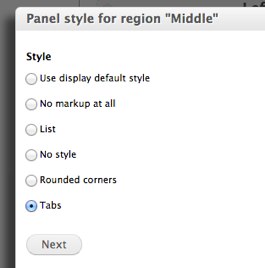
Each element of content in this region will become its own tab: entity fields, views, mini panels, etc. The title will be dictated by the content's title, so content without a title get a default title:

Help improve this page
You can:
- Log in, click Edit, and edit this page
- Log in, click Discuss, update the Page status value, and suggest an improvement
- Log in and create a Documentation issue with your suggestion
