

We have loved using BootstrapCDN. It has made setting up new sites that run Bootstrap a breeze!
Two of the biggest challenges has been selecting newer versions after a release and dealing with the change BootstrapCDN made in sub-domains (#2366307: Had to change netdna.bootstrapcdn.com to maxcdn.bootstrapcdn.com, https://www.maxcdn.com/blog/netdna-maxcdn-enterprise/).
As with anything though, there were complications from time to time and it was inevitable that we re-evaluate so that we could expand and grow! It turned out though, that BootstrapCDN supplies all of its data to the jsDelivr API.
All of this, coupled with jsDelivr's multi-CDN infrastructure, is what has lead us to the obvious conclusion that a switch to jsDelivr was a great choice!
Changed UI:
This entire section has been overhauled, but instead of trying to describe it... here's what it looks like:

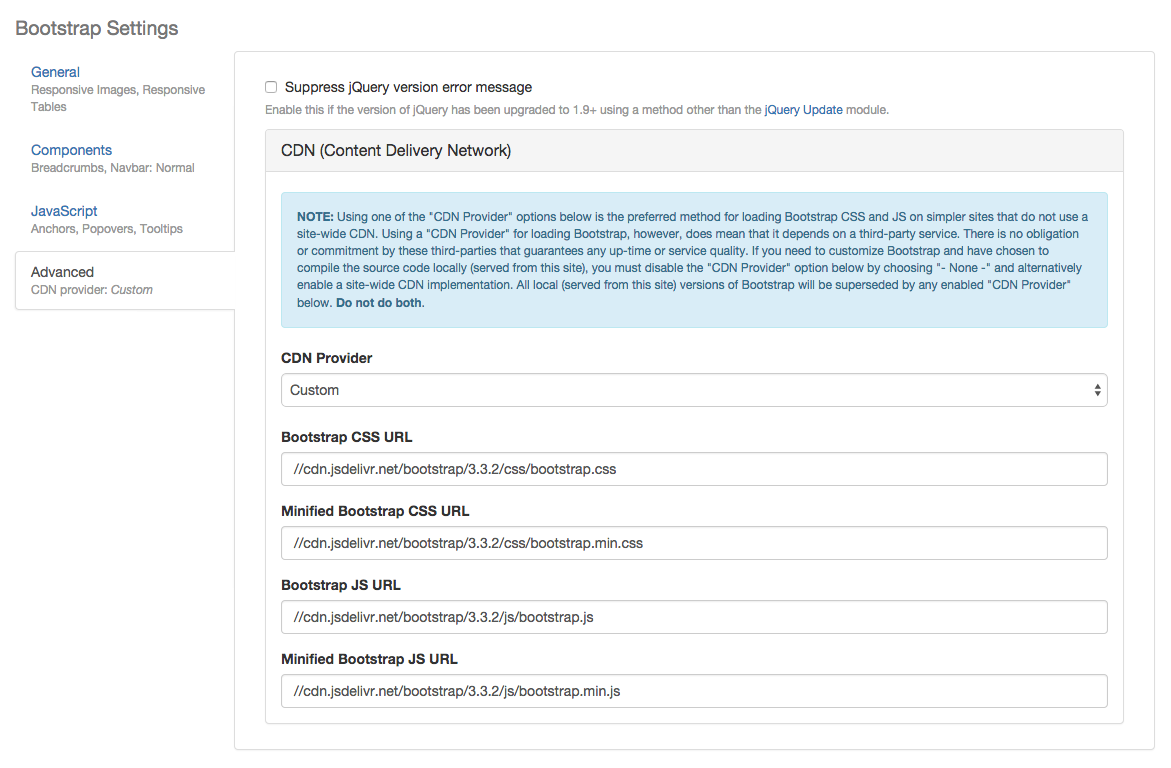
Bootstrap now has the concept of CDN "providers" and has overhauled the entire CDN asset handling management. When using the jsDeliver API, the versions and themes are automatically extracted and populated whenever the site cache has been cleared. No more static information.
There has also been extensive work done providing a way to "Import" this JSON data manually. This is useful for sites located on a server/host that blocks several PHP functions for security purposes (which affects drupal_http_request() calls).
One of the best features though, is likely the ability to specify your own URLs through the new "Custom" CDN provider. Now it's just a matter of specifying the fully compiled CSS and JS URLs to a Bootstrap framework and, optionally, the respective minified versions.
New & Deprecated Settings:
Obviously with all this awesomeness, came need for newer theme settings. What we had just didn't cut it. You'll be happy to know though, that there is detection in place for these deprecated settings via the new bootstrap_setting() function, so updating should be painless.
Note: It is highly recommended that you remove/change settings declared in any sub-theme .info files. These deprecated settings will automatically override any new setting and cause any changes made in the UI to "not save" (#2453977: CDN settings not saved).
| Deprecated setting from 7.x-3.0 | New settings in 7.x-3.1 | How these settings are automatically converted |
|---|---|---|
bootstrap_cdn |
bootstrap_cdn_providerbootstrap_cdn_jsdelivr_version |
If bootstrap_cdn is set at all, it overrides the new settings under the following conditions:
|
bootstrap_bootswatch |
bootstrap_cdn_jsdelivr_theme |
If bootstrap_bootswatch is set at all, it overrides the new setting under the following conditions:
|
Before in 7.x-3.0:
The settings in a theme's .info file:
-settings[bootstrap_cdn] = '3.3.2'
-settings[bootstrap_bootswatch] = 'yeti'
After in 7.x-3.1:
The settings in a theme's .info file:
settings[bootstrap_cdn_provider] = 'jsdelivr'
settings[bootstrap_cdn_jsdelivr_version] = '3.3.2'
settings[bootstrap_cdn_jsdelivr_theme] = 'yeti'
There are, of course, many new settings to account for with this new flexible system:
No CDN provider:
settings[bootstrap_cdn_provider] = ''
"jsDelivr" CDN provider:
settings[bootstrap_cdn_provider] = 'jsdelivr'
settings[bootstrap_cdn_jsdelivr_version] = '3.3.2'
settings[bootstrap_cdn_jsdelivr_theme] = 'bootstrap'
"Custom" CDN provider:
settings[bootstrap_cdn_provider] = 'custom'
settings[bootstrap_cdn_custom_css] = '//cdn.jsdelivr.net/bootstrap/3.3.2/css/bootstrap.css'
settings[bootstrap_cdn_custom_css_min] = '//cdn.jsdelivr.net/bootstrap/3.3.2/css/bootstrap.min.css'
settings[bootstrap_cdn_custom_js] = '//cdn.jsdelivr.net/bootstrap/3.3.2/js/bootstrap.js'
settings[bootstrap_cdn_custom_js_min] = '//cdn.jsdelivr.net/bootstrap/3.3.2/js/bootstrap.min.js'
