

Closed (duplicate)
Project:
Ubercart
Version:
7.x-3.8
Component:
Roles
Priority:
Normal
Category:
Support request
Assigned:
Unassigned
Reporter:
Created:
19 Feb 2015 at 08:49 UTC
Updated:
6 Oct 2020 at 04:45 UTC
Jump to comment: Most recent, Most recent file


Comments
Comment #1
marth commentedIf I check Roles module and hitt Save configuration button, it only ses: No update information available. Run cron or check manually.
Comment #2
tr commented"No update information available" is NEVER the result of trying to install a module. Please provide a more coherent report of what youtried to do and what the result was.
Comment #3
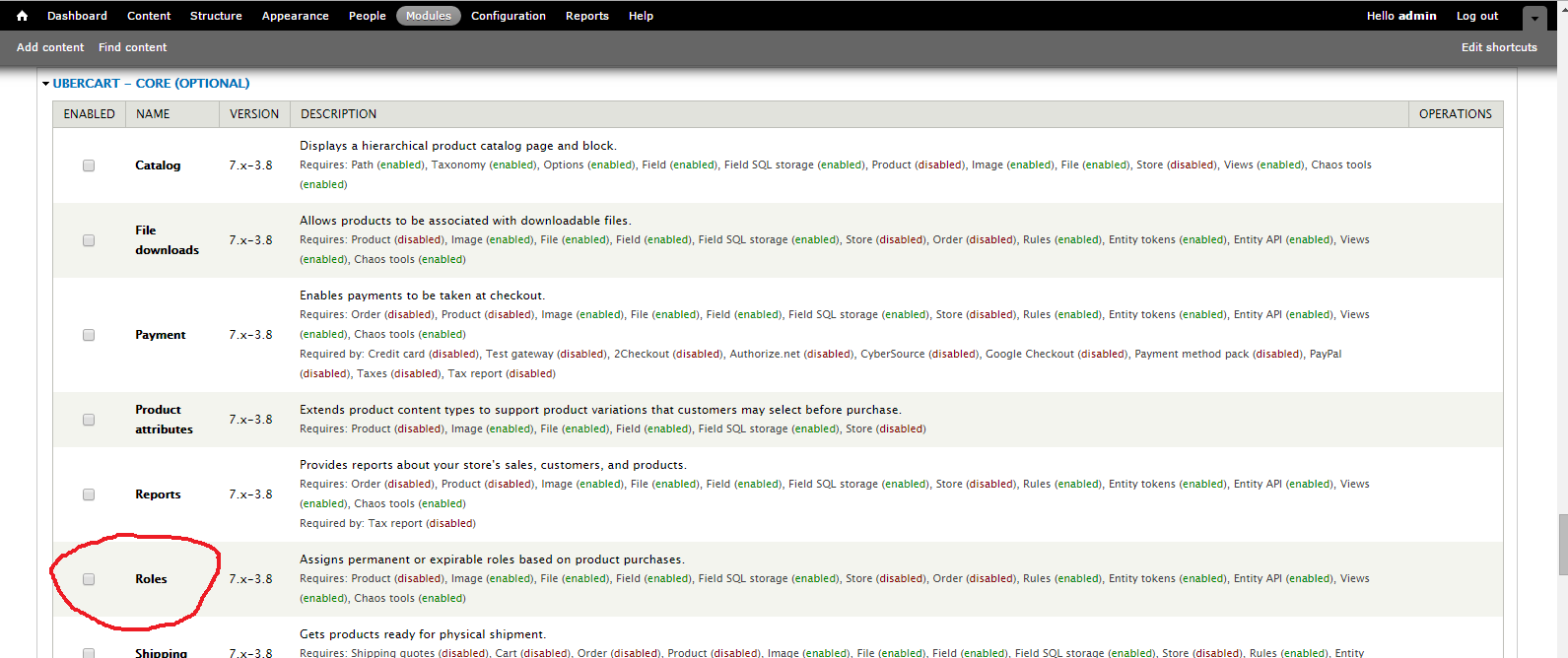
marth commentedI'm trying to enable Ubercart Core (optional) module Roles. I check the Roles and hit Save configuration. I have added screenshot, what drupal ses after saving configuration...
Is it enought to understand what I'm trying to tell?
BTW! TR, thanks for your reply!
Comment #4
marth commentedAll modules, what are under the "Ubercart core (optional)" gives the same answer and drupla does not enable them...
Comment #5
marth commentedHere is screenshot, what I'm trying to enable.
Comment #6
tr commentedThe yellow "No update information available" is an information message from the Update module and it will show at the top of that page all the time until you configure your updates. This has nothing to do with Ubercart or installing modules.
If you look at the image in #5, Roles requires Product, Store, and Order, which are all disabled. You can't enable Roles without enabling those other modules.
When you check the box next to the Roles module and press "Save" at the bottom of the page, you should be shown a confirmation page telling you that Roles can't be enabled unless you enable Product, Store, and Order, and it should ask if you want those enabled automatically. If you aren't seeing that confirmation page then either you didn't check the box next to Roles or there is something wrong with your Drupal installation.
There is nothing here that is specific to Ubercart, this is just how the normal Drupal module installation process works.
Comment #7
marth commentedHi,
I have enabled order, store, order... all modules what needed. It does not work. Images are made after I disabled those modules... And only ubercart core (optional) can't enable, other modules can... Maybe there is problems with MySQL... I have another website in same server and everything works, I don't understand, why it does not works with my new site...
Thanks for your answers TR!
Comment #8
Stefan Werner commentedHi,
I have the same problem, I can not enable uc_reports or uc_roles anymore. They were already enabled, but after installing and removing another module (logging and alerts), the modules were automatically disabled. Now I can not enable them, although all dependent modules are available and enabled. When I click the submit button on the modules page, nothing happens (the page just returns to the beginning). Other non-ubercart modules can be enabled without any problems.
There are no server or php errors. A backup on my local disk (xamp) does not have this problem. My question is, is there a way to debug the module enabling? My website is hosted on a shared hoster, so I can not install any php extensions.
Kind regards,
Stefan
Comment #9
Stefan Werner commentedHi,
I have more details about the problem. The problem only occurs for those ubercart modules in a package which has braces in the name, like "Ubercart - core (optional)". If I remove the braces from the package name, the modules can be enabled without any problems.
I think this is not a problem with ubercart, because I've not updated any ubercart module for month, but other modules. But because there are no error messages and I can not debug the live website on my shared hoster (local copy does not have this problem), I can not find the blamable module.
Kind regards,
Stefan
Comment #10
tr commentedI can't reproduce this on a clean install, and the SimpleTest test cases which enable these modules work fine as well.
I really don't see how it is possible in Drupal for a module to be disabled by installing another module, and I don't see how it's possible in Drupal for a module to stay disabled without any errors when you press the submit button. There should be some indication of a problem in your web server access or error logs, or in your Drupal dblog. Problems with modules that prevent them from being disabled (such as PHP syntax errors) typically cause a white screen - see the documentation on WSOD (https://www.drupal.org/node/158043) to learn how to print out all the error message from the page submit. Even if you aren't getting a WSOD these error messages might indicate what the problem is on your site.
uc_roles hasn't been modified since September 2013 - some 18 months ago. No one has ever reported a problem enabling it before, so it's hard for me to see how your problem could be caused by something within Ubercart.
It's possible something changed in Drupal core which causes packages with parentheses, especially if you are using a non-default Drupal distribution. But I don't see how this is anything that can be fixed within Ubercart.
Comment #11
tr commentedComment #12
JSElshoff commentedI'm experiencing the exact same problem in my up-to-date installation of Drupal (7.36): Modules listed under the category Ubercart - core (optional) cannot be enabled.
I could solve the problem myself by following Stefan Werner's excellent suggestion of eliminating the parantheses from the package entries in the submodules' .info files. I renamed them as Ubercart - core - optional.
Even though this seems to be a Drupal core issue and not a Ubercart issue per se, it would be great if this simple category name change could be adopted for the official Ubercart module files. Not being able to install a module at all -- even though all requirements are met -- can be a big issue for a user trying to set up a new web shop or the like. And as no errors are being reported, it's far from obvious how this issue can be solved. Had it not been for Stefan Werner's discovery, I think I would have been really frustrated. ;)
Comment #13
JSElshoff commentedI'm experiencing the exact same problem in my up-to-date installation of Drupal (7.36): Modules listed under the category Ubercart - core (optional) cannot be enabled.
I could solve the problem myself by following Stefan Werner's excellent suggestion of eliminating the parantheses from the package entries in the submodules' .info files. I renamed them as Ubercart - core - optional.
Even though this seems to be a Drupal core issue and not a Ubercart issue per se, it would be great if this simple category name change could be adopted for the official Ubercart module files. Not being able to install a module at all -- even though all requirements are met -- can be a big issue for a user trying to set up a new web shop or the like. And as no errors are being reported, it's far from obvious how this issue can be solved. Had it not been for Stefan Werner's discovery, I think I would have been really frustrated. ;)
Comment #14
tr commentedSome statistics:
There are 50,000 Ubercart users and now only two reports of this issue. The "optional" category contains many modules that are almost always used, like Catalog, Payment, and Shipping quotes, so these are certainly being enabled by someone on a daily basis. Additionally, the Ubercart test cases enable and test modules in the "optional" category, and we have never once had a test fail because one of these modules couldn't be enabled. Likewise, I have been enabling/disabling Ubercart modules on a daily basis for over 7 years and I have never seen this.
I am not denying that you have a problem, I am just saying that there is absolutely no indication that Ubercart has any role in causing this problem. It is certainly due to something very unusual in your local configuration or server environment. I suggested that perhaps this might be caused by customizations in a non-standard Drupal distribution, or perhaps a non-standard database, but I can't even begin to guess what your setup looks like and you haven't volunteered any of that information.
Regardless, please leave this closed as "Cannot reproduce" unless you can provide complete instructions for how to reproduce it. Even providing a simple hello world test module to duplicate this problem would be a big help - if you could do that I would be willing to track down the core issue and submit a fix. But if I can't reproduce the issue in a standard environment then I can't fix it.
Comment #15
philshields commentedI have just come across this thread having recently posted to the upgrade Drupal forum regarding the same issue at https://www.drupal.org/node/2490018#comment-9963585
Thanks to Stephan Werner for the workaround, which worked for me too
Comment #16
tim909 commentedThis is definetly an issue, not only for 2 People of 50.000, which sounds kind of ignorant btw. Have this an a fresh install of ubercart module, too. I can enable other modules, but no optional modules for ubercart. will have a look for solutions for this now.
Comment #17
fbau commentedMany thanks also to Stephan Werner for the workaround, which worked for me too after spending many, many hours comparing this one ubercart site with the same problem to several working ubercart sites using the same modules/versions and on the same vps without problem
Comment #18
ob3ron commentedConfirmed that there is an issue that we can't enable any module that has a bracket in the 'package' name in the module.info file -- and those modules will be automatically disabled if already enabled. This is not specifically a Ubercart issue, but seems to be hosting dependent:
https://www.drupal.org/node/2665152
Comment #19
fbau commentedThis issue has now occurred on several other ubercart sites on the same host, but has not happened on all ubercart sites on the same host. The issue just became expensive for us when Taxes became disabled, and was not noticed before purchases were made without charging the customer tax. Not all Optional modules are being disabled and it seems to be random between sites, usually one or more of catalog, or shipping, or taxes. Seeing variations with a multi site setup, 2 sites not affected at all one site catalog only and another catalog and taxes disabled
Comment #20
jsimonis commentedWe're having the same problem after updates to the server software. It is sounding like the problem is because of the suhosin blacklist not allowing anything with () in its name. So everything in that category was turned off and cannot be turned back on.
I'm currently working with our web host to get that removed from the blacklist. There's likely other people this is affecting who have not realized it yet. That was the case with us - we couldn't figure out why taxes, downloadable products, etc weren't working properly. So for several orders no taxes were charged.
Not everyone may be able to get their host to fix this, though, so it sounds like a better issue would be to fix the module so that it is not using the () in its name for that category of modules.
Comment #21
jsimonis commentedOk, I was able to get my host to fix it.
I pointed them to this post: https://www.drupal.org/node/2665152
And this is what they said:
I have made the modification and the suhosin.request.array_index_blacklist has been changed from this:
suhosin.request.array_index_blacklist => '"+<>;()
To this:
suhosin.request.array_index_blacklist => '"+<>;
Comment #22
tr commentedMany Drupal modules, including Drupal core modules, use () in the module name. This is allowed and accepted practice. That makes this a core bug. Indeed, #2665152: Simplify module form structure and fix bugs when Suhosin is used was opened and in that issue is the information about the suhosin blacklist problem which is the only thing that has ever been shown to cause this problem in the many years since it was first raised.
So to be clear, this is a Drupal core issue, and if you want it fixed you should be contributing to #2665152: Simplify module form structure and fix bugs when Suhosin is used - post your experience there, post a patch there, test any solutions provided there. This is not an Ubercart issue.
Comment #23
jsimonis commentedExcept that as long as it remains in *this* module, people will still have issues and not know why. Heck, they'll likely be like us and lose weeks worth of tax payments and such because the modules suddenly turn off and you have no warning that it happened. The fact that Drupal allows it - even though it causes a security issue on servers - doesn't change the fact that it shouldn't be done on *this* module. And as more servers get their software upgraded, this is going to become more and more of an issue for sites.
Comment #24
vihugarcia commentedI recently experienced the same problem. Fortunately, the site was not on production yet. Stephan Werner's workaround did the trick.
I agree this is not an ubercart issue per se, but couldn't at least a refrence to #2665152 [Meta] Module group names with brackets cause issues be included in the readme?
Comment #25
caw67 commentedsame thing here!
delete the brackets () helps
Comment #26
RGonski commentedThank you Stephan Werner for finding this solution - removing the braces worked for me too.
The problem on my site was that the ISP updated the version of PHP unilaterally to 5.6 , which was then reset back to 5.4 and then back to 5.6 when I had increased the memory allocation on the server.
I noticed that the whole SHOP menu had disappeared and spent most of the day comparing a test site with the live one - I would never have found this solution in a million years.
As soon as I removed the brackets from the .info files, the modules re-installed and the SHP menu with all its submenus reappeared intact.
Really appreciate this!
Comment #27
egarbeil commentedFor cleaner fixes - please remove all brackets in package files (*.info) for compatibility with all hosts. It will continue to be an issue for many hosts as spam and hacking continue to be issues and rules get tighter. It's a pain in the a** to have to continually go back in and fix all *.info files after every ubercart upgrade. It's not a big deal to change a package name from Ubercart - core (Optional) to Ubercart - core - optional for the developers, so why not fix?!! Far easier than having to go back and fix in all live sites using ubercart after every upgrade.
Comment #28
klonosThere's still 18k+ D7 sites using this module. This issue has the potential to cost 1000s of site owners $$$/time/trouble, and the cause has been identified, with an easy fix. Knowing that getting anything in Drupal core takes years and years (especially D7 core, which is practically neglected/unmaintained), I don't understand why the maintainers of this contrib module still refuse to simply rename the package human-readable name. Would that break functionality of the module? If not, then why not fix this potentially really harmful bug on your end?
@TR, I understand your drive to get things fixed in Drupal core, but https://www.drupal.org/node/2665152 has been switched to 7.x with a "patch to be ported" tag back in 2017, and has seen no action since. In the spirit of being a responsible contrib maintainer of a module being used by 1000s (82% of which are 7.x), can you please reconsider to (even temporarily) rename the package name and cut a new 7.x release? When (if really) this does get fixed in D7 core, you can change the package name back if that's so important.
Comment #29
jsimonis commentedklonos - honestly this is why so many of us have switched to Drupal Commerce. I couldn't fight this module anymore.