Problem/Motivation
When using the Enhanced Image plugin in conjunction with the Media button in the editor, there are some problems.
- After inserting an image using the Media dialog, the Enhanced Image widget is not initialized in the editor- There is no yellow widget highlight around the image and no way to drag to resize the image or use the drag handle to move the image to a different location.

-
After saving and editing again, or toggling the Source button, the Enhanced Image handling does work, and the drag handles are present.
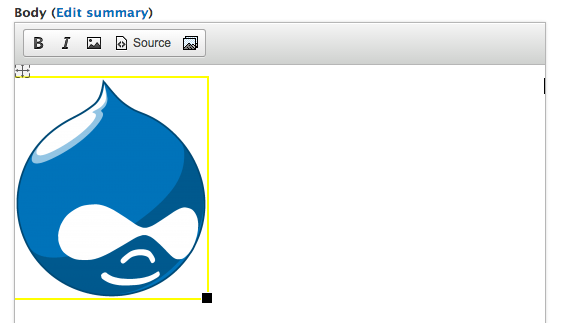
However, when clicking the image, the Media icon in the toolbar is no longer highlighted, so you can't re-open the media dialog to change other image parameters (like changing the display mode).

At this point, the Media token is still normal, like so:
[[{"fid":"1","view_mode":"teaser","fields":{"format":"teaser","field_file_image_alt_text[und][0][value]":"","field_file_image_title_text[und][0][value]":"","media_description[und][0][value]":"","field_tags[und]":""},"type":"media","link_text":null,"attributes":{"height":220,"width":192,"class":"media-element file-teaser"}}]]
- As identified in comment #3 of the issue, styling the image to be center aligned results in an empty
<p style="text-align:center"> before the media markup, due to #1906342: Make WYSIWYG wrapper on fielded entities a container instead of prefix/suffix
-
After changing the image to be a captioned image, the media token gets converted.

In the Image Properties dialog, Captioned image is selected.
After doing this, the image looks correct in CKEditor

However, the media token from earlier is converted from
[[{"fid":"1","view_mode":"teaser","fields":{"format":"teaser","field_file_image_alt_text[und][0][value]":"","field_file_image_title_text[und][0][value]":"","media_description[und][0][value]":"","field_tags[und]":""},"type":"media","link_text":null,"attributes":{"height":220,"width":192,"class":"media-element file-teaser"}}]]
to
<figure class="image file-teaser media-element" style="display:inline-block"><img alt="" data-fid="1" data-media-element="1" height="220" src="http://local.mediadev/sites/default/files/styles/medium/public/Druplicon.large.png?itok=tpeq5ewt" typeof="foaf:Image" width="192" /><figcaption>Caption</figcaption></figure>
- Converting from a captioned image to a non-caption image results in the the markup being replaced with
<p style="text-align:center">false</p>
Tested using the following:
- Media dev profile - latest dev, which includes the latest dev versions of file_entity, media, wysiwyg
- CKEditor library 4.4.7
- CKEditor Image2 - sandbox project in project review
I've been attempting to debug this behavior but I'm super confused with regards to the JS files that are used. I've found that the JS files in modules/media_wysiwyg/wysiwyg_plugins/media_ckeditor/*.js are NOT used anywhere. If I completely remove these files, everything functions normally.
Instead, it seems that the JS files in modules/media_wysiwyg/js/*.js are used, but there doesn't appear to be any specific CKEditor code in there that I would expect to see.
I'm hoping someone can explain this to me so I can dig into these compatibility issues with the Enhanced Image plugin.
Proposed resolution
- Fix widget initialization, where the image2 widget does not get created until node save/edit or toggling source.
- Determine how we can tackle fixing the centering issues identified in comment 3.
-
Fix image caption initialization and termination. We would need the token markup to stay consistent on caption initialization, ideally:
<figure>[[{token markup<figcaption>My awesome caption</figcaption></figure>
Initial issue
In a quest to figure out how to simply center an image in CKEditor, I've hit a stumbling block. The built in Image plugin that comes with CKEditor (simply code-named "image") does not allow centering an image by itself. Instead, you can use the newer version of the plugin, which operates as a CKEditor "widget", Enhanced Image (code-named "image2").




Comments
Comment #1
PascalAnimateur commentedI was having the same issue, but I managed to get the special image2 markup to go through using custom content rules in CKEditor ACF:
Place the above in the Content Rules under Cleanup and output of your WYSIWYG profile (using automatic ACF mode) and the embedded media images work great (left/center/right, with and without caption).
The only issue left is being able to use the Media button to replace the image once image2 has taken control of it. When image2 replaces the
[["fid":...]]media_wysiwyg token by its corresponding<img/>tag, Media doesn't recognize that image as a media content anymore. This also causes the file usage to be ignored for that piece of content.Maybe the ckeditor_media module could be used to provide media browser integration directly inside the image/image2 dialog, but I doubt this would preserve the media [[...]] markup... plus this module only works for ckeditor ATM, not wysiwyg.
Comment #2
PascalAnimateur commentedI found a problem with captioned images removing the 'media-element' class from the img tag which prevented the file usage from being properly reported.
Here's a patch for image2 plugin that fixes that.
As for your original comment, you're right concerning the files in modules/media_wysiwyg/wysiwyg_plugins/media_ckeditor/*.js not being used... there's a TODO mention to that effect in modules/media_wysiwyg/media.inc.
I still can't get the media button to highlight when selecting an image in the editor, I find it's not such a big deal as one can simply delete the image and insert again. FWIW, this feature doesn't work for embedded audio / video / document either, so the users won't be confused.
Comment #3
PascalAnimateur commentedFor some reason, centered & captionless images don't show up as centered when displayed in the text field of the rendered node.
It seems media_wysiwyg closes the
<p style="text-align:center">tag right before the image tag.Update: This is due to the following issue https://www.drupal.org/node/1906342 using a container (which produces a div tag by default)
Comment #4
PascalAnimateur commentedI've found a way to use span instead of div in the media container using hook_media_wysiwyg_token_to_markup_alter(). This solved the issue of captionless / centered images!
Here's the code to put in a custom module:
Comment #5
jwilson3Check out #2428005: UX bug, Cannot read property 'value' of undefined. This fixed some issues for us regarding the captions (provided by Enhanced image2 properties dialog) getting stripped.
Comment #6
PascalAnimateur commented@jwilson3 : the link you provided is for this issue itself !
#brainfart
Comment #7
jwilson3Yeah, just saw that and updated it.
Comment #8
jwilson3Our recipe for CKEditor + Enhanced Image plugin (image2) + Media module + Wysiwyg module (not ckeditor module):
https://www.drupal.org/node/2433083
https://www.drupal.org/files/issues/media-wysiwyg-ckeditor-image2-243308...
https://www.drupal.org/node/2428005
https://www.drupal.org/files/issues/media_fix.patch
Comment #9
bneil commentedI'm reopening this issue as I think there is an expectation that we should be able to use the image2 plugin with Media 2.x and #4 requires custom code to have that happen.
I'm also not sure how this plays out vs the solution for ckeditor.module that uses its own widget plugin, introduced here: #1504696: Integration with CKEditor module. I think it would be good to keep ckeditor library embed support consistent no matter if you are using ckeditor.module or wysiwyg.module. Can we use the plugin introduced there yet have image2 support?
Comment #10
jwilson3I agree this issue should probably remain open.
Don't understand that question.
Also, I've put the glue module for the image2 plugin on d.o in a sandbox (https://www.drupal.org/sandbox/jwilson3/2454995) and applied for full module status (https://www.drupal.org/node/2455107)
In the process, I also stumbled across https://www.drupal.org/node/2455103 which does much the same thing as my module, except it does less, my module purports to support both wysiwyg api AND ckeditor modules (but have not had time to test the ckeditor module integration).
Comment #11
bneil commented@jwilson3 - I got a little carried away looking at what the media implementation is for someone using ckeditor module. I was thinking we might want to be consistent with that approach, which was outlined in that issue, but spoke to a media maintainer yesterday and he changed my mind.
I tested out the image2 plugin with WYSIWYG module and media 2.x. My experience was exactly the same as reported in the original issue. Additionally, if I add an image, toggle the source button which initializes the widget markup, and try to move the widget, the image no longer renders and I just get [the alt text].
Comment #12
bneil commentedComment #13
bneil commentedComment #14
bneil commentedI've updated the issue summary with screenshots, and attempted to summarize what I think are the next steps to get the integration to work. I've also cross posted this issue on the CKEditor stackoverflow to see if there are any CKEditor developers who might help us debug this.
Comment #15
bneil commentedComment #16
jwilson3@Bneil,
if you're able to downgrade to media 7.x-1.x as mentioned in my recipe in #8 then a lot of the errors in the OP go away, the [[media]] token stays working even inside the<figure>.Nevermind, i just tested this again, and you were right. [[media]] token goes away when changed to an image with caption :-/
Comment #17
osopolarFYI: If you need Image2 only to be able to add caption to images and align images, in issue #1515186: Current best practice for WYSIWYG Image Insert #14 I described, how to achieve this without additional modules (only with media, wysiwyg and ckeditor).
Comment #18
bneil commentedIn our case, we need the caption to be different on a per usage basis, so tying it to a field on the file entity is not going to work well for us. I was hoping that image2 would allow us to abstract the caption away and use the image provided by media/file entity as is.
Comment #19
osopolarMedia WYSIWYG does this. When you upload an image it is stored with the field values you provided while uploading. When you add the image to a text field you can edit these fields. Instead of changing the file entity the values are added to the media tag in the text field like that:
[[{"fid":"28691","view_mode":"default","fields":{"format":"default","field_file_image_alt_text[und][0][value]":"Overriden alt","field_file_image_title_text[und][0][value]":"Overriden title","field_file_copyright[und][0][value]":"Overriden copyright"},"type":"media","attributes":{"alt":"Overriden alt","title":"Overriden title","height":"120","width":"120","class":"media-element file-default"}}]. The values of the file entity aren't changed. To get it work well, you will need to patch media module, see #2126697: Wysiwyg -- Alt and Title fields require some special handling. as described in my above referenced post.Comment #20
viresh shah commented@bkosborne @PascalAnimateur
Did you guys get any solution for Problem/Motivation that you mentioned for point #1 and #2?
Comment #21
PascalAnimateur commented@Viresh Shah
I'm still using solution from #4 in my current projects (patching media so it ouputs instead of
Regarding the original issue (inserted media image doesn't have the widget yellow outline), it might have something to do with #1102294 as I only experience this on safari.
In the long term, I really hope media will integrate better with the CKEditor widget / lineutils stuff..
Comment #22
viresh shah commented@PascalAnimateur
Thanks a lot. You're right it's related to #1102294 where it doesn't work in Webkit-based browsers. Can you please tell me solution from #4 you're using? I didn't get it. Does that solve this resize issue as well?
Comment #23
PascalAnimateur commentedMy solution involves changing the way media processes tokens into markup by implementing hook_media_wysiwyg_token_to_markup_alter(&$element, $tag_info, $settings) to change
like it is used for normal text (divs can't be centered that way).
I also patch the image2 plugin to preserve the media-element class in order have a way of styling the inserted media images (I add some padding around it). You also have to make sure CKEditor ACL (if enabled) allows the proper attributes/classes by adding the following ACL rule:
img[src,alt,height,width,data-cke-saved-src,data-fid,data-media-element]{width,height,float}(media-element,file-*,wysiwyg-break)This solution is somewhat incomplete as it doesn't allow media_wysiwyg to recognize the inserted media (and be able to change it using the media browser for example), plus it doesn't allow choosing a media from the insert image dialog (i.e. using media as a file browser in image2).
Comment #24
viresh shah commentedThanks PascalAnimateur. Basically for web-kit based browsers, initial resize doesn't work. (As mentioned in initial problem statement) though after saving and editing again, or toggling the Source button, the Enhanced Image handling does work, and the drag handles are present.
Did you create any patch to fix widget initialization, where the image2 widget does not get created until node save/edit or toggling source?
Comment #25
PascalAnimateur commentedNo I didn't patch image2 except for preserving the
media-elementclass.Comment #26
magicmyth commentedI've just published patches on improving Media with CKEditor at: #2513454: Improving CKEditor integration. Although image2 compatibility was not a goal of mine at this stage it seems (from my limited testing) the changes do resolve the conflict. I would be interested to hear feedback from any of you.
Comment #27
mkhamash commentedImproving Widget API handling will certainly improve image2 integration greatly, since most issues discussed above have to do with problems in current media plugin Widget API code, than to do with image2 support.
Comment #28
mkhamash commentedSorry forgot about WYSIWYG module, please feel free to moving this back to media issues queue since this is an issue in both ckeditor and wysiwyg modules and may needs to be accounted for in both, though it may become a big effort to include a fix in media module for wysiwyg module, so I would keep the issue here for now, but if any of the mentors of media module or media_ckeditor think this should be fixed in media module please feel free to move it back.
Comment #29
brockfanning commentedIn the interests of small, incremental fixes, here is a patch to fix the problem where the Image2 widget is not initialized until the node is saved/edited.
I'm including 2 versions, one of which (...OLD_MEDIA.patch) can be ignored unless you are using an old version of the Media module, from before this module split off into a separate project.
Comment #30
othermachines commented@brockfanning - THANK YOU. Your timing is amazing.
Comment #31
brockfanning commentedComment #34
csakiistvan#29 is working belonging to the first point
Comment #35
albertski commented#29 fixed the issues.
Comment #37
joseph.olstadfixed in 7.x-2.x dev
thanks again to @brockfanning
Comment #38
sambonner commentedHmmm, using the latest dev HEAD which has merged this patch has caused a JS error for me when trying to insert non-image based files using media_ckeditor. The Image2 plugin is firing improperly when a file (say, a PDF document) is inserted with a JS error of:
TypeError: image is nullDoes there need to me some kind of check placed around the initialisation of the image2 widget to ensure the file in question is an image?
Comment #39
joseph.olstad@sambonner
can you try alpha3
also, please review the installation procedure:
Installation
The 7.x-2.x version of Media CKEditor also require you to:
Comment #40
joseph.olstad@sambonner if this is still an issue for you after double checking, please open a new issue for this and mark this one as 'related'
Comment #41
joseph.olstad@sambonner , also you could also try the patch in this issue:
#2567275: Media plugin is not able to detect widget plugin registration properly
let us know if this helps
Comment #42
rreiss commentedI'm still having some problems with the latest "stack" of CKeditor 4.7.1, Media, Media Ckeditor, image2 ckeditor lib (with / wo the Drupal module).
It seems that CKEditor are not handling both widget types simultaneously, I've commented the `ckeditorInstance.widgets.initOn( editorElement, 'mediabox' );` line (see the patch from #29), and then things started to work with the image2 widget, but without the mediabox (Drupal media) module.
I'll be happy to assist here if anyone can think of a way to achieve a working integration between both widgets.
Thanks.
Comment #43
brockfanning commented@rreiss: I can't offer much help in configuration, but maybe I can help get to your basic requirements. What functionality/behavior are you looking to use in the Image2 plugin?
Comment #44
othermachines commented@rreiss
Not sure it'll help since it's been a little while, but I recall that it was necessary to swap the order of initialization; otherwise when an image was first added to the editor via the media browser, there was no "Image properties" selection when right clicking the image, nor could I edit the image by clicking the "Image" tool in the toolbar.
Comment #45
rreiss commented@othermachines You are right, I did try it before posting my comment, but even with to different initialization order there are issues such as - clicking the source button (twice) breaks the image2 widget, saving and reopening the node breaks the media module..
I think that the media ckeditor module still requies some work around this issue..
Comment #46
othermachines commentedNot a surprise to me. I didn't want to assume since there have been a few updates since I last updated the suite (media + file_entity + ckeditor + media_ckeditor).
As of last April (7.x-2.0-rc3) it was still necessary for me to patch the module so that it would fall back to legacy token handling after initialization (by commenting out the onLoad check in plugin.js so hasWidgetSupport defaults to FALSE). This would allow my client to use the media browser to insert images and image2 to edit them.
It's not ideal but my client insisted on using some features only this suite could offer and it's working well enough for them.
All of that being said, there's some tricky machinery going on here and I don't envy the maintainers, who are doing their best. If you have experience with CKEditor plugins (I have very little), I'm sure they would appreciate your assistance.
Comment #47
joseph.olstad#44 is interesting , changes to plugin.js . How about a patch?
For those that prefer an alternative to the image2 plugin:
see my comment in related issue:
https://www.drupal.org/node/2813413#comment-12183977
#2813413: Unable to resize images inserted with Media
Comment #48
othermachines commented@joseph.olstad -
Honestly, never submitted one because I don't know if it's a legitimate fix or something unique to my installation since until now I've never seen another report (although that doesn't mean there hasn't been) - and also because I have no idea if it contributes to problem described in #46 where I ultimately have to force the module to fall back to legacy code after initialization.
Comment #49
lreynaga commentedHi all,
I recently ran into the issue shown at step 4 (Token image turned into legacy markup). I've done the most basic steps to setup the modules:
media (7.x-2.18)
media_wysiwyg (7.x-2.18)
media_ckeditor (7.x-2.5)
while using:
Drupal 7.58 (vanilla).
If I upload an image using the Media browser, I get a tokenized image as result, but after toggling the "Source" button on the WYSIWYG twice, then the markup turns into legacy.
For now we just encourage people to not use the Image2 plugin in our small developer community.
I know this issue has been inactive for a while now and we recently figured that such problem existed. I just wanted to point out that we recently found it in our end and its still ongoing.
Comment #50
othermachines commented@lreynaga - For a couple of years now I've had to consistently apply a patch that gets rid of this bit of code in js/plugins/media/plugin.js in order to keep image2 working:
Also see comments in #44 and #46. There was a time when I had a better grasp of this "fix", but I can't recall now. However I did just try re-adding that bit of code and the problems returned.
Another thing that causes issues is when I turn on the more recently added "Display fully rendered files in WYSIWYG" feature. :(
FWIW, here's my set-up:
Comment #51
othermachines commentedRegarding my last comment, I've just learned that the same fix was added to the official recipe after it was pointed out by another user. (Visit the link for Andrew@Germany's explanation of the problem.)
From the recipe:
Comment #52
joseph.olstadI've updated the media recipe again
If you just simply disable the widget plugin, the issue should be resolved.
OR, see the notes in the thread by AndrewGermany , link is now in the media recipe.
https://www.drupal.org/node/2843391
Comment #53
joseph.olstadComment #54
othermachines commentedHi, Joseph. I was confused by that part since image2 requires the widget plugin, does it not?
Comment #55
joseph.olstadah ok, I will add some info about the image2 plugin then, so basically:
To use image2 must enable the widget plugin, but to use the widget plugin must follow instructions by Andrew @ Germany??
Comment #56
joseph.olstadI am not sure, some people reporting that disabling the widget plug-in is working for them, not sure if they are referring to image or image2 plugin
Maybe do some more testing.
Comment #57
othermachines commented@joseph.olstad - image vs image2 - I think you could be right that that's where part of the confusion is coming in. What I know is that I've been commenting out that same bit of code since widget support was brought into media_ckeditor, maybe 3 years ago? I've always used image2.
Incidentally, I reported it in this thread last July: #2400455-46: How to use the CKEditor Image2 (enhanced image) plugin. (Commenting out the entire
OnLoadis effectively the same as commenting out that one line, as suggested by Andrew.)There's something else going on here, and every time I have to update this suite of modules - as I did this week because of the security update - I try to figure it out, to no avail. :( I will certainly let you know if that changes.
Thanks -
Comment #58
sgarric commentedHello,
How can I ad the Enhanced Image plugin (https://ckeditor.com/cke4/addon/image2) to my CKE in Drupal 8 ?
My contributor are used to use it, but I can't find anywhere to put it back since we are on Drupal 8.
And I can't find any discussion about the fact that this little image dialog box disappeared...
Thanks :)
Comment #59
joseph.olstadWhat versions of ckeditor library are people using here? I had issues with 4.10.1 , I just adjusted the recipe back to 4.6.2 which seems to restore image functionality however as far as image2 support, I will test this patch some more