
Messages, Notifications & Subscriptions
Introduction
There are various ways space members can learn about updates to a space. Some ways are pre-configured by a site administrator while other methods allow individual space members to control both the notifications they receive and generate.
OpenAtrium uses the Message module, combined with Message Notify, Message Subscribe, Flag and the oa_notifications app to create and send messages from an Open Atrium instance.
Definitions
Some definitions are in order:
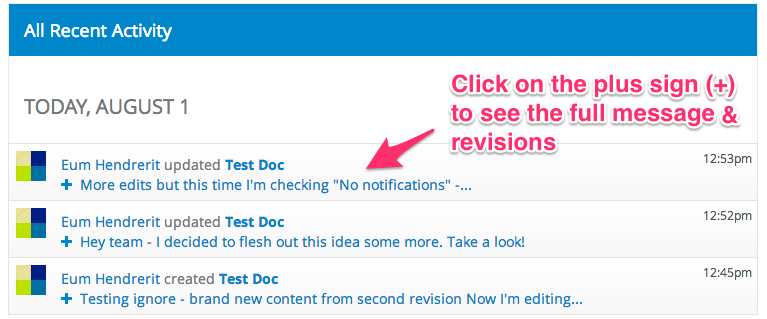
Message - A message is not the same thing as a notification. Messages are entities created within the site to log and display system events (by the Message module)--a message can generate a notification in OA, but not always. OpenAtrium relies on the Message system to track what happens to content even if no notifications are sent. Whenever space content is updated, the editor has the option to enter a Revision log message on the node edit screen. By default, this message is not included in email Notifications that are sent to subscribers of the content or space. These messages can be seen on the Space landing page in the block labeled "All Recent Activity"
Notification - Email that is sent to a user of the site. There are many ways for a user to be added to the Notifications list for a space or for a piece of content:
- The user can subscribe to (or follow) the space/content
- The user can add themselves to the Notifications widget on any given space or piece of content.
- An editor of content can add any Group, Space, Team or individual user in the system under Notifications (on the node edit screen).If the editor does this, members in the added group(s)/team(s) will receive an email notification about this update (and future updates to this piece of content unless someone removes them under Notifications). The content editor can optionally select the "Do not send notifications for this update" option, and then nobody (even subscribers) will receive an email notification.
Subscription - Users can subscribe (or request subscription if this is how your site is configured) to spaces, groups and individual nodes. As long as their user settings don't instruct the system otherwise (and as long as the content editor does not enable Do not send notifications for this update), a subscriber will receive an email notification when changes are made to spaces, groups and/or content they subscribe to. Whether these emails are sent for each change or grouped into periodically sent digests, is configurable under the user's settings. (Note: Organic Groups uses the term "subscribe to this group" as a way of indicating membership. When you subscribe to a group in that context, you actually become a member of the group. On the other hand, you can use the "follow" link on OpenAtrium, which triggers a flag that subscribes you to notifications--not to the group itself.)
Configuration - System-Wide
Documentation needed
Configuration - Individual Space
Each Space can have default Notifications set. Those users selected as "default" will pre-populate the Notifications tab on content created in that space. It does not mean that the users will be notified for changes to the Space itself.
These defaults can be overridden for each individual piece of content as usual--by changing the names included in the Notifications widget, or by checking the "do not send notifications" checkbox.
Configuration - User
Each individual user can control their notification settings by clicking on the little gear icon in the upper right-hand corner of the user dashboard and edit profile screens.
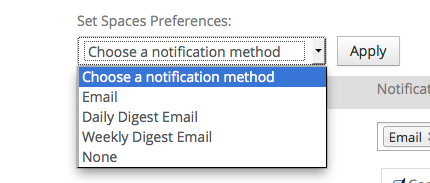
Users can decide on a per-space basis whether they want individual emails (one for each content change) or daily or weekly digests. They can also opt out of notifications for any spaces they subscribe to (while remaining a member).
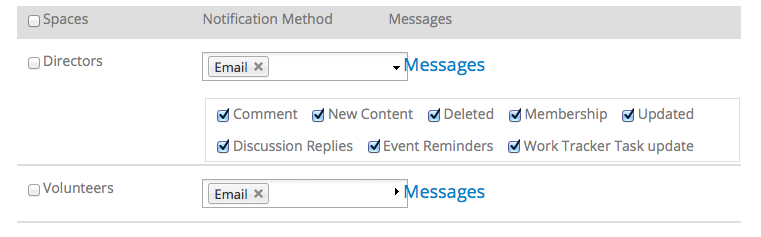
Users can also determine which space updates trigger notifications and which don't on the Settings screen.
Default Behavior
User Override
Support for Capturing Replies to Notifications
Something really cool that OA2 can do, but not out-of-the-box, is support email replies to notifications so that the reply will be posted back to the space content in question. If we want to enable this functionality, it requires adding some more OA modules and setting up a dedicated email account to receive the replies. The section "Emailing replies back to Open Atrium” in this article describes the required steps
Additional documentation
Linking a few articles about Messages and Notifications because they are really hard to find on the site they are posted on. The titles speak for themselves.
Custom Messages
Message Display Modes and Templates
Creating Messages in Code
Modifying Messages
Modifying Notifications
Help improve this page
You can:
- Log in, click Edit, and edit this page
- Log in, click Discuss, update the Page status value, and suggest an improvement
- Log in and create a Documentation issue with your suggestion
