

Closed (fixed)
Project:
Drupal core
Version:
8.1.x-dev
Component:
ckeditor.module
Priority:
Major
Category:
Feature request
Assigned:
Unassigned
Reporter:
Created:
21 Jul 2014 at 19:40 UTC
Updated:
12 Jun 2026 at 12:09 UTC
Jump to comment: Most recent, Most recent file

Comments
Comment #1
mgiffordComment #2
ParisLiakos commented+1 for native spell checker..faster and more reliable
scayt used to insert all kind of garbage in HTML..havent checked lately
Comment #3
mgiffordTotally agreed. I was trying to provide options, but why not suggest the one we want.
Comment #4
wim leersOf course +1 to this.
I've asked the CKEditor guys to chime in here, to explain what the best practice is. I'm guessing that browsers' native spell checkers only recently became sufficiently reliable.
Why is this tagged with "atag"?
Comment #5
mgiffordI was going through the ATAG Guidelines to look at how to make Drupal 8 more accessible. It's not released yet, but I've been communicating with people at the W3C about having Drupal 8 be one of the example use cases to highlight that these recommendations are actually doable.
I've added a few elements under ATAG because they are related to improving the authoring of accessible content as opposed to WCAG 2.0 which is much more related to the perception & basic operation of website.
Having properly spelled words is pretty important for conveying meaning, particularly to assistive technology.
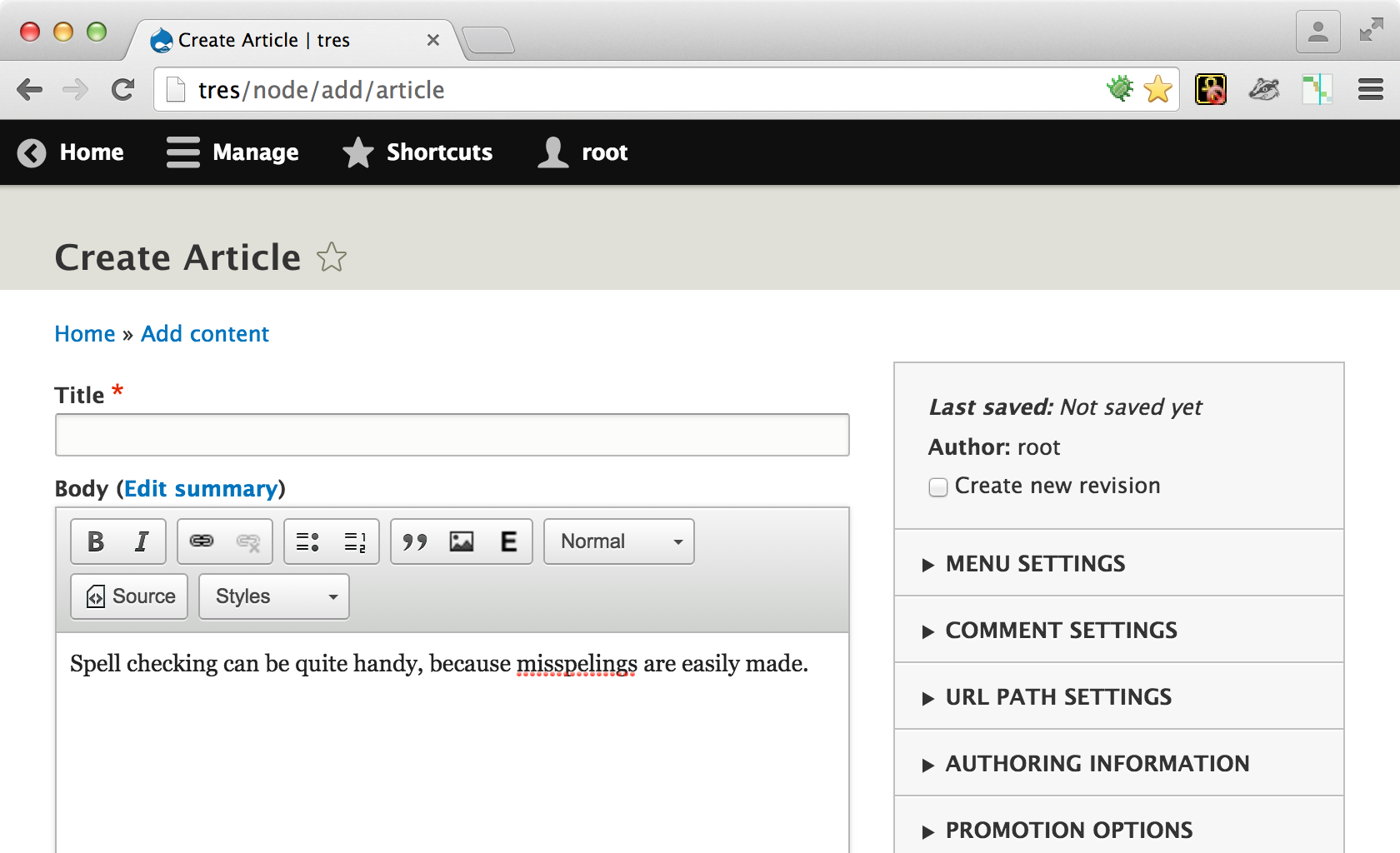
I do think that we should have a spell check option in Drupal 8. The easiest to implement seems to be the browser side ones. I can't speak to their reliability though compared with the built in CKEditor tools. Right now the default is that there is no spell check with CKEditor enabled.
Comment #6
reinmar commentedAs you know there are two options. Native spell checker and the SCAYT plugin. Both solutions are imperfect, though, in a general case like Drupal, I would choose SCAYT.
The problem with native spell checker is that you need the native context menu to use it. So if you enable native spell checker, you must disable CKEditor's context menu, losing the options that sometimes are available only there (table tools for instance). Unfortunately none of the browsers allow yet to extend native context menu (though the feature is included in HTML5) and there's no API to use native spell checker from JavaScript, so CKEditor could integrate native spell checker into its context menu (I proposed this on W3C's mailing list once but the reception wasn't good; will try again some day :>).
(There's also the possibility to display native context menu if CTRL was hold (http://docs.ckeditor.com/#!/api/CKEDITOR.config-cfg-browserContextMenuOn...) but no one knows about this, so this isn't a reasonable solution.
And the alternative for above is to use SCAYT which is integrated with CKEditor's context menu. It's not a perfect solution too though, because it requires internet connection (or buying a server from http://www.webspellchecker.net/), it is a little bit slower and has some additional bugs (it's absurdly hard to implement spell checking in contenteditable).
To sum up - if CKEditor's context menu isn't required, then native spell checker is a better choice because it's reliable and fast. If CKEditor's context menu is required, I believe that SCAYT is the only solution.
Comment #7
cs_shadow commentedRegardless of the solution we come up with, I don't believe we should disable the CKEditor's context menu. Since users are used to the context menu, its quite important to have its context menu for usability and UX.
Personally, I'd really like to see the native spell checker in action inside CKEditor. But if that comes at the cost of disabling CKEditor's context menu, my vote is against it.
Comment #8
damien tournoud commentedGiven #6, it seems like there is no viable solution, making this task won't fix or at least postponed?
Comment #9
wim leersAlthough I've personally never used the context menu in CKEditor, I agree that Drupal shouldn't ship with the assumption that it's okay to have CKEditor's context menu disabled.
So I have to agree with #8.
If anybody can think of a way to move this forward without disabling CKEditor's context menu, please reopen this issue.
Comment #10
ParisLiakos commentedI think this is a good enough solution, than no spellchecker at all..i have already used it on some projects..you have to train the editors, but thats pretty much it..
CKEditor's context menu works, native spellchecker works, everyone is happy
Comment #11
wim leersForgot about that one.
What do others think about that?
Comment #12
reinmar commentedAs we are discussing the context menu, I've got one more topic that you could be interested in. Apart from inability to add new options to native context menu, there's a problem with options that are already there. On Chrome@Mac I've got about 20 positions in it and some of them are harmful, because they cannot be integrated with editor yet - e.g. undo and redo, language direction. It's even worse on Safari, where we can find options to change font (color, name, bold, italic, underline), enable automatic quotes, automatic links, etc. Many times these options should not be available, but editor has no control over that. The situation is even worse on mobile Safari where native toolbar pops out when user makes a text selection.
Why I mention that? Because I was analysing whether we could move context menu to other location (e.g. toolbar or bottom bar) in order to unblock the native spell checker. That could however lead to unpredictable issues, because of native context menu's contents.
Therefore, being able to control native UI for contenteditable for me is one of the most important aspects of the contenteditable spec that may finally be developed. I spent a longer while trying to convince the committee that browser can't play a god here.
The conclusion is that until editor will gain more control over native UI it must block native context menu. We know that it's kind of anti-pattern, but it's lesser of two evils.
Comment #13
wim leersComment #14
nanospell commentedAs there is no viable solution - i would like to (shamlessly) propose that my own work that my own solution is viable:
http://ckeditor-spellcheck.nanospell.com
Its so easy to install it is silly:
Step 1 - Download it
Download nanospell ckeditor spellchecker and unzip it anywhere in your web/intranet project.
Step 2 - Test it
Browse to /path/to/nanospell/getstarted.html
The page will verify that everything is working for you, and even provide personalized code samples.
Step 3 - Code away!
Just copy the following lines of javascript code anywhere in your page.
Comment #15
wim leers#14: Thanks! That looks very interesting. Great website too. But there is one big problem: http://ckeditor-spellcheck.nanospell.com/license.
Drupal is GPL. Drupal can only include GPL or GPL-compatible code. Hence there is no way for nanospell to be committed to Drupal core.
Comment #16
wwalc commented@nanospell - please stop posting things that are not true to advertise your commercial addon.
For anyone interested, here's the summary of what @nanospell wrote and what isn't true: #1870398-20: Spell Checker not working in CKEditor 4.
Comment #17
adamps commentedA couple of thoughts from my experience:
Browser native spell-check: I think this is pretty usable and would suggest that it is the default.
SCAYT: credit to them for providing a free solution, but I'm not sure this something that's appropriate to enable by default in Drupal because of the terms of use / risks as below. I can see that many users might like this, so it could be an optional module - or off by default with an option to enable, and the checkbox to enable it can have a warning by it.
Comment #18
mgiffordGiven the summary by @AdamPS I really can't see how SCAYT would be an option.
Whether the description is on the screen below the editor or in the editor help pages, what should it say?
There might be an easy fix for this.
Comment #19
adamps commentedAs a starting point, setting config.disableNativeSpellChecker = false; by default in Drupal seems like a really useful change. This removes the barriers for your average user.
Now I think about it, any explanatory text is a bit awkward because it depends on browser and OS. This suggests that the editor help pages is the better option. (It seems many people install the "Better Formats" module merely to hide the existing "More information about text formats" link, so let's not make another!)
Some thoughts about the text:
1) Make sure your browser spell checker is enabled. Search the documentation of your browser for details.
E.g. Firefox: you need to tick a box "Check my spelling as I type" and have a dictionary enabled.
2) If you browser supports spelling suggestions, the way to access them in Drupal is slightly different. When you are in an edit area, then the normal browser context menu may be replaced by the editing context menu. However you can access the browser menu by clicking Control. [But on a Mac it is potentially command and on a tablet ....??]
Sorry this is a bit vague, but hopefully a starting point.
Comment #20
mgiffordOk, so some docs from here http://docs.ckeditor.com/#!/guide/dev_spellcheck
But without the config.js file I assume we should be adding
config.disableNativeSpellChecker = false;to:core/modules/ckeditor/src/Plugin/CKEditorPlugin/Internal.php
The help text can just be added onto function ckeditor_help():
I'm just trying to simplify this as much as possible. Let folks know it is an option, ask them to configure their browser and let them know that they may need to use the Control key to access it.
EDIT: Also will need to get feedback from @jhodgdon
Comment #21
wim leersComment #22
adamps commented@mgifford Your suggestion sounds good to me.
Comment #23
mgiffordOk, I've rolled up a patch to start this rolling. I really don't know if this is the right way to insert disableNativeSpellChecker configs, but it's worth a try....
Comment #25
mbayntonReroll of the patch that started things rolling. Also revised the wording to be inclusive of Macs and more task-oriented. It now simply describes what you need to do to get at the suggestions, without going into the CKeditor vs. browser context menu (it might not be obvious that the browser context menu is the one you want.)
Comment #26
mbayntonComment #27
mbayntonNot testing because a task?
Comment #28
mbayntonNot testing because [reasons]? Uploading again?
Comment #29
mgiffordbad bot?? I can try later tonight.
I got the same look here https://www.drupal.org/node/2396145
Not sure what has changed on d.o
Comment #30
mbayntontests running elsewhere; poke
Comment #31
mbayntonComment #32
mbayntonWithout the syntax error this time
Comment #33
mgiffordI think it might just be because this is to 8.1 and the bots may not be working against that just yet. Usually 8.1 is being marked as postponed for now.
Anyways, uploading a re-roll of your patch against 8.0.
Comment #34
mbayntonThere are really two lines of discussion in this issue: the easy improvement offered by recently posted patches, and possibilities for complete solutions that are harder and/or dependent on future standardized browser APIs.
Bringing browser native UI in harmony with the activities of the editor is I think the Right Way(tm) to do it, if the committee is actually moving in a direction that is going to eventually make it possible. Anyone know how that's going?
An alternative option that I haven't seen discussed yet here -- probably only worth pursuing if querying the native spellchecker isn't going to be possible -- is to use a spell checker implemented in JavaScript that does not transmit input to or rely on somebody's server. A few people have proof-of-concepts:
Just wanted to call out that building on one of those (and likely reusing lots of SCAYT's code for rendering the red squigglies) is another direction.
Comment #35
wim leersThanks for the thoughtful discussion, which led to consensus on how to move this forward. It's not perfect, but it's a compromise that presents a big step forward. Excellent work, everyone! :)
Manual testing shows this works great.
I don't see any reason to delay this any longer.
In this reroll, I just changed a single line to update test expectations. That IMO does not preclude me from RTBC'ing this patch.
Comment #36
wim leersComment #37
ParisLiakos commented+1 for RTBC
Thanks for the patch Wim!
Comment #38
rich_dawson commented+1 RTBC
Thank you for your work Wim.
Comment #39
thpoul commentedWorks great! +1 RTBC Thank you Wim for your work!
Comment #40
alexpottThis likes a sensible choice based on all the discussion on the issue. Committed e86e734 and pushed to 8.1.x. Thanks!
Comment #43
xjmComment #44
izmeez commentedBackport to drupal 7 ckeditor patch in #764100: Enable browser native spell checker by default (Backport for D7)
Comment #45
VBN commentedIs this implanted in the current version D8.3.0 with updated CKEditor 4.6?
I received this request from various Mac users.
Comment #46
mgiffordIt should be, yes.
Comment #47
VBN commentedSo is this working 'out of the box', or do I need to take extra steps to enable it?
If so, what to do?
Comment #48
mgiffordShould work out of the box.
Comment #49
leisurman commentedI am using Drupal 8. I was able to get Scayt working with a custom module and the plugin. But when I click on a misspelled word i sometimes get a popup that says "Past". How can I stop that? And how can I use this config in Drupal 8?
I like the spell check that drupal.org comments section uses. How can I use this?
Comment #50
web-beest@leisurman:
Could you share your code for the SCAYT plugin? I'm currently working on the same plugin but can't seem to get it to work. Thanks!
Comment #51
mgiffordIt would be great if we could close this issue and open up a new related one to discuss this. I'd definitely like to see it documented, just not on a closed issue.
Comment #52
lukusI've implemented the SCAYT plugin for D8 and would like to reset the config setting (config.disableNativeSpellChecker) to true.
What's the recommended way to do this?
Thx :)
Comment #53
andrewmacpherson commentedAs @mgifford said in #51, these recent comments should really have been new "support request" issues.
I understand that the correct D8 way for a module to change CKEditor settings is using hook_editor_js_settings_alter().
I haven't made use of this hook myself, but I found an example of using it in this Drupal Answers post - https://drupal.stackexchange.com/questions/186102/drupal-8-ckeditor-beha...
I hope that helps. If you're successful, perhaps you'd consider adding a short documentation page? There's a guide about how to contribute documentation. It need only be a short recipe, and other people might expand it later.
If you need any more help, please open a new issue.
Comment #54
benjarlett commentedI am having this problem on Drupal 8.7.8
I don't think I should have go to the trouble of creating a custom module as I'm sure many other users need this. I think this is an accessibility issue.
If there is some way to add this as a tickbox that'd be great. At the moment I have a user with dyslexia who can see he's spelt things wrong, but I cant help him to use the inbuilt spellcheck as "Paste" comes up. instead of the inbuilt osx spelling correciton.
config.disableNativeSpellChecker = false;
config.removePlugins = 'scayt,menubutton,contextmenu';
config.browserContextMenuOnCtrl = true;
Comment #55
quietone commentedUpdating tags per Issue tags field and Issue tags -- special tags and for issue #3565085: Drupal core issue tag cleanup.