

 Come together with the global Drupal community in Rotterdam, 28 Sept – 1 Oct 2026. Sessions, contribution, connection, and Early Bird savings until 8 June.
Updated: Comment #60
Problem/Motivation
It should be possible to limit the search through the issue queue to the title field. Currently it is a full text search which often yields to many results.
Also, searching for meta issues would be possible if search could be restricted to words in the title.
Proposed resolution
Add a select to the search fields which allows users to limit search to either Full text or Title. Default to Full text.
Instructions for working on a d.o issue:
Develop on our server (preferred) handbook page: https://www.drupal.org/node/1018084
Here is the development site built for this issue: https://issue-search-title-drupal.redesign.devdrupal.org
Username/Password for accessing the site is drupal/drupal
Sample user's Username/Password for login: bacon/bacon
This issue concerns updating the search_api on d.o.
Remaining tasks
- Add checkbox - Done (Added it to both the issue search form and filter config form) - https://www.drupal.org/node/2226335#comment-10061510
- Change search algorithm - Not needed
- Add the filter to the query - Done
- Add doc blocks in the patch to some function where they are missing - Done
- Post some before and after test case results - Done
- Add a fields_id field for the operator - Done
- Clean bugs in the UI - Done
- Deploy on d.o - Remaining
The patches to this issue are to be applied to the search api project.
User interface changes
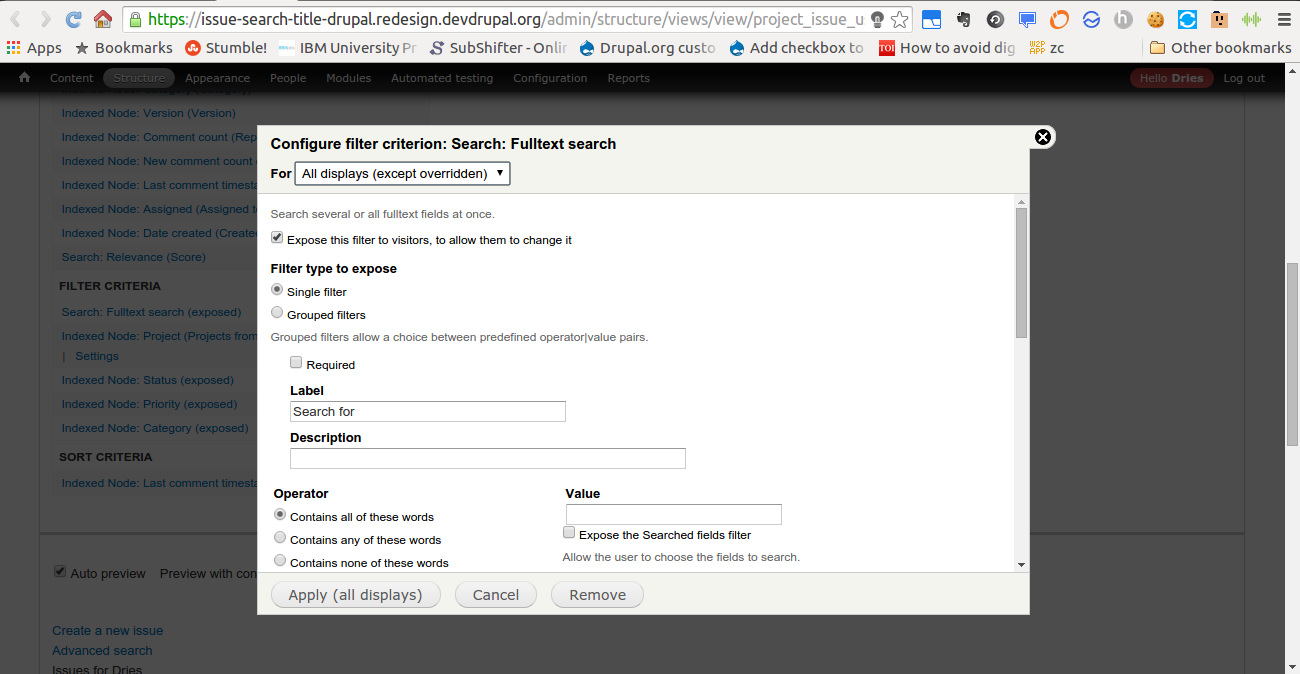
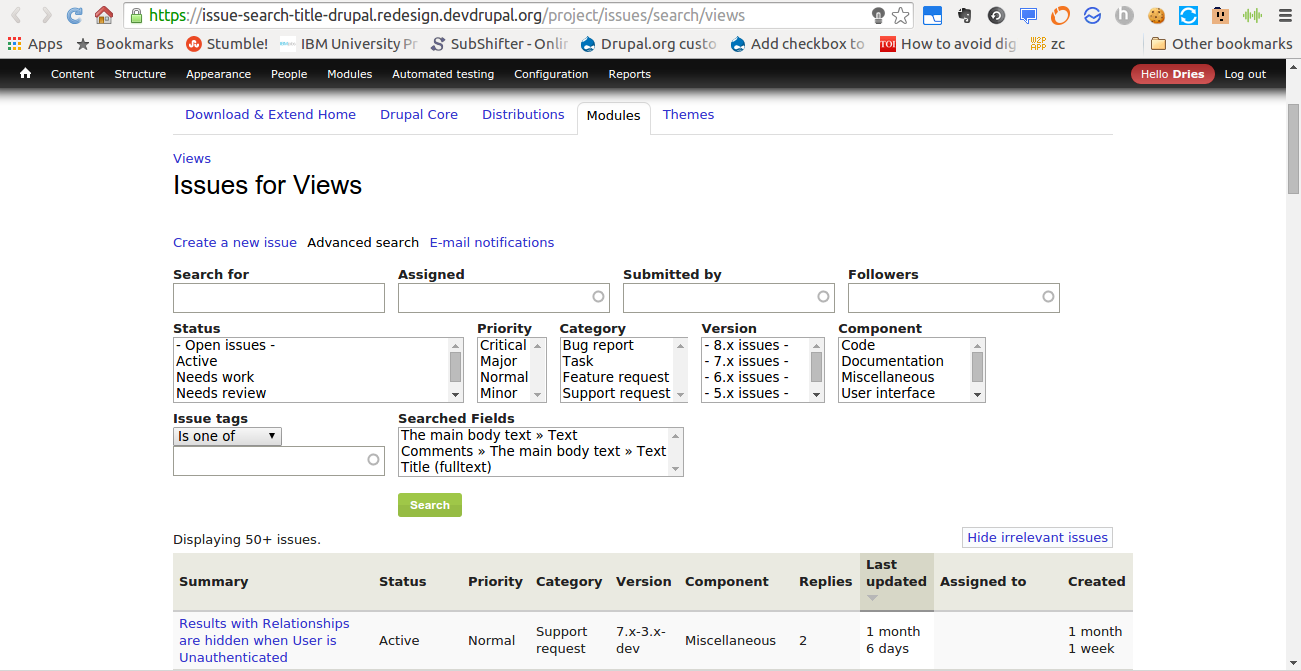
See the attached screenshots.
This is how the unaltered filter looks like (Issue search filter form):

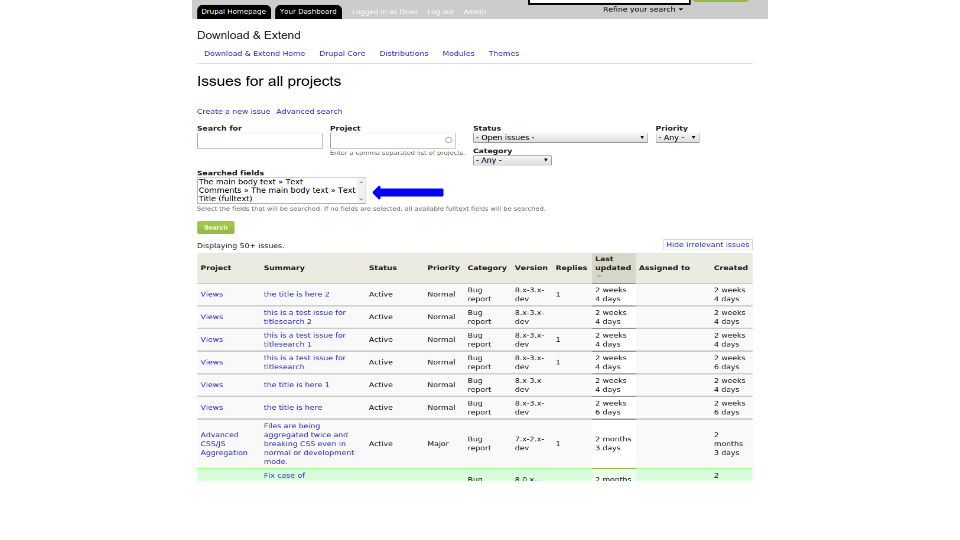
View with a query without setting the use fields filter:
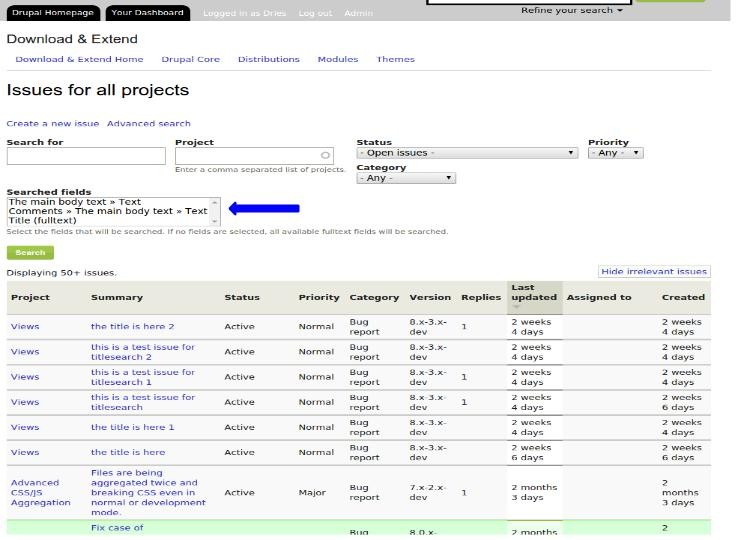
This is a view with a query and title search enabled:

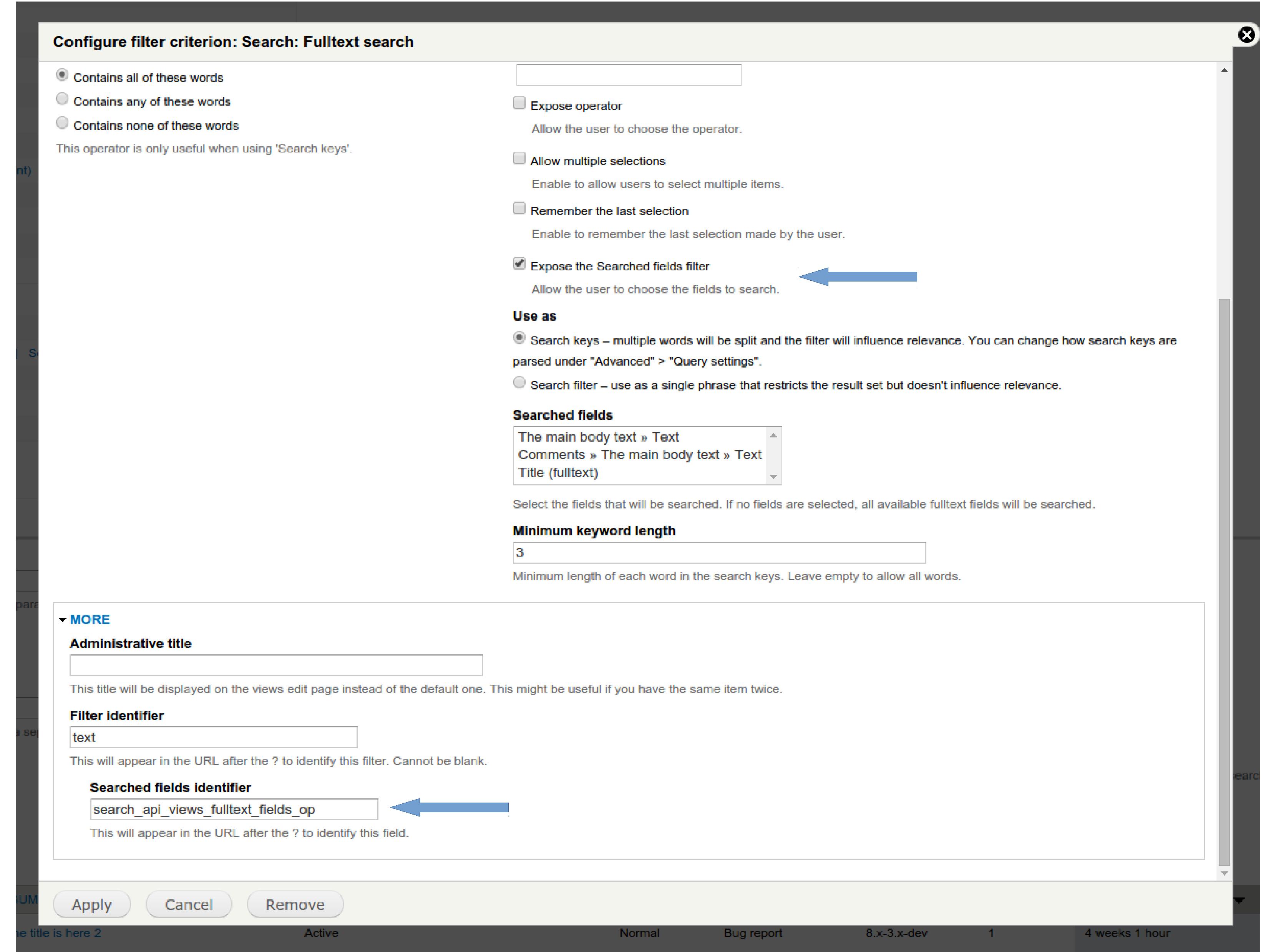
The filter config form:
Deploy on d.o
This feature is to be deployed on d.o using a features update.
| Comment | File | Size | Author |
|---|---|---|---|
| #71 | 2226335-drupal-titlesearch-71.patch | 1.27 KB | japerry |
| #70 | interdiff-2226335-63-66.txt | 2.93 KB | anksy |
| #69 | interdiff-2226335-63-66.txt | 3.62 KB | anksy |
| #66 | add_checkbox_to_limit_on_do-2226335-66-do-not-test.patch | 7.9 KB | anksy |
| #65 | Filter_config_form.jpg | 446.07 KB | anksy |










Comments
Comment #1
martin mayer commentedComment #2
drummFor Drupal.org, these Views are exported to the drupalorg_searchapi_issue_views Feature.
To implement, we should improve or extend SearchApiViewsHandlerFilterFulltext from search_api module.
Although, I'm hesitant to make this form more complex. I suppose it is okay on the advanced pages. Who else wants this?
Comment #3
Bojhan commentedIt should probably be a select list "Full text, Title".
Comment #4
yesct commentedComment #5
yesct commenteda select sounds nice.
Comment #6
yesct commentedIdentifying this as a potential good issue for Sprint Weekend. See discussion at #2407325: preparing for a sprint, would be good to have a list of candidate issues. Adding sprint queue tag.
If this is worked on during the sprint, please add the tag SprintWeekend2015. Add a comment when you start work saying what you are about to do, so we can coordinate.
Comment #7
develcuy commentedComment #8
develcuy commentedRemoved SprintWeekend2015Queue by mistake.
Comment #9
anksy commentedComment #10
anksy commentedI am working on implementing this feature so any ideas on which part of the site should I start for the select list suggested by Bojhan. Already made a development site for this issue.
Comment #11
yesct commentedA few ideas:
try to change anything at all, and make a patch for it.
That will help with the general idea of how to change things on d.o
For example...
to keep it really simple at first,
change the label on an existing field, but do not add anything,
like, change "Search for" to "Search for something". :)
After we know how to do that,
let's try something more complicated.
Comment #12
yesct commentedthe other thing I would recommend is setting up some issues, or finding some existing example
where when you put a search string in the search box, and that string is only in the issue title, the search does not find it.
And we should update the issue summary with steps to test, and links to those issue nodes that we will use for manual testing.
This is a good thing to do because it helps us define the problem clearly.
Comment #13
anksy commentedI was trying to modify the issues search page in the dev site. Actually I was trying to modify it using the drupalorg_searchapi_issue_views feature which was wrong because features should only be edited using the UI. So to proceed on this issue will have to read about features and views. The next step would be to play with features and views on a local drupal 7 site. There isn't a views exposed filter for adding title-only checkbox so we will have to extend the Views filter implementation.
Comment #14
yesct commentedfrom irc, via @drumm also
yeah, once we figure out how to do any search change, we can collect some ideas from other big project bug searches. that is a really good idea.
Comment #15
anksy commentedHere is the link to the view for the issue search page: Issue Search
Comment #16
yesct commentedThis issue and some related ones were submitted to GSOC https://groups.drupal.org/node/455978#project34
Comment #17
drummI'd say this is DIFFICULT.
Comment #18
MihailRm commentedThere is a solution for this issue?
Comment #19
tvn commentedComment #20
anksy commentedThis issue has been accepted as a part of a GSoC project this year and I will be working on this issue for the summer. I am working on SearchApiViewsHandlerFilterFulltext which is to be modified for implementing a checkbox for title search.
Comment #21
anksy commentedTo implement title search we will change the "Fulltext Search" filter's configuration. Right now there isn't an option to expose the "Searched Fields" select menu to the user.


So I propose that we add an option (Like a checkbox) in this filter form which when selected will add a select menu beside the Search box as shown here.
Here the user can select, to which fields does he want to restrict his text search. This approach involves altering the code in SearchApiViewsHandlerFilterFulltext. It will add a nice attribute to the Fulltext search filter which will give the developer an option to expose the Searched Fields select menu to the user thereby giving him more flexibility and control over his search.
Please give feedback on this approach.
Comment #22
drummThat sounds like Views's "Expose operator" option for exposed filters. Developing this to parallel that makes sense to me.
Do keep the widgets in the admin UI & exposed filter UI the same. The screenshots have a couple differences:
I'd consider changing both to a checkboxes element. For a handful of options, checkboxes are an easier UI to use. But, that's a separate issue.
How much of this do you expect to implement as patches to Search API Views module?
If project_issue or drupalorg want to simplify the widget down to a checkbox, they can do that in form altering.
Comment #23
anksy commentedI am going to implement everything I just described down to the final title search checkbox or select menu whichever we decide to use.
I wanted to know which files should I look at to make modifications to the filter form other than handler_filter_fulltext.inc. I mean I want to add an option to expose the searched fields menu which will lead to a select menu in the issue search page so any ideas on where can I find the file that deals with the UI for adding this menu to the search issues page and to modify the UI of the filter form to add the the radio button to expose this field.
Comment #24
anksy commentedThis is how the Fulltext Search filter form will look.

A patch to add the title search checkbox to the form is attached.
Comment #25
yesct commented@anksy which project should that patch be applied to? Is it to Project issue tracking https://www.drupal.org/project/project_issue ?
Comment #26
anksy commentedThe previous patch had some issues. This one has solved some bugs.
@YesCT This patch should be applied to the search api module in drupal.org.
Comment #27
anksy commentedI wrote this function in handler_filter_fulltext.inc. http://privatepaste.com/a4c88db341 .
It makes the 'Search for' field to become a select field as given in this image - http://postimg.org/image/48i3qfsqn/
I want to add a select field to the issue search form where a user searches for the issue beside the 'Search for' textbox.
Can someone tell me where I am going wrong?
Comment #28
anksy commentedI wanted to add a select field for title search to the issue search page.

drumm said that I should use the value_form() method and $form['value'] to put a field on the issue search page.
Therefore I modified the class SearchApiViewsHandlerFilterFulltext extends SearchApiViewshandlerFilterText from file handler_filter_fulltext.inc to include the value_form function. The attached patch first-do-not-test.patch contains this code.
I hoped that I would get a new select field beside the full text search box but instead the full text search box changed to a select field as shown below.
I think its because it overrides the value_form() method in class SearchApiViewsHandlerFilterText from file handler_filter.inc. The value_form() method in SearchApiViewsHandlerFilterText gives the textbox property to the full text field.
Therefor I made a new class SearchApiViewsHandlerFilterTitle for the value_form method. The attached file handler_filter_title.txt contains the code to this. But the new file i.e handler_filter_title.inc fails to work. It is as if the class is not called at all. Therefore I grepped for SearchApiViewsHandlerFilterFulltext and found search_api_views.views.inc. I then added SearchApiViewsHandlerFilterTitle to this file but it wasnt called even then.
So I want to know how the issue search form on d.o makes these fields like status, priotrity and category as drop downs.
Comment #29
anksy commentedComment #30
anksy commentedI finally understood how the whole filter system works. The options_form() method contains the implementation of the filter that is to be displayed in the filter config form. This is displayed to the site administrator. Here I can use the $form[] variable to add a field to the filter config form. I have used this variable with the $form['titlesearch'] value to represent state of the filter for titlesearch. Then this is linked to the field to be displayed on the issue search form using the $form_state[] variable. The value_form() method is used to display the filter on the issue search page. I used the $form['titles'] variable to represent the title search filter on the issue search form. There was no need to create a new file like handler_filter_title.inc. Now to implement the filtering of the query we have to use the query method of the handler_filter_fulltext.inc. I have implemeted the filter on the filter config form and also in the issue search form.
Here is the searched fields filter on the issue search form

The filter on the filter config form - "Expose the searched fields filter."

Now the work that is remaining is to link both to the query.
I have looked at the query that is generated using the "Search for" filter in handler_filter_fulltext.inc inside the method query().
I will extend that method to also include the title search filter.
For that I need to know where is the value of the filter that the user selects is stored. In other words, which variable contains the input entered by the user?
Comment #31
anksy commentedComment #32
anksy commentedComment #33
anksy commentedI wanted to add the filter to query so for that I wanted to know where is the value of the input given by the user stored. I tried to find it by using dpm($form) but didnt find it. The query() method uses $this->value to add the filter to the query. So I want to know how can I find a variable like $this->value that I can use to process the title search filter.
Comment #34
anksy commentedHere is the patch for the dpm function. I inserted it in the views.module file.
Comment #35
anksy commentedSo I found out that the $this->options[$fields] holds the value of the field that the the site admin enters into the filter config form and this line $this->query->fields($fields); adds the fields to search in into the query. So in this patch I hard coded the query to search in the title.
Comment #36
yesct commented@anksy please post some before and after differences without and with that hard coded query.
I think we agreed earlier in the summer that you were going to list some expected outputs of certain queries. Examples like: when I search for "...." I get X results including "...". When I restrict by title, I get Y results and we can see "..." is missing since that title does not contain the text.
Please do that.
Comment #37
anksy commentedHere are the before and after screenshots of the hard coded query.

Before
In the before screenshot the title search filter hasn't been hardcoded so we can see all the 6 results where the phrase "this is a test issue for titlesearch" occurs either in the title or the summary.
After

In the after screenshot we have hardcoded the titlesearch filter into the query thereby restricting the query to the title we get only 3 results where the phrase "this is a test issue for titlesearch" occurs in the title whereas the results in which this phrase occured in the summary are not displayed.
Comment #38
japerryCurious, why are we pegged to such an old version of search api? The git hash is from December 25th, 2013.
I'd suggest taking a look at the 'use_operator' form function and try to replicate what it does. That is essentially what you're doing here.
Comment #39
japerrySo to go more indepth on 'use_operator' --
First, its important to know the hierarchy of the classes you're extending:
class SearchApiViewsHandlerFilterFulltext extends SearchApiViewsHandlerFilterText
class SearchApiViewsHandlerFilter extends views_handler_filter
class views_handler_filter extends views_handler
These three classes contain everything in regards to dealing with exposed filters. I'd suggest using a IDE like PHPstorm to do function searches within these three classes. As you've already seen, the changes you need to make are in SearchApiViewsHandlerFilterFulltext, but the answers to your questions are within these three classes.
If you enable the 'Expose Operator to user' option, you'll see a select dropdown, that allows the user to select how to use search. We're essentially doing the same thing, wanting to expose the search fields.
To be generic, you want to hook into the fields variable, so I'd suggest looking at making a 'use_fields' variable. Also, look at the other variables around 'use_operator' that are needed, there are more than just that variable.
If you can figure out how exposed operators work, and how they show/hide that box, and alter the query, you'll have your answer for the fields (title search) box.
Once you get this, you can make a specific alter in the drupalcon search api module to the fields search so it looks nicer than what is currently displayed.
Also, the 'value_form' is the form ID for the value field, and shouldn't be changed. The fields form is currently hardcoded within the options_form -- it might be a good idea to abstract that out if its displayed in two places.
Comment #40
anksy commentedI have tried to use the use_operator function in my patch. Right now I am using it with $options['expose']['use_operator'] variable which represents the "Search for" textbox. I will be using a different variable to represent use_operator like $this->options['expose_title']['use_operator']. I havent been able to figure out where does this variable get the state of the "Search for" filter. If it is known how does this variable gets the state of the checkbox by the user than we can use it similarly in our title search filter. views_handler_filter.inc contains this use_operator variable in the expose_form() method. Also I wanted to know how do I find out which version of Views does d.o use?
Comment #41
anksy commentedjaperry: Thank you, I didnt see the comment. Yes, this is what I was working on too. I had found out about these three classes by grepping the different variables and from it I understood that in views_handler_filter.inc the Expose operator checkbox is made and in handler_filter.inc the use_operator variable is examined to display the operator to the user. I think that this variable is set in views_handler_filter.inc, I just cant figure out at which place in the file is this variable set.
The show/hide expose filter works in the following way:
1) The user sets the operator checkbox in the filter config form. The expose operator part of the form is built in views_handler_filter.inc file and here the use_operator variable is set.
2) Then in the issue search form this variable is checked in the file handler_filter.inc and if its value is true then it is shown on the issue search form and is not shown if its false.
The value_form() is a method in handler_filter_fulltext.inc which builds the "search for" textbox for the issue search form so instead of overwriting it I am extending it to also show the select menu for "Search in fields".
Yes the fields form is hard coded in the options_form so I will abstract it out in the end so that it doesnt appear in two places.
Now the place where I am stuck is that I cant seem to figure out that how does the use_operator variable get the state of the checkbox which the user dets in the filter config form.
Comment #42
japerryThere is an options definition, that is where part of the functionality is.
In the end, You'll add the use_fields variable to most places the use_operator variable is.. the exception is functions relating specifically to the operator logic itself.
The value form is for the value element only. You'll notice the operator var is not in there. You shouldnt be altering the value form.
Comment #43
anksy commentedThe expose operator logic is mainly contained in function expose_form(&$form, &$form_state) , function exposed_info() and function accept_exposed_input($input). I will use that logic to make the titlesearch feature.
Trail of use_operator key -
function option_definition - Line 122 - Here the variable $options['expose']['use_operator'] is defined.
function expose_form - Line 512 - the expose operator checkbox is defined using $form['expose']['use_operator'] and its default value is set to true or false dependind on whether $options['expose']['use_operator'] is empty or not
function expose_options - Line 721 - $options['expose']['use_operator'] is set to false function exposed_form - Line 806 - if $options['expose']['use_operator'] is true then the operator_form is exposed to the user.
I have yet to figure out what the function accept_exposed_input() does.
Till now I had been trying to understand the code from implementing a new feature standpoint but I need to go back and look at how an existing feature works, learn it, document it, understand everything about it. When thats done, I should be able to take that existing feature, and adapt it to what we need. In this case, creating an exposed filter for the fields function.
Now what I found out is that the expose key is all of the variables under a filter when its being exposed. Now I will document the operator_id and operator keys.
Trail of operator_id -
function init - Line 89 and 90 - If operator_id is empty and the filter is set to be exposed than $options['expose']['operator_id'] is set.
function option_definition - Line 119 - Defines the value of $options['expose']['operator_id']
function expose_form - Line 528 - The operator identifier field is defined using the form api.
function exposed_form - Line 806 - Here if the operator is to be exposed to the user than the radio buttons form is exposed to the user with the operator id that has been specified.
I have yet to figure out what the function accept_exposed_input() does.
Trail of operator -
It is only used alongwith operator_id in the function init where it provides the value to operator_id.
Comment #44
anksy commentedBy studying the use_operator var, I found out that the approach that I had used previously was a bit flawed. Our filter shouldnt be an independent key but instead should be a part of the 'expose' key. It will be similar to the use_operator var. It will be contained in a function called the fields_form() and its key would be use_fields. Our function will be called from exposed_form() and the filter config form will be located in expose_form(). The $options['expose']['use_fields'] variable will contain the state of the checkbox and it will be used to display the select field on the issue search form. I will be posting a patch with these changes shortly.
Comment #45
anksy commentedI have made the final changes that are needed to implement the title search filter. These patches contain the code that implemets the checkbox on the filter config form and the select menu on the issue search form. The checkbox in the filter config form has been linked to the select menu on the issue search form. The title search filter is almost complete.
I just have one doubt which is in handler_filter_fulltext.inc in the patch that is attached, the function accept_fields_input() is not called when the issue search page loads. My doubt is that how to make a function that I create to be called automatically.
Comment #46
anksy commentedPlease ignore the patch in this comment. The final patch is posted in the next comment.
Finally I have completed implementing fields search in the drupal.org test site. Attached in the next comment is the final patch that implements fields search (Title search) on the dev site. The title search filter is up and working correctly. The changes have been made in the following pages - Filter config forms and the issue search form. For example this Filter config form in the Search: Fulltext search (exposed) Filter Criteria section and its associated Issue search form show the title search checkbox and the select fields respectively. Here is the screenshot for the title search checkbox on the filter config form.
Filter config form
Following are the screenshots of the issue search form with the field search (Title search) filter enabled.
Title search
Title and Full body search
Please review and test this feature and notify me if you find any bugs. I have finally implemented this feature on the dev site and it can now move on to testing.
Comment #47
anksy commentedHere is the patch with the final feature.
Comment #48
anksy commentedIn the previous patch there was a bug which led to wrong results due to an empty $filter. This patch corrects it.
Comment #49
anksy commentedI had been chatting with YesCT about the things to do now and we came up with the following tasks that are to be done -
1) Add doc blocks in the patch where they are missing in some functions.
2) Post a patch that is created from the modules root so as to show the full path of the files that are being changed.
3) Update the issue summary remianing tasks section - Will be done with this comment.
4) Post some before and after test case results.
5) To post as to what project does this patch modifies.
Also changing the status of the issue to Needs Review as the filter is ready for review by the community in the demo site. It is live here Demo Site .
Comment #56
japerryuse_fields is a boolean, should not be getting the fields set here.
Use fields is a boolean, should be getting the fields from the options form instead.
Here, use_fields is set to a boolean, which is correct.
Also
Views Handler filter should not be touched. Everything should be extended in the handler_filter_fulltext file.
Also, we should move this specific patch to search api, so tests can run and that it is patched correctly. This issue can remain open for the drupalorg side of things.
Comment #57
anksy commentedI have incorporated all the suggestions in the remaining tasks section in this comment.
I have shifted everything to handler_filter_fulltext.inc from views_handler_filter.inc.
I have added the doc blocks in the patch and changed the name of the $this->use_fields variable to $this->use_fields_op which is better understandable.
Here are the before and after test case screenshots.
Initial view of the filter
When searched without the "Searched fields filter"
View with the "Searched fields filter"
Comment #58
anksy commentedComment #59
anksy commentedI have changed the names of the filter options to something that can be better understood by the user. The patch is to be applied to the project search api. I have also posted a patch to the issue that I created in the search api issue queue. #2513126-3: Add checkbox to limit issue search to different fields like the title, comments etc. in search api
Comment #60
anksy commentedComment #61
anksy commentedI have added the fields_id field to the filter config form.
This is how it looks.

I am working on adding a field identifier for the searched fields filter. The fields id field works using the store_exposed_input method. It sets the url value in this method. It uses expose_options to set the default value of fields id. All this is similar to the operator_id field. I will be extending the store_exposed_input method to handler_filter_fulltext.inc and it will then change the url for the fields_id identifier.
Comment #62
anksy commentedThere is a problem with the UI. When you search for a term on the issue search page it starts showing two select boxes. Below is the image of the problem.
I think this issue is because the function that makes this select box in handler_filter_fulltext.inc is called twice.
Can anyone comment on how to solve this problem?
Comment #63
anksy commentedHere I have added the fields_id field into the filter config form and to the url of the issue search form.
Comment #64
anksy commentedComment #65
anksy commentedI have solved the duplicacy issue and completed the addition of a fields_id field. Attached is the patch incorporating these changes.
Comment #66
anksy commentedForgot to attach the patch with the previous comment.
Comment #67
anksy commentedComment #69
anksy commentedHere is the interdiff for the last two patches.
Comment #70
anksy commentedSo me and YesCT were discussing about this issue on #drupal-contribute and we discussed the following points:-
1) This patch first needs to be accepted into the search_api module. It can be deployed only after that.
2) I will update the search_api issue with steps to reproduce this issue, including building a drupal 7 site, contrib modules needed.
3_ The interdiff that I posted contains a change in position of expose_options() which is not needed in solving the duplicacy issue so I am attaching an interdiff with that change removed.
4) Also I had ignored some points in the coding standards. YesCT told me about using phpstorm with the code sniffer for drupal coding standards enabled. So I am gonna use that so I dont leave unnecessary whitespaces in my patches.
This interdiff solves the duplicacy issue and it also make the fields_id thing operational.
The addition on line # 20 sets the default value of the fields_id field so it is not empty by default.
The addition on line # 110 adds the fields_id field as the identity for the use_fields_id filter.
The store_exposed_input method sets the fields_id value in the URL and also solves the duplicacy issue.
The change on line # 158 adds the filter to the query only if it is enabled and the fields_is isn't empty.
Comment #71
japerryMoving this into the drupalorg issue queue. The alters we need to do based on #2513126: Add checkbox to limit issue search to different fields like the title, comments etc. in search api are a bit too specific to put into project module.
This patch is designed to work with Patch #11 in #2513126: Add checkbox to limit issue search to different fields like the title, comments etc. in search api for search api.