

 The 2026 Drupal Business Survey is open. Your response will help shape the future of the Drupal business ecosystem.
I have a form with ~200 submissions. I can download delimited files and open them in excel without issue.
When I download excel files, I get one of two errors from Excel
1. "Excel could not open [filename].xlsx because some content is unreadable. Do you want to open and repair this workbook?"
2. "Excel cannot open this file. The file format or file extension is not valid. Verify that the file has not been corrupted and that the file extension matches the format of the file."
In case 1, if I open and repair the file opens up and appears to be fine. In case 2, the file never opens; if I change the extension to xls, the file opens but is empty.
I updated from alpha-9 to beta-1, then the issue appeared.
| Comment | File | Size | Author |
|---|---|---|---|
| #57 | webform_excel_reports_corrupted-2125543-57.patch | 521 bytes | herved |
| #54 | webform_export_to_excel.patch | 644 bytes | arjunbhandage |
| #51 | Knipsel3.JPG | 286.23 KB | RAWDESK |
| #51 | Knipsel2.JPG | 133.94 KB | RAWDESK |
| #51 | Knipsel.JPG | 137.04 KB | RAWDESK |



Comments
Comment #1
quicksketchDoes this issue happen in all forms on your site? Can you create a new form, fill it out a few times, and see if you get the same problem?
Comment #2
pixlkat commentedI also have this issue with beta-1. I created a test form with a textfield, email field, and an option list, submitted it four times and I got error #2 above when I downloaded as Excel.
I tried to download as a Delimited text file and for the simple form, that works. However the form I really need to export results for has several text area form elements which have newlines so the delimited text file doesn't really import correctly.
Comment #3
fullerja commentedSeems to be an issue with old forms, I used at least one of each field type and could not replicate on a new form.
Comment #4
pjcdawkins commentedI have the same problem (using Webform 7.x-4.0-alpha10+9-dev: not on beta1 yet due to another issue).
The file opens fine in LibreOffice, but Excel (for Mac, 2011) complains about it. Just going to find myself a Mac to debug this on...
Comment #5
pjcdawkins commentedOK after some testing with different values for "Included export components", it definitely works fine with the following types of component:
but it breaks with textarea components.
I suspect that's the issue for fullerja too (#3)?
Or perhaps it's to do with specific content that people have entered into the textarea... in which case I could investigate some more.
Comment #6
pjcdawkins commented... OK textarea components actually work fine in general, but sometimes there is content that upsets Excel.
Examining one specific piece of content (which upsets Excel) - I've downloaded it as TSV to check - it has one very weird character in it that renders in Geany like this screenshot:
Comment #7
liam morlandComment #8
quicksketchFurther clarifying the topic. Any idea what this character is or how we could reproduce this? Sounds like it's just a matter of entering this unexpected character into a textarea and then trying to export it.
Comment #9
selwynpolit commentedThis is happening on a site I am working on. The webform is setup as a contact form allowing users to submit a question. This question field is often filled in by spammers with some html links and text. I did notice a little black block with SOH one line. Apparently this is a control character ie ascii less than 32 as displayed by notepad++. It is pasted below. This might be the culprit. When I posted the whole spam text below, it appears as a little square with 00 and 01 in it.
I should also note that I am able to view the export to CSV or TSV, only excel fails.
I trimmed out a lot of this so the spam police don't ding me:
..not the generic Dispense the medication either with..
Does this help?
Comment #10
liam morlandMarking #2351657: Export to Microsoft Excel Gives Excel Issue as duplicate of this.
Comment #11
steven_ght commentedI have the same corrupted file issue with one of my forms. The problem occures when there are rows with a plus sign ("+") in one of the submissions (in my cases, it's a phone field that sometimes contains the area code).
Removing the plus sign from those lines made the probleme disappear so ... guess it's a part of the issue, hope it will help :)
Comment #12
thomaschall commentedHope this helps troubleshoot.
I had the same issue and resolved it by deleting the character that was causing the problem from a specific webform entry field. I was asking for an address in the form with each part of the address as a separate field. From looking at the submission, the user entered "Baltimore, " I deleted the comma and few characters thereafter, and the problem was solved. My guess is that the form was autocompleted with the comma and either 2 spaces, return character, or line break. I don't know the specific ASCII character, but hope this helps.
Comment #13
acidaniel commentedYou should write a little code to clean the special chars, the code looks like
With this code your Excel files should open properly :)
Comment #14
leewillis77 commentedI can confirm the report in #2125543-11: Excel reports Webform export files are corrupted when some characters are entered in text fields in that it appears to be + symbols that cause the file to be reported as corrupt.
We're seeing the exact same issue with telephone fields.
Unzipping the .xlsx, editing the xl/worksheets/sheet1.xml, removing the '+' symbols, and re-zipping the file leads to a file that can be successfully opened.
I tried to add a + in Excel, and re-save to see how it encoded it, but it seems to structure things entirely differently (the content is all in xl/sharedStrings.xml for one).
Comment #15
tormu commentedConfirming the "+" sign problem - we also have a phone field and when the user enters a phone number with country code with the + in the front, the Excel export fails when opening in Excel.
I tried opening the exported .xlsx files in Google Sheets but they open up blank there too in these cases.
Can't get the CSV to work due to newlines within fields being interpreted as new record rows in the Excel so the whole export functionality is now quite dead end :(
Comment #16
intaminfanatic commentedHas anyone found a solution to this, beside removing the plus signs manually in a text editor?
Also, has anyone tried acidaniel's code? I'm not familiar with modifying modules; where does this snippet go?
Thank you! I'm a little frantic to fix this as we (used to) use this excel export feature a lot.
Comment #17
danchadwick commentedIt seems that there are a number of issues with excel output. It would be great if someone would step forward and offer a patch, or offer to sponsor the development. One option would be to use the phpexcel library, if it's present. I am not sure that it can split the output of webforms with many submissions into batches to avoid browser timeout.
Comment #18
quicksketchI think the root of this problem is that XLSX files are simply XML files. When we encode the text, we use
htmlspecialchars()to escape characters into HTML entities. Unfortunately, it does it for HTML, which does not escape the plus sign (and presumably other symbols as well). In PHP 5.4+, you can pass in a second parameter of ENT_XML1, and that supposedly would fix the encoding, because then it would escape it for XML properly.We can probably find some backwards-compatible way of handling this. Perhaps it'd be as simple as
str_replace('+', '+', $value), but there may be other characters that we're missing here.Comment #19
danchadwick commentedSome info on the options for htmlspecialchars():
http://stackoverflow.com/questions/13745353/what-do-the-ent-html5-ent-ht...
It doesn't look like ENT_XML1 would help. It would add encoding of single quotes, which could be done with ENT_QUOTE.
The cell contents are stored as an XML attribute, and the definition of the value, only requires quoting the quote used (double in our case) and less-than.:http://www.w3.org/TR/xml/#NT-AttValue
EDIT: The cell contents are stored as XML character data:
http://www.w3.org/TR/xml/#syntax
So I don't see anything in the XML spec that relates to plus. It would be easy to try encoding plus to see if that helps. I'm not sure what others might be problems.
There are other characters which are illegal in XML files:
http://www.w3.org/TR/xml/#NT-Char
And last, I suspect that the character set for htmlspecialchars() is an issue. The default depends upon the version of PHP, and for 5.3, it is ISO-8859-1. We should probably set this to UTF-8.
EDIT: I'm wondering if the problem with plus is that it is being output as a number. If a phone number were typed with a leading plus and then all digits and no spaces, dashes, or parens, then is_numeric() would consider it a number.
Comment #20
danchadwick commented#19 is a red herring.
The problem with + is that (surprisingly) Excel cannot accept numbers with a leading plus.
The solution is to import them as text. This causes Excel (at least my version) to give a warning that a text cell has a number in it. The only other option would be to remove the plus, which would be undesirable for some use cases.
The other issue is that XML files cannot contain all legal UTF-8 characters:
Char ::= #x9 | #xA | #xD | [#x20-#xD7FF] | [#xE000-#xFFFD] | [#x10000-#x10FFFF]
Committed to 7.x-4.x and 8.x
Comment #22
liam morlandI was having problems with htmlspecialchars() in XML generation in fillpdf, so I re-wrote the XML generation code to use DOMDocument() instead, which removed the need for htmlspecialchars(). See:
http://cgit.drupalcode.org/fillpdf/commit/?id=e3c456f
Comment #23
danchadwick commentedWhat problems were you having?
I am still a little concerned about the characterset, but since the 5 entites that are converted are all 7-bit ASCII, I'm not actually sure that it matters.
If we continue to have problems your use of DOMDocument() would be a good way to rewrite the XML document generation. I'm not sure if it can be batched, however. This is one of the reasons we don't use PHPExcel. The other being the added dependency on the libraries and PHPExcel modules (at least to do the export -- webform itself wouldn't have to depend upon them).
Comment #24
liam morlandIt got started with problems when umlauts are in the text. For details see #1904100: Don't use htmlspecialchars() in create_xfdf().
Comment #25
danchadwick commented@Liam -- That umlaut issue may well be related to character set. I'm still wondering if we should add utf-8 to our call to htmlspecialchars(). That said, I find it hard to believe that with 100,000's of webform installation, some German data wouldn't have been downloaded successfully to webform on a PHP 5.3 server.
Let's see if any more issue arise with specific data.
Comment #26
liam morlandMakes sense. In the case of fillpdf, there is no need for batching, so we were able to side-step the whole thing by using DOMDocument. I think it makes sense to set the charset to avoid different behavior on different PHP versions, which could be difficult to debug.
Another idea: What is the overhead for DOMDocument? Could each batch run use it to make an XML fragment which are then concatenated together (after removing and leading and trailer bits that shouldn't be there)? That would again avoid htmlspecialchars().
Comment #27
danchadwick commentedRe #26. Good idea. I'll set the charset in htmlspecialchars to UTF-8
Committed to 7.x-4.x and 8.x.
I thought I noticed in my testing that a solo + in a cell was a problem, but I can no longer reproduce it. I did try outputting the HTML entity for +, but Excel does not decode it and you get literally:
Comment #30
RAWDESK commentedHello,
After several problems with the excel download feature i've upgraded my webform module from 7.x-4.7 to 7.x-4.7 (released March 25, 2015).
I am now able to dowload an xlsx file (recognized as such by my OS), but excel 2013 gives me this error message when trying to open it :
"Excel cannot open this file. The file format or file extension is not valid. Verify that the file has not been corrupted and that the file extension matches the format of the file."
Have the above patches been applied to any version (4.3 till 4.7) yet ?
Thanks
Comment #31
liam morlandThe commit referenced in comment #28 shipped with 7.x-4.4.
Comment #32
danchadwick commentedThanks Liam. @RAWDESK -- you can answer questions like this yourself by searching for the issue in the commit log: http://cgit.drupalcode.org/webform/log/
You can find the commit log for any project by visiting it's project page and clicking View Repository.
If this problem is specific to Excel 2013, you can send me a legally licensed copy and I'll take a look at it.
Comment #33
possibriI can confirm that this is still an issue. I'm using 7.x-4.7+61-dev, and I've tried opening the file using both Excel 2011 (Mac) and Excel 2013 (Windows) and I still get the error. I'm really not even sure where to start looking, so any direction would be super helpful! Thanks =]
Comment #34
danchadwick commented@possiBri -- You can send me a legal licensed copy of Excel 2013 and your file and I can try to see what's wrong in it (if it isn't too big). You can contact me via my contact page if you're interested.
Comment #35
defigo commentedI have been having this same issue also where the excel file would not open. After words it would through the following error, Warning: end() expects parameter 1 to be array, null given in webform_results_export() (line 875 of \modules\webform\includes\webform.report.inc). However, I was able to download and open a CSV.
What was weird is that I have this same configuration set up on three sites on the same server, but only one is giving me this issue.
At first I checked my folder permissions for the temp folder. However, what I found out was that another module, Webform Confirm Email, was giving me this headache. I changed it to v7.x-2.0-beta3 and it worked.
If you have other modules that are working with Webform, turn them off and turn one on at a time to test if they may the thorn in your side.
Servers: WISP
PHP: 5.4.40
Excel 2013
Comment #36
liam morlandI have reported the warning message you mention in #2483251: Warning: end() expects parameter 1 to be array, null given in webform_results_export().
Comment #37
rosscullen commented@possiBri @RAWDESK Can you open these files with something other than Excel (such as Notepad++)? What size(s) are they? I'm having similar error as some above using Excel 2013, but the files downloaded (both xlsx and csv) are 0 bytes, which may point more specifically to the issue at hand.
"cannot open the file '***.xlsx' because the file format or file extension is not valid. Verify the file has not been corrupted and that the file extension matches the format of the file."
Comment #38
liam morlandThat problem may be caused by Drupal not having write access on the temporary files directory.
Comment #39
rosscullen commentedTrue @Liam Morland, i'll check it out and let you know how I get on.
Comment #40
rosscullen commented@Liam Morland, checked temp folder in "admin/config/media/file-system" (temp location was "sites/default/files/tmp").
Has FTP permission 755.
Still no joy unfortunately.
Changed folder to temp but still no joy (also ran cron after change as a precaution).
Comment #41
danchadwick commentedRe 40: If you are relying on the group for access, rather than the user, you'd need 775, not 755.
Comment #42
rosscullen commentedHi @DanChadwick, thanks for info. Tried that but no joy... i'll go back to the drawing board and rethink!
Comment #43
liam morlandTry 777. If that fixes it, then put it back to 775 and change the group to the right thing, probably "apache" or whatever you are running your web server as.
Comment #44
rosscullen commentedAfraid no difference with 777 @Liam Morland
Comment #45
possibri@rosscullen The file I get says it is 4kb (5 submissions), and when I open it in LibreOffice there are random characters in the file, but nothing readable (e.g. "PK########5#�F################_rels/PK########5#�F]��.�###,#######_rels/.rels�Ͽ#�0##�hn���1��bLX
>@-ǟPzM[#�ގb##/w���#�2k�D�G2#�4#�FQ;�^-���|����")
Comment #46
dherbold commentedSimilar issues here. CSV downloads are correct. xls downloads are missing data. Interestingly, when I open the xls files in something like google docs, the data is there. This is on Pantheon hosting.
Comment #47
dherbold commentedProgress on what's going on. When I attempt to open a webform xlxs file using Excel for Mac (Preview), v. 15.10.1, I am prompted with the following:
"excel could not open because some content is unreadable. do you want to open and repair this workbook?"
When I click yes, the repair report is this:
<?xml version="1.0" encoding="UTF-8" standalone="yes"?>
Repair Result to (2)0.xmlErrors were detected in file '/Users/xxxxxxx/Desktop/file(2).xlsx'Repaired Records: Cell information from /xl/worksheets/sheet1.xml
Any insights on this?
Comment #48
RAWDESK commented@DanChadwick What do you mean by 'legally licensed copy' ?
You need a copy of the MS Office 2013 installation disk i used here + license key ?
FYI: Just like posiBri, i cannot find anything in the commit log that might lead to a solution.
Comment #49
nitebreedStill having issues with Excel export in the latest version of Webform.
All of my webforms have trouble with the generated XLSX files, they all are 'corrupted' according to Excel. Even a simple form with only a textfield is 'corrupted', so it seems to me that it's not only caused by some specific characters.
CSV export works like a charm.
This happens on my local environment, but also on the production environment. So it doesn't seem to be a server configuration issue. No watchdog errors are reported.
Am I really the only one having these problems?
Comment #50
danchadwick commented@Nitebreed - you seem to have a totally different issue. You are saying that even the simplest export -- say one submission, one textfield component -- is being reported as corrupted.
If you want this addresses, please open a new issue, but be prepared to supply a copy of Excel to the maintainer to test with. I'm not buying it with my own funds to test an issue I don't have. The older version of Excel that I have accepts all the webform export files that I have tested it with.
Note that RAWDESK supplied me a copy of Office 2013, but could not legally transfer the copy to me so I am not willing or able to use it.
Comment #51
RAWDESK commentedHi Dan, just wondering if some friend, colleague or family member doesn't have a 2013 version so you could borrow their PC, completely legal of course... ?
Here are some tests i performed on the exported XLSX file i also sent you earlier.
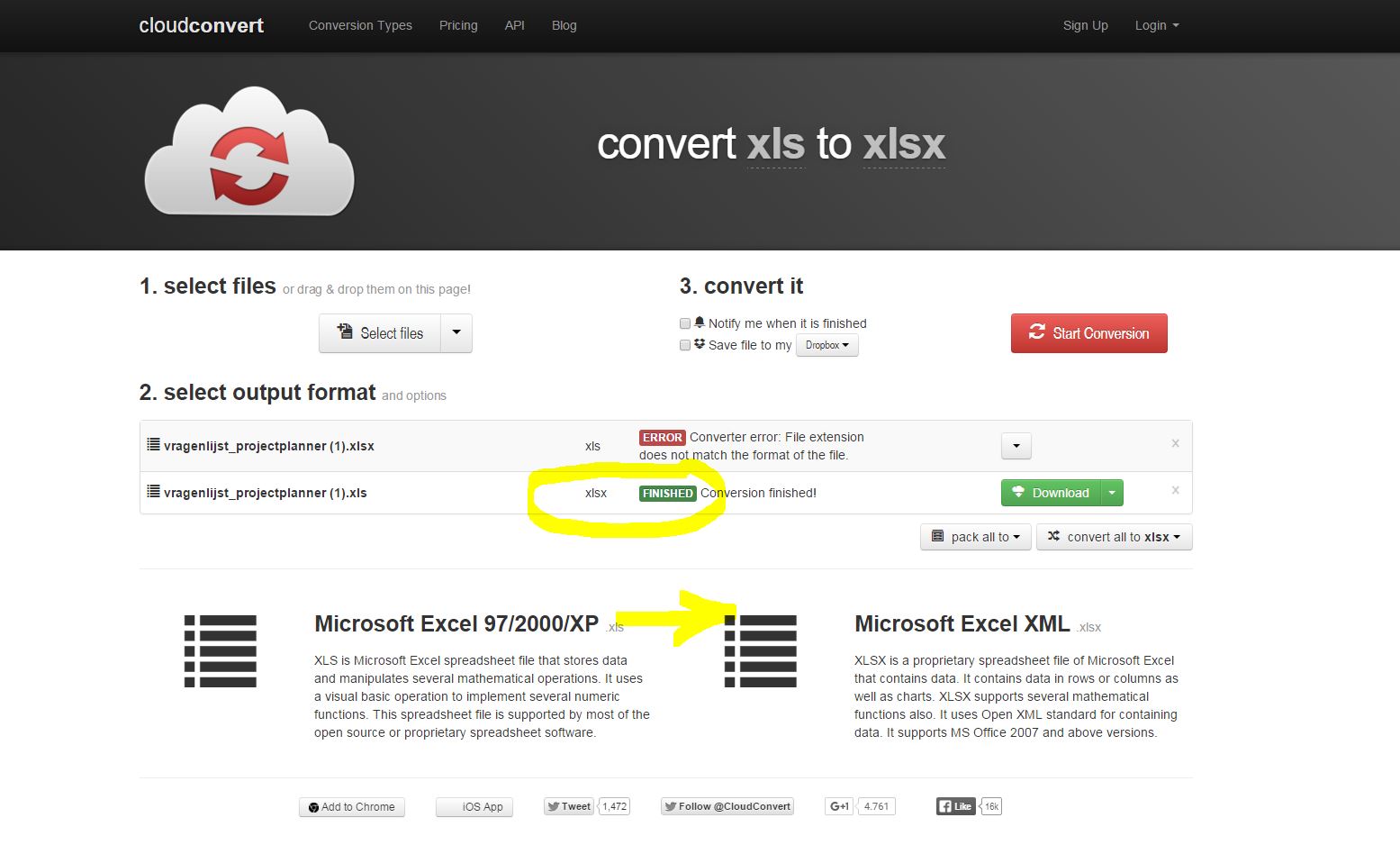
What i tried first was convert it from XLSX to XLS using cloudconvert.com, but this resulted in an error, visible in attachment 1
Renamed the xlsx file to xls and converted it from XLS to XLSX successfully using cloudconvert.com, visible in attachment 2
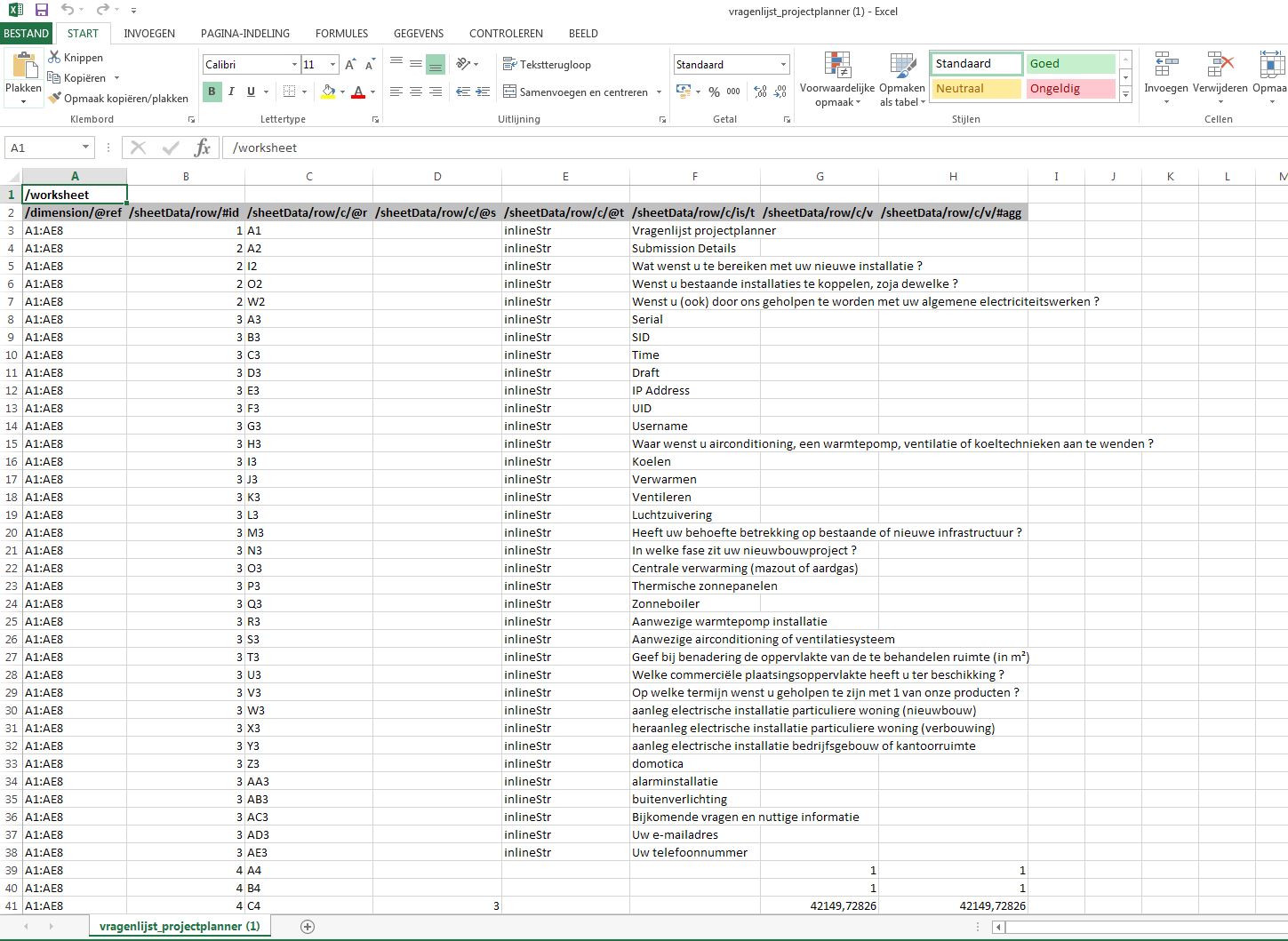
I could open this converted XLS in Excel 2013 but the data structure looks weird.
Have a look at it in 3th attachment and share me your thoughts about it...
Comment #52
nitebreedI found out that having a " " (blank space) before the
<?phpopen tag in a .module or .inc file corrupts the excel file. A colleague of my wrote a regex that finds these files, unfortunately I don't have it anymore.Comment #53
arjunbhandage commentedHi all,
My core drupal version - 7.41 and webform version 4.12. Using OpenOffice to open ***.xlsx.
The php excel files i download from webform are corrupted. I just figured out why, if you edit the ***.xlsx file in Notepad++ you will see 3 blank lines at the beginning of file. Remove these 3 lines and save the file. Now open in the file in open office. you will be able to see the desired data. Request people facing the same issue to confirm on this.
Please someone help me know where these lines are coming from, I will be very greatful.
Thanks,
Arjun.
Comment #54
arjunbhandage commentedHere's a patch from me. worked for me.
Comment #55
raphael apard commentedSame problem on an ugly website. Maybe there is blank space before <?php somewhere (@see #52).
I confirm that patch #54 works, this patch can save time.
Comment #56
herved commentedExact same problem here happening only on other environments than my local.
I am able to reproduce the issue on local when adding a space before a <?php tag as stated in #52 and patch #54 works for me as well.
Thank you.
Comment #57
herved commentedI don't think flush is required here.
So I just re-rolled the patch from #54 and applied proper patch naming conventions.
Credits to arjunbhandage.
Comment #58
drupalevangelist commentedHi pneaumme, did you able to resolve your issue? I have the exact same issue as it was mentioned in #46. I have applied the patch #57 and using Webform 7.x-4.12. Any insights?
Comment #59
antonio.bertolini commentedI've webform 7.x-4.12 on a Drupal 7.43. Webform with 1 text field, 1 date field, 4 select list (quite small..). I insert a submission with "àòèé" characters then try to download xlsx and I've the same issue mentioned in #45. The problem disappear applying patch #57.
Comment #60
nirbhasa commentedI can confirm that the patch in #2125543-57: Excel reports Webform export files are corrupted when some characters are entered in text fields worked. It would be great to get this committed.
Comment #61
nirbhasa commentedComment #62
rosscullen commented@DanChadwick as per my comment #37, I was having an issue whereby excel spreadsheets were downloading empty (0kb).
It appears that my php.ini file has a line which is preventing the excel file being generated.
Once removed, Everything is ok
I hope this is of use to others having a similar problem.
Comment #63
washburn commentedMy experience lately with this export problem is that if I export four times, two are usable by excel and two are not. The files that are not useable by Excel are different sizes than the usable ones.
Good ones were 165 KB
Bad ones were 937 KB and 2KB.
Still a mystery.
Comment #64
cilefen commentedThe patch in #57 needs review for this to be committed.
Comment #67
john_b commentedTested patch in #57 and it works. It simply adds an
ob_clean();after setting headers and before reading the data into the file, in order to remove stray whitespace which is causing the output file to be corrupt.There is an argument (see comments at http://php.net/manual/en/function.ob-clean.php) that this use of ob_clean is a bandaid to be avoided. As far as I can see the fix works, has no unwanted effects, and even if a more elegant solution could in theory be found, the patch in #57 should be accepted to get this old issue fixed for the D7 version.
Comment #69
liam morlandThanks everyone.
Comment #70
liam morlandComment #72
nil.ned commentedYeah #57 Works.
Thanks a lot!