Note: The functionality suggested below has been added to the latest dev version of Gmap. This issue only remains open awaiting unit tests.
---
#1990714: Google Maps API v3 drops method for Tabs in infoWindow: Plans for providing in d.o gmap module?
Problem/Motivation
The Gmap module allows themers to style the contents of their popup bubbles, but has limited options for styling the bubble itself.
Proposed resolution
The attached patch adds the abillity to use the infobubble google maps v3 library plugin. This plugin presents a variety of new options for styling the gmap popup bubble including:
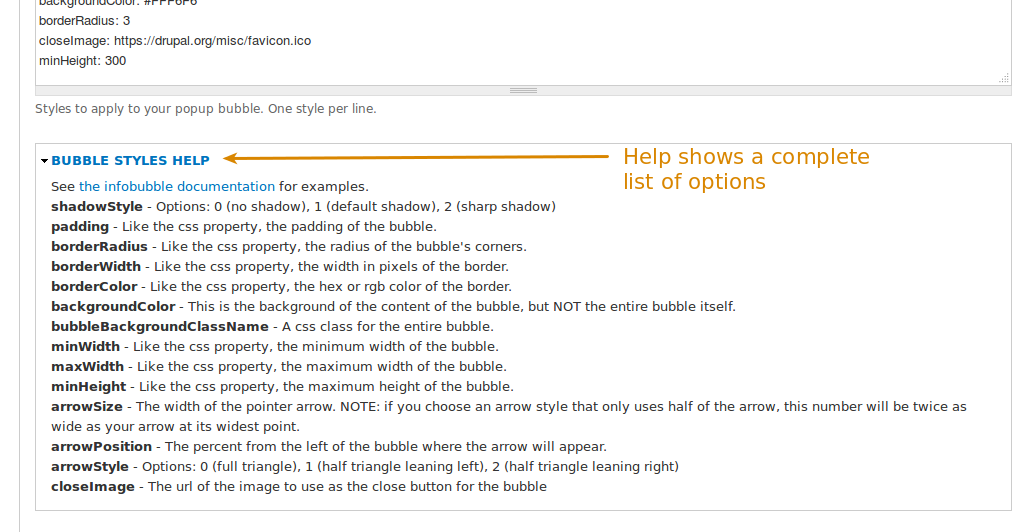
shadowStyle - Options: 0 (no shadow), 1 (default shadow), 2 (sharp shadow)
padding - Like the css property, the padding of the bubble.
borderRadius - Like the css property, the radius of the bubble's corners.
borderWidth - Like the css property, the width in pixels of the border.
borderColor - Like the css property, the hex or rgb color of the border.
backgroundColor - This is the background of the content of the bubble, but NOT the entire bubble itself.
bubbleBackgroundClassName - A css class for the entire bubble.
minWidth - Like the css property, the minimum width of the bubble.
maxWidth - Like the css property, the maximum width of the bubble.
minHeight - Like the css property, the maximum height of the bubble.
arrowSize - The width of the pointer arrow. NOTE: if you choose an arrow style that only uses half of the arrow, this number will be twice as wide as your arrow at its widest point.
arrowPosition - The percent from the left of the bubble where the arrow will appear.
arrowStyle - Options: 0 (full triangle), 1 (half triangle leaning left), 2 (half triangle leaning right)
closeImage - The url of the image to use as the close button for the bubble
An example of most of these options can be seen on the infobubble examples page.
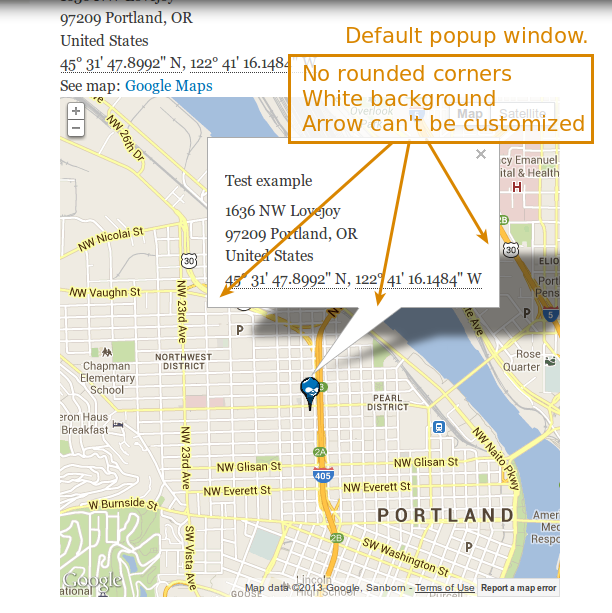
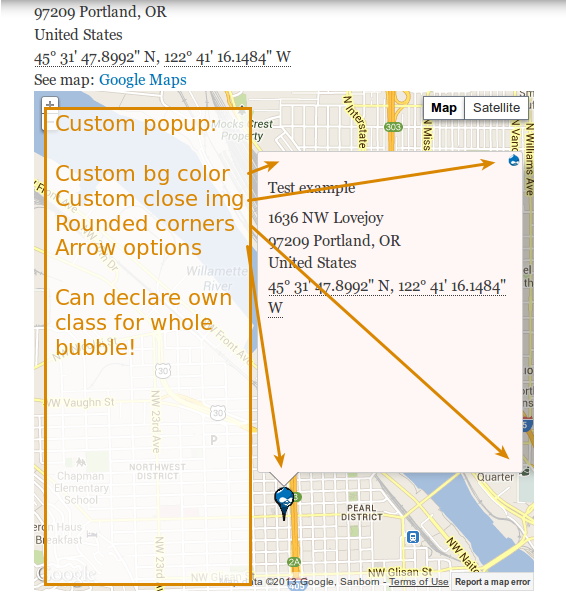
Here are before/after pictures of what a popup window might look like when styled with this plugin:
Before picture: Popup is white, has not rounded corners, has a sharp arrow, has the default "close image," etc.
https://drupal.org/files/default_popup.png
After picture: Entire popup can be styled via a user-declared css class. Arrow can be customized. Image to close the popup can be changed, etc.

https://drupal.org/files/custom_popup.png
And the code only requires one small change to the original gmap code (altering markers.js to allow your info window to be an infobubble or an infowindow).
Remaining tasks
I didn't write tests for this yet, as I'm a bit new at this and wasn't sure the best way to go forward. I can investigate that more and add tests if it's needed.
User interface changes
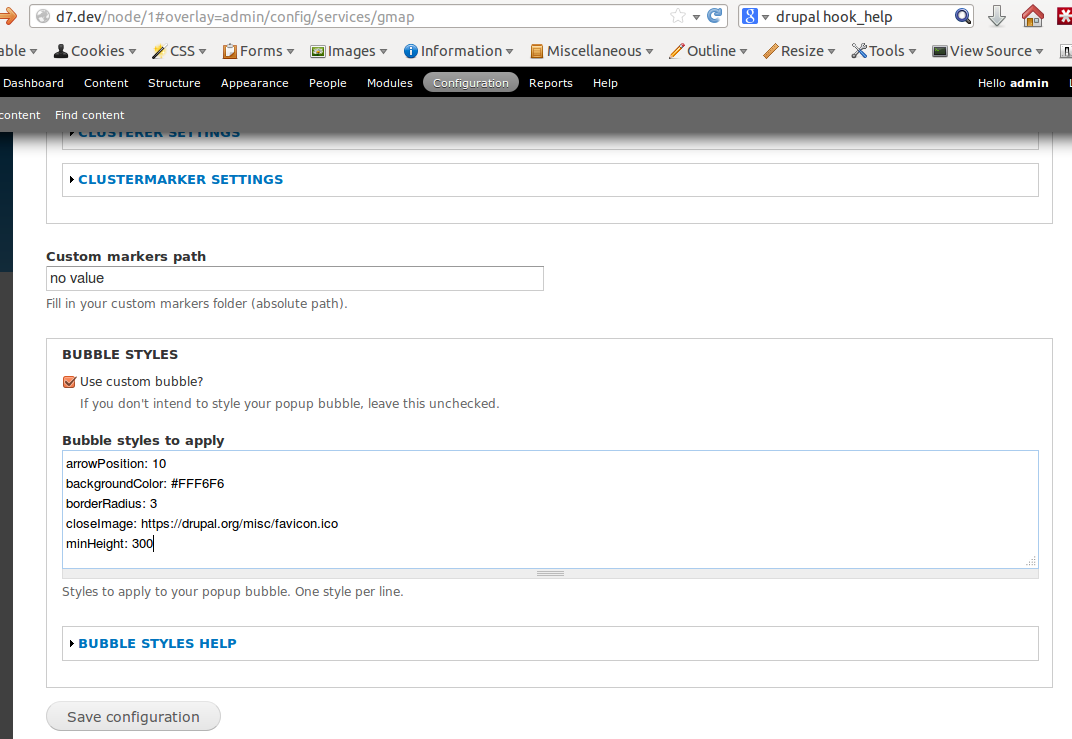
This adds two new fields and two new fieldsets to the bottom of the gmap configuration page that allow a themer to globally style their popups. It would likely be more user-friendly if the form contained an input field for each option instead of one textarea, and if others are interested, I can implement that later.
Here are the added fields:

https://drupal.org/files/altered_configuration.png
A fieldset of explained instructions can be expanded below the textarea.

https://drupal.org/files/documentation.png
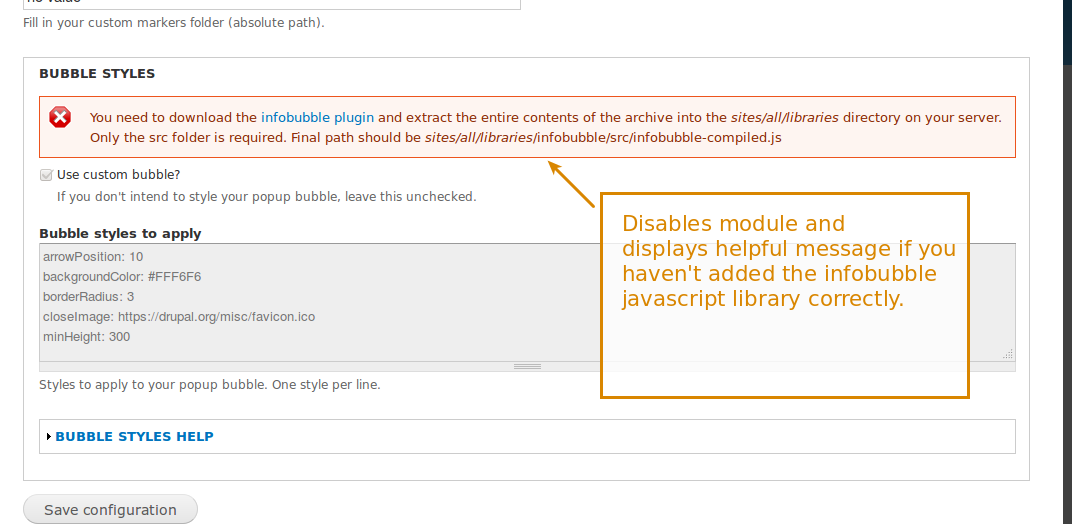
The libraries module is used to verify users have downloaded the required infobubble.js files.
https://drupal.org/files/library_required.png
API changes
None








Comments
Comment #2
mariacha1 commentedLooks like I was working off a more recent version of the dev code. Trying that patch again with new line spacing.
Comment #3
abdobasha2004 commentedvery creative module indeed !
Comment #4
mariacha1 commentedAll my images in the first post are broken, so I'm adding them back.
Comment #4.0
mariacha1 commentedImages appear broken.
Comment #5
adamdicarlo commented"semicolon" should be "colon," right? Overall though, I'm pretty confused about what this function accepts. What exactly is it able to clean up / what's the ideal input? Is this being transformed into JSON or into actual JavaScript?
For coding standards, these should all be single quotes except where a t() string has a single quote inside of it.
What does this do? I think foo['bar'] and foo.bar are equivalent.
This should be removed. It will be added by the Drupal.org packager - you don't have to specify versions manually in contrib modules.
This should be removed.
Comment #6
tostinni commentedThank you very much for this patch, it is much needed to make customization of gmap complete.
I was using #774078: ExtInfoWindow for GMap - Styling the info window for Google Maps before but it hasn't been updated for Google Maps v3 and it seems that InfoBubble is its successor.
I'd like to suggest a few improvements, is it possible to add some properties for the close image to be able to position it and set its size as these setting are currently hardcoded in infobubble.js ? At least height, width and margin properties would help a lot.
I noticed that your modifying marker.js which would prevent this module to be a standalone module, I haven't seen some hook available there in gmap module but this would definitely be a great addition to the gmap project to avoir the need to hack.
Again thank you so much for this great work and write up.
Comment #7
hutch commentedinfobubble_extended.js is a very nice clean way to improve infobubble, I'll be adding it to the Getlocations module for sure.
Comment #8
sletis commentedit doesnt work for me !!! i can see the fields and fieldset and i added this " backgroundColor: #222222" and nothing happens ! could you provide me some help. I have also included the library source files.
Comment #9
mariacha1 commentedsletis -- is there a chance you have a space at the beginning of the line? Try removing that. I'll add checking into the code to trim that extra space as well.
Comment #10
mariacha1 commentedThanks for all the great feedback everyone. I'm submitting another patch with a series of changes:
All that remains is the question of why lines like this exist:
The short answer is that the original infobubble has a line like this for each of its methods as well, and I copied it:
http://google-maps-utility-library-v3.googlecode.com/svn/trunk/infobubbl...
It also seemed unnecessary to me, but I figured it was better not to risk it.
Comment #12
mariacha1 commentedI'm rerolling the patch to work with the 7.x-2.x branch after commit a67553d...
Only thing that's changed is the tabs spacing in js/marker.js, but it was keeping my patch from applying.
Comment #13
mariacha1 commentedSetting to "needs review" since the interdiff is the only thing failing the tests.
Comment #14
tostinni commentedThe interdiff should be named ".txt" to avoid being tested (creating an interdiff).
Thanks for this great patch.
Comment #15
podarok#12 ok, let`s make it in
commited pushed to 7.x-2.x
this one needs test coverage before stable release, so making it critical task ans assigned to author
Thanks!!!
Comment #16
hutch commentedOne minor typo and "maxHeight" added to function _gmap_style_bubbles_help_text()
Patch on dev attached
Comment #16.0
hutch commentedStill trying to fix my images
Comment #17
mariacha1 commentedSorry the test took me so long, but I was learning. Still pretty beginner at this, so any suggestions are welcome!
Comment #19
jessehsThis causes a javascript error in IE 8 that breaks the map. Adding this javascript file in the theme fixes the issue: https://github.com/eligrey/classList.js/blob/master/classList.js
Example IE8 inclusion in an AdaptiveTheme theme's info file:
Comment #20
mariacha1 commentedHere's another patch with a new version of the tests that will hopefully pass this time. I'm also deleting some unnecessary testing lines that came from the test I copied.
I'm going with the old-school IE8 compliant
this.contentContainer_.className += " " + newClassName;Usually classList.add/remove is better, but since this class is only added instead of removed, it seems alright to just use concatenation.
Comment #21
mariacha1 commentedComment #23
mariacha1 commentedHmm. My test is failing on Drupal but succeeding on my local machine. Anyone with testing experience have any advice?
Comment #24
podarok20: gmap-infobubble-style-2035847-20.patch queued for re-testing.
Comment #26
podarokre #23
Your patch has broken tests
Look at screenshot from simpletest.me
Comment #27
mariacha1 commentedSo the issue with getting tests to succeed is this: I'm disabling all infobubble-related inputs if you don't have the infobubble js library installed. See the image:
The difficulty is that I'm not sure how to simulate the existence of the infobubble js library on the Drupal testing site.
Comment #28
podarokIt is impossible
You can only write unit tests for you code in such situations
Comment #29
arun ak commented20: gmap-infobubble-style-2035847-20.patch queued for re-testing.
Comment #31
arun ak commentedStill it is like patch? or released any module for this?
Comment #32
mariacha1 commented@ARUN AK The latest dev version of gmap should have the basic infobubble functionality. Currently the issue is that there are no new tests for the infobubble popup. I'll update the summary to explain that.