

 The 2026 Drupal Business Survey is open. Your response will help shape the future of the Drupal business ecosystem.
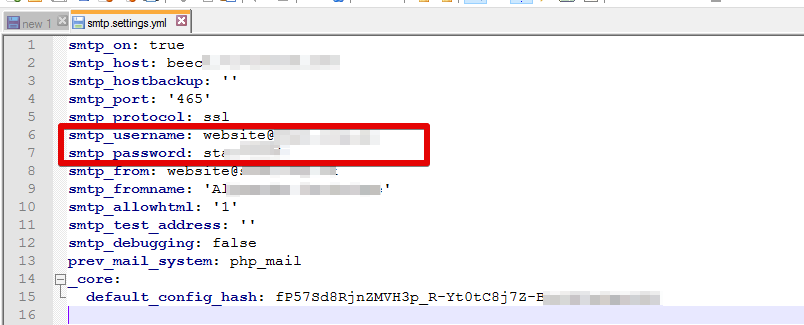
The smtp_password variable in the database is being stored as plain-text. This is not good. Please patch immediately.
| Comment | File | Size | Author |
|---|---|---|---|
| #36 | smtp-password-warning.png | 41.18 KB | bluegeek9 |
| #31 | smtp.png | 28.31 KB | ruslan piskarov |
| #1 | SMTP_Authorization_Project-add_password_encryption-1834604-0.patch | 11.85 KB | Harold Villacorte |


Comments
Comment #1
Harold Villacorte commentedHere is the "patch." It is actually a major addition to the module. There is still an issue of Drupal throwing notice errors but I have a solution for that. If the patch will be included in the next release we need to discuss on having the module create a cusom table. I also have other ideas for this project I would like to contribute but first I think this issue should be addressed.
The patch incorporates two-way encryption which does not completely secure the password but it does add a good layer of security.
Comment #2
Harold Villacorte commentedComment #3
pandapowder commentedI just read through a great discussion about this same issue http://drupal.org/node/117450 and I came to the same conclusion they did. As http://drupal.org/node/117450#comment-1118888 kylehase said, the module needs the password in plain text one way or another. In my opinion, since your patch stores the encryption key alongside the encrypted password itself, the protection you gain by doing it is not enough to justify the extra complexity in the module. Any savvy person with access to the database could decrypt the password and if the hacker has access to your database then the entire site is compromised anyway.
Comment #4
Harold Villacorte commentedYou are right that using two way encryption does not necessarily secure the password but it does provide a high level of obscuration. If encryting is overkill then maybe salting it might be the solution. Even if for no other reason than obscruring it from some employee at a shared hosting company. As it is now all the information is just sitting there in plain sight.
Comment #5
pandapowder commentedthat's true. Perhaps that alone is worth it. If nothing else, it will ensure that only the serious attacker gets it.
Comment #6
amonteroI was googling for a way to store one password entered in a module settings page and I've come with this:
https://groups.drupal.org/node/258513
Implementing one of those would avoid storing the passwords in cleartext. The site owner can harden the encryption by using a key stored in a file, away from the database.
Also found this nice reading:
http://drupalscout.com/knowledge-base/storing-private-information-secure...
I think I'll be using Encrypt module, since looks like the upcoming 2.x release will add an '#encrypt' FAPI property that might help me elsewhere in the future.
Comment #7
bwood commentedAnother option would be to store the username/password in custom webserver environment variables. This is the direction that the Pantheon hosting service likes. Providing the ability specify the keys for theses variables in the admin UI in this module, would be a nice addition.
Comment #8
chris burge commentedAnother option is to take advantage of the Encrypt module and/or the AES module.
Seems fairly straightforward:
Encrypt
AES
Comment #9
wundo commentedComment #10
damienmckennaThis is a feature request.
Comment #11
Neo13 commentedHello,
any progress on this?
Comment #12
damienmckennaAnother approach would be to just handle it in the site's settings.php file using normal PHP and maybe an external file that wasn't stored in the site's repository. Certainly something that could be handled outside of the module on an as-needed basis.
Comment #13
wundo commentedComment #14
amonteroIs this solved in any version? If not, a more appropiate "closed won't fix" would be in order.
Storing the password in the db without any mechanism to encrypt it and keep the key outside of the db (as the suggested encrypt module allows) coud provide an acceptable level of security.
Also, a security notice in the project page warning users about insecure password storage would avoid a false sense of security, since the module even does SSL. It can even encourage others to fix it, perhaps.
Comment #15
wundo commentedComment #16
wundo commentedComment #17
wundo commentedComment #19
wundo commentedSecurity is always a matter of compromises. The question is always what threats do you want to protect against and what level of hindrance are you taking.
If the attacker got access to your Drupal database (or worst, root access to your server) you have more important things to worry than the SMTP password.
I've updated the description of the password field on the settings form to mention that this password it's going to be stored plain text together with other Drupal's variables.
Marking this as fixed.
Comment #20
ajitsShouldn't this be back ported to D7?
Comment #21
amonteroThe patch is worth porting, in fact.
However, I've checked the final looks of the message and there is a risk of distracted/unexperienced/unsuspecting users missing the warning at all. Suggestions:
I agree on security being a matter of tradeoffs, but at least the warning signs should be as visible as possible.
I'm also aware that implementing encryption requires time, so I would propose to postpone the issue in case someone wants to tackle it someday, if interested. Instead of confusingly retitling and closing it as if there was no longer any security risk.
One does not need to hack into your DB to gain access to the stored password. A badly sanitized db dump (module does not provide any drush sanitize hook) stored as a backup or handed to developers could leak the password. Even if some attacker gains access to your backups, for instance, there's no need to make it easier to him/her.
Drupal's core, for instance, makes hard to retrieve user's passwords even in possession of a db dump by salting password hashes. You can avoid this happening by warning more visibly your users and providing workarounds, at least.
Tentatively marking as 'Needs work'. But I think the issue title should be reverted to original title, which still stands and a new issue opened to deal with the nice mitigation measure in the works (and its needed backport).
Comment #22
sic commentedguys - storing the password in plaintext is really a bummer. what about the suggestions made here?
this must also be backported to 7!
Comment #23
estoyausenteI have another appreciation. The password is stored as a plain text and... exported with Configuration Manager, converted to a yml file and pushed to the repository too easily
Can we save the password in another place? I don't know, exists the way to save the password and do not export it using a standard (simple configuration api or config entities?
Comment #24
wundo commentedYou could set it inside settings.php, that is what I do.
Comment #25
estoyausenteYes I know, @wundo. I did it when I saw, but I think that the module could be avoid it.
But thanks anyway for the suggestion.
Comment #26
joelsteidl commentedAnother option is considering a dependency on the https://www.drupal.org/project/key module.
This allows the user to decide where they should put it (including in a file outside the webroot).
Comment #27
chris burge commentedThere's an issue for the Just SMTP module that uses the Encrypt module to encrypt the SMTP password prior to storing it. It could be adapted for this module, as well: #2800401: Provide Integration with Encrypt Module. The Key module also provides Encrypt integration.
Comment #28
amonteroHow about placing a warning in the project page linking to this issue while it is being addressed? Sounds the most cautious and responsible stop-gap measure, by now.
At least, let's warn people and let them know (and hopefully, help with) the current security compromises.
Comment #29
sgp913 commentedCould we just save it in settings.php? If it's set there, remove the field. If it's not in settings.php, tell admin to set it there or leave the field for those that don't want to/care. Maybe the admin account shouldn't have access to this (assuming important) password.
I'm sure lots of devs are using Google Apps/other for $5 email with only one account and don't want to save this PW in plaintext.
Doing all this DB encryption work now seems like a major change, but the DB password is in settings.php anyway...seems like a simple addition to greatly improve security. I'd prefer to keep it locked down in a file somewhere instead of floating around in the DB (in any form). Someone gets that password, maybe they can take over your external account and do some real damage.
I'm not sure about the scope of settings.php and where those variables are available though, so it would need to be accessible only by this module. If someone is doing this already, please share your code so we can commit this.
Another option is just making a plaintext file and hiding it somewhere, letting the module read that file for the PW (like #26 had mentioned). I think any approach is better than leaving it plaintext like this. The best thing would be to implement multiple ways and let the dev decide which is preferable for them.
Comment #30
ruslan piskarovConfirming.
> The password is stored as a plain text and... exported with Configuration Manager.
And think I can be dangerous and security issue because someone can grep by "smtp.settings.yml" on github for example.
Comment #31
ruslan piskarovComment #32
esolitosFrom this video seems like there is an integration with the Key module already?
In any case the key imho the key should not go to the configuration management, it's really easy to accidentally commit this and expose your own key without realising it.
Comment #33
therobyouknow commentedwundo commented (#22): https://www.drupal.org/project/smtp/issues/1834604#comment-11739760
@wundo - how specifically did you do that? Please provide example code snippets.
From my examination of the module, it would appear that it doesn't retrieve from settings.php but rather from the config.
See also my issue here: https://www.drupal.org/project/smtp/issues/3016831
Comment #34
tim bozeman commented@therobyouknow google bra...
Comment #35
xem8vfdh commentedthis is a very old issue, so I'm guessing it's not a priority
but I'm wondering if instead of adding a warning we could store the password in some other way altogether (not plaintext)
Comment #36
bluegeek9 commentedThe password field tells the site builder that the password is stored in plain text. There are other issue to add support for Key and Encrypt.
Additionally, there is a help topic for setting these values in settings.php
I want to thank everyone for their hard work and effort, so I will mark this as fixed and grant everyone credit.
Comment #37
bluegeek9 commented