

Closed (fixed)
Project:
Gallery formatter
Version:
7.x-1.x-dev
Component:
Javascript
Priority:
Normal
Category:
Bug report
Assigned:
Unassigned
Reporter:
Created:
7 Jul 2011 at 13:37 UTC
Updated:
30 Jun 2019 at 18:44 UTC
Jump to comment: Most recent, Most recent file


Comments
Comment #1
manuel garcia commentedI cannot reproduce the problem here. If you stil find the problem, please provide more information so that I can troubleshoot.
Comment #2
rajeesh commentedManuel Garcia,
I got the above mentioned error in my application. I integrated gallery formatter in views which had a display format of quicktabs. In the display the error appears only when the second tab contains more than four images to display and the green arrows were also not showing in the second tab where as in the first tab it was showing. I was also getting the following error.
Error: invalid array length
Source File: http://my_site/sites/all/modules/galleryformatter/theme/infiniteCarousel.js?m3ncyi
Line: 15
Help from anybody regarding this issue will be appreciated.
Thank you.
Comment #3
suzethi commentedHi!
I´m creating the following page http://ferjovi.consultoresdigitales.net/unidades
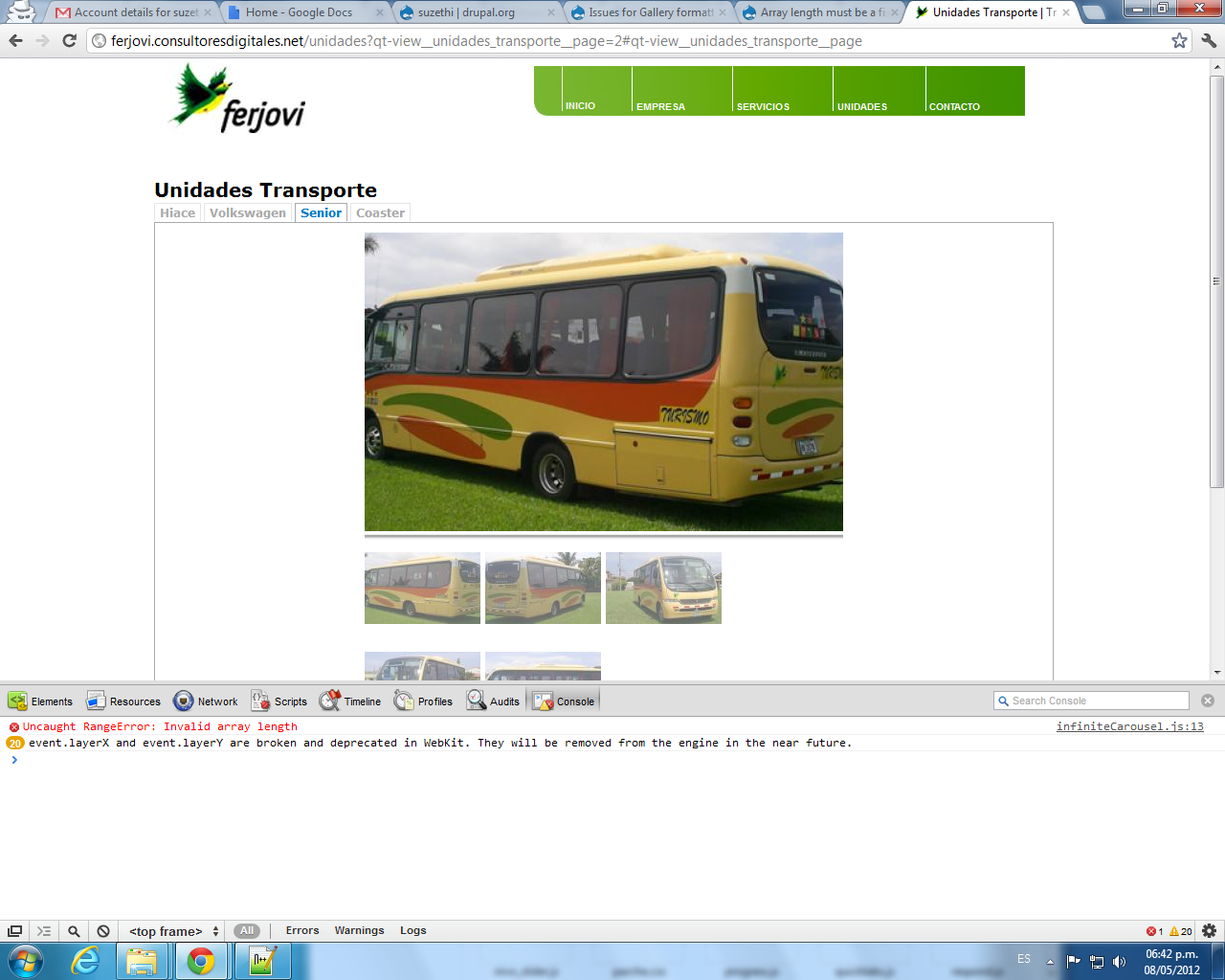
I need to use tabs and a gallery, but if I use the view tabs (quicktabs) and the gallery (galleryformatter) I get the following error:
Invalid Array Length
You can open the page http://ferjovi.consultoresdigitales.net/unidades and using chrome, press ctrl+shift+i in the tab console you can see this error.
Also, in the first tab I can see the greenarrows and the carrousel works well, but if i press the second, third, ... tab I can´t see the greenarrows and the carrousel doesn´t work.
I attach the image error.
Thank you!
Comment #4
manuel garcia commented@suzethi I get a 500 internal server error on that page
question to suzethi & rajeesh: are the quicktabs loading the content via ajax?
Comment #5
suzethi commentedThe quicktabs doesn´t use ajax. I attach the view page of the quicktabs.
Comment #6
suzethi commentedIs there any solution?
Comment #7
dkre commentedI don't think this is an issue with Gallery Formatter / InfiniteCarousel as such, more pushing the functionality beyond it's design.
I had this issue when I changed .gallery-thumbs to hidden (display:none). In my case I have gallery formatter used throughout the site and needed an easy way to link a single image to a colorbox gallery through views.
I got around the issue by changing Views > Field > Multiple Field Settings from simple separator to unordered list with some style tweaks (list-style:none; list-style-type:none; margin:0) to the ul/li added. Tested on IE7/8/9, FF, Chrome.
In a couple of the cases above Quick Tabs are involved, most likely InfiniteCarousel is not able to reference the object needed to process the function which spits out an error. With quick tabs the content won't exist until it's pulled via ajax.
Comment #8
tripper54 commentedthanks for pointing me in the right direction, @dkre.one .
In my case I also had added display:none to .gallery-thumbs. Wasn't using views, just a field formatter in a node template.
Strangely enough it worked fine on my dev box, but not on the production server.
I changed my css to :
Seemed to do the trick.
Comment #9
Anonymous (not verified) commentedI've found how to reproduce: have a thumbnail bar narrower than a single thumbnail: this causes a division by zero and then passing NaN as the array dimension.
Please find an attached patch for it.
Comment #10
manuel garcia commentedComment #11
manuel garcia commentedCan anyone verify the proposed fix on #9 please?
Comment #12
VBuz commented#9 It works for me! Thank you
Comment #13
manuel garcia commented@monnerat thanks for the patch by the way :)
I'm not sure I understand #9, if the problem is the division by zero, i don't think the proposed patch would work?
For example:
https://jsconsole.com/?Math.max%281%2C%20Math.floor%282/0%29%29%3B
Comment #14
Anonymous (not verified) commentedThe overflow does not occur on the patched line, but later: the patch only prevents
visiblefrom being zero.The overflow occurs in modulus of lines:
Comment #15
manuel garcia commentedAh OK, I follow now, it's been a while since I looked at this part of the code... thanks for explaining the reasoning behind the change.
Also, great job hunting this down @monnerat!
This was probably caused by the change introduced in #2044143: Math.ceil should be floor on infiniteCarousel, which was justified but unfortunately introduced this bug.
Crediting people for reports and follow ups here.
Comment #17
manuel garcia commentedThanks everyone!
Comment #18
Anonymous (not verified) commentedThanks :-)
Comment #19
manuel garcia commentedThis fix is now part of the release I just made. If you're seeing this error, please update to
7.x-1.5.