

Needs work
Project:
Bootstrap Layout Builder
Version:
2.0.1
Component:
Code
Priority:
Normal
Category:
Bug report
Assigned:
Unassigned
Reporter:
Created:
3 Dec 2022 at 15:38 UTC
Updated:
30 Oct 2024 at 13:25 UTC
Jump to comment: Most recent, Most recent file
 Show commands
 changes


Comments
Comment #2
yospyn commentedThanks for creating this ticket. Is there a way to switch dependencies to Layout Builder iFrame Modal without uninstalling Bootstrap Layout Builder + Bootstrap Styles? Then Media Library Theme Reset can be uninstalled.
Comment #3
grabby commentedThanks for that. I installed Layout Builder iFrame Modal, but it’s unclear to me how to switch dependencies to it. Please help.
Comment #4
mark_fullmerDue to concern over the "unsupported" status of Media Library Theme Reset, the maintainers have set it back to "supported" and instead marked the module as "deprecated." A summary of this, along with a timeline for marking it as "unsupported," is at #3325258: Mark Media Library Theme Reset as "Deprecated".
So sites using Bootstrap Layout Builder may continue using Media Library Theme Reset. However, we encourage you to switch to using https://www.drupal.org/project/layout_builder_iframe_modal , as it will improve the user experience. I have functionally tested integration with Bootstrap Layout Builder and Layout Builder Iframe Modal and everything works as expected, and the media library looks better: it matches whatever the site's administrative theme is, and does not employ any CSS overrides to do so.
Switching to Layout Builder Iframe Modal
The project page of Bootstrap Layout Builder lists Media Library Theme Reset as a needed module. However, it is not a dependency in code. Therefore, sites should be able to switch as follows:
1. Add "Layout Builder Iframe Modal" to the site codebase. https://www.drupal.org/project/layout_builder_iframe_modal
2. If the site is using the alternate module "Layout Builder Modal," uninstall it and remove it from the codebase.
3. Enable "Layout Builder Iframe Modal."
4. Uninstall "Media Library Theme Reset" and remove it from the codebase.
Comment #7
andileco commentedThank you @mark_fullmer - definitely appreciate giving us a little more time.
bootstrap_layout_builder does not actually require media_library_theme_reset - it requires bootstrap_styles:^1.0, which requires media_library_theme_reset. However, bootstrap_styles:^2.0 does *not* require media_library_theme_reset.
My colleague @yospyn and I tested using bootstrap_styles:^2.0 with bootstrap_layout_builder:2.0.1 (we had to trick Composer to allow us to do this) and we experienced no issues with the updated code. We did, however, need to export > import the core.extension configuration file to remove media_library_theme_reset because it was deleted by Composer.
I will update the merge request (also available as https://git.drupalcode.org/project/bootstrap_layout_builder/-/merge_requ...) to try to avoid needing to manually update the configuration to uninstall media_library_theme_reset.
Definitely would want others to check that using bootstrap_styles:^2.0 doesn't cause any problems for them.
Comment #8
rajab natshahThank you, Mark
Following with issues which have the switch to layout_builder_iframe_modal
#3326412: Redirects to external URLs are not allowed by default. When adding or updating blocks
Comment #9
smustgrave commented+1 for removing Media Library Theme Reset
Comment #10
chikeAs per #4, attempting to uninstall 'Media Library Theme Reset' is prevented,
Comment #11
chikeAs a side note, 'layout_builder_iframe_modal' broke the styles from 'bootstrap_styles' while 'layout_builder_modal' worked better.
Comment #12
chikeSorry it is my bad, I shouldn't have installed 'layout_builder_blocks' and that was messing with the setup. I later found out 'layout_builder_modal' also had issues cos trying to type in a custom block, the text were not visible, they were apparently colored white and wasn't visible on the white background.
I removed 'layout_builder_blocks' (which I should not have installed in the first place) and 'layout_builder_iframe_modal' worked while 'layout_builder_modal' continued giving the invisible text issue so I removed 'layout_builder_modal' as well.
Comment #13
chikeI think I have gotten myself utterly confused. I sure should install 'layout_builder_blocks' I checked my old D9 sites and I do have it enabled and it is working well with 'layout_builder_modal'.
In D10 it is giving the above mentioned issues conflicting with both 'layout_builder_iframe_modal' and 'layout_builder_modal' as described above.
I found this issue already reported for 'layout_builder_iframe_modal' https://www.drupal.org/project/layout_builder_blocks/issues/3238141 and I opened a new issue for layout_builder_modal, https://www.drupal.org/project/layout_builder_blocks/issues/3346996
Comment #14
dawnherald commentedTrying to enable Boostrap Layout Builder
I think I'm past the confusion but there is no progressive workable solution with layout builder iframe modal.
It seems impossible to implement bootstrap layout builder without media Library Theme Reset, despite its deprecated status and advocation for Layout Builder Iframe Modal.
If someone has implemented this, could they say how?
I tried the approved release and dev release of Bootstrap Layout Builder, both require Media Library Theme Reset.
I know its hard to remove it post install, so would very much appreciate guidance on getting Bootstrap Layout Builder correctly with Layout Builder IFrame Modal.
Is there a risk of going with Media Library Theme reset and not being able to update to the current and future correct Boostrap Layout Builder ecosystem?
What is the current Bootstrap Layout Builder eco system of modules?
https://www.drupal.org/project/bootstrap_layout_builder
https://www.drupal.org/project/bootstrap_styles
https://www.drupal.org/project/layout_builder_iframe_modal
https://www.drupal.org/project/layout_builder_blocks (requires styles, so questionable)
https://www.drupal.org/project/section_library
https://www.drupal.org/project/block_library
composer require 'drupal/bootstrap_layout_builder dev-2.x' still requires Bootstrap styles 1.1, as bootstrap styles 2 does not have reciprocated dependency by bootstrap layout builder.
Answers and a best way to proceed for anyone beginning with bootstrap layout builder would be much appreciated.
Comment #16
shaunole commentedRebased previous commit in issue fork against 2.x.
Comment #17
flyke commented@andileco
My colleague @yospyn and I tested using bootstrap_styles:^2.0 with bootstrap_layout_builder:2.0.1 (we had to trick Composer to allow us to do this)
How Exactly ?
I am trying to update bootstrap_layout_builder and layout_builder_blocks in my project, but having difficulties.
Problem 1
- drupal/bootstrap_layout_builder[dev-2.x, 2.x-dev] require drupal/bootstrap_styles ^1.1 -> found drupal/bootstrap_styles[1.1.0] but it conflicts with your root composer.json require (2.0.x-dev@dev as 1.0).
- drupal/bootstrap_layout_builder 2.x-dev is an alias of drupal/bootstrap_layout_builder dev-2.x and thus requires it to be installed too.
- Root composer.json requires drupal/bootstrap_layout_builder 2.x-dev@dev -> satisfiable by drupal/bootstrap_layout_builder[2.x-dev (alias of dev-2.x)].
Update: nevermind, got it working with some patches and also this: "drupal/bootstrap_styles": "2.0.x-dev@dev as 1.1",
Comment #18
potassiumchloride commentedI appreciate @mark_fullmer giving a list of steps, but I do not see consensus on how to move forward. Like @dawnherald, I have questions about how the preferred set of modules.
I've got a Drupal 9.5.10 site with: Bootstrap Layout Builder 2.1.1, Bootstrap Styles 1.10, Media Library Theme Reset 8.x-1.5, Layout Builder Modal 8.x-1.2, Layout Builder iFrame Modal 1.3.0, and Layout Builder Restrictions 8.x-2.19 installed.
This was working perfectly until updating to CKEditor 5 and installing Layout Builder iFrame Modal, and now the WYSIWYG for blocks (only while using Layout Builder) are showing white text on a white background (like @chike but without Layout Builder Blocks installed), rendering them nearly impossible to use.
@mark_fullmer (above) said this:
If there's folks in my position with Layout Builder iFrame Modal, Layout Builder Modal, and Media Library Theme Reset installed and enabled, should the steps be these?
Because @flyke ran into the requirements still for Media Library Theme Reset, does anyone know:
Does Bootstrap Layout Builder 2.1.2 still require Media Library Theme Reset?
Does Bootstrap Styles 1.1.1 still require Media Library Theme Reset?
Comment #19
flyke commentedFor me the steps were:
- Download layout_builder_iframe_modal
composer require 'drupal/layout_builder_iframe_modal:^1.3'- Add this diff from this issue for bootstrap_layout_builder in composer.json:
composer install- Add patch #22 from issue #3325150 for bootstrap_styles in composer.json:
composer require 'drupal/bootstrap_styles:^1.1' --prefer-source(just composer install did not work for me to apply the patch)
- Enable Layout Builder iFrame Modal
drush en layout_builder_iframe_modal- Disable Media Library Theme Reset
drush pmu media_library_theme_resetNow it disabled media_library_theme_reset without having to disable other modules in my case.
Comment #20
almador commentedThank you flyke!
The solution in #19 helped me to uninstall the "Media Library Theme Reset".
Comment #21
yospyn commentedConfirming flyke's solution in #19 worked for me as well. Very helpful thanks!
layout_builder_iframe_modal is a bit wacky looking at least for me, but it works.
Comment #22
trevorbradley commentedJust wandered in here from Media Library Theme Reset. It looks like the transition is finally here. The module is no longer "deprecated" but has now moved into "unsupported" state. See: https://www.drupal.org/project/media_library_theme_reset
Comment #23
trevorbradley commentedJust a heads up for anyone having issues deploying this.
I previously had bootstrap_layout_builder 2.1.2, which required bootstrap_styles 1.1.5, which required media_library_theme_reset 1.5.0
The strategy of the patch is to require bootstrap_styles:^2.0 - a little dicey as bootstrap_styles 2.x doesn't have a release branch, but let's run with it.
It's insufficient to simply patch composer.json, as the composer dependencies don't care for patches. To get around this, you need to (temporarily) install bootstrap_layout_builder from a different source, to avoid composer dependencies. In the repositories section of composer.json:
Then in the patches section of composer.json:
(don't put merge_requests directly into your composer.json, kids)
And in the require section of composer.json:
"drupal_git/bootstrap_layout_builder": "^2.1.2",(Usually I reserve this drupal_git repository trick for patched dev branches, but it'll work here for now. This whole drupal_git business )
Run composer install to get bootstrap_layout_builder installed.
For some reason, this didn't upgrade bootstrap_styles for me. I had to do the following steps:
1)
composer require drupal/bootstrap_styles:^2.02) I had to do a
drush cex(to capture changes to bootstrap_styles.settings.yml), removemedia_library_theme_reset: 0from my core.extension.yml and do adrush cimI think this leaves me with a system upgraded to bootstrap_styles-2.x dev branch, no dependency on media_library_theme_reset (imposed by bootstrap_styles 1.1.5) and media_library_theme_reset removed from my system.
Initial testing suggests this is working fine. My Bootstrap Layout Builder admin menu is working as expected, my odd custom bootstrap layout sections appear to be working. Going to deploy this to my dev server and see if it survives further testing...
Comment #24
trevorbradley commentedTesting looks good on my systems here. Layout Builder styles seem to apply well, no weirdness, errors on editing, creating styles, etc.
+1 to switching to bootstrap_styles 2.x branch. :D
Comment #25
janoka commentedI tested with the feedback of @flyke (thanks for the information!), and it worked well with the patch.
Review: So, with the given description of the modification suitable.
Comment #26
amstercadThis new recipe with layout_builder_iframe_modal is working for me on a newly developed Drupal 10.2.2 website, however the functional style-sheets of one of the modules fails to load in the new modal window when a Section is clicked. What displays is only HTML except for the fields exposed via javascript drop-down at the bottom of the modal window, which uses a stylesheet from the Claro theme.
Selecting a desired radio button to set section widths successfully is not something obvious to do, and tabbing to select isn't possible either. In my case, clicking about 3cm to the right and down a bit selects the desired radio button. Most people would regard a setup like mine as failing completely, but aside from a critical stylesheet failing to load, Bootstrap Layout Builder and Bootstrap Styles are functional and overall useful on this website, thank goodness! I need the Layout Builder breakpoints more than anything.
It is not clear to me what stylesheet is failing to load, or why. Or even which module it belongs to. The console doesn't give a clue either, however FireFox devtools sometimes displays an error message that can be clicked away that says a stylesheet failed to load. So far I cannot consistently make that error message appear.
For what it is worth, this is a new install so I never had this recipe working with Media Library Theme Reset earlier. This is my composer.json:
require section:
Patches section:
And just like @flyke at #19, I had to use this exact command:
composer require 'drupal/bootstrap_styles:^1.1' --prefer-sourceComment #27
amstercad...for whatever reason, my prior comment failed to include this screen scapture of what I see on a fresh Drupal install when I try to edit a Section using these tools, given the details I've previously written about.
The result I am seeing doesn't look anything like the screenshots in this article.
Comment #28
drupler8 commentedHi,
I am seeking help on what the correct solution is. I have spent a while looking at this and have confused myself.
Option 1: Are we supposed to go with a solution like @flyke #19 which looks like #27?
Option 2: Are we supposed to go with @TrevorBradley #23 an not use the iframe modal?
Option 3: Should I remain calm and wait for official releases of drupal/bootstrap_styles and drupal/layout_builder_blocks to come out?
I was able to get option 1 (#19)working, but it really looks pretty poor so far and .
I was able to get option 2 (#23) almost working, I have Media Library Theme Reset uninstalled via drush, but I can not remove it via composer :(.
Any guidance would be great. I just want to go in the correct direction.
Thanks!
Comment #29
imrodmartin commentedalso getting the formatting issues from #27 after applying #19 and agree with #28 - what's the best approach please? Very much appreciate all the work going on to make Layout Builder a very usable tool.
Comment #30
transmitter commentedSame here - just did #19 and ran into the same issues like #27.
How to handle this here?
Comment #31
mericone commentedThere is no way around replacing Media Library Theme Reset with Layout Builder iFrame Modal as the former is no longer supported.
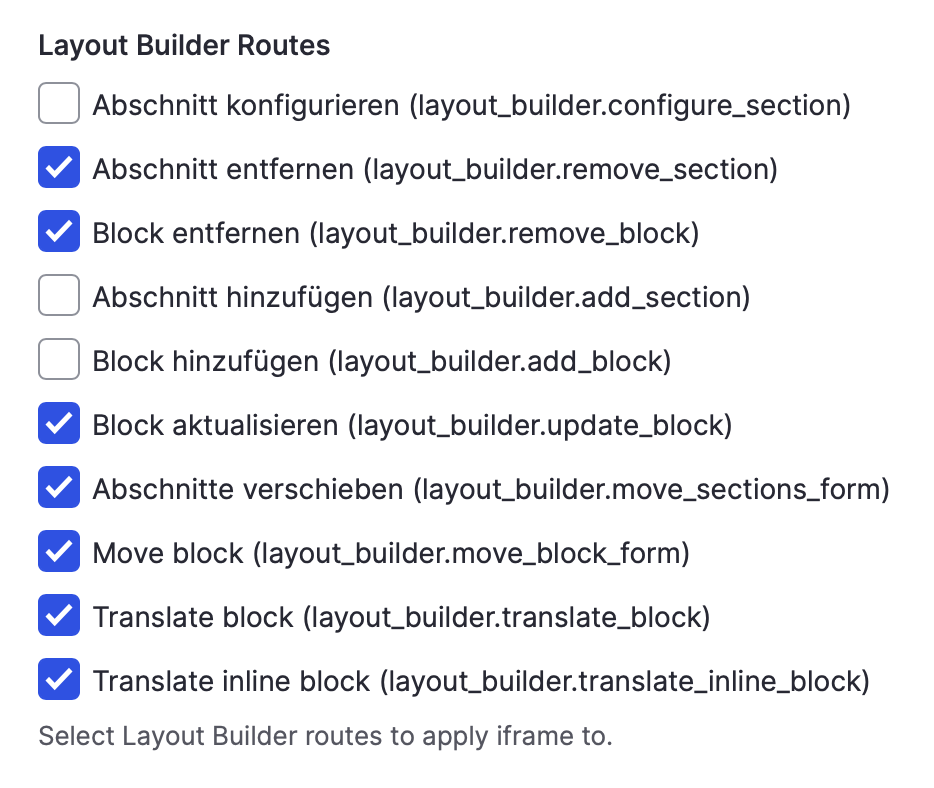
After following #19, you need to go to /admin/config/content/layout_builder_iframe_modal and exclude Bootstrap Layoutbuilder from being displayed in a modal (see screenshot, I am sorry, but I only have a German version). This should help anyone having problems with the Bootstrap Layoutbuilder interface not displaying properly.
Comment #32
nickgeorgiou commentedAlso facing the styling issues in #27. Following the instructions in #31, I was able to get the layout selection as desired.
Here is the screenshot in English:
Comment #33
flyke commentedThis is the relevant composer setup that worked for me to be able to remove media_library_theme_reset and use layout_builder_iframe_modal:
With this setup, I was able to disable media_library_theme_reset.
drush pmu media_library_theme_resetComment #34
imrodmartin commentedthank you to everyone !
#19 worked for me - then the update to config at #31! (#33 works as well)
have updated several sites already - works great!
Comment #35
dac_ca commentedHi folks. I am a new Drupal user and this module is required for a tutorial I am following. I am an experienced bootstrap user but do not have any Drupal sites in production either with or without this module :). If you were me, would you follow the instructions in #19+#31 (#33) or simply wait for a module update that removes the dependency on media_library_theme_reset?
Comment #36
imrodmartin commented@dac_ca
there's no telling when the patch will be committed. If you are doing tutorials - go ahead and do 19+31. If you want a completed site with those patches done already - you can grab my starter site. (you'll need a gitpod.io account) - https://rodsurl.com/startersite. Username/pw is admin.
It's a setup I use for training and you're more than welcome to it. It's a completely finished layout builder config.
otherwise - yep - go ahead and patch whatever you're working on. You'll likely need this blog post to learn how to do a patch if you don't already know - https://gorannikolovski.com/blog/how-to-apply-a-patch-in-drupal
hth
Comment #37
dac_ca commented@imrodmartin
Thank you for the help! I'll follow your advice and I'll check out the patch info. I've been a software developer for years so I hope the patching will be easy. I'll also check out gitpod.io and your site.
If its ok with you, I'll see if I can copy your sample site to my development system so I can play with it.Thanks again. I hope all is well.Edit: I see how gitpod.io works now :)
Edit2: I just realized it is your youtube videos I am following. Well done. They are easy to follow and informative.
Comment #38
chike@dac_ca I thought about this two days when I installed a new site using steps at #33 then I found layout_builder_iframe_modal wasn't showing a good UI so I tried to remove it but found out I couldn't cos the method at #33 made bootstrap_layout_builder require it so I had to unstall bootstrap_layout_builder before I would be able to uninstall layout_builder_iframe_modal.
I then realized the implication of one using his own methods, if the module finally makes an update to remove the dependency on media_library_theme_reset and the way the modules goes does not play with your custom way, you have to roll back to follow the module and if you have built a heavy site, it wouldn't be easy rolling back. E.g. before I could uninstall layout_builder_iframe_modal I had to disable all layouts made with bootstrap_layout_builder and then uninstall bootstrap_layout_builder. I could do that because it was still a new site, if I had gone far with the project it won't be that easy removing layout_builder_iframe_modal. Perhaps there could be some type of way of requiring all the projects independently in localhost and overwriting in production. But to be safer I would suggest waiting for the module to make an update so you are not left to fight your fires alone.
Comment #39
adaragao commentedBased on #19, this steps worked for me on Drupal 10.3.1 :
- Download layout_builder_iframe_modal
composer require drupal/layout_builder_iframe_modal
- Add this diff from this issue for bootstrap_layout_builder in composer.json as a patch:
"drupal/bootstrap_layout_builder": {
"#3325151": "https://git.drupalcode.org/project/bootstrap_layout_builder/-/merge_requ..."
},
composer require drupal/bootstrap_styles - ( since version 1.1.6 does'n require the patch mentioned on #19 )
composer require drupal/bootstrap_layout_builder
drush en layout_builder_iframe_modal
drush en bootstrap_layout_builder
Comment #40
flyke commentedPatch is not compatible with patch from #3429050 to make this module compatible with D11. I think it might be good to have a modified patch here that also updates version requirements in info.yml and composer.json file to D11 OR one that applies after the other patch was applied (so where the D11 compatibility is added via #3429050 first and then the adjusted patch in this issue works with those changes)
Comment #41
flyke commentedJust a test for combination with D11 patch:
Update: both patches apply. BUT even though the patch makes bootstrap_layout_builder require "drupal/bootstrap_styles": "^2.0", in practice it doesn't because composer checks the requirements before applying patches:
Comment #42
flyke commentedThis screenshot shows the composer problem that says that bootstrap_layout_builder requires bootstrap_styles ^1.1 despite being patched to require ^2.0.
So I created a new MR that adds both D11 as well as bootstrap_styles ^2.0 versions in requirements.
In your projects composer.json you can add this repo to your repositories section:
And then you can add the MR version of bootstrap_layout_builder via:
composer require drupal/bootstrap_layout_builder:"dev-3325151-d11-bootstrap-styles-2 as 2.x-dev" -WComment #44
socialnicheguru commentedAs of bootstrap_styles 1.5 the Media Library Theme Reset requirement is removed: #3325150: Remove unsupported Media Library Theme Reset module
There is no need to update to 2.0.x anymore.
Should this be closed or the requirement updated?
Comment #45
ugintl commentedIf I want to use layout_builder_iframe_modal with bootstrap_layout_builder, do i still need the above patch?
Iframe Modal was last updated on Dec 2022, whereras, https://www.drupal.org/project/layout_builder_modal was last updated on Oct 2024.
Which module should we be using with bootstrap_layout_builder?
Comment #46
imrodmartin commented@ugintl - I don't believe so. When I spin up new sites with both I've removed the patch from my composer.json file and it works fine.
Don't miss #31 though - that's still not working unless you uncheck a few options.