#2897190: Tax calculations do not take discounts (promotions) into account fixed the interaction between taxes and discounts for cases where prices are both entered and displayed with/without taxes.
However, if the prices are entered with tax but displayed without (also including tax-exempt prices), or vice-versa, the discounts are incorrect.
This is because LocalTaxTypeBase / TaxOrderProcessor modify the unit price (which modifies the total price) after the discounts were already calculated. So a 10% discount on 12 eur gets calculated and added as 1.2, then the price gets lowered to 10 eur. The discount is no longer correct, it is too large.
This means we probably need to process taxes in two phases:
1) Resolve rates, figure out if unit price needs to be modified, modify it
2) Calculate discounts
3) Now calculate taxes based on the resolved rates


 Show commands
 changes


Comments
Comment #2
bojanz commentedComment #3
maurizio.ganovelliHi bojanz,
after updating to latest stable version of commerce, i've found that in cart, order summary and orders, prices are totally wrong. In my specific case prices are inserted taxes excluded (only Vat is configured) but displayed tax included. Tracking down the problem, i've found that the price alteration done in LocalTaxTypeBase, re-add Vat (also when no promotion is active in order) to every order item. Moreover when adding a coupon, also discounts are wrong.
I've developed a quick (and surely dirty) workaround that seems to work, at least for my case. I try to recalculate prices without changing unit price.
I hope would be a starting point for who got same problem.
Suggestions and corrections are welcome!
Thank you.
Comment #4
bojanz commented@maurizio.ganovelli
Please give us a test case, at least in comment form (entered price, configured discount, expected price, shown price).
Comment #5
maurizio.ganovelliThank you for quick response.
While preparing some test data, i found that after deleting the cart order from backend and restarting checkout
process, VAT is not more added twice in order items (in the example above, item total was 66.61 instead of 54.60).
Also cannot get patch provided above to working correctly on new carts and orders, so don't take in account.
I get also a correct discount amount. The only thing that goes wrong is tax amount on totals.
See the following example.
Configuration:
Taxes:
VAT: European Union VAT, Display taxes of this type inclusive in product prices. (TRUE)
Promotions:
Discount: 20% off on order total
Store:
Prices are entered with taxes included. (FALSE)
Test product price entered by user:
44.75 EUR
Store/Profile country:
Italy
Expected results in order summary during checkout:
Item total: 54.60 EUR
Subtotal: 54.60 EUR
Discount: -8.95 EUR
VAT: 7.88 EUR
Total: 43.68 EUR
Current result:
Item total: 54.60 EUR
Subtotal: 54.60 EUR
Discount: -8.95 EUR
VAT: 8.23 EUR
Total: 45.65 EUR
Thank you.
Comment #6
maurizio.ganovelliHi bojanz, i made some tests on a vanilla install (Drupal 8.5.5 + Commerce 8.x-2.8) reproducing same conditions and configurations.
I got same results as above.
The issue seems related to how taxes are applied in LocalTaxTypeBase for my specific case (price entered vat excluded, displayed vat included).
VAT is first added to unit price:
then tax amount is determined:
So adjustments are calculated on VAT included prices, leading to a wrong tax amount.
I'm wrong?
Comment #7
maurizio.ganovelliFor the sake of completeness, if i try to change configuration using "Prices are entered with taxes included." and changing product variation price to 54.60 EUR (44.75 + 22%), calculated discount seems too big (-10.92 EUR).
Comment #8
bojanz commentedWe have extensive tests that confirm that discounts and taxes are correct when prices are both entered and displayed with VAT included.
You are free to check them with a calculator.
The logic that we're using for prices entered without tax, but shown with tax is:
1) Take the original unit price, and determine which tax it has by default. Add that tax to the unit price, making it tax-inclusive.
2) Taking the tax inclusive price as a base, calculate the included tax.
Using your numbers, with a 22% tax rate:
1) 44.75eur price + 9.85eur tax (price * 0.22 rounded up) = 54.60 eur (new price)
2) (54.60 * 0.22) / (1 + 0.22) = 9.85eur tax
The problem that is exposed in this issue is that promotions run before #1, using 44.75eur as a base, instead of running between #1 and #2, using 54.60 as a base. That's the part we need to fix, by making the unit price modification run before promotions. I hope to tackle that in August.
Comment #9
maurizio.ganovelliThank you for explanation.
This logic is absolutely correct, so my problem is (at least partially) unrelated.
I need to calculate promotions always on net price (tax excluded) and then calculate taxes.
This is exactly what happens now:
1. promotion amount is correctly calculated (at least for my case) on "net" price (44.75 * 0.20 = 8.95)
2. unit price is then updated adding tax amount (44.75 * 1.22 = 54.60)
3. order item adjusted price is calculated with getAdjustedTotalPrice(['promotion', 'fee']) (54.60 - 8.95 = 45.65)
4. tax amount is determined with (45.65 * 0.22) / (1 + 0.22) = 8.23
I need something like this:
1. promotion amount is calculated on "net" price (44.75 * 0.20 = 8.95)
2. order item adjusted price is then calculated with getAdjustedTotalPrice(['promotion', 'fee']) (44.75 - 8.95 = 35.80)
3. tax amount is determined with (35.80 * 0.22) = 7.88
4. unit price is then updated adding tax amount
I think that i must implement a custom solution.
Thank you for your time and help!
Comment #10
bojanz commented@maurizio.ganovelli
Yeah, that sounds highly irregular. I suggest checking with your accountant, cause I'd never expect prices to be shown with tax in such a scenario.
Comment #11
maurizio.ganovelliI can confirm that these are the project requirements requested by committent. Anyway is not the first time i found this kind of tax/discount configuration in B2C sites. Instead, in B2B sites prices are often shown tax excluded. In both cases discounts are almost always calculated from net price.
Thanks again and see you soon.
Comment #12
mattjones86Just ran into this myself, my prices are entered excluding VAT and shown including VAT.
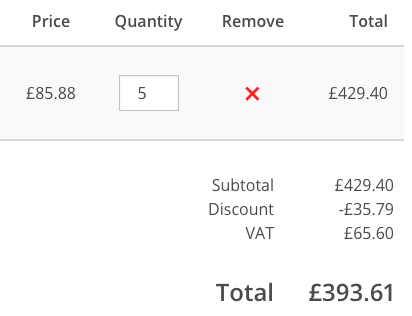
A 10% discount produces the following:
I would expect the calculated discount to be £42.94
I'm going to take a look and see if I can produce a patch for this.
Comment #13
maurizio.ganovelli@orphans supposing a VAT rate of 20% is this what you want to get?
subtotal vat inc: 429.40
subtotal vat exc: 357.83
discount (vat exc): -35.78
vat: 64.41
total: 386.46
if yes, i think we have a similar need.
Comment #14
mattjones86Yes, that's exactly what I get.
This is my patch which corrects the issue, it's certainly not the ideal way to resolve this but it works for me until the official solution is released.
Note that I've also bundled the patch for #2874158: Support taxing the shipping cost into this, since it really seems to be the same issue with adjustments not being taxable.
Comment #15
mattjones86Comment #16
bojanz commentedThe issue summary is still correct:
We need an EarlyTaxOrderProcessor and a LateTaxOrderProcessor.
The EarlyTaxOrderProcessor needs to be the only one modifying unit prices (no more alterations in LocalTaxTypeBase).
That's where #2874167: Handle the prices-include-tax and Intra-Community-Supply scenario would be resolved as well.
This will also help us with #3026301: Allow order items to show the full (unreduced) unit price.
Note that modifying the unit price before discounts are applied means that percentage discounts will now correct, but fixed amount discounts won't. That means that as a second step we'll need to introduce a helper for getting the amount without tax before it is applied (so that 6eur becomes 5eur, without a 20% store VAT, for example), and then use it from promotions. This might prove to be tricky dependency-wise.
Comment #17
trebormcThe discount calculation still doesn't work well when it's configured:
- prices are entered without tax
- prices are shown with taxes included
I have been looking at the code, and in my specific case I have fixed it by removing a 1 line of code.
In the file:
modules/tax/src/Plugin/Commerce/TaxType/LocalTaxTypeBase.php
The problem is "'included' => $prices_include_tax"
We are overwriting the promotion adjustment options .... why?
From what I understand we can have promotions of order or product, and some are included and others should not be included in the price.
In my case, it seems to work, but I don't know if I'm altering the expected behavior, or if there's something I don't understand.
I don't upload a patch because I'm not sure this is a solution, but in my case it works.
Comment #18
lexsoft commentedI'm also having an issue with Discounts.
My options are as follows:
Display taxes inclusive + Prices are entered with taxes included. The tax system used is called Quaderno and it's using the RemoteTaxTypeBase plugin.
19% tax
15% discount
On checkout review, the following is displayed:
Subtotal £150.00
Discount -£22.50
TVA £20.36
Total £127.50
The discount is applied on the full price including tax, where I would need to apply it on the product variation item-unit price - tax = 126.05 where the discount would be -£18.9075.
Any idea how can I achieve this? I've also tried the option where
Display taxes NOT inclusive + Prices are entered with taxes included
On checkout review, the following is displayed (Order total price £150.00 including VAT):
Subtotal £129.64
Discount -£22.50
TVA £20.36
Total £127.50
The discount is applied again on full-price and before tax is calculated where it should be 0.15 x 126.05 = 18.9075 instead of 22.50.
The expected result should be:
Subtotal £150.00
Discount -£18.90
TVA £20.36
Total £127.50
Or
Subtotal £129.64
Discount -£18.90
TVA £20.36
Total £127.50
Comment #19
JeremyFrench commentedThe patch in #14 works for me in that it calculates the total correctly, however, the display on checkout pages and emails is still wrong.
I've made some code to recalculate all of this but it's not really solving the issue it just allows me to display something correct to the customer.
Comment #20
timlie commentedIt's clear to me now why these tax calculations are wrong.
I follow bojanz his idea to start with an EarlyTaxOrderProcessor to determine if the unit prices need to be modfied (which is only the case if prices are entered tax inclusive, displayed tax exclusive, or vice-versa).
So some of the code from LocalTaxTypeBase should be moved into the EarlyTaxOrderProcessor. I am only not sure where the resolving of the rates needs to be done. Should this be some helper class?
Comment #21
matthiasm11 commentedWork in progress.
1) Resolve rates, figure out if unit price needs to be modified, modify it.
=> The EarlyTaxOrderProcessor calculates the unit price without taxes.
2) Calculate discounts
=> Percentage discounts are working, but fixed amount discounts are not. Will need to create a service which converts the discount amount to a discount amount excluding taxes, depending on the order item it is applied to.
3) Now calculate taxes based on the resolved rates
=> LateTaxOrderProcessor adds the taxes. LocalTaxTypeBase will add the taxes back into the unit price if the price should be displayed tax inclusive.
TODO
Comment #22
matthiasm11 commented1) Resolve rates, figure out if unit price needs to be modified, modify it.
=> The
EarlyTaxOrderProcessorcalculates the unit price without taxes.2) Calculate discounts
=> Percentage discounts are working out of the box. Fixed amount discounts are now calculated excluding taxes with the helper service
TaxCalculator.3) Now calculate taxes based on the resolved rates
=>
LateTaxOrderProcessoradds the taxes.LocalTaxTypeBasewill add the taxes back into the unit price if the price should be displayed tax inclusive.Remarks
I think I've managed to solve everything Bojanz mentioned in this ticket.
TaxCalculatorservice.TaxOrderProcessorservice should update their code to use/extendEarlyTaxOrderProcessorand/orLateTaxOrderProcessor.OrderFixedAmountOffandOrderItemFixedAmountOff.Comment #23
matthiasm11 commentedAltered the patch to apply against 8.x-2.x-dev so it can be tested.
Comment #24
matthiasm11 commentedCleaned patch to remove unwanted changes. Sorry for that!
Comment #25
matthiasm11 commentedI've no idea why the test fails on composer. Nothing regarding composer dependencies has been changed in this patch...
Comment #26
longwaveThe Composer 1.x endpoint appears to be having some issues today, as other people are reporting similar 404s in #drupal-infrastructure.
Comment #27
matthiasm11 commentedFixed inheriting constructors of
PromotionOfferBase.Comment #28
matthiasm11 commentedThe tests are running with PHP 7.1 apparently. Removed variable type hinting since this is only supported as of PHP 7.4.
Comment #30
mistrae commentedThis patch cause bugs with my carts.
I have prices entered without taxes but displayed with taxes.
Base price of this example is 23.21CHF and taxe is 7.7%
Without patch :
25 x 6 = 150CHF
23.21 + 7.7% = 24.9972 (rounded to 25)
25 x 6 = 150CHF
With patch :
25 x 6 = 203.58CHF
23.21 + 7.7% = 24.9972 (rounded to 25)
25 x 6 = 150CHF
150 - 6 x 23.21 = 10.74 (total taxes)
5 x 10.74 = 53.7
150 + 53.7 = 203.7CHF (displayed 203.58 because my calculation is probably wrong somewhere)
See screenshots with and without patch.
So with the patch, the first product add its taxes right, but every other same product add somehow the total taxes to its price.
This has been tested on a clean drupal and the behavior is the same.
Taxes is Swiss tax and checkbox "Display taxes of this type inclusive in product prices" is checked.
Comment #31
timlie commentedHi @matthiasm11 thanks for your hard work on this issue.
I tried you're patch.
In LocalTaxTypeBase I changed the code to this:
Otherwise the wrong tax amount is added.
Comment #32
matthiasm11 commentedThank you for testing the patch @Mistrae. The project I'm working on does not allow to combine multiple products in one order item. The suggestion from @timlie should indeed fix this.
I've rerolled the patch to apply to the current 8.x-2.x-dev branch and added the code of @timlie.
@Mistrae, can you please verify if this fixes your use case?
Comment #34
timlie commentedHi @matthiasm11,
Thanks for adding fix to your patch.
After a lot of debugging I think we need to swap what is happening in EarlyTaxOrderProcessor and LateTaxOrderProcessor.
Like mentioned by @bojanz in comment #16 I think we need to first resolve rates in EarlyTaxOrderProcessor and adjust the unit price here if necessary (add tax when it should be included, ...)
In the LateTaxOrderProcessor we should only calculate tax adjustment.
Maybe we should create an issue fork?
Thanks!
Comment #35
timlie commentedI should clarify a bit where this still goes wrong.
When prices are entered without tax but shown with, this is what is happening with patch #32:
1) EarlyTaxProcessor checks if the order items unit price should be lowered with the store's tax rate to get the unit price exclusive tax. In the case of this example, this is not needed as prices are entered without tax so unit price stays untouched.
The EarlyTaxProcessor makes the unit price always tax exclusive.
2) Promotions are applied in a next phase, the code in patch #32 checks for the fixed amount promotions and makes the fixed amount tax exclusive. The promotion adjustment is added with this tax exclusive amount.
3) LateTaxOrderProcessor applies all tax types. The patch changed the code in LocalTaxTypeBase to calculate the tax amount and to change the unit price to tax inclusive if requested (which is the case in this example).
What still goes wrong is the display of the promotion amount on cart or checkout summary. Promotion adjustments are added tax exclusive (both percentage as fixed amounts). They will be shown (if the promotions are not included in the price) without tax which makes the order total amount wrong and although the tax amount is calculated correct, this is wrong for this order total amount.
Comment #36
mistrae commentedHi @matthiasm11,
Thank you for your patch, it seems to work pretty well.
Now with the same example ( a product at 23.21CHF ) this is what I can see :
With one product :
Base price 23.21 + 7.7% : 25CHF
With 6 products :
Base price 23.21 * 6 + 7.7% : 149.98CHF
Is this the excepted behavior ?
Is there a missing round somewhere ?
I think the total price should display as 150CHF as the "one product" is rounded to 25CHF
Comment #37
matthiasm11 commented@Mistrae
From #21 in #2567089: Round up summed tax price components when calculating the order total: D8 calculates taxes per-line.
And from #5 in #3044185: Rounding can cause VAT in orders to be higher than expected: D8 taxes are calculated by applying the percentage to the [row] total price, then rounding to get the tax amount. This is known as per-line calculation in accounting. It is also the more common way of calculating VAT. [...] Per-line has the benefit of being much more precise when a large quantity of products is being ordered (a thousand, for example).
Which means (23.21 * 6) + 7.7% : 149.98CHF is the correct calculation. (per-line calculation)
Comment #38
matthiasm11 commentedAltered some calculations in an attempt to fix the test. This results in a total of 150CHF, so the expected result is the same as before the patch.
Made the code more performant too.
@Mistrae can you please verify if your case is solved?
Still need to look into the promotion display in the cart mentioned by @timlie.
Comment #40
matthiasm11 commentedLogic
Fixed promotions/fees when not included in the unit price. Beware, there may be a rounding difference depending on the discount included or excluded in the unit price. Therefore I added the following description to the discount form:
Due to rounding, this can result in a slightly different order total when using taxes.An example with entering tax exclusive, displaying tax inclusive.
A unit price (excl tax) of 23.21 CHF and a discount (excl tax) of 1 CHF, ordering a quantity of 6:
- Include the discount in the displayed unit price:
- Only show the discount on the order total summary:
If we undo the rounding introduced in #38, the above problem will be fixed, but we will end up with 149.98 CHF again when there is no discount. So it's one or the other. I believe we should round on the order line total level, according to this code:
Can someone (@bojanz?) shine a light on the way to go?
Tests
Since
LocalTaxTypeBase.phpnow expects all unit prices to be tax exclusive, the tests on tax inclusive prices fail.I've cleaned up those tests. Also added a "non-tax-inclusive prices + non-display-inclusive taxes."-test, since that was the only one of the 4 possiblilities missing.
- Entered tax exclusive - Displayed tax exclusive: 10.33 unit price + 2.07 taxes => Test covered.
- Entered tax exclusive - Displayed tax inclusive: 12.40 unit price (including 2.07 taxes) => Test covered.
- Entered tax inclusive - Displayed tax exclusive: 8.61 unit price + 1.72 taxes => No test yet.
- Entered tax inclusive - Displayed tax inclusive: 10.33 unit price (including 1.72 taxes) => No test yet.
Did the same for
testDiscountedPrices(), sinceLocalTaxTypeBase.phpnow expects all unit prices to be tax exclusive before the promotion/fee adjusted total is calculated.To be absolutely sure, we could create a
Drupal\Tests\commerce_tax\Kernel\TaxTest.php, which covers those not covered yet.Also fixed some coding standards and comments.
Comment #41
matthiasm11 commentedThis ticket was a difficult one.
Since it would complicate the logic too much (would require a whole different approach), I kept the code with the message
Due to rounding, this can result in a slightly different order total when using taxes..Verified the automated tests, any errors in
ProductLayoutBuilderIntegrationTest.phpare due to a Drupal core regression, not a Commerce regression. More information in comment #12 of #3253323: Missing block's section tag after price calculation and #79 of #3020876: Contextual links of reusable content blocks are not displayed when rendering entities built via Layout Builder.Also did some manually testing in a clients project: prices entered tax included, displayed tax included. Tested with products with different tax rates in one cart. Tested the editing of orders in the admin backend. Also tested with an intra-EU-VAT billing address. Al seems to work fine.
Did some code clean up too.
This should fix the issue in my opinion. I would appreciate it if someone (preferable more than one person) could test those changes too, because taxes are quite important.
Comment #43
timlie commentedHi matthiasm11,
Thanks for great work on this issue.
I tested you're patch with "prices entered tax exclusive" and "displayed tax inclusive".
Promotions are now tax aware and tax calculations are correct.
This screenshot shows order with percentage promotion added:
This screenshot shows the intra community vat is now also respected:
I'll review you're code in the following days and will test with other cases like mine here (prices entered tax exlusive, displayed inclusive) as well.
This looks very promising.
Comment #44
matthiasm11 commentedComment #45
matthiasm11 commentedImproved the precision of the early tax order calculation.
This was needed when the prices are entered tax inclusive and displayed inclusive.
Example: unit price of €170 including 21% VAT. Without patch that would give €140.50 excl VAT (rounded) in the EarlyTaxOrderProccessor. €140.50 * 0.21 VAT = €29,51 (rounded). Unit price displaying tax inclusive: €140.50 + €29.51 = €170.01; which is not correct.
With the patch that would be €140,495867 + €29.50 (rounded) = €170 (rounded); which is correct.
Comment #46
rossb89 commentedThank you for the excellent work here matthiasm11!
I originally came to this issue as I was testing promotions with a % off the order subtotal, and found issues with the default code - having product prices entered without tax, and then displaying tax inclusive.
Your latest patch #45 works brilliantly for '% off' promotions. After applying the patch and testing out various % level discounts, it resolved any issues I was seeing when it came to the correct amount of tax etc.
However, I have noticed today that when testing discounts of type 'Fixed amount off' (the order) the patch is falling down slightly here IF the store does not have the prices_include_tax option enabled.
The problem i'm seeing is this; Although the EarlyTaxOrderProcessor is correctly stripping taxes from the order item (if any are present), when
$amount = $this->taxCalculator->getUnitPriceExcludingTaxes($order_item, $amount);is being called from e.g. OrderFixedAmountOff, the
$amountbeing passed in from the promotion is inc tax (e.g. I have set my promotion to minus £9 from the order subtotal) and because my store is set to NOT have prices including tax enabled, the logic block inside of TaxCalculator:never gets ran, and thus the fixed $amount of discount - £9 - does NOT get the tax taken off.
When the LateTaxOrderProcessor then runs, it will apply any tax types to the order, and thus the -£9 discount now becomes -£10.80 because the 20% VAT has been applied and the customer ends up getting more money off than they should have.
An obvious 'workaround' to this would be to enter fixed amount discounts excluding tax but that doesn't feel quite right to me. As there isn't a way (that i've seen!?) in the promotion creation to specify whether the promotion fixed amount off is inc/ex tax, I think we need to assume that it is inc tax and thus needs to be handled correctly for the instances where the store prices_include_tax is FALSE.
Comment #47
rossb89 commentedAttached is a patch that adds a third parameter to
getUnitPriceExcludingTaxes()which is a flag specifying if the unit_price is inclusive of tax or not. Set tofalseby default and only set totruein calls togetUnitPriceExcludingTaxes()inOrderFixedAmountOffandOrderItemFixedAmountOffwhere we know the amount (off) from the promotion is inc tax.This leaves the other call to
getUnitPriceExcludingTaxes()fromEarlyTaxOrderProcessoralone, to only use theprices_include_taxstore setting, as the flag will be false by default.This change now lets the 'fixed amount off' promotion discounts work correctly in addition to the 'percentage amount off' style promotions.
Comment #48
rossb89 commentedComment #49
trickfun commentedPatch 47 works with "Percentage off the order subtotal" promotion
thank you
Comment #50
trickfun commentedComment #51
alumni commentedPatch #47 works well for me. Nice work !
EDIT : The calculation of the Tax ajusted for a country is now broken. Even if the tax is included in the price, the calculation of the Total is calculated from the tax.
Exemple : Price is 120€ Included
If the customer comes from a 21% VAT country, the total is now 121€.
Comment #52
luksakThis needs a re-roll.
The patch has got BC. I have this error, because i have commerce_shipping promotions:
ArgumentCountError: Too few arguments to function Drupal\commerce_promotion\Plugin\Commerce\PromotionOffer\PromotionOfferBase::__construct(), 4 passed in /app/web/modules/contrib/commerce_shipping/src/Plugin/Commerce/PromotionOffer/ShipmentPromotionOfferBase.php on line 53 and exactly 5 expected in Drupal\commerce_promotion\Plugin\Commerce\PromotionOffer\PromotionOfferBase->__construct() (line 52 of modules/contrib/commerce/modules/promotion/src/Plugin/Commerce/PromotionOffer/PromotionOfferBase.php).Can we achieve this without BC?
The patch fixes the tax and promotion calculations. But since applying it, I see rounding errors.
Comment #53
micka commentedHi,
Do you have a solution for stack : PHP 8.1 - D9.5.9 - Drupal Commerce 8.x-2.36
With a clean install and following parameters :
- Custom Tax config : include in the product price (10%)
- Promotion config : not include in the product price (displayed in total summary) (10%)
- original product variation price : 100$
Tax is not well if we consider it is calculated on without tax price.
VAT : ((priceTTC - actual VAT) - discount) * actual VAT percentage
VAT : ((110 - 9.09) - 10) * 0.1 = 9.09
Subtotal : $110.00
Discount : -$10.00
VAT : $9.09
Total : $100.00
Expected :
VAT : ((priceTTC - old VAT) - discount) * actual VAT percentage
VAT : ((110 - 10) - 10) * 0.1 = 9
Subtotal : $110.00
Discount : -$10.00
VAT : $9
Total : $100.00
Thanks in advance for your answer.
And sorry if i misunderstood this issue (french english ^^).
Comment #54
aarnau commentedNew re-roll here
Comment #55
cslevy commentedI recreated this patch to work with the latest commerce.
But I also encounter rounding issues, and I think that the discount amounts should be always rounded half down, not up. I'm not sure if it's correct or not, but I created the patch in 2 versions. one as it was in the previous comment with round up, and one with round down.
Please advise on this
Comment #56
anybodyComment #57
johazielI had the same probleme too but I 'don't use promotion module to manage promotions,
my config :
product price entered without VAT (I didn't find where you manage prices are displayed with or without VAT )
I using also commerce_tax_product
one field_discount added to an order item type
I directly add promotions in module like this
So I separated the patch to only be applied to tax module and calculations of price a ok

my price without VAT is 50 €
Comment #58
matthiasm11 commented@ #47: I would advise against the mixing of excluding taxes in products and including taxes in promotions at the same time.
A webshop including taxes in products, is often a B2C webshop, where the product price is something rounded (€50 incl. 21% VAT for example). The fixed amount of promotion should thus be € -10 incl. 21% VAT.
A webshop excluding taxes in products, is often a B2B webshop, where both product prices and promotions can be communicated excluding VAT.
Depending on the webshop requirements, one could argue to change this.
At the moment, the tax setting is called "Prices are entered with taxes included.". It does not differentiate between products or promotions. I therefore rerolled patch #45 against 3.0.0-beta2.
I also rerolled patch #45 against 3.0.0-beta2 containing merge request 371 from #2881056: Can't distinguish two taxes of different percentages in the order summary.
IF we allow mixing this, the incl/excluding of VAT in promotions should be configurable, just like the VAT incl/excluded in products. It should fallback to the same setting as the incl/excluded VAT of products in an update hook. The todo based on the attached patch would then be:
TaxCalculator.phpto useif ($store->get('prices_include_tax')->value || $store->get('promotion_prices_include_tax')->value) {promotion_prices_include_taxbased onprices_include_taxComment #59
cslevy commentedRe-rolled patch from #58
Comment #60
cslevy commentedFix php 8.4 warning from last patch
Comment #61
cslevy commentedFurther php 8.4 fixes
Comment #62
anybodyI think this needs tests and should be proceeded in a MR. Only with tests we can ensure this works as expected in the future.
Comment #64
matthijsComment #66
matthijsCreated an MR from #61 and added an extra commit to fix the calculation of the tax excluded unit price if it's overridden.
Comment #67
matthijsComment #68
anybody@matthijs thank you very much - I can only see removed or modified tests (which scares me a bit), but no added ones that show the test-only error proving the issue. I think that still needs to be done to be save here?
Are the test modifications correct and required?
Comment #69
matthijs@anybody It wasn't my intention to change the patch in the first commit. I see the test changes are also in https://www.drupal.org/files/issues/2025-10-09/commerce-tax_processor-29..., so they got lost earlier? Or am I missing something?
Comment #70
anybody@matthijs sorry I didn't mean you personally - just has to be checked and done by someone.
Comment #71
tbkot commentedIs there any reason to remove this condition
in LateTaxOrderProcessor? Tests are failing because of this.