
Limiting Views access by group permission
When trying to add an extra tab to the homepage of a Group using Views, you may (or should!) want to limit access based on a specific group permission. Luckily, Group supports this out of the box, but there is a catch that I'll explain here.
First of all, make sure you are working with a Page or Feed display.
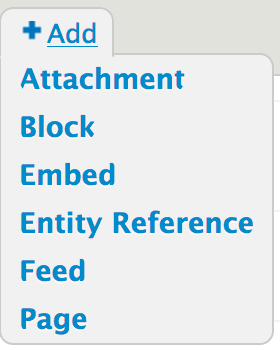
Select Page or Feed when adding a new display to your view.
Other contributed displays might also work, but they have to extend Drupal\views\Plugin\views\display\PathPluginBase in order to work with the "Group permission" access plugin.
Second, when specifying a path, do not use % as your placeholder, but %group instead. This is the most important part!

Typing group/%/members will not work
The technical explanation is that the "Group permission" access plugin will alter the route to check for a {group} parameter and upcast it so that we can use the wildcard as a fully loaded Group. See \Drupal\group\Plugin\views\access\GroupPermission::alterRouteDefinition()
Finally, select the "Group permission" access plugin and choose the permission you want to limit the view's access by.

Now you are free to choose any permission in the dropdown of the access plugin's configuration dialog.
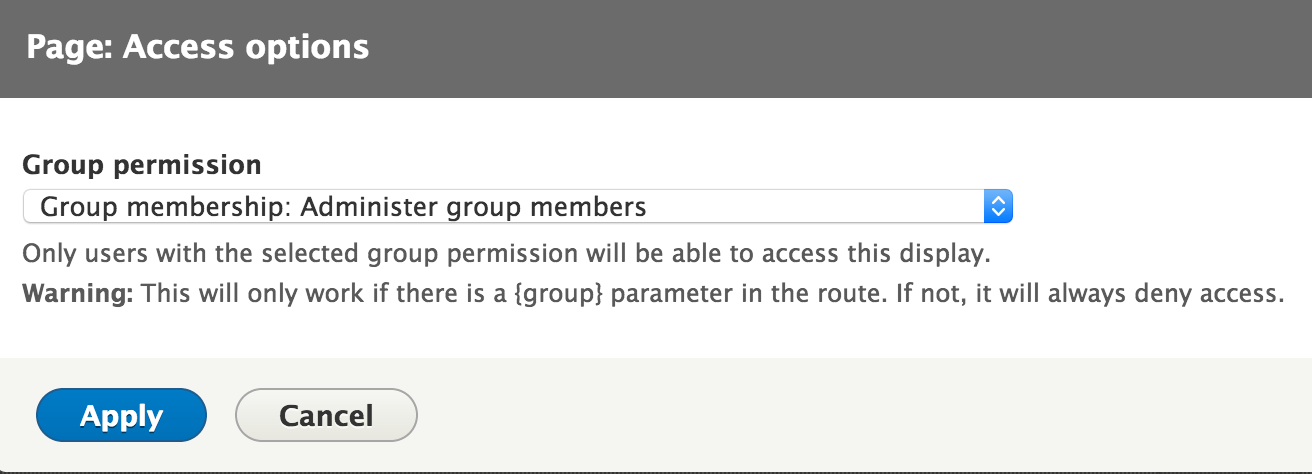
Keep in mind this will show all group permission defined in the system, regardless of group type. So if you choose to limit the view by a permission that is only available for group type Foo, then all groups of type Bar will deny access for this view (because they lack the permission).
Help improve this page
You can:
- Log in, click Edit, and edit this page
- Log in, click Discuss, update the Page status value, and suggest an improvement
- Log in and create a Documentation issue with your suggestion
