

Closed (fixed)
Project:
Webform Rules
Version:
7.x-1.1
Component:
Code
Priority:
Normal
Category:
Support request
Assigned:
Unassigned
Reporter:
Created:
7 Dec 2011 at 15:53 UTC
Updated:
29 Sep 2016 at 19:47 UTC
Jump to comment: Most recent, Most recent file




Comments
Comment #1
stborchertIf you add a PHP condition the submitted webform data should be available (
$data). Using Develsdpm()on it will show you its structure so that you can check the value of the field.Comment #2
lsolesen commentedCan't you just use Webform has name ... rule? Though I have not figured out what to put in the value field yet.
Comment #3
lsolesen commentedTried with the following code, but that did not work.
See attached screenshot and the exported rule:
Comment #4
stborchertThe condition "Webform has name" compares the name of the webform with the value you have entered into the textfield. Entering token or complex expressions (as you did) is not intended to work with this type of condition.
Comment #5
stborchertplease reopen for further questions ...
Comment #6
pierredvumali commentedi have almost the same problem with my webform. I created a survey using webform and I would like to place values for each corresponding option in my radio buttons, ex:
1) question
a) option 1 = (2)
b) option 2 = (1)
2) question
a) option 1 = (3)
b) option 2 = (2)
Then after the user has submitted the form the values of the options he selected will be summed up. I intended to use the sum for Rules to auto-subscribe the user, depending on his result, to a specific group.
Can this be done using webform and rules? Or do I have to create a PHP page? but I don't know how to integrate that page with the options in Rules. Any kind of help will be greatly appreciated. Thanks in advance!
Comment #7
thatoneguy commentedReading through this, the README file, I still have no idea what I am supposed to put for a value in the field "the form ID of the submitted form." Perhaps you could elaborate? Documentation would be highly useful, especially when the description of the field doesn't make sense. (What I'm really wonder, when I see that, is why do I have to tell you what form was submitted, when the fact that it was submitted is what triggered the rule in the first place?)
Comment #8
dkelly60 commentedI am also having trouble trying to understand how to use webform rules.
I have a webform that collects firstname, lastname, email, and a checkbox for health-practitioner.
What I need to do is to subscribe the person who submits the form to one of two newsletters depending on the status of the health_practitioner checkbox.
I have spent hours looking reading through this issue list, watching videos, and any other source I could find but without success.
I am sorry to have to ask but I would really appreciate a step by step example of the best way to achieve this.
I have no trouble with the action of subscribing to a newsletter when the form is submitted. My problem is in setting the conditions.
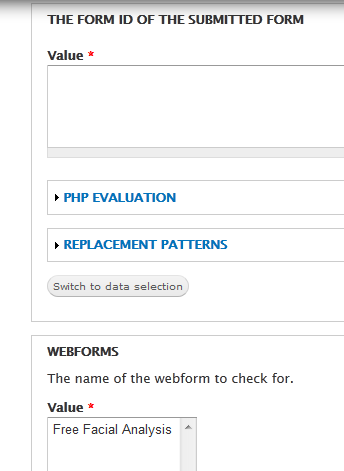
I also have a question regarding what can and should go in the Form ID section as seen below?
I was trying to use the "Webform has name" as a condition but nothing I tried worked and I tried form-id as was shown in one of the issue answers.
Comment #9
stborchert@dkelly60: could you provide an export of your rule?
I guess you try to add the condition to an event where the webform object itself is not available (and therefore the form_id field isn't filled).
Comment #10
dustinbrunson commentedThe problem is not in getting the form id but in getting whether a value is selected or not and being able to do something with that info.
How do we access the the values of the webform itself?
Comment #11
stborchertHm, I'm curious that it seems to be so complicated to access the data.
If you use an action with PHP to output data you simply can inspect the given structure using
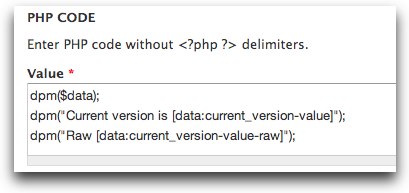
dpm($data)(given by module Devel.Example:

I've created a simple component (textfield) named "Current version" (machine name: "current_version"). A rule uses "execute custom PHP code" as action:
This prints the following:

If you want to print out the entered value you may either use the token
[data:current_version-value]orprint $data['components']['current_version']['value'][0];Comment #12
stborchertbtw.: if you see something like http://drupal.org/files/webform_1.png while creating your rule (as in comment 8, click on "Switch to data selection". Now the textarea should switch to a simple textfield with "form_id" as value.
I don't know yet why rules didn't do this by default for this condition.
Comment #13
Adon Irani commentedI too am having trouble clarifying what to enter for form_id
i've tried:
71 (the node id)
webform_client_form_71 (the form_id in css)
13 (sid)
i'm not sure what else I can try for the field.
please excuse my misunderstanding on this.
kind regards,
Adon
Comment #14
stborchert@mr_ad0n: as said some times before in other issues (e.g.: http://drupal.org/node/1550774#comment-5945984 and just in my previous comment): this field must contain the string "form_id" (after clicking on "Switch to data selection" this should happen automatically).
The webform can be selected in the list below.
Comment #15
stborchertComment #17
vaibhav_jadia commentedhii i am new bee in drupal world, and my boss has assigned me an project to developed an portal in drupal. i have one webform which is for request, as soon as the employee submits the form an e-mail should be send to his manager, manager approve his request and should be able to submit the same form after updating it and this updated form should be mailed to group head. i am struck at this point i think webform rules can help me ut but how , plzzzzzz help me...........
i am attaching the image of workflow of the mails as how the same submission will travel from one person to another.
Comment #18
loopy1492 commentedI, too am looking to execute a Rule based on whether a specific item is selected in a submitted webform.
I have no idea how to do that based on #11 above or anything else I've read in these issue logs.
I would have expected it to be one of the data selectors. You know, like this.....
data:my-webform:field-in-my-webform
And then a textbox allowing you to fill in the value that you want to test on.
But that doesn't seem to exist. So, I'm assuming, to add things to this list, you need to add PHP code?
Comment #19
loopy1492 commentedComment #20
JayShoe commentedOK.. This is the answer to this as found in #12.
Comment #21
gcaudle commentedSimply done with PHP:
1. Make sure php filter is turned on in modules
2. Create a rule with the following:
a. Event: After a webform has been submitted
b. Condition: Execute custom PHP code
Code to add:
(Replace yourcomponentsmachinename with the machine name of your component [duh!] and safekey with the safe key value from your select list)
c. Action: Whatever you want to do after you've checked for the value.
Use case: I used this to send a different email to the person submitting the webform based on which item they selected. I created a rule for each selection.
Comment #22
dremy commentedThanks @gcaudle. In case anyone wants an export of the rule from above. This checks for webform with name and webform id, then evaluates the PHP condition, and if they pass, then redirects to a specified path base on the value:
Comment #23
stborchertClosing this as there were many questions and much more answers ;)
Comment #24
4aficiona2 commented#12 solved it for me too. Thanks!
Comment #25
16am commented#21 is the answer.
Thank you @gcaudle
Comment #26
iainh commentedThanks @stBorchert for pointer towards dpm for gathering intelligence. Just what I need. But how on earth do you stop the webform page either reloading or redirecting before you can see the devel output printed?
Comment #27
pthornhi6 commented@iainH, Throw in a "die();" in the line directly following your debug line.
Comment #28
spinsheet commentedI was trying to get #21 to work but I'm not sure of the values I need to put in there.
The code is:
But I'm not sure what to put in 'yourcomponentsmachinename'.
In my select list I want this condition to hit if the user chooses 'Other' in the select list. In the code for that select list I have:
<select class="civicrm-enabled form-select processed" id="edit-submitted-training-needs-civicrm-1-contact-1-cg34-custom-281" name="submitted[training_needs][civicrm_1_contact_1_cg34_custom_281]"><option value="">- None -</option><option value="1">BLM</option><option value="2">ABC</option><option value="3">XYZ</option><option value="4" selected="selected">Other</option></select>Would I put civicrm_1_contact_1_cg34_custom_281 in place of yourcomponentsmachinename? And would "4" replace the [0] in the safekey value? I tried those and some other values but the email is not being sent.
Comment #29
btc97 commentedUse "civicrm_1_contact_1_cg34_custom_281" to replace "yourcomponentsmachinename", and then use "4" to replace "safekey"
Comment #30
StephYu commented@gcaudle "Use case: I used this to send a different email to the person submitting the webform based on which item they selected. I created a rule for each selection"
I would like to know how you were able to achieve this. I tried the solution you provided but somehow it does not send the email, do you mind sharing what you had in your "Action" area?
Comment #31
awebmanager commentedHello,
I found this post because I want to stop webforms from sending by email if they contain spam terms. #21 seems to be a way of checking text from a particular webform submission field, but it says "replace 'safekey' with the safe key value from your select list" and I don't know what select list is being referred to. Do I need to define a separate list somewhere of the spam terms I want to check for? Or should the PHP use strpos to identify terms from the webform submission and if so what would be the exact syntax for that?
I'm aware this post is 8 years old so if I am needlessly reinventing the wheel then do please point me in the right direction.
Thanks.