

 Come together with the global Drupal community in Rotterdam, 28 Sept – 1 Oct 2026. Sessions, contribution, connection, and Early Bird savings until 8 June.
Problem/Motivation
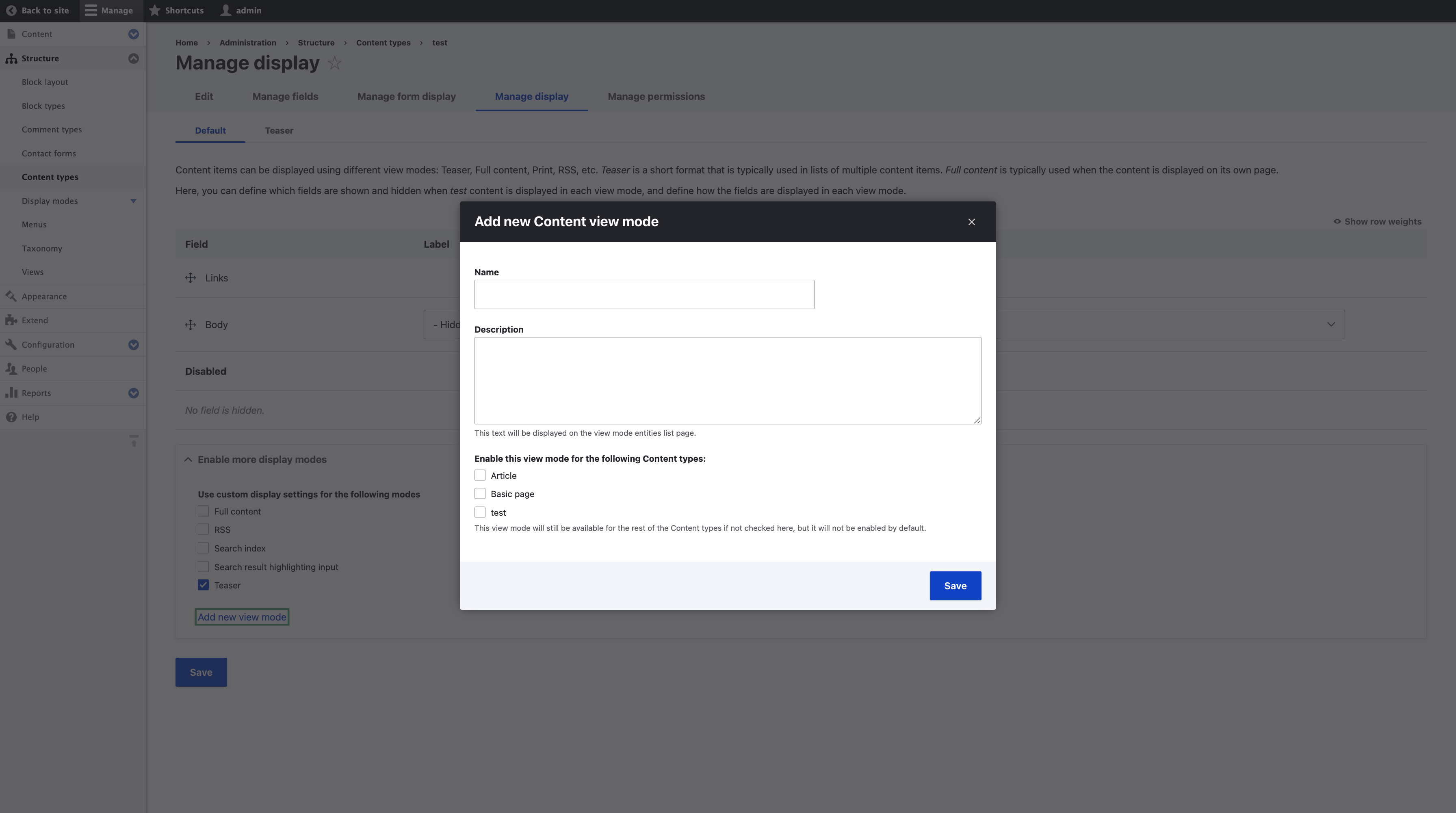
Currently the users cannot add/create a new form/display mode while entity creation flow.The view display mode has a link Manage view modes which redirects to the view display mode form where you can create a new display mode to attach to the entity.We want the to provide the users with the flexibility of adding display modes from the field UI of the entity flow creation.
Steps to reproduce
Proposed resolution
The proposed resolution is that we can directly create both the display modes from respective Field UIs. The current implementation allows a user to create respective display modes by opening the respective forms in a modal on while the user is not redirected anywhere.
We should find an alternate way of what has been done in the MR right now, i.e. There may be new tabs (local tasks) that should display when the modal form is submitted. That means we also need a page reload, right? If so, then that removes one of the advantages of using a modal in the first place.
Remaining tasks
- Usability review
- Accessibility review
User interface changes



API changes
Data model changes
Release notes snippet
| Comment | File | Size | Author |
|---|---|---|---|
| #93 | MOCKUP-2721727-too-many-actions-at-once.png | 244.5 KB | skaught |
| #71 | field_ui_issue.mov | 48.74 MB | narendrar |
Issue fork drupal-2721727
 Show commands
Start within a Git clone of the project using the version control instructions.
Or, if you do not have SSH keys set up on git.drupalcode.org:
 changes







Comments
Comment #2
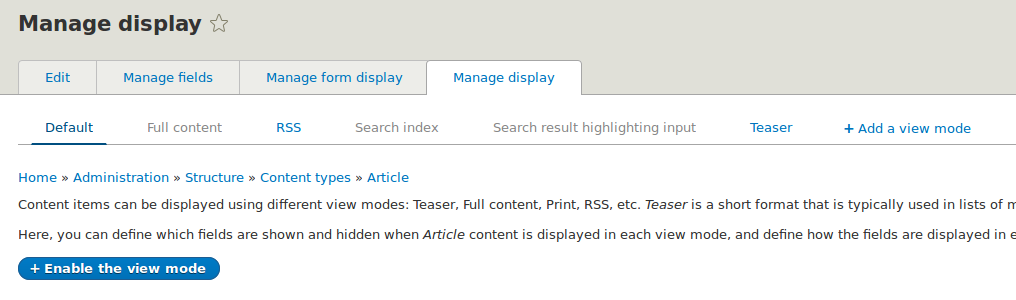
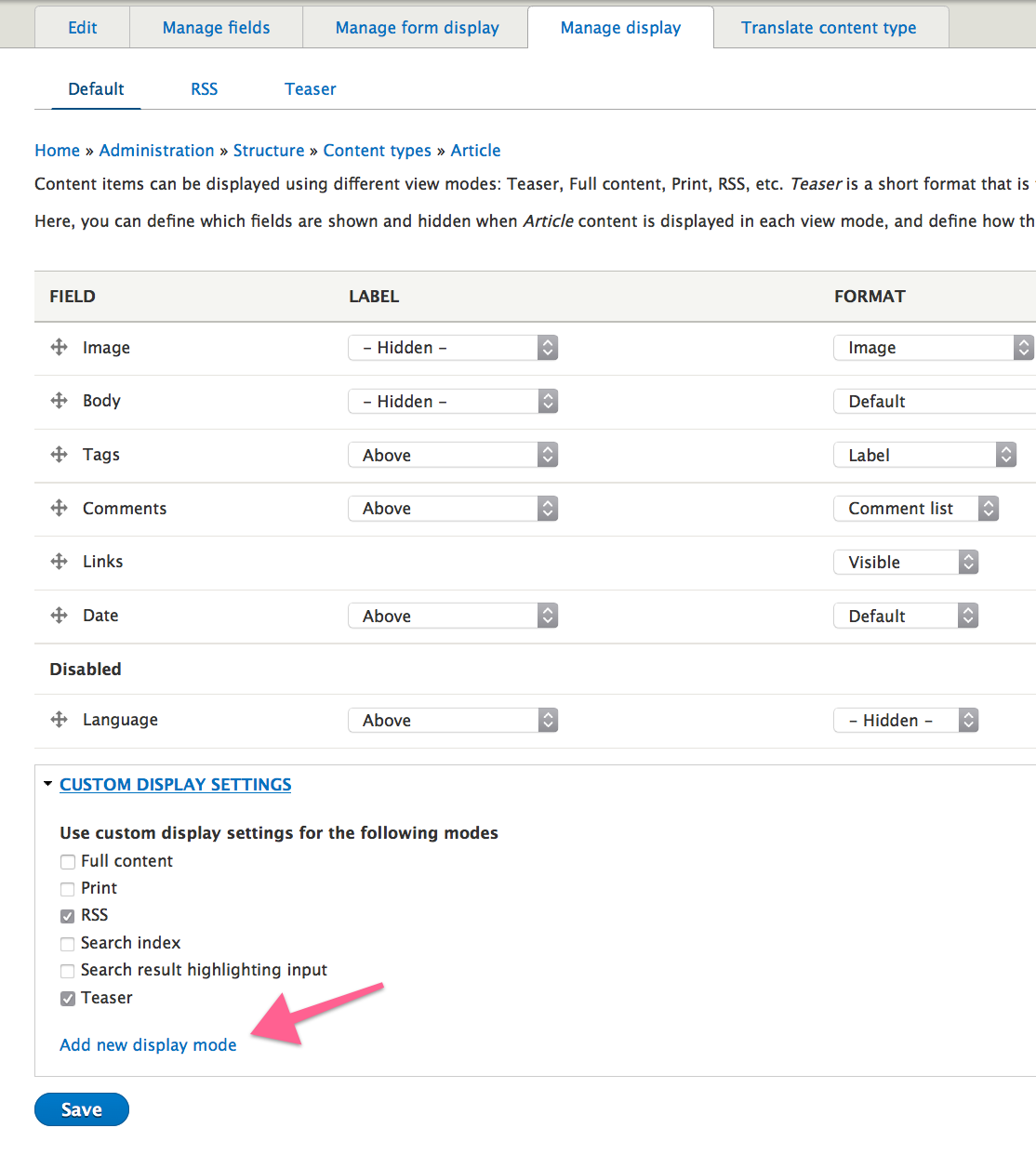
yoroy commentedLets show the "add display mode" inside the fieldset where you can select the display modes to use:
There's room for more consistent naming of things here too.
Comment #3
yoroy commentedBut we still need to be able to edit, edit, delete display modes. So can we move the whole table into the fieldset? We would need to add the checkboxes for selecting which ones to actually use:
(wonky edit links because of rough firebug hacking :)
Comment #4
yoroy commentedComment #5
ifrikThe Display mode menu item include both Form modes and Display modes for every fieldable entity.
Adding a link to the forms to on the Manage form display and Manage display pages would be useful, but that should to totally replace their menu items. Site builders should not need to have to scroll round pages to find links somewhere at the bottom of a collapsed field to in order to build sites.
By default an entity such as Content type already has six View modes, and the more fields a fieldable entity has, the more likely it is that more View modes are needed. This will just make very long pages with hidden functionality.
It would be possible to combine the two pages on one with two tabs, and group it with fieldable entities on the structure page, to emphasize where it is of use.
Comment #6
artusamakComment #7
artusamakWhen i think about what you suggested, i think that we can go for something even more intuitive.
In the following screenshot we could deport the view mode / form mode creation to the "Manage display" / "Manage form display" screen pages in a new tab.

When the display mode is created, it's automatically enabled (it'd be a better default behaviour than what we have now).
Now, we have to deal with the activation / deactivation of the display modes which is really hidden. We can represent this state with a tab color (or even better a pictogram) and then a pimary action button to enable / disable the customization of the display mode (this behaviour should be improved latter on i think).
What do you think of this?
Comment #8
yoroy commentedComment #9
ifrikI like where that is going, but I'm not sure about turning secondary tabs (that are usually used for navigation) into something that can be enabled.
But taking it from here: Could we move the collapsed field "Custom display settings" up above the table, and change it to something like "Enable more display modes" with a link to the Display modes page to add new ones?
Then we would need less explanation text at the top of the page, the functionality to have more modes would be close to the tabs that link to the enabled ones, and at the bottom of the page the Save button would be directly under the items that it's supposed to change.
However, that is not actually the scope of this issue, so maybe need to make a new one for this.
Comment #10
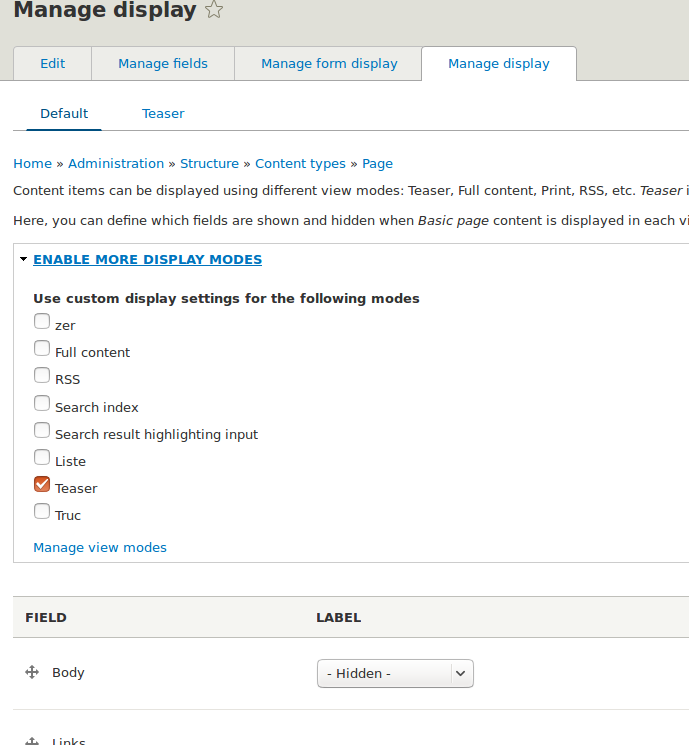
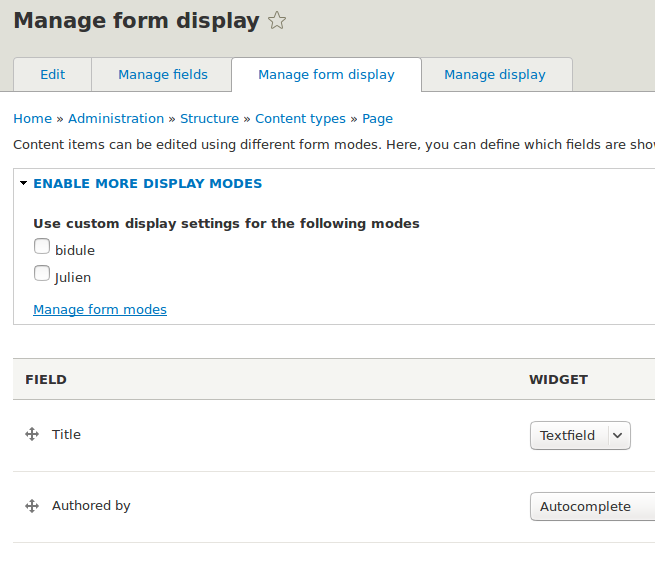
artusamakHere is a patch to stay in the first orientation asked. (We can go farther in a second step.) The fieldset has been moved on top of the fields table and a link to manage the display modes has been added.
Preview after the addition for the manage form display tab:

Preview after the addition for the manage display tab:

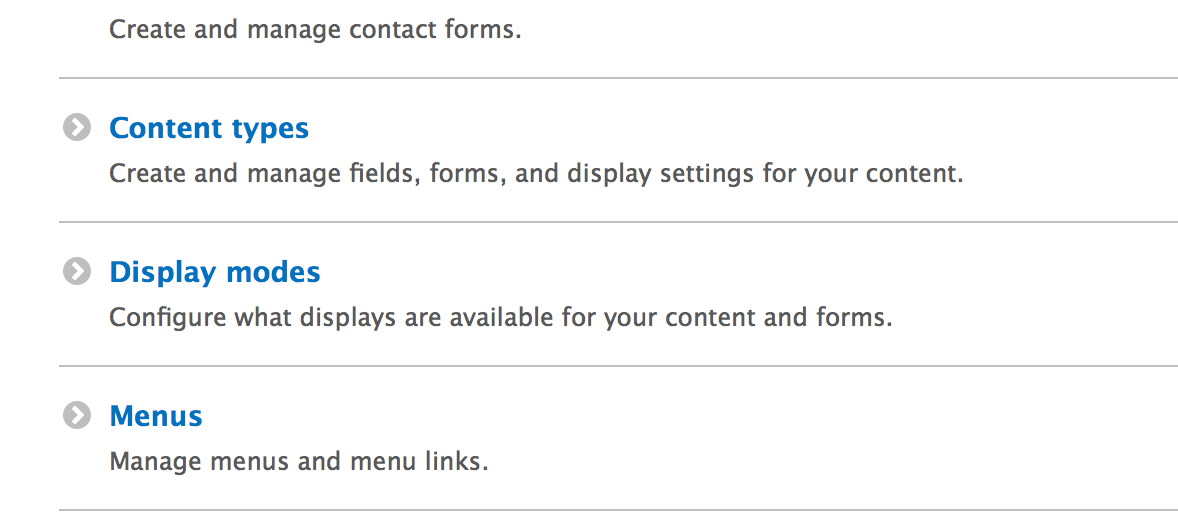
A note about removing the Display modes entries from the structure menu, we need to find how to access the create / edit / delete pages for the display modes.
Comment #11
Bojhan commentedWhat about making it a page "manage displays" and always stick it to the right of display modes?
Comment #12
ifrikBojhan,
If I understand you correctly, you propose to add a link "Manage displays" into the list of secondary tabs. That would mean that enabling an existing display mode and adding a new one would still be at two different places, and it would be confusing with having to different type of actions in those secondary tabs.
A typical workflow is to check whether there is an existing form/display mode that can be enabled, and to create a new one if there isn't. So keeping that together makes sense.
Artusamak,
the target for the "Manage view modes" isn't quite correct - but maybe we could even tweak it further so that it will bring the user directly to the correct form? Such as
admin/structure/display-modes/view/add/nodewhen you come click the link on the "Manage display" tab of a content type, oradmin/structure/display-modes/form/add/userwhen you are on the "Manage form display" of the user account page.Also the link should rather say "Add new display mode" or "Add new form mode" instead of "manage".
Comment #13
artusamakWhat we can do is remove the default display mode being the exclusive mode on which the "Custom display settings" fieldset appears.
We add a new "Manage displays" (this title may not be intuitive), in this page we display the content of the display modes available with the possibility to enable them, add them and delete them. It would be a merge of the "Custom display settings" fieldset content and of the Display mode overview page.
Ifrik,
I started by implementing the links that you described and went backward to a "manage form/view mode" link because if we link directly the user to the add link, he will never see the edit and delete features.
(For the record this issue #2409591: Increase discoverability of view modes is related to the same topic i think)
Comment #14
ifrikThanks Artusamak,
the question about "Default" is way beyond the scope of this issue. If you want to propose that, then that needs to be a different issue.
And actually, moving the elements on the page around is also beyond the scope of this issue - even more though since you found an existing issue for that. We need to take the discussion to #2409591: Increase discoverability of view modes and see what has been done there in the last days.
Comment #15
artusamakI've reviewed #2409591: Increase discoverability of view modes. This current issue is indeed a duplicate of #2409591: Increase discoverability of view modes. I suggest that we rename this current issue to "Manage display modes within "Manage form display" and "Manage display" tabs" which would be the wilder issue and second step once #2409591: Increase discoverability of view modes is committed.
Would you agree with that ifrik?
Comment #16
ifrikI think it would be better to merge this two patches into one and getting it committed in one go, instead of waiting and then reroll it anyway.
pguillard is in the Sprint room at DevDays if you want to talk about that directly.
Comment #17
ifrikOkay... I see the reason for keeping the two issues separate, and get the first one committed because can be RTBC'ed anyway now. And then working further on this one.
I also understand the reasoning for keeping the link to the general Form modes or View modes pages, and not directly to an Add... page, because users might not be aware of the existence of these pages.
And another thing I noted about the initial idea to remove the Display modes menu item from the menu: The field set to enable additional form or view modes only is visible if an entity type has at least two such modes. If we would remove the menu item, then there would be no way at the moment to add new ones for such entities, both for core and contrib.
Comment #32
lauriiiComment #35
utkarsh_33 commentedAttaching the screenshots with the updated manage form display and manage display.Also removed the Display Modes from the main structure page.
Comment #36
utkarsh_33 commentedComment #37
smustgrave commentedHow would users be able to delete or manage view modes now though? Would they have to go through a content type now to delete a view mode?
Comment #38
smustgrave commentedAlso does it negate all the work done on https://www.drupal.org/project/drupal/issues/3359240?
Comment #39
benjifisherIt will help for reviews if we update the issue summary using the Issue summary template. Can we also get an updated screenshot using Claro? On Slack, @lauriii also suggested updating the title.
Comment #40
smustgrave commented@benjifisher beat me to it!
Comment #41
utkarsh_33 commentedComment #42
utkarsh_33 commentedComment #43
utkarsh_33 commentedComment #44
benjifisher@Utkarsh_33:
Thanks for working on the issue summary.
The goal of rewriting the issue summary is to add enough information so that the issue can be reviewed without reading all the comments and without reviewing/testing the merge request.
It helps to have a more explicit list of changes in the Proposed Resolution section. I think this issue is removing links from the Administration menu in the Standard profile. I am not sure whether they are being added somewhere else. Can you clarify that?
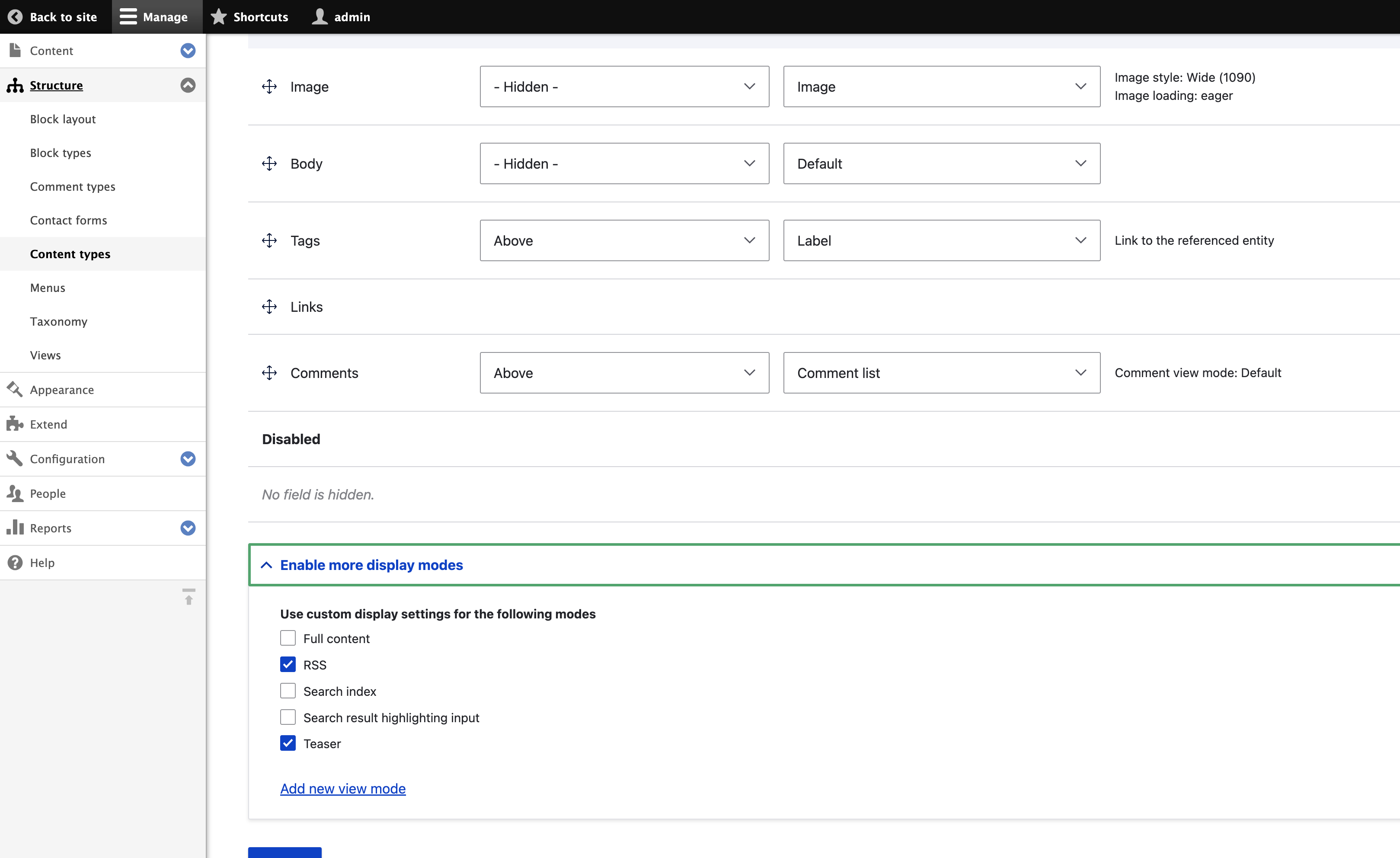
We like to have "before and after" screenshots in the "User interface changes" section. I see that you attached new screenshots to the issue, but you did not use them in the issue summary. The previous version of the issue summary did show one screenshot.
Comment #45
utkarsh_33 commentedComment #46
utkarsh_33 commentedComment #47
kunal.sachdev commentedI tested it locally and it's working as expected. I think the Issue summary is updated and "before and after'" screenshots are also added.
Comment #48
benjifisherI think a change like this should get usability and accessibility reviews. I am setting the status to NR and adding the appropriate issue tags.
I have not had a chance yet to review the changes to the issue summary in detail, but thanks for adding the screenshots.
Comment #50
smustgrave commentedLooked at this with @mgifford. Noticed that when tabbing to the "Add view mode link" and clicking open. Focus remains on the link and not into the modal.
Comment #51
rkollerWe discussed this issue at #3395398: Drupal Usability Meeting 2023-10-27. That issue will have a link to a recording of the meeting.
For the record, the attendees at today's usability meeting were @AaronMcHale, @anmolgoyal74, @benjifisher, @rkoller, @shaal, @simohell, and @worldlinemine.
If you want more feedback from the usability team, a good way to reach out is in the #ux channel in Slack.
In general the group liked the changes introduced with this merge request. To summarize the few additional points that came up during the discussion:
1) The name field is missing the red star for required fields and if you are saving the modal dialog without entering anything into the name field you are forwarded onto the
Add new Content view modepage outside of a modal dialog context. Ideally the modal dialogue shouldn't be left until a successful save or deliberate quitting of the modal.2) If you click the
Add new view modelink on theArticlecontent type, no content type in the list of available content types for the new content view mode is selected.There was a clear consensus that it would be convenient and handy to auto select the content type which the new view mode is created for. So for example if you press the
Add new view modefor theArticlecontent type theArticlecheckbox would be auto-selected on theAdd new Content view modemodal.3) On for example
/admin/structure/types/manage/article/displaythe label for the field set is calledEnable more display modeswhile the add button is calledAdd new view mode. It might be potentially confusing if the label is using the termdisplay modewhile the add button is using the termview mode. Display mode is the parent term for view mode but the user might not necessarily know that. To avoid confusion and to lower the cognitive load it might be a reasonable step to make the wording of the label consistent and useEnable more view modes. And strictly speaking the fieldset is not only about enabling but also about disabling view modes. Therefore the suggestion would be to change the label for the fieldset to something likeEnable view modes.4) Out of scope for this issue: One idea that came up during the meeting is to adopt a pattern for Core in general is to enable the user to select a range of checkboxes by shift clicking (A pattern Gmail employs). if you have checkbox 1 to 50 you first click number 3 and then shift click number 27, that way all checkboxes from 3 to 27 are getting checked.
I'll also remove the Needs usability review tag and set the issue back to needs work.
Comment #52
mgiffordThanks for catching that @rkoller. Really appreciate you looking over this in the UX channel and providing the feedback here.
I'd missed that name field was a required field. Are there any instances where this wouldn't be the case?
Comment #53
rkollerre #50 in regards of
add view mode linkclick and the focus remaining on the add button instead of going into the dialog modal. would it would make sense to open up a follow up issue and collect and fix the occasions in a single issue because that problem seems to be a more general one happening in other places in the admin ui as well. for example i just noticed it for the place block button on the block layout page as well.re #52 in the context of the add a view/form mode it looks mandatory. the name is needed for the machine name. without it can't be saved.
Comment #54
smustgrave commentedSo maybe? But that modal issue doesn’t happen on the Display Modes page using the same modal. So actually not sure how it got introduced.
Comment #55
benjifisherAnother thing we noticed during #3395398: Drupal Usability Meeting 2023-10-27:
If I start on
/admin/structure/types/manage/article/displayand click on the link to add a new view mode, then the form opens in a modal window. If I try to save the form without entering anything, then the non-modal version of the form loads:/admin/structure/display-modes/view/add/node?destination=/admin/structure/types/manage/article/display:When there is an error like this (a validation error, I think) can we make it so that the form is still displayed in the modal?
Also, as the screenshot shows, the error message refers to the machine name, but the machine name is still hidden. We have run into this on other recent issues adding modal forms. So maybe that is a systematic problem that deserves its own issue, or maybe that is something that has to be fixed separately on each of these issues. I guess that is why the Name field is not marked as required: the Name field is actually optional, but the machine name is required.
Comment #57
yash.rode commentedNeed to fix the tests and write test coverage for the newly added things (going to do that tomorrow).
Comment #58
yash.rode commentedTo run drupalci
Comment #60
yash.rode commentedHi, in
core/modules/field_ui/src/Form/EntityDisplayModeFormBase.phpI need to get the value of $bundle which is hardcoded to 'article' right now. I want the value of bundle from where we are opening theEntityDisplayModeAddForm. Can someone help me with this?Comment #62
yash.rode commentedComment #63
smustgrave commentedStill seeing the accessibility issue where when the modal opens up the focus is lost.
Not seeing that when I add a form mode via admin/structure/display-modes and that modal, so maybe the same fix could be made generic or copied over?
Comment #64
yash.rode commentedI agree with #53 and there is an existing issue for that https://www.drupal.org/project/drupal/issues/3397785. So, may be this is ready for review.
Comment #65
smustgrave commentedBut this accessibility, for this modal, was introduced in this issue I believe. The modal popup for adding view modes via the Display Modes section doesn't have it.
Comment #66
yash.rode commentedThe focus is working now this can be reviewed.
Comment #67
smustgrave commentedConfirmed accessibility issue has been fixed here.
Comment #68
lauriiiPosted feedback on the MR.
Comment #69
yash.rode commentedAll the threads have been addressed. Except the local task issue, which I am not able to reproduce.
Comment #70
smustgrave commentedI was able to reproduce the issue @lauriii was seeing.
On a standard install
On the article view display, added a new view mode called test
Clicked save and got the message that the view mode was saved but it doesn't appear.
Refreshing the page made it appear.
Comment #71
narendrarRe #70, I tried to reproduce the issue but failed. Attached is the screen recording. Can you please let me know if something is missed?
https://www.drupal.org/files/issues/2023-11-30/field_ui_issue.mov
Comment #72
lauriiiPushed commit that fixes #70.
Comment #73
yash.rode commented@smustgrave would be a good fit to review this one, as he was able to reproduce it on local.
Comment #74
smustgrave commentedSome weirdness where it appears the background is refreshing before the modal closes, but may just be my machine.
Don't think it should be a blocker for the overall feature.
The issue before where newly added modes weren't appearing appears fixed.
Comment #75
omkar.podey commentedIt all seems to work as expected but I couldn't get the test
\Drupal\Tests\field_ui\FunctionalJavascript\DisplayModeBundleSelectionTest::testDisplayModeLinksto fail without the fix for the local task.Comment #76
omkar.podey commentedComment #77
yash.rode commentedI think https://git.drupalcode.org/project/drupal/-/merge_requests/4839/diffs?co... is not must have for all the setup but a good to have as it was not showing the display modes in the local task bar for some set-ups. That's the reason for #75.
Comment #78
yash.rode commentedAs everything is working as expected.
Comment #79
benjifisherI made a few comments/suggestions on the MR. Back to NW for that.
It is not strictly enforced, but it is good practice for each developer to stick to one role: making changes or reviewing the issue. Based on that, it is unusual for @yash.rode to set the status to RTBC.
Also, I am not satisfied with the response to Comments #75, #76. If I read them correctly, they are saying that the new test for this issue does not fail as expected when run without the non-test changes here. If that is the case, then it is not a useful test.
Comment #80
yash.rode commentedThanks for the review @benjifisher,
this is not right, the test for this issue won't pass without the not-test code. But the test will pass if we skip https://git.drupalcode.org/project/drupal/-/merge_requests/4839/diffs?co... and reason for that is explained in #77.
Comment #81
yash.rode commentedAddressed feedback and responded to #79
Comment #82
benjifisher@yash.rode:
Thanks for the more complete explanation in #80.
I did some more code review and added some suggestions on the MR, so back to NW.
I guess the reason for rebuilding the router is that there may be new tabs (local tasks) that should display when the modal form is submitted. That means we also need a page reload, right? If so, then that removes one of the advantages of using a modal in the first place.
It would help to discuss this problem in the "Proposed resolution" section of the issue summary. I wonder if there is a more targeted solution than rebuilding the router.
Comment #83
benjifisherIn #79, I wrote,
I meant to say that this practice applies one issue at a time. It is OK to take one role on one issue and a different role on another issue.
Comment #84
yash.rode commentedAll the feedback has been addressed, except the local task issue, for which we still need input from others. Updated the issue summary for that.
Comment #85
utkarsh_33 commented-While testing this locally one thing that i found was if we keep the "Name" field blank it does not show any error. The AJAX processing throbeer
appears but the error is not shown up(neither js error not the status error message).
-Another thing that i noticed is that if we click on the edit machine name , the edit machine name form element appears after the description but ideally it should be next to the Name form element.
Comment #86
yash.rode commentedAddressed #85's first point and
this is an existing form, so if we want to do this, we should do that in a separate issue.
Comment #87
smustgrave commentedRetested this and still seeing expected before.
+1 RTBC from me but leaving in review for additional eyes.
Comment #88
smustgrave commentedBeen about a week so going to go ahead and mark.
Comment #89
benjifisherOne of my comments on the MR was
I still see that behavior. I am setting the issue status back to NW and assigning it to myself.
Comment #90
benjifisherI would like to have another look at this issue with the usability team, so I am adding back the tag for a usability review.
While testing this issue, I realized that it is odd to have the "Add new view mode" link on the "Manage display" page, and to have the modal form trigger a page load. It is confusing to have a form with some elements that do not take effect until the form is submitted and other elements that do not need the page to be submitted.
For example, suppose I
Whatever I did in Steps 2 and 3 will be lost.
I think it makes more sense if submitting the modal form just creates the new view mode and returns to the form as it is, except that the new option is added. Then the user needs to select the new view mode and submit the form.
One advantage is that this might make the router rebuild unnecessary. In fact, I am not sure that is the right solution in the first place. It looks to me as though there is some sort of race condition. See comments #69, #70, #71: the missing local task problem seems hard to reproduce consistently, and the local task appears if you refresh the page. I see the same behavior. If reloading the page is enough, then rebuilding the router is not the right answer. Probably it just creates enough of a delay to resolve the race condition.
If we do not need to rebuild the router, then we do not need to inject the router service, and that will simplify the changes for this issue.
Comment #91
kunal.sachdev commentedAddressed all the feedback. It needs a usability review as mentioned in #90
Comment #92
benjifisherUsability review
We discussed this issue at #3415702: Drupal Usability Meeting 2024-01-26. That issue will have a link to a recording of the meeting.
Thanks for the updates. We tested with the latest version of the MR.
For the record, the attendees at the usability meeting were @benjifisher, @duncancm, @rkoller, @shaal, @simohell, @skaught, and @worldlinemine.
The usability team agreed with the point I made in Comment #90: it is a problem that submitting the modal form will lose any unsaved work on the main form (selecting or de-selecting existing view modes, reordering fields, other changes to fields). It is also a problem that there is no indication that the "Add new view mode" link opens a modal window. Unfortunately, there is no clear choice for how to indicate that. Specifically, we recommend the following changes:
<details>elements, for example.Opinions were split, but some of us think that the modal form should not have the option to enable the new view mode for other bundles. One reason is that it adds cognitive load. There are multiple view modes and multiple bundles. It makes sense to look at one view mode and be able to select several bundles, or to look at one bundle and select several view modes. But in the context of a particular bundle, it is confusing to manage other bundles. Another reason is that we should try to keep the modal form simple. On a real site, there are often dozens of content types, and that makes the modal form too complicated.
So we leave it up to you whether to keep the list of bundles in the modal form, just as we leave it to you to decide what styling to use in (2). If you decide to make this change, then keep the checkbox for the current bundle, selected by default.
If you want more feedback from the usability team, a good way to reach out is in the #ux channel in Slack.
Implementation is out of scope for a usability review, but I will repeat what I said in Comment #90: implementing (5) should simplify the current changes since we will not need the route-builder service. You can also consider which approach is simpler when deciding whether to remove the other bundles from the modal form.
Comment #93
skaught@benjifisher
What doing too many things in one form brings up a good point. Users are both choosing that they want a view mode active, and fields of the specific (tab) view mode/display they may have unsaved changes to field order, formatter setup..
the page should have separate submits. IF!! those forms had 'ajax on' that would be extra awesome...

image mock-up only.
combining Fields and Layout toggle into in 'inset panel' with their submit would be good to align the submit purpose.
Comment #94
rkollerin regards of "doing too many things in one form" in #93. I had some more time to think about things since yesterday. I think the main problem here, with layout builder installed, are the differing scopes:
The Layout Builder field set:
the setting is on a per view mode basis. on each view mode for a content type you are able to either enable or disable layout builder individually
The Display settings field set:
the setting is "global" across all configured view modes for the content type in question. if you enable for example the
search indexview mode being on theRSSview mode and save, you get redirected to thedefaultview mode tab and thesearch indextab is shown as well now.That differing scope might be not THAT apparent and a potential source of confusion. i am not sure if the suggestion raised in #93 by moving the
display settings field set on top of the list of available fields would bring in additional clarity or solve that aforementioned issue in regards of scope. thedisplay settingsfield set would be still within each view mode tab. i am also not sure if having two save buttons is a good idea it is more of an indication that we are having two different forms here (the "doing too many things in one form" problem) and that there should be a separation of concernssemantically and hierarchically the
display settingsfield set would have to be placed further up between the primary tab bar and the secondary tab bar to clearly communicate that the display settings are for ALL view modes globally. But for one it would be odd to move those display settings in-between the two tab bars and having thedisplay settingsfield set in between those two tab bars would also complicate the saving. it would require a save button as well and would things only more confusing. probably the better choice is to move thedisplay settingsout of the view mode tabs.one approach might be to add a dedicated "settings" tab (or however it will be called) to the list of available secondary tabs on the
Manage displaypage - as the first or the last option. the other approach might be to add an additional vertical tab on theEditpage of a content type . But all out of the scope of this issue.