

Closed (cannot reproduce)
Project:
ZURB Foundation
Version:
8.x-6.x-dev
Component:
User interface
Priority:
Normal
Category:
Bug report
Assigned:
Unassigned
Reporter:
Created:
3 Nov 2017 at 15:11 UTC
Updated:
31 Jan 2020 at 23:18 UTC
Jump to comment: Most recent, Most recent file



Comments
Comment #2
hongpong commentedThank you for reporting this steveoriol, if you can find a way to change the CSS to fix this that would be really great.
Comment #3
steveoriolHello HongPong,
I tried to overwrite the template 'core/themes/stable/templates/navigation/menu--toolbar.html.twig' and juste remove the "menu" class inside the root ul tag:
(on ligne 33)
and it'is working for me...
But I do not see why the class 'menu' appeared here so what is not there in the stable theme?
Comment #4
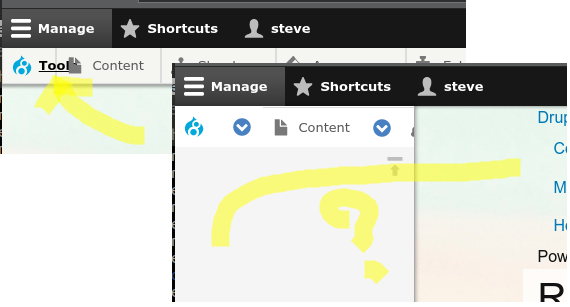
hongpong commentedIs anyone else getting menu items 'floating' within rows instead of forming full rows, in conjunction with 'toolbar' code module? Maybe the Foundation _menu.scss is to blame on this.
EDIT. this seems to work. would suggest we put into _drupal.scss:
Comment #5
serg2 commentedI am pretty sure there has been a regression somewhere as I do not remember this being an issue.
The CSS causing the issue is in this block:
Specifically it is the display: flex which is causing the problem and can be fixed in by changing to display:block .
As far as I can see the best solution at the moment is to add:
I will try to figure out where the regression occurred first.
Comment #6
serg2 commentedAttached is a patch which adds the following CSS fix to the Drupal specific scss. :
This seems the most appropriate fix.
Comment #7
serg2 commentedComment #8
hongpong commentedthis seems reasonable to me, I think we should put it in soon unless someone objects. where is the .menu coming from that you observed serg2?
Comment #9
serg2 commentedWhen comparing against the admin theme (Seven) there are some minor differences in the use of Stable/Classy but I do not think it comes from there. When have made a few changes to the menu templates to aid sub-menu and active trails but do not see it added there either. Then we have a patches and reverts around the toolbar but again do not see it. At this point i decided that it was easier just to fix ;)
Before committing this please do a visual check against the lastest dev, both with flex enabled in SCSS and not, worried about regressions.
Comment #10
serg2 commentedI cannot reproduce with the current dev.
If someone can, please re-open noting the versions and the scss configurations.
Comment #11
sim_1Closing this issue after 2 years of being unable to reproduce.