Closed (fixed)
Project:
Zen
Version:
5.x-0.8
Component:
layout.css
Priority:
Normal
Category:
Support request
Assigned:
Unassigned
Reporter:
Created:
20 Dec 2007 at 21:03 UTC
Updated:
1 Mar 2011 at 16:59 UTC


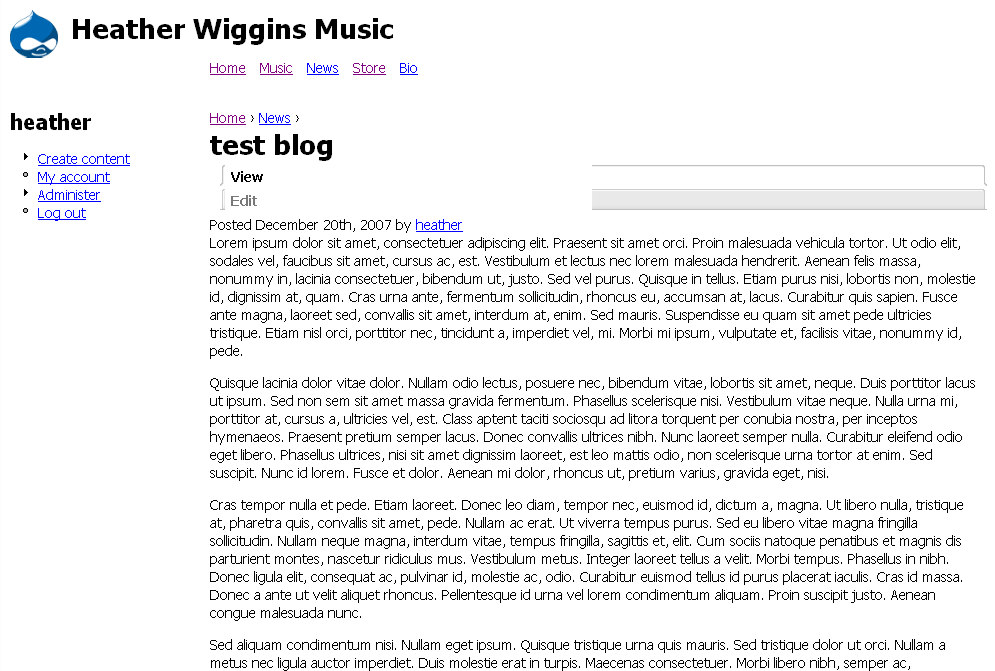
Just wondering if this theme has been checked in IE6 recently. I was checking my theme that I'm developing, and it didn't look right in IE6 for several reasons, so I checked Zen and Zen classic in IE6. In both, it seems, the tabs are not doing their job at all. I'll post screenshots.
Also, just wondering if anyone knows why IE6 (but not 7, nor Firefox or Safari) is stretching my title and header images?
| Comment | File | Size | Author |
|---|---|---|---|
| custom-subtheme.png | 365.45 KB | kevinsmith | |
| zen-classic.png | 34.34 KB | kevinsmith | |
| zen.png | 49.05 KB | kevinsmith |


Comments
Comment #1
johnalbinTabs were fixed in this issue: http://drupal.org/node/196230
Without a link to the site, I don't think anyone is going to be able to determine that but you.
Comment #2
kevinsmith commentedWell, it's still in development so it's only on my localhost. Otherwise I would've just posted a link. I'll research it. Doesn't seem to be a Drupal issue for now, but I was just wondering if anyone happened to know.
Comment #3
kevinsmith commentedapparently the problem with the stretching of images in IE6 is due to the PNG Fix module. Read about the problem here: http://openconcept.ca/blog/ravijo/png_fix_miraculously_resolves_longstan...
Comment #4
ChuckL commentedI have downloaded and installed version 5.x-1.0-dev which supposedly fixed this problem but the problem still remains. I also tried installing the pngfix module with absolutely no effect. Using IE6. From looking at the css it appears to me that the technique being attempted here is based on ALA Sliding Doors articles and I know from past experience that that works. The difference appears to be the use of png images rather than gif.
Comment #5
kevinsmith commentedChuckL, I noticed some of my PNG's still stretching even after the update, but it was only when the size of a foreground div with background image was larger than the div in which it resides. When the PNG Fix was applied, for some reason, the containing div stretched to at least the size of the foreground div. I had to work from there to specify more accurately which div's to apply the PNG fix.
Comment #6
Anonymous (not verified) commentedAutomatically closed -- issue fixed for two weeks with no activity.
Comment #7
rajmataj commentedI found image stretching was occurring with images that had placement made with padding. For example, if an image had padding-left: 70px, the image in IE6 would stretch an additional 70px to to the left, whereas more standards-compliant browsers would move the image from the left as expected. When I used margin settings instead of padding, this eliminated the stretching and the image was consistent from IE6 and up. Hope that helps....