Hi there,
the error happend from one the to the other. The whole time the latest beta version worked perfectly. Today i looked into the google webmastertool which said that it cant find my sitemap.xml. Dont know how this could happen. I didn't make any changes to my site.
After reading all of the 404 threads and trying to solve the issue with all given suggestions i still get the 404 error.
I disabled the module, uinstalled it and made a clean install. Even the trick with the elements module were not successfull. I am not using I18n.
Current context: Array ( )
Sitemap: Array ( [smid] => 2 [context_hash] => 40cd750bba9870f18aada2478b24840a [context] => Array ( ) [updated] => 1279373597 [links] => 5965 [chunks] => 2 [uri] => Array ( [path] => sitemap.xml [options] => Array ( [absolute] => 1 [base_url] => http://www.mydomain.com ) ) )
Chunk: index
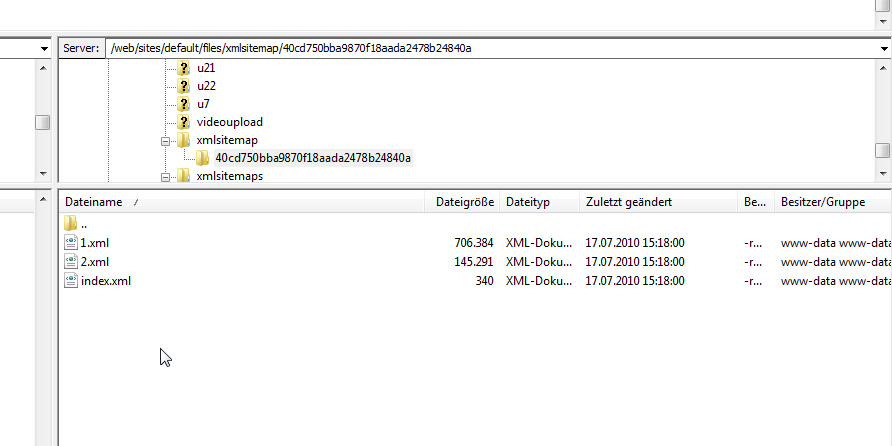
Cache file location: sites/default/files/xmlsitemap/40cd750bba9870f18aada2478b24840a/index.xml
Cache file exists: Yes
The sitemaps are created and populated. But i cant access them via domain.com/sitemap.xml.
domain.com/sitemap.xml?page=1 works.
I hope to get some help here. Thank you very much.



Comments
Comment #1
Witch commentedAnybody?
Comment #2
Witch commentedOk, i have no idea why i get this 404 error, but a simple Rewrite
RewriteRule ^sitemap\.xml$ sites/default/files/xmlsitemap/40cd750bba9870f18aada2478b24840a/index.xml [NC,L]should be a temporary solution.
Hope we can find a better way :(
Comment #3
Anonymous (not verified) commentedWhy isn't your Drupal finding /sitemap.xml as a page to serve without the rewrite? What permissions have you assigned to the anonymous user? What modules do you have enabled? What aliases do you have assigned? Do you have a sitemap.xml file in your DocumentRoot?
Comment #4
Witch commentedHi Earnie,
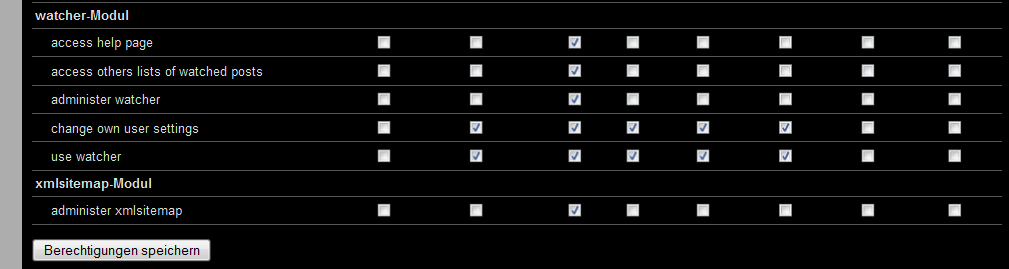
anonymous user have no permissions, because you can only assign "Administer xmlsitemap".
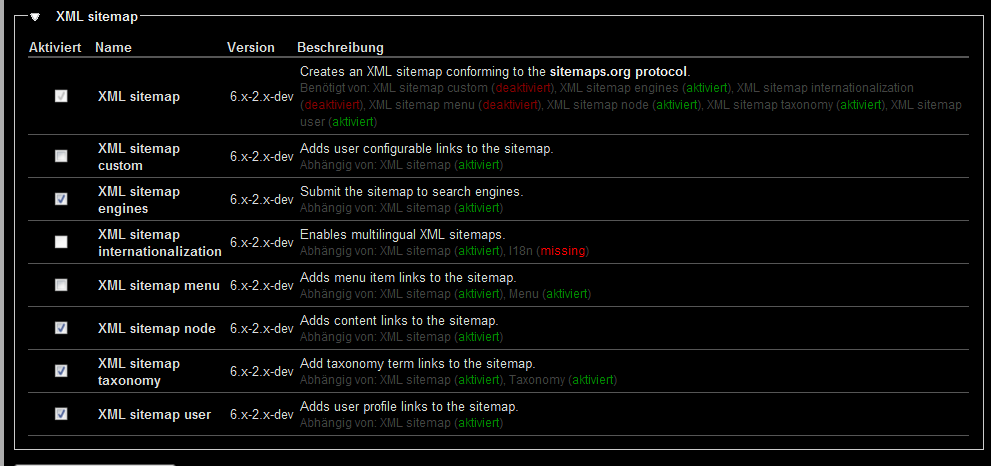
I have a lots of modules enabled. I attached a screen with xmlsitemaps enabled modules. I have no idea which module could interact with xmlsitemap module.
Maybe boost or pathauto?
I have no aliases assigned to sitemap.xml or same and there is no sitemap.xml in my document root folder.
Comment #5
dave reidThe anonymous user should have the 'access content' permission in order to view the sitemap.
Comment #6
Witch commentedCant see that permissionpoint. But i know that it existed in earlier version 0o. I thought the developer changed this point.
Comment #7
dave reidIt's not an xmlsitemap permission. It's a node.module permission found higher up in the page.
Comment #8
Witch commentedno chance. i cant find it. :(
Comment #9
Witch commentedI uninstalled the module completely and reinstalled it. The permission still wont appear.
What went wrong? Where can i have a look into to solve this?
I appreciate your help.
Comment #10
Anonymous (not verified) commentedYou still don't understand that the permission is located with the node module's set of permissions. If you don't have 'access content' at all on the permissions page then something is wrong with your installation of Drupal. Don't look under "xmlsitemap module", look under "node module".
Comment #11
Witch commentedHi earnie,
I missunderstood you in prior posts. Sorry for that :(
"access content" were and is activated for anonymous users but you cant access the sitemap it will return a 404.
Comment #12
coloryan commentedSame problem here. Upgraded, purged caches, uninstalled/reinstalled, still no love.
Comment #13
coloryan commentedCorrection: I just rebuild (sitename.com/admin/settings/xmlsitemap/rebuild) and it magically appeared.
Also note that on the page it did advise me that 'Your sitemap is up to date and does not need to be rebuilt.'
Fixed for me.
Comment #14
fleshgrinder commentedI also got the “Page not found” error. I use a multi-domain configuration and I rebuild the sitemap as mentioned in #13. It worked for one language, the other keeps returning “Page not found”. This is a really annoying error. Hopefully a fix is coming soon.
Subscribing!
Edit: Completely uninstalled the module. Only generating errors and creating problems. This isn't a beta for me, this is a development build.
Comment #15
Witch commentedFleshgrinder, you dont should have any problems if you test any changes offline. Always make backups. Dont get developers with such unqualified comments on their nerves.
Comment #16
Witch commentedVery strange is that drupal does not handle the 404. The Browser says "The file were nout found on the server". I checked the htaccess but there is no hint.
Comment #17
fleshgrinder commentedI don't have problems, the module has. I'm always trying to help, but in this case I can't see any land – it's just not working. Which, for me, is really sad and I don't know how I could help to solve those issues.
Comment #18
dave reid@Witch If you're not getting a Drupal 404 message then something else is going wrong and not letting Drupal load when using the path 'sitemap.xml'. Check server/cache/etc configurations.
@Fleshgrinder: Did you go through all your re-save all your sitemaps at admin/settings/xmlsitemap/list (click edit link for each one and just press Save on the edit sitemap page)?
Comment #19
coloryan commented@Fleshgrinder: Try using the 6.x-1.2 build. As I said, my sitemap was being produced, but Google Webmaster Tools wouldn't accept it. I noticed that it was being accepted for two other sites and they're both using that branch with no issues. It doesn't have 100% of the functionality as the latest dev, but the Google Gods seem to approve.
Comment #20
fleshgrinder commented@Dave Reid: Definitely not, but I'm going to reinstall the module and then I will give it a try also with your advices. Thanks for your input.
@coloryan: Thanks for your input but the 6.x-1.2 build isn't suitable for my website. Because I need to create different sitemaps for all subdomains (languages).
Comment #21
coloryan commentedUnderstood. I'm having issues with submitting the sitemaps to Google Webmaster Tools. I'm using multiple sites via the domain module, and when I checked this morning Google gave me the red 'X' and didn't accept the sitemaps for some reason. domain_xmlsitemap is current, as is xmlsitemap.
All other sites, even a multiple language site, are responding in Google.
I can provide URLs if anyone wants to see an example.
Comment #22
Anonymous (not verified) commented@coloryan:
is a different issue than 404-not-found-error. Do not hijack this issue with a different problem.
@Witch: Can you please provide a list of enabled modules?
Comment #23
Witch commentedHi earnie,
i attached a screenshot with all enabled modules. Maybe you can find something. I will check the apache and serverlogs for hints.
Comment #24
kingofsevens commentedI had the same problem. I have 3 languages with different domain names. First there was the default english map, then I have added the other languages first disabled the human readable format, changed the lifetime to 1 day. The module said running cron is enough but it didn't worked so I rebuilt to create the maps. It worked and I have changed back to the human readable format. Also, a simple question but did you specify in the settings of the module what pages to include?
Comment #25
Ingumsky commentedcoloryan
Thanks mate. Your solution (#13) works for me too.
Comment #26
WebWalker3D commentedSolution (#13) worked for me as well... It appears that the sitemap is not getting built until you "rebuild" it.
Comment #27
Witch commentedMy problem is that drupal does not handle the 404. May there be an error in my htaccess file? Can i post it?
Comment #28
alex.skrypnykI Have similar problem.
But in my case a sitename.com/sitemap.xml is accessible, but www.sitename.com/sitemap.xml - page not found.
I use 3 languages.
Update: when I changed base XML Sitemap->Settings->Advanced Settings->Default base URL: to www.sitename.com -> www.sitename.com/sitemap.xml became accesible, but sitename.com/sitemap.xml - page not found.
Is it possible to fix this?
Comment #29
firex commentedI have the same problem
404 error for requesting sitemap.xml with or without Friendly Url enabled.
Rebuilt links and in my file folder i can see only the file "1.xml"
Solutions?
Comment #30
cookiesunshinex commentedI had to disable, un-install, and re-install this module to get it working with a 6.x-2.0-dev to 6.x-2.0-beta1 upgrade.
I had 404 not found and lots of PHP errors otherwise.
Comment #31
jisuo commentedPost #13 fixed this problem for me too. Thanks.
Comment #32
Witch commentedHi,
in the very beginning of my project where the error occurs i used the following code in settings.php
Removing xml solved this issue.
Thank you :)
Comment #33
Michsk commented@#32: you saved me! I started looking if boost didn't cache anything untill i saw your post. Thanks!
Comment #34
Witch commentedI am glad to see you happy with this :) This issue blowed my head up for many months....
Comment #35
aronne commentedHi all, i had the same problem and i solved it following these steps:
After these steps you should be able to see again all of your sitemaps.
Hope it helps!
Fixed for me.
Comment #36
dave reidComment #38
asb commentedSorry guys, this issue is not fixed. By default, this module seems to generate a bogus sitemap.xml on i18n sites. This sitemap.xml simply won't be accessible whatever you do. Especially the steps provided in #13 do not work on those sites.
#35 is a partial workaround. The sitemap.xml file generated by defaul has to be manually deleted and then manually configured. On a i18n site, you'll get a dropdown when creating the new sitemaps where you can choose the language. The sitemaps created by this method will be accessible. So there is a workaround available to fix the broken default behaviour, but still there is is no fix for the code.
However, what makes this issue complicated: The seemingly language-specific sitemap files do not honor the selected language. This is another issue, but it's probably connected to the broken default behaviour.
Steps to reproduce:
* recent version of Pressflow/D6
* i18n, language subdomains, translated content
foo.mysite.org has "foo" content, bar.mysite.org has "bar" language content. Translated content is marked as "foo" respectively "bar". By default, the module will create an inaccessible fake sitemap.xml at the site's default language, e.g. foo.mysite.org/sitemap.xml.
Manually created sitemaps will be created at foo.mysite.org/sitemap.xml respectively bar.mysite.org/sitemap.xml. These sitemaps are accessible, but contain a mixture of content in the languages "foo" and "bar".
The expected behaviour would be: The module honors the language settings chosen when creating the sitemap.
An pragmatic approach might be to not fake i18n support and by default just create one sitemap at mysite.org/sitemap.xml that contains the mixture of language content that is in foo.mysite.org/sitemap.xml nad bar.mysite.org/sitemap.xml anyway.
An even more pragmatic approach would be to make a note on the project page that this module las none or limited support for localized sites/i18n.
Comment #39
dave reid@asb Unless you turn on the xmlsitemap_i18n sub-module, this is the expected behavior. Since you never mentioned you have that module enabled, I assume it isn't. Either way, it's nice etiquette to not re-open issues that have been closed for over three years and instead file a new bug report for your issues.
Comment #40
asb commentedFollow-up issue: #2392849: Still get 404-not-found-error