

 Come together with the global Drupal community in Rotterdam, 28 Sept – 1 Oct 2026. Sessions, contribution, connection, and Early Bird savings until 8 June.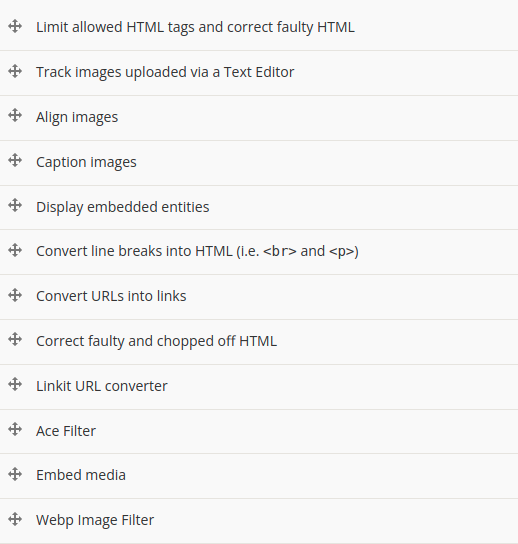
This module provides extra functionalities for the WebP module with CKEditor.
It provides an additional filter plugin for CKEditor. This filter allows you to convert images embedded in the CKEditor body field to WebP format.
After enabling and configuring the filter, any image you add to a CKEditor body field in the specified text format will be converted to WebP format when the content is displayed. This allows you to take advantage of the superior compression and quality provided by the WebP image format.
Configuration
- Navigate to the Text Formats and Editors configuration page (/admin/config/content/formats).
- For each text format where you want to enable the WebP filter, click 'Configure'.
- In the 'Enabled filters' section, check the box for 'webp image filter'.
- Make sure to drag 'Convert images to WebP' into the correct order in the 'Filter processing order' section. Filters are processed from top to bottom. Therefore, you'll probably want to put this one after the 'Limit allowed HTML tags and correct faulty HTML' filter or any other filters that might affect image tags.
- Save your changes.
Sponsored and developed by:

Supporting organizations:
Project information
- Project categories: Content editing experience, Media
- Ecosystem: WebP
 590 sites report using this module
- Created by yahyaalhamad on , updated
 Stable releases for this project are covered by the security advisory policy.
Look for the shield icon below.


