

 Come together with the global Drupal community in Rotterdam, 28 Sept – 1 Oct 2026. Sessions, contribution, connection, and Early Bird savings until 8 June.
This project is not covered by Drupal’s security advisory policy.
About this Module
Webform Sanitize module for sanitizing Webform submissions to remove potentially sensitive data. Also provides a drush command.
Do you use the excellent module Webform??
Do you move databases from production to test and need to sanitize sensitive data from webform submissions?
If yes, this module is for you!
How to use this module
Once you enable this module, a new item under Development will appear on the Drupal administration page. Click on 'Webform Sanitize' to configure your sanitisation options.
Configuration
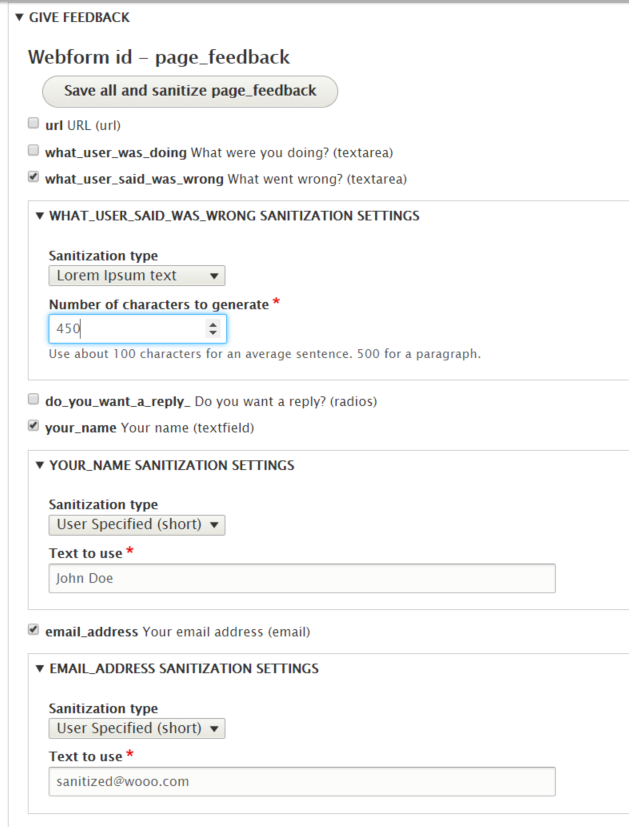
Once inside the administration form, you can see all of your webforms. For each form that you want to sanitize, set the options.
If you want to sanitize just one webform, click the 'Save all and sanitize [webform_id]' button.
If you want to sanitize all webforms, click the 'Save and sanitize submissions' button.
Drush
Once you have configured the module, you can use the command:
drush webform-sanitize [webform_id]
To sanitize one or all of the webform submissions. Or use the alias:
drush wfsan [webform_id]
Supporting organizations:
| Attachment | Size |
|---|---|
| Capture.PNG | 132.49 KB |
Project information
 Seeking new maintainer
The current maintainers are looking for new people to take ownership.- Project categories: Administration tools, Developer tools, Integrations
 4 sites report using this module
- Created by mattgill on , updated
 This project is not covered by the security advisory policy.
Use at your own risk! It may have publicly disclosed vulnerabilities.


